

What is Engagement on Facebook and Why It Matters for Your Strategy
 Gretchen Oestreicher
08 December 2025
Gretchen Oestreicher
08 December 2025 
If you’re building a presence on Facebook for your brand, your clients, or your own projects, engagement tells you a lot about how your content lands with your audience. Likes, comments, shares, video views, reactions, link clicks… every one of these signals shows that people are spending time with what you publish.
Think of engagement as a window into how well your community connects with you. It helps you understand what sparks interest, what drives conversation, and what inspires people to act.
To put it simply: stronger engagement means more visibility, a livelier community, and better long-term results across your Facebook presence.
What is Facebook Engagement?
Facebook’s algorithm favors posts that spark activity. When your content gathers more interaction, it’s more likely to appear in feeds, reach fresh audiences, and stay visible for longer.
A steady flow of engagement can support:
- Wider organic reach
- Better brand recall
- A more active and loyal community
- More opportunities to convert viewers into customers
It also serves as a reliable indicator of audience interest. If your engagement dips, it might signal that your content needs a new angle. If it rises, you know you’re connecting with your community in the right way.
Facebook Engagement Metrics to Track
Engagement isn’t just one number. Understanding different types of interactions gives a fuller picture of how your content connects with your audience.
- Reactions: Likes, loves, wows, hahas, sads, and angry faces reflect immediate emotional responses.
- Comments: Show deeper engagement and provide insight into audience opinions or questions.
- Shares: Spread your content to new people and indicate strong interest.
- Clicks: Include clicks on images, videos, links, or call-to-actions, showing active engagement.
- Post Reach: Number of unique users who saw your post. Helps assess content exposure.
- Post Impressions: Total times your post appeared, including multiple views by the same user.
- Video Views and Watch Time: For video posts, track 3-second views, total watch time, and retention.
- Follower Growth: Tracks how your audience is growing, which can affect future engagement potential.
How to Calculate Engagement Rate on Facebook
There are two common approaches to calculating engagement rate, and understanding both helps you compare your numbers with others in your industry or reports from different analytics tools.
1. Engagement Based on Followers
This method measures how your interactions relate to the size of your audience.
Engagement Rate = (Total Engagements / Total Followers) × 100
Total engagements can include likes, comments, shares, reactions, link clicks, and more depending on how you track performance internally.
2. Engagement Based on Reach
This version focuses on interactions per person reached, which gives you a more accurate view of how well a single post performed, especially if your reach varies a lot.
Engagement Rate = (Total Engagements / Total Reach) × 100
Facebook Engagement Rate Example
If a post earns 225 total interactions and reaches 5,000 people, you’d calculate:
225 ÷ 5000 × 100 = 4.5% engagement rate
This percentage helps you compare performance across posts, weeks, or campaigns.
How to Analyze and Apply Engagement Insights
- Use Analytics Tools: Facebook Insights and Meta Business Suite provide dashboards with all the metrics above. Review metrics per post and over time to spot patterns.
- Calculate Engagement Rate Consistently: Add reactions, comments, shares, and clicks, then divide by either followers or reach. This lets you compare content fairly.
- Analyze Content Types: Compare images, videos, links, and text posts to see what drives the most interaction. For example, short videos may get more shares, while polls may generate more comments.
- Track Trends: Look at engagement patterns over weeks or months to find peak posting times and recurring content that performs well.
- Segment Your Audience: Use demographic data such as age, location, and gender to create content tailored to the most active groups.
- Cross-Platform Reporting: Tools like Metricool combine Facebook data with other networks for a complete view of engagement performance.
By tracking multiple metrics together, you can understand not just how many people engage, but how they engage, which types of content work best, and how to adapt your strategy for better results. Regular analysis turns numbers into actionable insights, helping your brand build a more connected and interactive Facebook community.
Tips and Strategies to Increase Facebook Engagement
Growing engagement on Facebook does not happen by chance. Certain habits and strategies consistently help brands, freelancers, small businesses, and creators connect with their audience and build a lively community. These five tips give you practical steps to boost interactions without feeling overwhelmed.
1. Post Consistently and at the Right Times
Showing up regularly keeps your audience connected to your page. It reminds followers that your brand is active and worth their attention.
Start with a schedule you can maintain. Posting every day is not required. Two or three times a week works as long as your audience knows to expect fresh content. Scheduling tools like Metricool or Facebook’s native planner make it easier to prepare posts in advance and avoid last-minute stress.
Timing is also important. Facebook Insights can show when your followers are most active. Posting during those windows increases the chances your content will be seen and interacted with. Small adjustments in timing can make a big difference in engagement.
2. Keep Your Page Updated
Your Facebook page is often the first place people meet your brand. A complete and inviting page encourages followers to stick around and interact.
Focus on:
- Updating cover and profile photos regularly to reflect your brand.
- Filling out the “About” section with your personality and voice.
- Including accurate contact information and links.
When your page is visually appealing, complete, and easy to navigate, followers are more likely to comment, share, and engage. A page that feels approachable builds trust and makes your audience comfortable interacting with your content.
3. Get Verified
Verification can boost credibility. A blue checkmark shows users that your page is authentic, which can make followers more confident about liking, commenting, and sharing your posts. Verified Pages often see higher engagement simply because people recognize them as real and trustworthy.
4. Use Visuals that Invite Attention
On Facebook, visuals are your first impression. Posts with images or videos naturally stand out in a crowded feed, and they usually get more likes, shares, and comments than plain text. The goal is to make people stop scrolling for a moment and notice what you’re sharing.
Types of visuals to try
- Original Photos: Show your products, workspace, or team in action. Authentic images feel personal and approachable.
- Lifestyle Images: Give your audience a sense of how your products or services fit into real life.
- Short Videos and Reels: Facebook Reels are gaining traction. Quick, snappy clips with captions can capture attention even without sound.
- Live Broadcasts: Going live brings your followers into the moment. Real-time interaction builds a sense of community and can boost engagement dramatically.
Facebook’s algorithm favors content that people engage with quickly. Visuals naturally attract attention, encourage interaction, and give your audience more reasons to pause, react, and share. Over time, this helps your posts reach more people and builds a more engaged community.
5. Encourage Interaction
Interaction is what turns a post into a conversation. Engaging your audience makes them feel involved and connected to your brand.
Ways to spark participation:
- Ask Questions: Invite followers to share opinions or experiences. Questions like “Which of these new products would you try first?” give people a reason to comment.
- Run Polls: Quick polls are interactive and can appear in feed posts, Stories, or groups. They help you understand your audience while keeping them engaged.
- Start Discussions: Share a trend, idea, or challenge and ask followers to weigh in. Posts that generate meaningful comments get more visibility in the feed.
- Contests and Giveaways: Encourage followers to comment with a story, tag friends, or share experiences related to your brand. Focus on genuine interaction, not empty likes, and follow Facebook’s promotion rules.
Small efforts like these build stronger connections and signal to Facebook that your content matters, which can increase organic reach and engagement over time.
6. Ask Direct Questions
Direct questions are one of the simplest ways to spark conversation. A short prompt asking for opinions, preferences, or experiences gives your audience an easy reason to comment.
For example:
- “Which color do you prefer for our new product?”
- “What’s one tip you use to stay productive?”
- “How do you usually enjoy this service?”
These types of posts invite genuine responses and encourage people to share more than a simple like. Over time, questions help build a community where followers feel heard and valued.
Rotate between different types of questions, from personal preferences to industry insights, so your audience stays engaged and curious about what comes next.
7. Share Content From Your Community
Your followers can be your best content creators. Sharing user-generated content such as photos, reviews, or stories gives recognition to your community and motivates others to participate.
For instance, if a customer tags your product in a post, reshare it with a comment thanking them. Highlighting testimonials or experiences adds authenticity and shows potential followers that your brand has a loyal and active audience.
User-generated content also adds variety to your feed without extra production time. It encourages others to join the conversation and reinforces a sense of community around your brand.
8. Join Current Conversations & Trends
Keeping your content timely helps your posts get noticed. Trending topics, seasonal events, memes, or industry news are opportunities to make your page feel current and relevant.
Tools like social listening platforms or trend reports can help you spot what’s gaining attention before it’s everywhere. For example:
- Posting about a holiday or special event relevant to your audience.
- Sharing commentary or insights on trending industry news.
- Participating in meme culture in a way that fits your brand voice.
Timely posts tend to perform better because people are already talking about these topics. Adding your brand’s perspective keeps your content fresh and gives followers a reason to engage with you instead of just observing.
9. Go Live
Facebook Live creates a sense of connection that pre-recorded posts cannot. Live sessions allow real-time interaction, giving followers a chance to comment, ask questions, or react instantly.
Some ideas for Live sessions include:
- Behind-the-scenes looks at your business, team, or product launches
- Q&A sessions with your team
- Demonstrations or tutorials of your services or products
Going live can feel intimidating at first, but even a short session of 10–15 minutes can make a big difference in engagement. Followers often return for future live events because they feel more involved and connected.
10. Use Stories and Groups
Stories and groups help you reach followers in different ways.
Stories sit at the top of the feed, giving your content immediate visibility. They work well for casual, behind-the-scenes, or interactive content such as polls, Q&As, or quick product reveals. Stories can be posted frequently without overwhelming your main feed, keeping your brand top-of-mind.
Groups offer a space for deeper discussion and belonging. They allow followers to connect with each other and with your brand around shared interests. Posts in groups often spark longer conversations, which increases engagement and loyalty.
Using both Stories and groups together helps maintain constant visibility while fostering a community that feels involved and valued.
11. Reply to Comments
Engagement works best as a two-way street. When someone takes the time to comment, send a message, or tag your page, responding shows that you are present and listening. Even a simple acknowledgment like “Thanks for sharing!” can turn casual interactions into stronger connections.
Quick responses make followers feel valued, which encourages them to comment again in the future. If your team cannot reply immediately, consider using a centralized messaging tool or a chatbot to keep communication organized. This way, no message goes unnoticed and your audience always feels seen.
Regularly replying to comments also signals to Facebook that your page is active. Active pages are more likely to have posts appear in feeds, helping your engagement grow naturally over time.
12. Avoid Engagement Bait
As tempting as it may be to ask for likes, comments, or shares just to boost numbers, this approach can backfire. Posts that say “Comment YES if…” or “Share to win” often reduce reach because Facebook’s algorithm recognizes these tactics as low-quality engagement.
Instead, create posts that spark genuine interaction. Encourage conversation with thoughtful questions, stories, or interactive content that naturally inspires followers to respond. Authentic engagement builds trust, keeps your page visible, and strengthens your community over time.
13. Focus on Quality Content
Your posts should provide value, entertain, or inspire. Followers are more likely to engage when they see content that feels fresh, helpful, or fun. Stick to a balance like the 80/20 rule, with 80% of posts offering value and 20% promoting your products or services.
Try these types of content:
- Trending topics, pop culture, or industry news
- Fun facts, statistics, or infographics
- Memes or humorous content that fits your brand voice
- Behind-the-scenes glimpses at your team or business
High-quality and varied content keeps your audience coming back and encourages more interactions. Over time, it helps your page become a go-to source of interesting and relatable content.
14. Engage Through Influencers and Employee Advocacy
Your content can reach further when others share it. Employees, partners, or influencers can amplify your posts to audiences you may not reach on your own.
Employee advocacy programs make sharing simple. You can provide suggested copy, images, or videos so team members can post quickly and consistently. Influencers, on the other hand, bring engagement from their established followers and help introduce your brand to new communities.
This approach broadens reach while encouraging more meaningful engagement because people are interacting with content recommended by someone they trust.
15. Boost or Promote Strategically
Paid promotion helps amplify content that already performs well organically. Boost posts or use Ads Manager to target audiences beyond your current followers. A little investment can make a big difference when it comes to getting your best content in front of the right people.
Start by identifying posts that are already receiving good engagement. Promote these first, and consider experimenting with different audience segments to see which groups respond most. Combining paid promotion with organic posting helps build consistent reach and keeps your page active in followers’ feeds.
16. Use Calls-to-Action (CTAs)
Calls-to-action give your audience a clear next step. They guide followers toward interaction, whether that’s leaving a comment, joining a group, or making a purchase. Adding CTAs to your posts and page helps engagement flow naturally because people know what action to take.
Some examples to try:
- “Shop Now” to direct traffic to your products
- “Book a Service” for appointments or consultations
- “Join Our Group” to grow your community
- “Let us know your thoughts below” to spark conversation
CTAs work best when they feel natural and match the tone of your post. Experiment with placement, wording, and even design to see what gets your audience responding the most.
17. Know Your Audience Inside Out
Creating content without understanding your audience is like throwing a party and forgetting to invite anyone. Study who your followers are to create posts that connect with them. Facebook Insights offers data on age, location, interests, and engagement patterns.
Use this information to tailor your content. If your audience responds well to tips and tutorials, create more of those. If polls and questions spark conversation, include them regularly. Paying attention to your audience’s preferences helps you post content they care about, which naturally increases interaction.
18. Leverage User-Generated Content (UGC)
Sharing content from your followers shows appreciation and authenticity. When fans see their photos, videos, or stories featured on your page, it builds trust and encourages others to engage.
You can ask followers to tag your brand or submit content directly. Hiring UGC creators can also jump-start this process if you need additional material. User-generated content brings variety to your feed, highlights real experiences with your brand, and often leads to higher engagement than standard promotional posts.
19. Monitor Competitors
Keeping an eye on similar brands can help you stay competitive and discover new ideas. Look at which posts get the most likes, comments, and shares. Pay attention to contests, campaigns, and formats that are working well for them.
This doesn’t mean copying their content. Instead, use their performance as inspiration and to identify gaps or opportunities in your niche. Observing competitors can help you refine your strategy, spot trends early, and keep your page fresh and relevant.
20. Track What Works
Analytics are your guide to smarter posting. Check which content formats, posting times, and topics generate the most engagement. Look at patterns over time instead of reacting to a single post.
Small adjustments, like posting at a different hour or trying a new video style, can make a noticeable difference in engagement. Tools like Metricool or Facebook Insights help you track these trends and measure results, so you know which strategies are working and where to focus your efforts.
21. Repurpose Successful Content
When a post performs well, it’s worth finding new ways to share it. Repurposing content helps you reach more people and keeps your feed fresh without starting from scratch.
Look at your top-performing posts and consider how they could work in other formats:
- Turn a blog post into a carousel with bite-sized tips
- Transform a survey or quiz into a poll for quick audience interaction
- Clip a video into short snippets for Reels or Stories
Repurposing also reinforces your message. Followers who may have missed the original post get another chance to see it, while your best ideas continue to deliver value. Tracking which formats perform well helps you decide how to repurpose content for maximum engagement.
Measure Your Facebook Engagement in Metricool
Understanding how your audience interacts with your Facebook content is one of the beste ways to grow your page and build a loyal community. Likes, comments, shares, clicks, and follower growth tell you which posts connect, which topics spark conversation, and where your content could improve. Metricool brings all this information together in a single, clear dashboard, making it simple to track, analyze, and plan your content with confidence.
Here’s how to monitor your engagement:
- Connect Your Facebook Page: Start by linking your Facebook Page to Metricool. This gives you access to all your posts, Reels, Stories, and interactions in one place.
- Access the Evolution Tab: Go to the Evolution tab in Metricool and select Facebook. Here you can pick your date range to focus on a week, month, or longer period.
- Explore Your Metrics: Metricool provides clear charts and tables for:
- Total interactions, including reactions, comments, shares, and clicks
- Average reach per post or Reel
- Impressions, including organic and paid views
- Follower growth and page likes
- Content performance for posts, Reels, and Stories
- Analyze Engagement: Metricool calculates engagement rates based on either reach or followers. This gives consistent numbers you can use to compare posts, track trends, and refine your content strategy.
- Advanced Reporting: Premium plans let you download automated PDF or PPT reports, complete with charts, engagement breakdowns, and explanations ready to share with clients or your team.
Understanding the Metrics
Metricool captures both organic and paid interactions, giving you a full picture of performance. Here’s what you can track:
- Reactions: Likes, loves, hahas, sads, wows, angry faces
- Comments: Direct audience feedback on posts or Reels
- Shares: How often your content is redistributed by followers
- Clicks: Clicks on links, images, videos, or call-to-action buttons
- Reach: Unique users who saw your content
- Impressions: Total views, including repeat impressions
- Follower Growth: Track increases and decreases in your audience
- Video Metrics: Views, watch time, and retention rates for posts and Reels
- Stories: Viewable if Story Archive is enabled on the page
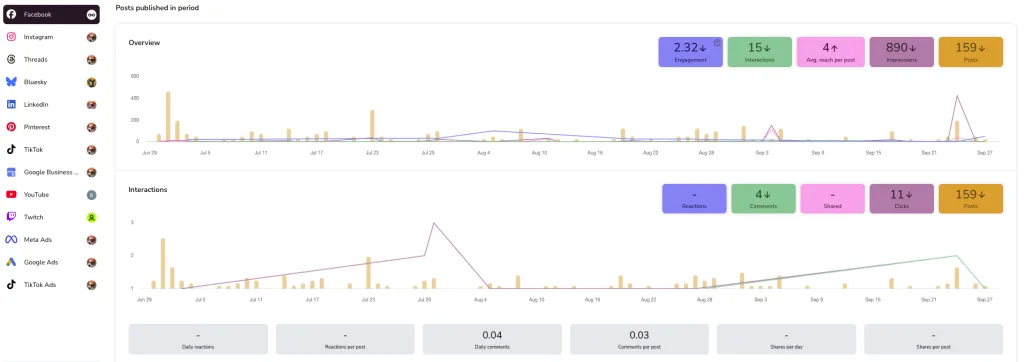
Metricool also allows you to break down metrics by content type including posts, Reels, Stories, links, images, or videos, so you can see what drives the most engagement.
Comparing Competitors’ Engagement on Facebook
Metricool also lets you monitor your competitors’ pages, including:
- Followers, likes, and posts
- Average reactions, comments, and shares
- Engagement trends over time
Adding competitors to your Metricool can make your analysis more meaningful, helping you spot opportunities and set realistic benchmarks.
Take Your Facebook Engagement Further
Engagement is more than a number. It’s a window into what your audience enjoys, reacts to, and wants to see more of. Likes, comments, shares, clicks, and other interactions show how people connect with your content. Tracking these signals helps you understand which posts spark conversation and which ideas need a refresh.
Understanding these interactions allows you to fine-tune your content, join trends, involve your community, and test new formats like Stories, Reels, or Live videos. Every reply, poll, or user-generated post adds another layer to building a loyal, active audience.
To make tracking and improving engagement simpler, use Metricool to monitor your posts, analyze results, and plan future content based on real data. With these insights, you can create Facebook content that not only reaches people but inspires them to interact, share, and come back for more.
