

How to Find Out Who Doesn’t Follow You Back on Instagram
 Kata
29 July 2026
Kata
29 July 2026 
To find out who doesn’t follow you back on Instagram for free, you can manually check a profile’s following list to see if you’re on it. Or you can download your followers and following data and cross-reference it.
Finding out who doesn’t follow you back on Instagram is one of the most searched questions out there. In this guide, we’ll explain how to find out who doesn’t follow you back on Instagram, what legit options are available in 2026, and what tools to use if you want to do it right (without putting your account at risk).
Does Instagram Let You See Who Doesn’t Follow You?
Short answer: No.
Long answer: Not directly, but there are ways to find out.
Instagram doesn’t offer an official feature that lets you see who doesn’t follow you back or who has unfollowed you. You can only see your followers and the accounts you follow. And while many people would love a list of people who don’t follow them back or users who have unfollowed them, there’s currently no official way to get to that information.
So, how do you find out who doesn’t follow you back on Instagram?
Method 1: Check Their Following List
This is the fastest free, manual method. You can do it from your desktop, phone, or tablet.
- Go to your profile.
- Tap Following.
- Find the user you want to check.
- Go to their profile.
- Tap their Followers list.
- Type your username into the search bar.
Do you show up? They follow you back.
Don’t show up? They don’t follow you back.
This method is free, safe, and doesn’t rely on any external apps. It’s great if you only want to check a handful of people, but doing this for 10,000 followers could take a while.
That’s when you can turn to the next method.
Method 2: Download Your Information
This is still a safe, free method, but it involves a few more steps. Here, you’ll download your data and cross-reference your followers and following lists. Follow these steps:
- Go to your profile.
- Tap the three lines in the top-right corner to go to Settings and activity.
- In the search bar, type “Download your information”.
- This will take you to Instagram’s Accounts Center.
- Tap “Create export” and select your account.
- Choose where to export and the specific data to download. In this case, just “Followers” and “Following”.
Once that’s done, Instagram will notify you within a few hours that your file is ready to download. From there, you have a couple of options:
- Open the file in Excel and manually cross-reference your followers and following.
- Upload the file to an AI tool like Claude and have it compare the data for you in seconds. Try a prompt like: “Read this data and tell me who doesn’t follow me back on Instagram.”
Apps to Find Out Who Doesn’t Follow You Back on Instagram
If you search on Google, you’ll find plenty of apps promising to show you who’s unfollowed you and who doesn’t follow you back.
Just be careful!
Many of such apps can put your account at risk. Meta restricts the use of these kinds of tools that access your account.
Some consequences of using apps like these include temporary blocks, restrictions, or even losing your account entirely. Never enter your Instagram password into suspicious third-party apps.
What to Do With People Who Don’t Follow You
You’ve used one of the two methods above and found out who doesn’t follow you back. Now what?
- Unfollow them if they don’t add any value for you.
- Keep following them if you enjoy their content and get something out of it.
Take this as an opportunity to also check what kinds of accounts follow you, which ones don’t, and what content you were posting on the days you lost followers.
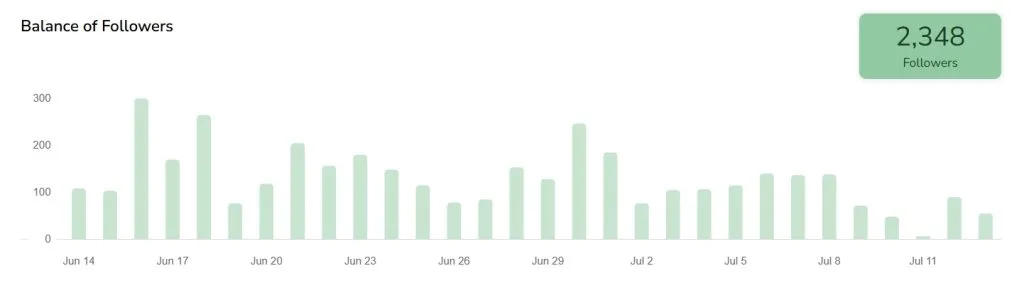
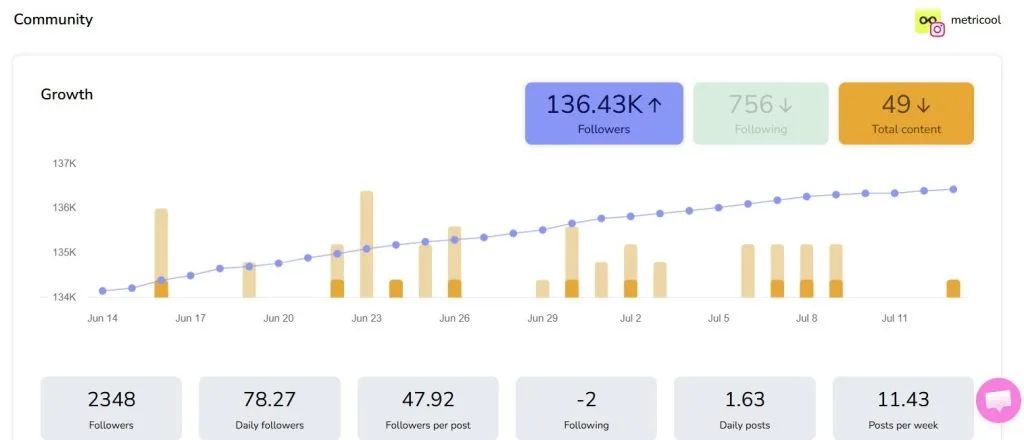
In Metricool’s Analytics section, you can check whether your follower count is trending up or spot specific days (or date ranges) when you lost followers. What kind of content were you posting on those days?
You can also check when your competitors lose followers and analyze what kinds of posts they shared around that time, so you can avoid creating similar content.
Knowing who doesn’t follow you back on Instagram can be useful, but what really matters is understanding how your community evolves, what content works (for you and your competitors), and what brings you new followers – or what makes them unfollow you.
