

AI Social Media Management Tools: What They Can Actually Do for Your Workflow
 Gretchen Oestreicher
18 November 2025
Gretchen Oestreicher
18 November 2025 
Managing social media can feel like a full-time job on top of your full-time job. Writing posts, creating visuals, scheduling content, replying to messages, and tracking results all take time and energy. AI tools can help by making these tasks faster, keeping your content consistent, and highlighting opportunities you might miss.
This guide explores the best AI social media management tools and how they can improve your workflow. From generating captions and designing graphics to scheduling posts and analyzing performance, each tool has features that save time and simplify management. Knowing what each tool offers lets you create better content, stay organized, and manage your social channels with ease.
What Can AI Tools do for Social Media Management?
AI tools can help simplify your daily social media tasks and make your workflow more efficient. Some of the ways teams and creators use them include:
- Content Creation: Generate captions, post ideas, blog drafts, ad copy, or even scripts in your brand’s tone.
- Visual Design: Create or edit images, videos, graphics, and templates quickly, often directly from text prompts.
- Scheduling and Publishing: Plan and schedule posts across multiple platforms in one place, with suggestions for optimal posting times.
- Automation: Set up workflows for repetitive tasks like responding to messages, routing leads, or posting updates.
- Engagement Management: Monitor comments, DMs, and mentions, and use AI to respond or suggest replies efficiently.
- Analytics and Reporting: Track engagement, follower growth, campaign performance, and audience insights without manual calculations.
- Brand Monitoring: Identify mentions, hashtags, or trends across social platforms to inform content strategy.
- Collaboration and Organization: Streamline teamwork with shared dashboards, content drafts, and approval workflows.
These features let you spend less time on repetitive work and more time creating, engaging, and refining your social strategy.
Best AI Social Media Management Tools
There are so many AI tools for social media that it can be hard to know where to start. Each platform focuses on different aspects of the workflow, like writing, visuals, scheduling, analytics, and automation. Knowing which tool is best for each task makes it easier to choose the right solution for your team and save time.
- Metricool: Best overall for social media management
- Jasper: Best for writing and content creation
- Canva: Best for creating and editing images
- ChatGPT: Best for brainstorming and generating text variations
- Freepik: Best for AI-generated visuals and stock assets
- Zapier: Best for workflow automation and app integrations
- ManyChat: Best for automated messaging and conversational flows
- Brand24: Best for social listening and monitoring online mentions
- Notion AI: Best for planning, organization, and content drafting
Here’s a deeper dive into our favorite AI social media management tools.
Metricool
Metricool’s AI tools support your workflow from the first draft to the moment you schedule your post. You can tailor the assistant to fit your brand style and adjust the tone for each platform. The AI helps you work faster and stay consistent across all your channels.
Metricool AI features include:
- Custom AI tone settings so the assistant writes in your brand style
- AI text generator to draft posts, rewrite captions, or create variations
- Automatic alt text for images to speed up accessibility tasks
- Smart AI scheduling that suggests strong posting times based on audience activity
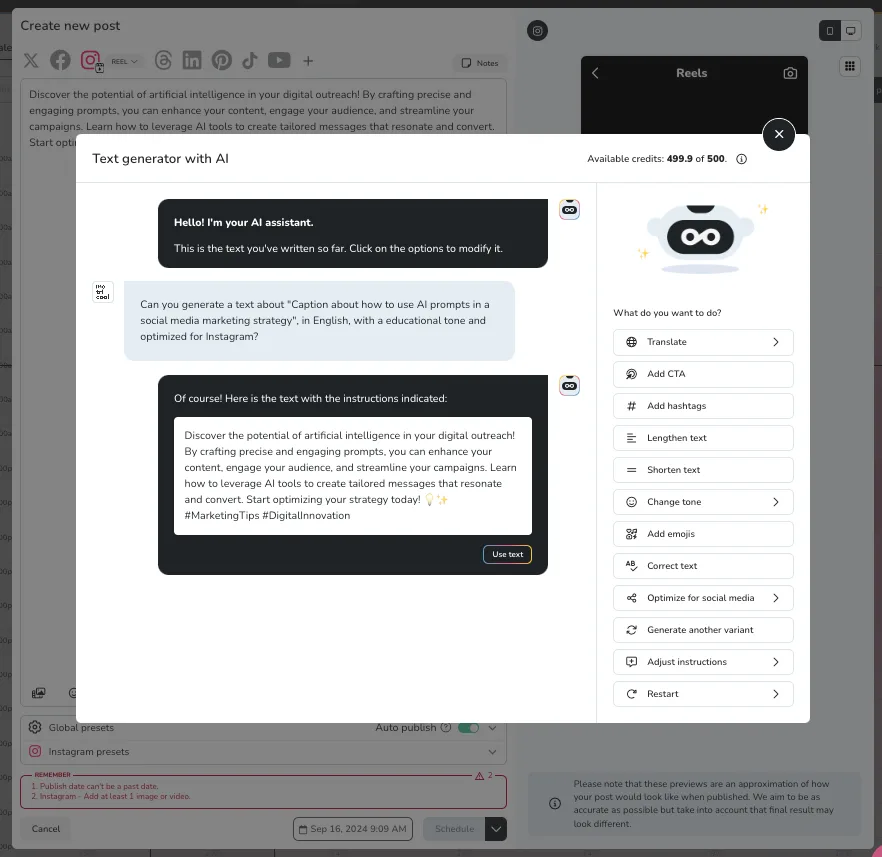
Once your content is ready, Metricool keeps everything in one place. Plan and publish across Instagram, TikTok, Facebook, X, LinkedIn, YouTube, Pinterest, Twitch, and Google Business Profile. You can also manage paid campaigns for Meta, Google, and TikTok directly from the same dashboard.
The visual calendar gives you a clear snapshot of your full content plan. Drag and drop posts, spot gaps in your schedule, and keep campaigns organized from start to finish.
Metricool also includes detailed analytics for every platform. Track performance, study what works, compare channels, and follow your audience growth. Automated reports save teams and agencies time by turning data into clean, ready-to-share documents. You can also research competitors, generate and track hashtags, and manage conversations through a unified inbox that brings comments and messages together.
With AI-powered content creation, scheduling, analytics, reporting, and audience insights all in one platform, Metricool makes social media management simpler and more efficient.
Jasper
Creating consistent content across multiple channels can take hours, especially if you’re juggling social posts, blogs, and ads. Jasper is designed to take the pressure off by helping you write faster without losing your brand’s voice.
- Content Pipelines: Automate the content lifecycle from idea to publication. You can manage campaigns, captions, blog posts, and ads in a more structured workflow.
- Jasper IQ: Acts as a context hub, storing your brand voice, audience insights, and company information. This helps AI-generated content stay on-brand across platforms.
- Agents and Studio: Build custom workflows and let AI handle tasks like research, SEO, or personalization. Agents work autonomously to speed up repetitive tasks.
- Canvas: Plan, create, and collaborate on content at scale, making it easier to see how campaigns come together across channels.
Jasper uses advanced AI models like GPT, Gemini, and Claude to generate content that matches your tone. You can upload writing samples or a style guide to teach it your brand’s voice, so each caption, blog, or ad copy feels authentic. It doesn’t replace creativity. It helps make content creation faster, more organized, and consistent.
Canva
Creating designs for social media, blogs, or campaigns can take time. Canva AI makes it faster and easier. Think of it as a creative teammate that helps you brainstorm, design, and refine content in a few clicks.
- All-in-One Assistant: Design, write, generate images and videos, or even add basic code in one place.
- Content from Prompts: Describe what you need with text or voice. Canva AI turns ideas into editable designs, suggests layouts, or generates images.
- Editable Designs: Refine layouts, tweak images, or adjust copy directly in the editor.
- Brand Consistency: Connect your Brand Kit and Canva AI applies your colors, fonts, and style automatically.
- Collaboration and Accessibility: Chat with Canva AI using text, voice, or images. Collaborate in comments and work on desktop or mobile.
Canva’s AI features simplify design for social media. You can generate images from text prompts, edit photos automatically, and create layouts or videos with minimal effort. Canva also offers templates, shared team folders, a drag-and-drop editor, and direct scheduling with Metricool, keeping design accessible even if you don’t have a background in graphics.
ChatGPT
ChatGPT works as a creative partner for social media content. It helps you brainstorm post ideas, write captions in different tones, draft responses, and even create longer pieces like scripts or campaign concepts. While it doesn’t schedule or publish content, it pairs well with tools like Metricool to support planning and content creation.
- Save Time: Generate multiple captions, posts, or templates in seconds.
- Boost Creativity: Brainstorm campaign ideas, rewrite captions, or expand simple topics into full content series.
- Enhance Engagement: Create polls, interactive posts, or personalized replies.
- Tailor Content: Adjust tone, style, and format for each platform.
- Maintain Consistency: Keep brand voice steady across all posts.
ChatGPT is a tool to make social media work faster and smarter. When combined with Metricool, it helps streamline the creative process while keeping your content organized, consistent, and ready to publish.
Freepik
Freepik’s AI image generation tools make it easy to create realistic or stylized visuals from text prompts or uploaded references. With access to advanced models like Google Imagen, Flux, and others, you can produce everything from product images to portraits while keeping full control over style and detail.
- Describe Your Vision: Type a prompt or upload an image reference to start generating visuals.
- Stay Consistent: Use reference images to maintain your brand style across posts and platforms.
- Edit in One Place: Crop, remove objects, change aspect ratios, and refine images without switching tools.
- Scale Production: Connect to the Freepik AI API to automate workflows and create visuals at scale.
Freepik also has a large library of stock images, templates, and icons, plus tools for organizing and downloading assets for your content calendar. With Freepik, you can generate images that match your brand, save time on design work, and create visuals at scale, all from a single platform.
Zapier
Zapier helps you automate your workflow by connecting Metricool with thousands of other apps. Its AI can handle trigger-based actions, such as generating drafts, pulling analytics, or sending alerts when scheduled posts go live.
- Trigger Actions: A new post, draft, or message in Metricool can start an automated workflow.
- AI Support: Use AI to create content, route leads, or respond to messages automatically.
- Easy Integrations: Works with Google Sheets, Notion, Slack, Airtable, and more.
With a visual workflow builder, no-code setup, audit logs, and compliance tools, Zapier lets Metricool work seamlessly with the tools your team already uses. This allows you to automate repetitive tasks, bring AI into your marketing processes, and focus more on strategy and creativity.
ManyChat
ManyChat provides conversational automation to manage customer questions, qualify leads, and guide interactions efficiently.
Its AI works wherever your followers are active. Instagram DMs, TikTok, WhatsApp, and Messenger all integrate with the platform, so your audience gets a seamless experience 24/7 even when you’re not online. The AI handles typos, recognizes intent, and adapts responses naturally.
- AI Replies: Responds to questions based on intent, maintaining a consistent brand voice.
- AI Comments: Handles comment replies promptly, helping convert engagement into actions.
- AI Goals: Connect automations to business objectives, from collecting emails to supporting purchases.
ManyChat includes a visual flow builder, so you can map out your conversation paths without touching code. You can also test different messages with A/B testing, track performance with analytics, and connect your CRM for better lead management. The platform is designed to be intuitive, so you can focus on growing your audience instead of troubleshooting tech.
Brand24
Brand24 uses AI to help you stay on top of your brand’s online presence. It monitors mentions across social media, blogs, news sites, forums, and reviews, giving you real-time insights so you can act quickly. With access to over 25 million sources, including Instagram, TikTok, Facebook, YouTube, and blogs, you can also track hashtag performance, competitor activity, and campaign reach.
The AI organizes all this data into clear, actionable reports. You’ll see trends, sentiment, and topic insights that make it easy to spot opportunities and adjust your social strategy. Some of the main features include:
- Sentiment and Emotion Analysis to understand how people feel about your brand
- Intent and Topic Detection to uncover what your audience is looking for
- Anomaly Detection to flag unusual spikes or drops in activity
These insights let you improve engagement, guide your content, track awareness, and share results with your team. Brand24’s AI handles the heavy work, leaving you free to focus on planning and creating content that connects with your audience.
Notion AI
Notion AI helps social media teams stay organized and work faster inside a single workspace. It can summarize notes, search your docs using natural language, and help you draft content without switching tools. Many teams use it to build calendars, outline campaigns, brainstorm ideas, and keep all planning in one place.
Alongside the AI features, Notion offers shared workspaces, documentation, task management, and collaboration tools so everyone stays aligned. The AI supports your daily workflow by creating drafts, turning meeting notes into clear action items, and pulling information from your workspace the moment you ask for it.
You can use it to:
- Search across your workspace and connected apps
- Turn meeting notes into summaries
- Draft and edit social posts or briefs
- Create outlines and project docs
- Translate content
- Autofill database fields with summaries or insights
Notion AI runs inside the platform you already use for planning, which keeps all your work connected and easy to maintain.
What Makes the Best AI Social Media Management Tool
Not every tool suits every workflow, so choosing the right AI social media management tool comes down to a few important elements:
1. Reliable Data Insights
The best AI tools go beyond basic numbers. Look for features that show performance trends, suggest the best posting times, and highlight which content drives engagement. With clear data, you can spot patterns, adjust your strategy, and make decisions without guesswork.
2. Strong Content Support
AI should help you create content efficiently. Good tools assist with drafting posts, rewriting captions, generating variations, and suggesting visuals. Some can recommend hashtags or content ideas that match your brand voice, keeping your channels consistent and saving you repetitive work.
3. Multi-Platform Scheduling
Managing multiple social networks is easier when everything is in one place. The right tool lets you schedule posts across Instagram, TikTok, Facebook, LinkedIn, YouTube, and more. Features like post previews, calendar views, and drag-and-drop scheduling help you plan campaigns and maintain a consistent posting rhythm.
4. Collaboration Features
Teams need smooth workflows to stay efficient. Shared dashboards, approval systems, and comment threads allow designers, copywriters, and managers to work together without confusion. Easy-to-read reports keep everyone on the same page and reduce unnecessary back-and-forth.
5. Analytics That Go Deeper Than Likes
Surface-level metrics only show part of the story. Strong AI tools track engagement patterns, follower growth, clicks, watch time, and platform-specific insights. These metrics help you understand what is working, where you can improve, and how to adjust campaigns for better results.
6. Integrations
A tool becomes more valuable when it works with the apps you already use. Integrations with design software, CRMs, messaging apps, and automation platforms save time and reduce manual work. Connecting your tools lets you combine processes without constantly switching between apps.
7. Ease of Use
Even the most powerful tool is ineffective if it is difficult to learn. Look for software with an intuitive interface, clear guides, and responsive support. A simple and accessible tool helps teams adopt it quickly and spend more time creating and analyzing content rather than figuring out how the software works.
What is the Best AI Social Media Management Tool?
AI is changing the way social media teams work. From writing and design to planning, analysis, and automation, today’s tools can make daily tasks easier and more efficient. Each platform has its strengths, and using the right combination can save time, improve your content, and keep your presence consistent across channels.
For a single platform that combines AI-powered writing, smart scheduling, analytics, reporting, and community management, Metricool brings everything together in one place, making it easier to manage all your social media in one workspace.
