

Here’s What We Know About the Threads Algorithm in 2026
 Anniston Ward
25 February 2026
Anniston Ward
25 February 2026 
Threads is winning the microblogging race. With 141.5 million daily active users on mobile, it’s now ahead of X’s 125 million, according to Similarweb. This proves that Threads is a platform worth investing your content efforts in. But how do you succeed there? A smart first step is understanding the Threads algorithm and the new AI‑powered “Dear Algo” feature, which lets users temporarily fine‑tune what shows up in their feeds by posting a public prompt.
What Determines the Threads Algorithm in 2026?
While other platforms hone in on personalization, Threads takes a slightly different approach to provide a range of content from those you already follow, as well as content from creators you don’t follow.
Since the Threads algorithm doesn’t organize content chronologically, this automatically randomizes and mixes what content appears on each user’s feed. However, the Threads algorithm isn’t completely random and has a few methods to its madness.
AI Feed System
Meta released a blog post on their Transparency Center, which explains how Thread’s feed content is selected and ranked. Thanks to the innovation of AI, the Threads AI system gathers information from the public content available on Threads. Then, using a variety of input signals, the system ranks content based on predictions they believe will provide more value for users.
Which “input signals” matter in the Threads AI system? When ranking content, the Threads algorithm considers the following:
- Whether or not you will like a post: Thread’s goal is to present each user with content they are interested in therefore to help determine this, they look at signals such as how many posts you’ve seen in your feed, which posts you’ve liked, and which author’s posts you tend to like the most.
- How likely you are to click to view replies in a post: With quality content comes quality responses, another important factor in Thread’s algorithm. To create these predictions, the algorithm looks at how many times users have clicked to reply to a post, how many replies you’ve viewed, and how long it’s been since you were active on Threads.
- How likely you are to follow the author of a post: Finding your ideal community on Threads is vital. To facilitate this, Threads looks at how many posts you’ve seen in your feed, which authors you’ve recently followed, and how many times you’ve viewed an author’s Instagram account.
- How likely you are to click on the profile of a post’s author: As a creator or brand, you want users to click on your profile. To determine this prediction, the algorithm uses signals such as how many times the author’s post has been clicked, the profile click rate, and the number of times people have clicked on the author’s profile.
- How likely you are to scroll past a post rather than engage with it: Signals that determine this prediction include the amount of time you’ve viewed a post, if you’ve clicked to like this post, and how many total views the post has.
Post Ranking vs. Content Discovery
The goal of Thread’s algorithm is to create a balance between post-ranking and content discovery. This means that while you will see content based on the profiles you follow, and the content you interact with, the platform will also mix in content from accounts you don’t follow.
This is a way to further test what content you like, as well as give creators an equal opportunity for their content to be found. Remember when TikTok was like this…? However, instead of throwing you completely random content, the algorithm tends to supply your feed with content based on your interests.
Recent updates also increased emphasis on content from followed accounts and reduced visibility for obvious engagement bait, while still surfacing viral or trending discussions to help you discover new profiles.
Threads wants to help content creators leverage their accounts so the algorithm works to have users discover creators they aren’t aware of but may interest them.
Topic Tags and Search
Threads released a rather big addition to the platform, Topic Tags. These tags (which work like hashtags, but often display as pill‑style topic labels instead of “#” strings) allow users to join trending conversations and organize posts into specific topic feeds. Depending on what topics you are more interested in, you can assume your feed will reflect these topics.
Thread’s search feature has broadened since its first launch, which can further play into determining its algorithm. You can search by keywords to find related content. So as it goes, we can assume Threads tracks these searches to curate your feed.

User Control and Personalization
Users do have a few options when it comes to personalizing their accounts to determine what content they want to see on their feeds. This includes actions such as blocking accounts, restricting users, and reporting content.
Furthermore, Threads has a feature called “hidden words” in which users can add specific words or phrases they want to be excluded from their feed. In this setting, you can select to turn off “Offensive words and phrases” as well as create “Custom words and phrases” to exclude from your feed.
To find this, head to your account Settings, then “Privacy” and select “Hidden Words”.
On top of these controls, Meta has introduced “Dear Algo”, an AI‑powered feature that lets you temporarily personalize your feed by posting a public Thread starting with “Dear Algo” and describing what you want to see more or less of (for example, more NBA posts or fewer spoilers about a TV show). The adjustment typically lasts for about three days and gives you more direct, short‑term influence over recommendations than a simple “Not interested” button.
This trend is playing out across platforms. Instagram recently launched a similar feature called “Your Algorithm” that — as the name suggests — lets you influence what shows up in your feed.
Tips to Gain Visibility on Threads
You may be wondering if you can break the Threads algorithm and boost your content’s engagement. While there is no exact formula for succeeding on this platform, we do have a few tips that can help you build a strong community on this platform:
Post consistently
Just as other networks go, the Threads algorithm favors consistency. If you notice that your posts aren’t performing well, adjust your posting frequency accordingly and consider increasing your posting. As this platform has an early Twitter feel, we recommend posting at least once a day.
Provoke conversations
This platform is perfect for facilitating interesting conversations with your audience, and to reach new users. Consider adding questions in your posts, a poll, or topic tags to encourage users to engage with your content.
You can also experiment with “Dear Algo” requests from your brand or creator account (e.g., “Dear Algo, show me more posts about social media tips”), then watch how your feed changes and which types of conversations you can join in real time.
Engage with other users and creators
As you scroll through your feed, you will notice content from profiles you don’t follow. Engage with content you find interesting, and consider reposting if you think it will interest the rest of your audience.
Engaging on posts under relevant topic tags (for example, marketing, design, sports, or creator economy tags) helps the algorithm better understand what you’re about and can increase your chances of being shown to similar audiences.
Show off your personality
Many of the posts on Threads are feelings and experiences of professionals, creators, and brands, so be authentic and share your personal stories. Threads is also a platform where you don’t necessarily need to worry about punctuation, capitalizations, or grammar. It is a very relaxed and informal platform, perfect for brands to show a different side to their business.
5 Proven Hacks to Grow on Threads
The Future of The Threads Algorithm
While Threads continues to roll out new features and changes to the network, we can only assume the algorithm will follow suit. Does this mean a chronological feed? Trending topics? Filters in the search function?
So far, Meta has focused more on better topic surfacing, safety tools, and explicit personalization (like “Dear Algo”) than on a pure chronological feed, so it’s more realistic to expect continued refinement of recommendations and topic discovery than a full switch to chronological by default.
How to Manage Your Threads Presence With Metricool
Understanding the Threads algorithm is step one. Managing your presence consistently is step two.
With Metricool, you can centralize your Threads strategy alongside your other social channels — so you can plan, publish, analyze, and optimize from one single dashboard.
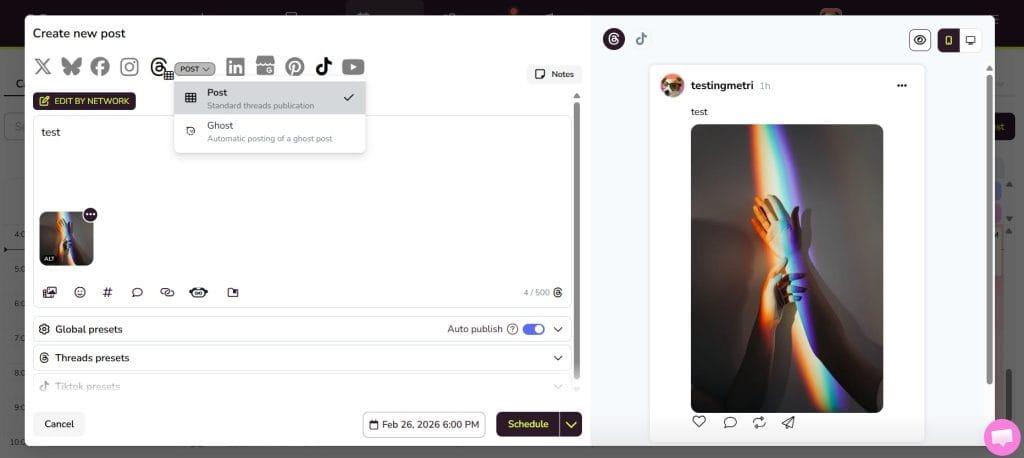
Plan Your Content
Build a clear posting calendar for Threads, schedule posts in advance (you can even schedule your ghost posts from the planner), and maintain consistency without being online 24/7.
This makes it easier to:
- Test different posting times
- Experiment with formats
- Stay consistent
- Avoid last-minute posting
Consistency fuels visibility, especially on conversation-driven platforms like Threads.
Analyze Performance
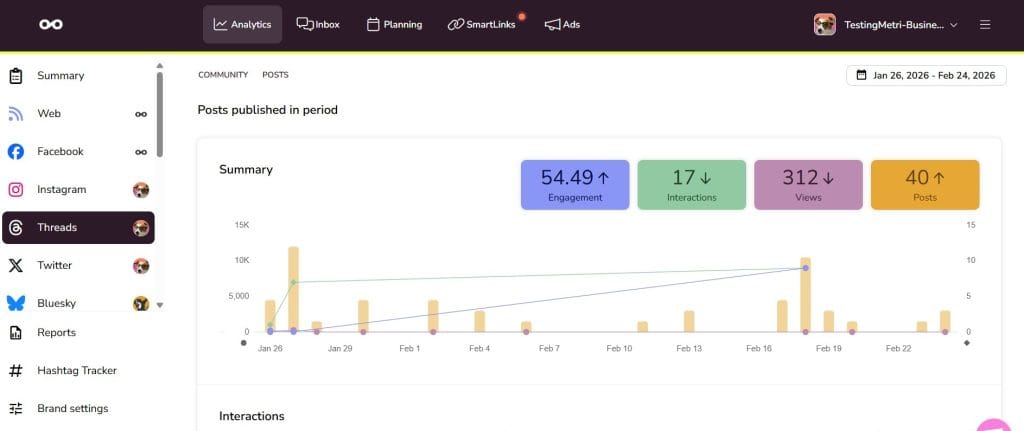
Track key metrics such as:
- Replies
- Reposts
- Shares
- Balance or demography of followers
Reviewing performance over time helps you identify:
- Which topics spark conversation
- What tone resonates most
- What post structures drive replies
Coordinate Your Cross-Platform Strategy
View Threads alongside Instagram, X, and other platforms in one dashboard.
This allows you to:
- Repurpose strong ideas strategically
- Adapt the same message to different formats
- Launch coordinated multi-platform campaigns
Threads shouldn’t live in isolation, it can perfectly be integrated into your broader strategy.
Report and Iterate
Generate professional reports with your Threads results to share with clients, managers, or teammates.
Use those insights to:
- Refine your content direction
- Adjust posting frequency
- Double down on posts that drive real conversations
By combining algorithm knowledge with Metricool’s planning and analytics tools, Threads becomes a strategic channel. And that’s how you turn visibility into long-term growth.
