

How to Repost a Public Story on Instagram [And Why You Should]
 Kata
19 January 2026
Kata
19 January 2026 
Instagram keeps tweaking Stories, and this one’s a keeper: you can now repost a public Instagram Story to your own Story feed, even if you weren’t tagged in it.
What does this mean for creators? You can now leverage high-quality content from other accounts to boost your visibility without having to create every single slide from scratch.
Here’s your short guide to the new “public reposting” feature — why it should be on your radar, and a few practical ways to work it into your content calendar.
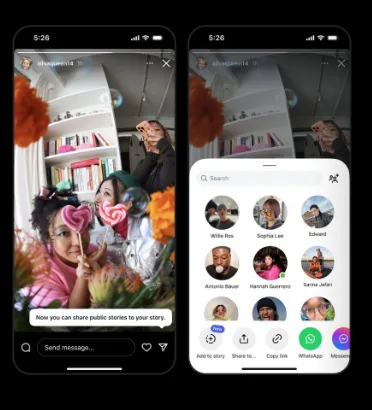
What Exactly is Public Story Reposting?
Until now, you could only share someone else’s Story if they manually tagged or mentioned you.
With this update, if a Story is public, you can add it to your own Stories even without a tag. The original creator still gets the credit, but you get the content.
In practice, this makes it much easier to:
- Collaborate with other accounts seamlessly.
- Amplify interesting content without starting from zero.
- Highlight your community or industry leaders.
The Evolution of the “Repost”
This move isn’t a coincidence. Instagram has been going all-in on “Repost” features to keep content circulating within the app.
It started with Reels and feed posts, which already allowed for native resharing with credit. Now that it’s reached Stories, the era of blurry screenshots and third-party “repost” apps (which kill image quality) is finally over.
By making resharing native and collaborative, Instagram is sending a clear message: they want content to travel. For brands and creators, this means creating content that is “share-worthy” beyond just its initial 24-hour window.
How to Repost a Public Story: Step-by-Step
Ready to try it? Here is how to repost a public Instagram Story in seconds:
- Open Instagram and go to the public Story you want to share.
- Tap the ‘Share’ icon (the little paper airplane).
- Select ‘Add to your story’.
- Customize it with stickers, text, or music to match your brand’s voice.
- Post it!
The original creator’s username will automatically appear, keeping your resharing transparent and giving credit where it’s due.
🔒 A Note on Privacy: Just because a Story is public doesn’t mean it’s always shareable. Creators can opt-out of this feature in their privacy settings. If you don’t see the “Add to your story” option, the author likely has resharing disabled.
How to Keep Your Own Stories from Being Reposted
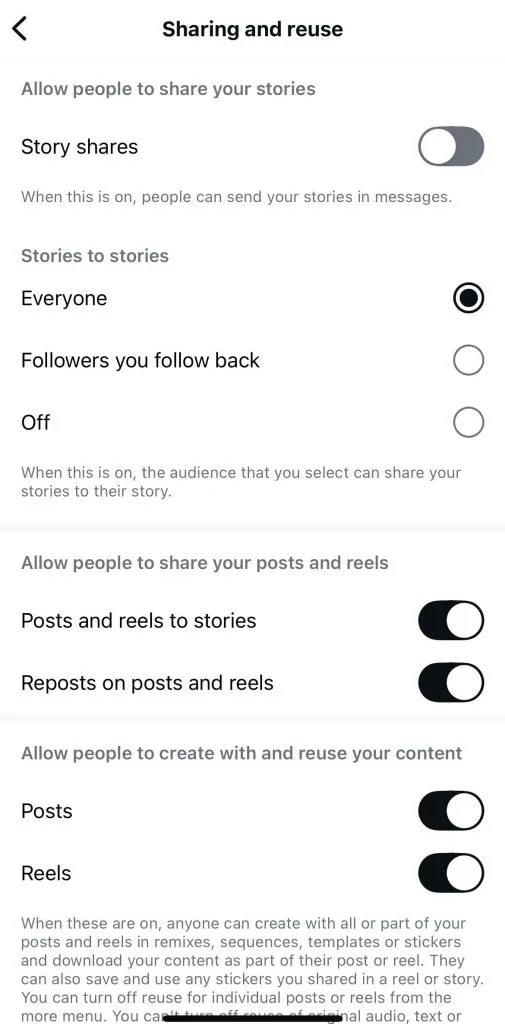
If you have a public account but want total control over who shares your content, you can easily toggle this off:
- Go to your profile and tap ‘Settings and activity’.
- Tap ‘Sharing and reuse’.
- Toggle off the option to ‘Allow people to share your posts and reels to stories’.
Even if your account stays public, this ensures your Stories can’t be added to anyone else’s profile.
4 Ways to Use This Feature for Your Brand
- Highlight your community: If a customer posts your product in a public Story, share it! It’s an easy way to showcase User-Generated Content (UGC) and build social proof.
- Curate valuable content: You don’t always have to be the source. If you see a great tip, an interesting stat, or a helpful idea from an industry expert, sharing it adds value for your followers.
- Support partners and collaborators: If you’re working with other brands, resharing their Stories helps strengthen the relationship beyond just the “official” campaign posts.
- Jump on trending topics: When there’s a big event or a viral conversation happening, reposting Stories from the scene allows you to join the conversation in real-time and provide context for your audience.
Think of Reposting as a means to amplify your reach, not as a calendar-filler.
Every time your content is reposted, you’re tapping into new, organic audiences. By treating Stories as a collaborative tool rather than just a “post and forget” format, you can significantly boost your brand’s engagement.
So go ahead — share something worth sharing! 😉
And when you’re tired of posting manually? Check out Metricool and plan your Stories in advance. Here’s how:
