

YouTube Auto-Dubbing: Now Available to All Creators
 Kata
10 February 2026
Kata
10 February 2026 
Struggling to get your content in front of international audiences? YouTube has rolled out auto-dubbing to all creators, which could help you do just that. If you were one of the lucky few in the early tests, you may have already tried this feature last year, and you might also have access to something called ‘multi-language audio tracks’. Both tools are part of YouTube’s larger goal: making global reach more accessible to all creators.
But hang on a second – auto-dubbing and multi-language audio tracks? They sound pretty much the same, and yes, it’s indeed a bit confusing. So in this article, I’ll walk you through what both tools are, how they work, the key differences between the two, and which option makes the most sense for you depending on your goals.
Whether you’re looking to grow your channel internationally or improve viewer experience across languages, you’ll know exactly which tool to use by the end of this post.
Why YouTube Is Expanding Language Options
It all comes down to one fundamental part of human connection…
If you talk to a man in a language he understands, that goes to his head. If you talk to him in his language, that goes to his heart.
Nelson Mandela
Speaking to people in their own language is one of the most genuine (and still underused) ways to connect. And YouTube is making that possible with new tools that help creators bridge the gap.
Auto-dubbing was the first big step, giving millions of creators AI-generated dubbed audio, powered by Google’s translation and speech tech. After a two-year pilot, multi-language audio tracks rolled out to millions more creators, letting you upload your own dubbed files directly into your videos.
Together, these features make your content more accessible and give you the chance to reach entirely new audiences.
What is YouTube Auto-Dubbing?
Think of auto-dubbing as the fast lane. It’s YouTube’s AI-powered tool that automatically generates dubbed audio tracks for your videos.
The difference between the two can be a bit confusing, so let’s get it straight: auto-dubbing is fully AI-generated inside YouTube, while YouTube multi-language audio tracks are controlled by the creator, who uploads their own dubbed audio.
In a nutshell, auto-dubbing means:
- Your videos are labeled “auto-dubbed” so viewers know it’s AI-generated.
- Viewers can toggle between the original and dubbed tracks.
- No need to upload or record audio files yourself.
In June 2025, YouTube made auto-dubbing available to 80 million creators worldwide, and in early 2026 it added “Expressive Speech” to make dubs sound more natural, mirroring pitch, intonation, and energy in eight key languages (English, French, German, Hindi, Indonesian, Italian, Portuguese, Spanish). Auto-dubbing is now available in 27 languages in total.
At the same time, YouTube began testing a new lip-synch feature, similar to what we’ve already seen from Meta AI’s voice translations for reels.
👉 Best for: educational content, tutorials, or any video where speed and accessibility matter more than emotional nuance.
Who Can Get Access to Auto-Dubbing?
Auto-dubbing started in the YouTube Partner Program, then expanded to all creators in the YPP, and is now available to a much broader pool of verified creators who enable “advanced features” in YouTube Studio. If you haven’t seen it yet, there may be a delay before the automatic dubbing setting appears on your channel.
How YouTube Auto-Dubbing Works
- Upload Your Video
Just like you normally would! YouTube automatically detects your video’s language and generates dubbed versions in supported languages. - Preview and Manage Your Dubs
Check your dubbed tracks in YouTube Studio > Languages. You can listen, unpublish, or delete any dubs you’re not happy with. - Control Settings
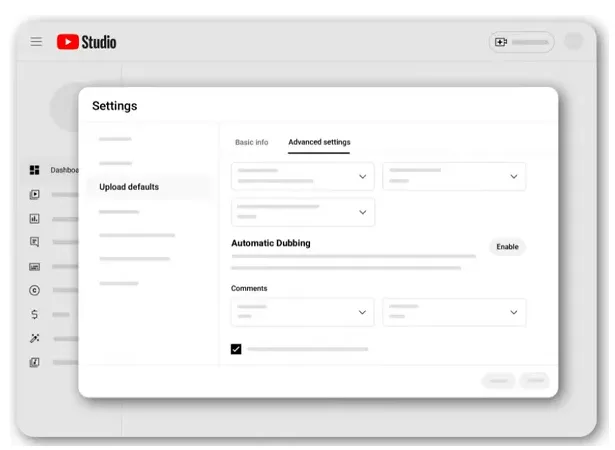
If auto-dubbing is available for your channel, you’ll find it under Advanced Settings / Upload Defaults. You can:- Turn automatic dubs on or off
- Choose to review dubs before they go live
- Use new “Automatic Smart Filtering” so music-only or silent videos don’t get pointless dubs.
👉 For a comprehensive guide on using YouTube Studio, check out:
Supported Languages
YouTube’s language coverage keeps evolving. In 2025, YouTube confirmed that:
- Auto-dubbing was available from nine major languages into English and vice versa (French, German, Hindi, Indonesian, Italian, Japanese, Portuguese, Spanish, more).
- Later in 2025, YouTube added 11 more target languages and expanded the feature to 80 million creators.
- In early 2026, Expressive Speech launched in eight languages (English, French, German, Hindi, Indonesian, Italian, Portuguese, Spanish), with more coming.
Exact language lists can change, so it’s best to check your own Studio for up-to-date options.
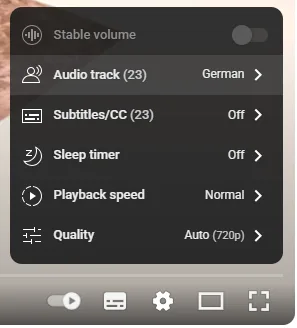
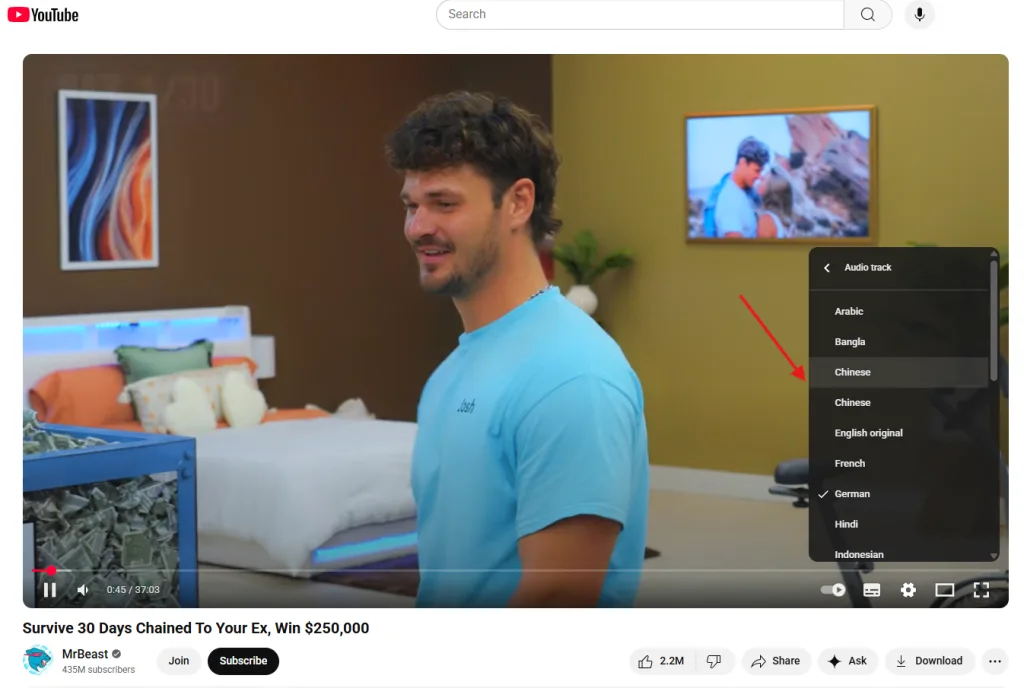
Viewers can switch between the original and dubbed audio tracks, and YouTube remembers their language preference for future videos.
What to Keep in Mind About Auto-Dubbing
Auto-dubbing is powerful but not perfect. Even with Expressive Speech, translations and timing might miss nuances, especially for humor, idioms, or very emotional content.
That’s exactly where YouTube’s multi-language audio tracks step in as a stronger alternative. While auto-dubbing helps you scale quickly, multi-language tracks give you full control over quality and cultural nuance.
💡 The smartest strategy? Combine auto-dubbing for broad experimentation with manual multi-language tracks for your most important videos and markets.
What Are YouTube Multi-Language Audio Tracks?
Multi-language audio tracks are the more hands-on, premium option for your videos. Instead of relying on AI, you (or a professional) upload high-quality audio recordings in different languages.
Here are the most important specs of this feature:
- You can upload up to 30 languages per video.
- No need to create multiple channels for different languages.
- According to YouTube, creators using multi-language audio tracks have seen 25% of watch time come from non-primary languages.
- Ideal for universal topics like food, travel, gaming, tutorials, and more.
This feature gives you full control over quality, tone, and style, which makes it perfect for storytelling, premium content, or branded videos.
👉 Best for: creators who care about emotional impact, cultural nuance, or professional-grade content.
On average, creators uploading Multi-language Audio tracks to their videos saw over 25% of their watch time come from views in the video’s non-primary language.
YouTube
Multi-Language Audio Tracks vs. Audio-Dubbing: Key Differences
Now that we’ve explored both options, let’s break down the key differences and see how each one works in practice.
| Feature | Multi-Language Audio Tracks (Manual Uploads) | Auto-Dubbing YouTube (Automatic) |
| How it works | Record or hire voice-over talent, then upload manually in YouTube Studio. | AI automatically generates dubbed audio tracks when you upload a video. |
| Control over quality | Full control: tone, emotion, style, accuracy. | Limited: AI may misinterpret idioms, tone, or technical terms. Can review/edit before publishing. |
| Languages supported | Up to 30 languages per video. | Available for a growing list of source/target languages. Expanded in June 2025 with 11 additional languages and continues to roll out in 2026. |
| Cost & effort | High: recording, editing, or hiring professionals. | Low: generated instantly, no extra cost. |
| Viewer experience | Polished, professional, expressive. | Fast and scalable; best for tutorials, explainers, evergreen content. |
| Availability | Pilot initially; open to all creators for uploads. | Originally for Partner Program; now available to 80M+ verified creators who enable advanced features. |
| Best for | Storytelling, premium content, branded videos. | Quick global reach, accessibility, scaling tutorials or educational content. |
How to Upload Multi-Language Audio Tracks
IIf you want a more polished, nuanced translation and already have your audio tracks ready, adding them to your video is super simple:
- Sign in to YouTube Studio on your computer.
- Open the video you want to edit.
- Go to the ‘Languages’ or ‘Subtitles’ tab.
- Click ‘Add language’ and choose your language.
- Under ‘Audio’ or ‘Dubs’, click Add.
- Upload your audio-only file (it should closely match your video length).
- Hit Publish.
Your video now has multi-language audio – viewers in those languages will see (and hear) a localized version without needing a separate channel.
How to Turn Off Auto-Dubbing YouTube
Don’t want automatic dubs on your videos? You can turn them off anytime:
- Go to YouTube Studio on your computer.
- Open Settings > Upload defaults > Advanced settings.
- Uncheck ‘Allow automatic dubbing’ (or disable in the Dubbing section if visible).
- Click Save.
You can turn it back on at any time, and in many cases choose to review dubs before they’re published.
Why This Matters for Social Media Managers
For creators and brands, it’s a great opportunity for growth. Adding YouTube multi-language audio tracks or using YouTube auto-dubbing can:
- Help your content perform in global markets.
- Improve retention, since viewers prefer hearing content in their own language.
- Save you time and money compared to traditional dubbing.
If you’re managing a brand channel, experimenting with YouTube auto-dubbing is a smart first step. Even if translations aren’t perfect, the potential reach and traffic boost are hard to ignore.
But once you see the benefits, the next question naturally is: which languages should you start with? Choosing the right languages can make all the difference in connecting with your audience worldwide.
Choosing the Right Languages for Your YouTube Multi-Language Audio
Let’s say your video is more than just a tutorial and your audio is ready. How do you decide which languages to start with? The key is understanding your audience and matching your content to the right regions. Here’s a simple guide to help you choose wisely:
1. Dive Into Your Analytics
Start by checking YouTube Studio to see where your viewers are coming from. Which countries bring in the most views? Take a peek at the languages used in comments or auto-translation metrics. Many successful creators start with languages that already make up a big part of their audience. For example, a cooking channel might notice strong engagement from Spanish- and Portuguese-speaking regions and prioritize those dubs first.
2. Think Global Reach
Some languages cover multiple countries. Spanish, for instance, works across Spain, Latin America, and beyond. French, Arabic, or Hindi also reach large regions. If your content has broad appeal — like tutorials, lifestyle videos, or entertainment — starting with widely spoken languages can instantly expand your potential audience.
3. Match Your Content Niche
Consider your video topics and which cultures might connect. Pasta recipes? Italian or Spanish could be perfect. K-pop dance covers? Korean or Japanese might make the most sense. The goal is to find languages that naturally fit your content.
4. Listen to Your Viewers
Your audience can guide you. Watch for comments like, “Please dub this in French!” or “I wish my parents could watch this in Hindi.” Even better, ask directly in a community post which language they’d like next.
Start small with one or two languages as a trial — no need to offer ten from day one. Once you see results, like a bump in views from new regions or enthusiastic comments, you’ll know it’s time to expand further.
Boost Your YouTube Strategy with Metricool
All these YouTube tools are powerful, but managing multiple languages, analyzing performance, and planning content can get tricky fast. That’s where Metricool comes in.
With Metricool, you can:
- Track performance across all your videos, so you can see which dubbed or auto‑dubbed content drives the most views, watch time, and engagement.
- Plan your video calendar: schedule uploads for different regions and languages to maximize global reach.
- Monitor audience feedback in one inbox: manage comments and DMs across multiple platforms, so you never miss requests for new language tracks.
- Optimize your strategy with analytics: identify which regions and languages are your growth hotspots and prioritize your multi‑language efforts.
