

Best Instagram Post Sizes Guide 2026
 Kata
21 January 2026
Kata
21 January 2026 
The right size makes all the difference on Instagram. When you nail the dimensions for photos, videos, Stories, Reels, and ads, your content looks sharp, professional, and optimized for every device.
Instagram’s full-screen formats and evolving aspect ratios mean one wrong crop can tank your engagement. In 2026, knowing exactly which pixels stay visible (and which get cut) is the difference between content that converts and content that gets scrolled past.
This guide breaks down the exact Instagram sizes you need to design smarter, repurpose faster, and stop second-guessing every upload.
Instagram Post Sizes: Quick Reference
| Post | Size |
|---|---|
| Profile photo | 320 x 320 px |
| Square photos | 1080 x 1080 px |
| Horizontal photos (landscape) | 1080 x 566 px |
| Vertical photos | 1080 x 1350 px |
| Square videos | 1080 x 1080 px |
| Horizontal videos | 600 x 315 px |
| Vertical videos | 600 x 750 px |
| Stories | 750 x 1334 px |
| Video Stories | 750 x 1334 px |
| Reels | 1080 x 1920 px |
| Square Ad | 1080 x 1080 px |
| Landscape Ad | 1080 x 566 px |
| Vertical Ad | 1080 x 1350 px |
Instagram Profile Picture Size
Your profile picture is your trademark; it’s how people recognize you in feeds, comments, and DMs.
Pro tip: Use the same profile photo across all your social platforms. Consistency = instant recognition.
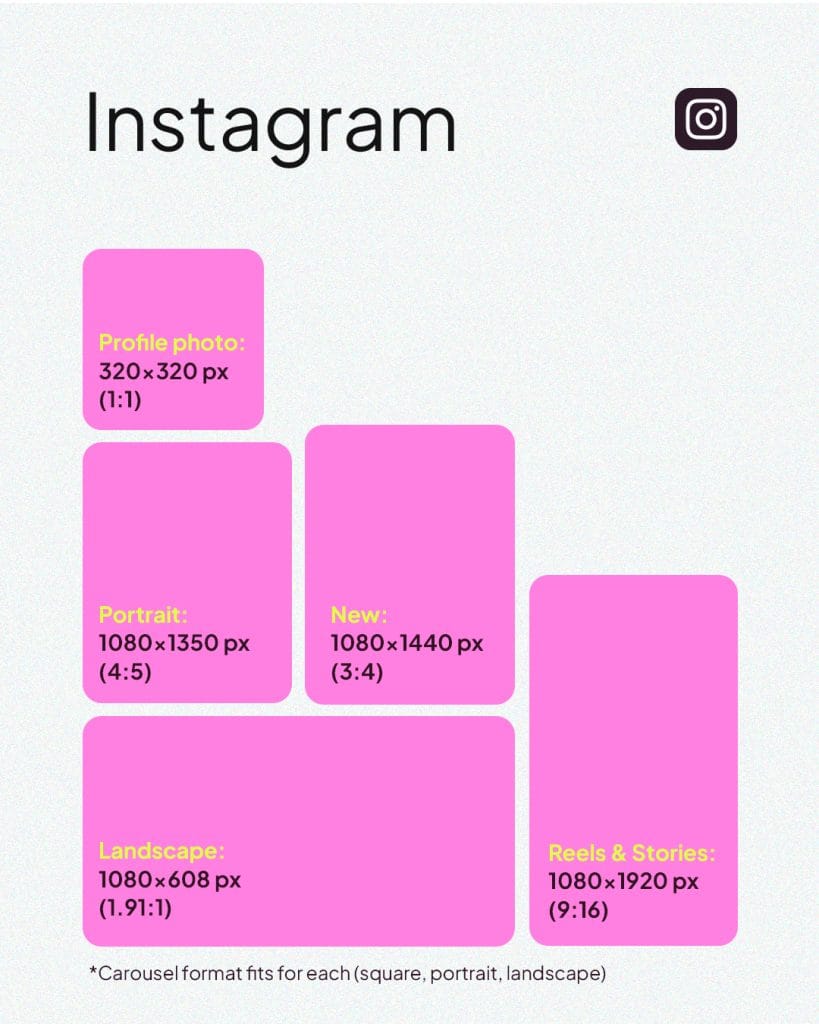
✅ Recommended size: 320 x 320 px (minimum)
✅ Maximum resolution: 1080 x 1080 px
Instagram Photo Sizes
Instagram supports three aspect ratios for feed posts: square, landscape, and portrait. Here’s how to optimize each one.
Square Photos (1:1):
While Instagram now offers different dimension options, square images are one of the app’s original unique features… and they still get the job done today!
✅ Aspect ratio: 1:1
✅ Dimensions: 1080 x 1080 px
Horizontal Photos (Landscape):
Great for showcasing wide shots, products, or scenery.
✅ Aspect ratio: 1.91:1 (up to 16:9 supported)
✅ Dimensions: 1080 x 608 px (minimum 600 x 400 px)
Instagram Vertical Photos (Portrait):
Takes up more space in the feed; ideal for stopping the scroll.
✅ Aspect ratio: 4:5
✅ Dimensions: 1080 x 1350 px
Instagram Video Sizes
Instagram supports three video formats for feed posts. Choose the right dimensions based on your content and how much screen space you want to own.
Square Videos (1:1)
✅ Aspect ratio: 1:1
✅ Dimensions: 1080 x 1080 px
✅ Duration: 3 seconds to 60 minutes
Horizontal Videos (Landscape)
✅ Aspect ratio: 1.91:1 to 16:9
✅ Dimensions: 1080 x 566 px
✅ Duration: 3 seconds to 60 minutes
Vertical Videos (Portrait)
✅ Aspect ratio: 4:5
✅ Dimensions: 1080 x 1350 px
✅ Duration: 3 seconds to 60 minutes
Instagram Stories Size
✅ Aspect ratio: 9:16
✅ Dimensions: 1080 x 1920 px
✅ Duration: Up to 60 seconds (videos longer than 60 seconds auto‑split into additional 60‑second Story segments)
Works for both photo and video Stories.
Instagram Reels Size
✅ Dimensions: 1080 x 1920 px
✅ Aspect ratio: 9:16
✅ Maximum length: 20 minutes (previously 3 minutes; keep in mind that according to Instagram, “Reels over 3 minutes won’t be recommended to new audiences.”)
Why shorter wins: Shorter Reels have higher completion rates and better algorithmic performance.
Instagram Ads Sizes
Instagram ads follow the same dimensions as organic posts, but there are a few extra rules to maximize delivery.
Square Ad (1:1)
✅ Dimensions: 1080 x 1080 px
Landscape Ad (1.91:1)
✅ Dimensions: 1080 x 566 px
Vertical Ad (4:5)
✅ Dimensions: 1080 x 1350 px
📌 Meta’s text rule: Keep text overlays minimal. Ads with too much text on the image may get reduced reach.
What’s New with Instagram Dimensions in 2026
Instagram officially ditched its iconic square grid in 2025, shifting to a taller 3:4 preview format (1080 x 1440 px); and this change is here to stay in 2026. If your carefully curated feed suddenly looked off-balance, that’s why.
Here’s what changed:
- Grid previews now display in 3:4 ratio instead of the classic 1:1 square
- You can customize thumbnails to control what’s visible in grid previews
- You can now post directly to your grid without content appearing in feeds; great for maintaining aesthetics without worrying about engagement
The technical reality:
Despite the 3:4 grid preview, Instagram still limits uploads to a maximum of 1080 px wide and 1350 px tall. Stick with the 4:5 format (1080 x 1350 px) for feed posts — it minimizes cropping while maximizing screen space.
Why Photo Quality Matters
Quality visuals are essential for:
- Stopping the scroll: Sharp, well-composed content gets noticed
- Building brand recognition: Consistent quality = professional presence
- Making ads that convert: Pixelated, poorly cropped ads kill click-through rates
Your photos don’t need to be perfect (more on that below), but they do need to be intentional. Crisp images load properly across devices and signal that you care about your audience’s experience.
The Shift to “Raw” Content (According to Instagram’s CEO)
In his 2026 outlook, Instagram head Adam Mosseri posted that “authenticity is becoming infinitely reproducible” as AI makes polished content easy to fake. The platform is shifting focus from what is being said to who is saying it.
What this means for creators:
- Overly polished, “professional” content is becoming less engaging
- Users increasingly value blurry photos, shaky videos, and “imperfect” content as proof it’s real
- DMs and Close Friends Stories are now the primary sharing spaces for many users
The bottom line is, your content still needs to hit the right dimensions and load cleanly, but don’t stress about making it look like a magazine spread.
How to Optimize for the New Grid
Follow these strategies to ensure your content looks sharp whether people see the square or taller grid:
✅ Stop creating 1:1 square posts: The era of square-first content is over
✅ Design in 4:5 ratio (1080 x 1350 px): This minimizes cropping in both formats
✅ Leave padding around key elements: Add extra space around borders to prevent cropping in grid previews
✅ Use Instagram’s thumbnail adjustment tool: After posting, tap the three dots and select “Adjust Preview” to reposition your image
✅ Keep critical elements centered: Place text and important visuals within the center square to accommodate users who haven’t received the update yet
Schedule Smarter with Metricool
Now that you know the exact dimensions Instagram wants, make posting effortless. With Metricool, you can:
✅ Schedule and auto-publish to Instagram (no manual uploads)
✅ Preview how your grid will look before you post
✅ Analyze performance to see what dimensions and formats drive the most engagement
✅ Get optimal posting times based on when your audience is most active
Metricool allows you to schedule and plan your posts on your professional profile so the content can auto-publish on Instagram or through email or push notifications on your mobile phone.
Both free and premium plans have access to this feature, in addition to the best hours to publish.
Ready to streamline your Instagram strategy?
Discover what Metricool can do for you for free. 👇🏻
