



How to Generate Leads on Social Media in 2026
 Kata
13 November 2026
If you run a small business, whether it’s a dog grooming salon or a small accounting boutique, chances are you don’t have a huge marketing budget to get your name out there. That’s where social media can help. Use it wisely, give it a bit of time each week if possible, and it can become one of your best sources of leads.
To make that easier, here are 5 ways to generate leads on social media in 2026.
What is Social Media Lead Generation?
Social media lead generation means using your social profiles, posts, and ads to get potential customers to share their contact details with you. That could be an email address, a phone number, or a booking request. Once you have those details, you can follow up directly instead of hoping people come back to your profile.
A lead is someone who has shown interest in what you do and might soon become a customer. For a dog grooming salon, that might be a pet owner who signs up for a first-visit discount through the link on your Instagram profile. For an accounting firm, it could be a business owner who downloads your tax deadline checklist from a LinkedIn post. Offers like these are called ‘lead magnets’: something useful you give away in exchange for contact details.
There are two main ways to get leads on social media:
- Organic: Your profile, posts, comments, and DMs point people to a form, booking page, or free resource.
- Paid: Lead ads put a sign-up form right inside the app, so people can share their details in a couple of steps.
Most small businesses do best with a mix. Use organic tactics to find out which offer people want, then put ad budget behind the one that works.
5 Ways to Generate Leads on Social Media
There are a variety of ways to generate leads on social media platforms, and a lot of it comes down to the old learning by doing. But to get you started, here are five tactics worth trying first.
1. Optimize your profile
Before you launch a lead generation campaign, make sure your profile can turn visitors into contacts.
- Add a clear link: Instagram, for example, lets you add up to five links in your bio, so you can send people to a landing page, a sign-up form, or a booking page. If you’re on Meta One’s Advanced plan, you can also add links directly to your posts and Reels.
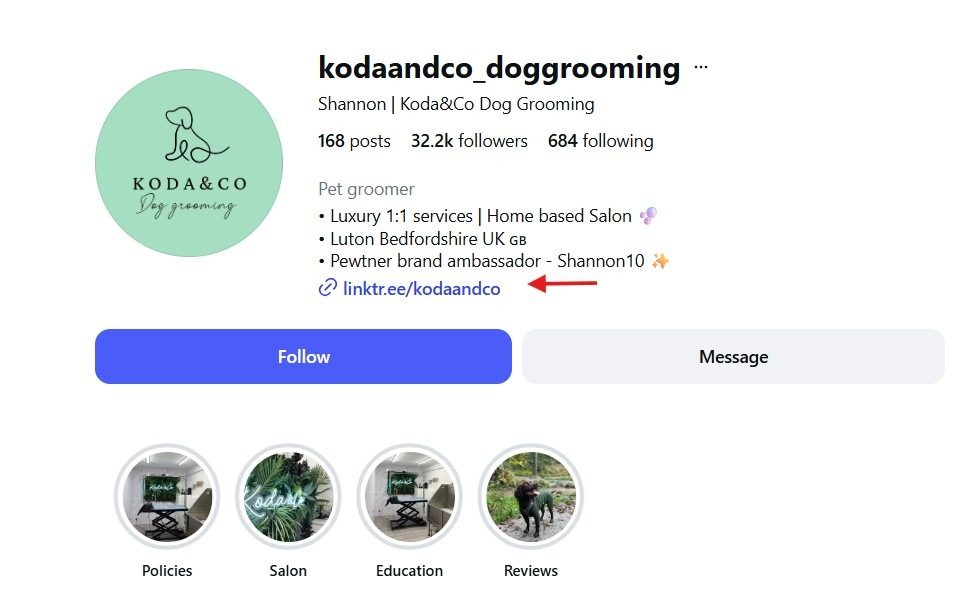
- Use action buttons: Business profiles on Instagram and Facebook can show buttons like “Book now”, “Reserve”, or “Order food”, depending on your category. On Facebook, you can choose the button that fits the kind of lead you want, such as “Sign up” or “Contact us”.
- Say what people get: Your bio should make it obvious what someone gets if they click.
2. Automate your DMs and turn comments into leads
Ask your followers to comment a keyword on a post (“Comment GUIDE and I’ll send it to you”), then send an automatic DM with the link to your form or resource. People get what they asked for right away, and you open a conversation that often converts better than a link in a caption. With Metricool’s Flows, you can set up these automatic replies so you don’t have to watch your inbox all day.
3. Run a giveaway
Giveaways can still work well on social media, especially when the prize is one of your own products or services. You reach new people and collect leads at the same time. Simple entry requirements usually get more people to enter.
To turn entrants into leads, ask them to enter through a form on your website, for example by leaving their email address. Tell them clearly what they’re signing up for, follow each platform’s promotion rules, and make sure you comply with data protection laws like GDPR.
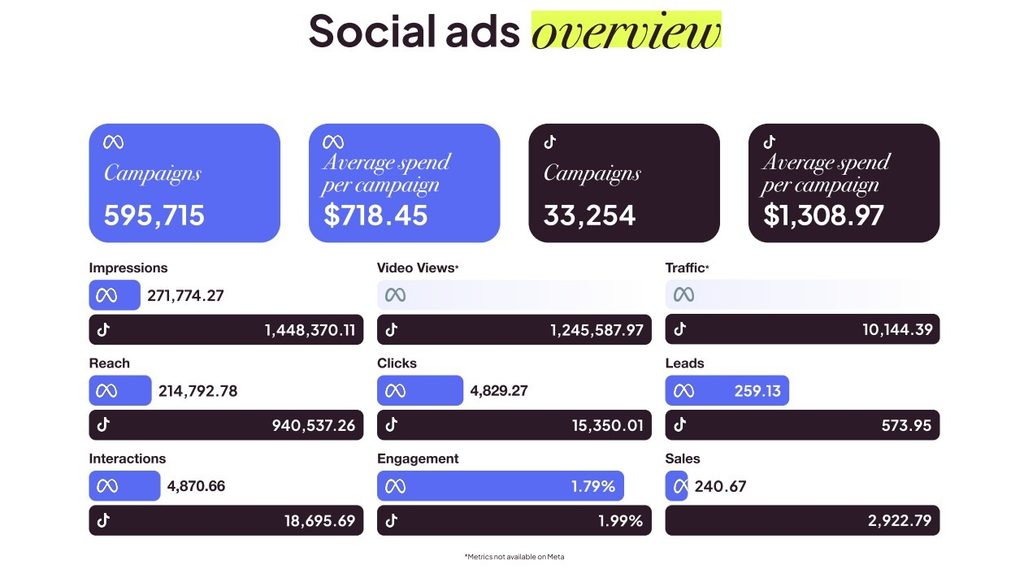
If you put ad budget behind a giveaway or a comment-to-DM post, Meta is worth a look. Metricool’s 2026 Social Ads Report found that Meta engagement campaigns get more interactions per dollar than TikTok’s (10.8 vs. 8.2).
4. Use a visual hook
People are less likely to share their details unless your call to action stands out. Show a preview of what they’ll get when they sign up, like a page from the guide, part of the template, or the discount itself. Carousels, short videos, and Stories with a link sticker all work well here.
5. Use lead ads
If you want to scale, paid social is one of the most direct routes. Meta (Facebook and Instagram), TikTok, and LinkedIn all offer lead ads with native forms that can pre-fill some of the user’s details, so people can sign up without leaving the app.
So which platform gives you more leads for your money?
Our 2026 Social Ads Report analyzed over 620,000 campaigns from nearly 45,000 advertisers and more than $471 million in ad spend on Meta and TikTok, comparing January–June 2025 with the same period in 2026. Lead campaigns showed one of the biggest gaps between the two platforms:
- Same budget, twice the leads: Lead campaigns spent almost the same per campaign on both platforms (around $1,550), but TikTok generated more than twice as many leads: 574 per campaign vs. 259.
- Less than half the cost per lead: A lead cost $2.69 on TikTok, down 33% from 2025. On Meta it cost $6.00, up 14%.
- More clicks become leads on TikTok: Meta lead ads have a higher click-through rate (2.04% vs. 0.75%), but more people drop off after clicking. TikTok turns about 6 of every 100 clicks into leads, and Meta turns fewer than 5.
- Cheaper traffic too: If you’d rather send people to a landing page on your own site, TikTok traffic campaigns cost $0.03 per click vs. $0.07 on Meta, and they generated nearly 8 times as many clicks per campaign.
Still, 91% of advertisers run paid social on Meta alone, and lead campaigns take a big share of that budget. They make up 13% of Meta campaigns but 27% of Meta ad spend.
If your audience is on TikTok, test a lead campaign there before you put your whole budget into Meta. Smaller advertisers are already doing this: accounts spending under $100 a month that advertise on both platforms now give TikTok 44% of their budget. However, cost per lead isn’t everything. Before you move budget, check how many of those leads become customers.
And don’t forget the people who almost signed up. Retarget people who watched your videos, visited your profile, or opened your lead form without sending it, and show them an ad that reminds them what they’ll get.
What to Do After the Lead Comes In
Once someone signs up, they’re interested, but they won’t stay that way for long if nobody follows up. Have a plan ready before your campaign goes live.
- Reply right away: Send the guide, discount, or confirmation automatically as soon as someone signs up. If the lead looks like a good fit, follow up personally within a day.
- Get leads out of Ads Manager: Connect your lead forms to your CRM or email tool so new contacts don’t sit in a spreadsheet you check once a week.
- Nurture them: Send a short email sequence that builds on what they signed up for. Someone who downloaded a pricing guide needs different emails than someone who entered a giveaway.
- Pass the best ones to sales: Decide what makes a lead ready for a sales conversation, like requesting a demo or opening several emails, and hand those leads over quickly.
Following up is much easier when your social media work isn’t spread across a dozen tabs.
How Metricool Helps You Get More Leads on Social Media
Between posting, replying to comments and DMs, and running ads, lead generation on social media can mean jumping between several apps every day. Metricool brings all of it into one place, so a small team can run the whole process, from the first post to the follow-up, without losing hours switching tabs.
- Turn your bio into a lead page: SmartLinks gives you a link-in-bio page where you can add buttons to your sign-up form, booking page, or free resource. Metricool tracks how many people click each one.
- Automate comment-to-DM: With Flows, anyone who comments your keyword on an Instagram post gets an automatic DM with your link. Flows can also reply to keywords in DMs and Story reactions, and send instant replies to TikTok comments.
- Answer every message from one inbox: The Inbox collects comments and DMs from your social networks in one place, so no potential lead gets left on read.
- Plan the content that brings people in: Schedule your carousels, Reels, and giveaway posts ahead of time, and publish them at your audience’s best time to post.
- Manage your ads without the ad manager maze: Create and manage Meta and Google Ads campaigns from Metricool. You can also connect TikTok Ads to track results next to the rest.
- See what’s working: Campaign Dashboards show a campaign’s organic posts and paid ads side by side. That way you can tell whether leads came from the giveaway post itself or the budget behind it.
Try Metricool for free and see how it can help you generate more leads on social media and manage everything from one dashboard.
FAQ
How much does it cost to get leads on social media?
It depends on the platform and your offer, but Metricool’s 2026 Social Ads Report gives you a benchmark. In the first half of 2026, a lead from a TikTok lead campaign cost $2.69 on average, down 33% from the year before. On Meta, a lead cost $6.00 on average, up 14%. Organic tactics like your bio link, comment-to-DM, and giveaways don’t cost anything in ad spend, but they do take time. Whichever route you choose, judge it by how many leads become paying customers, not just by cost per lead.
Which social network is best for lead generation?
It depends on where your audience is. Meta reaches the most people and is where most advertisers spend. In Metricool’s 2026 Social Ads Report, TikTok lead campaigns got leads at less than half the cost of Meta’s. For B2B, LinkedIn’s targeting by job title and company is hard to beat.
Should I use organic or paid social for leads?
Use both. Organic tactics like profile links, comment-to-DM, and giveaways cost time rather than money. Lead ads help you scale once you know which offer works.
How do I know which posts or ads bring in leads?
Add UTM parameters to every link, use your ad platforms’ conversion tracking, and compare cost per lead across campaigns and networks.
How quickly should I follow up with a new lead?
As soon as you can. Send something automatically the moment someone signs up, then follow up personally while they still remember who you are.