
Using Metricool within Claude Code
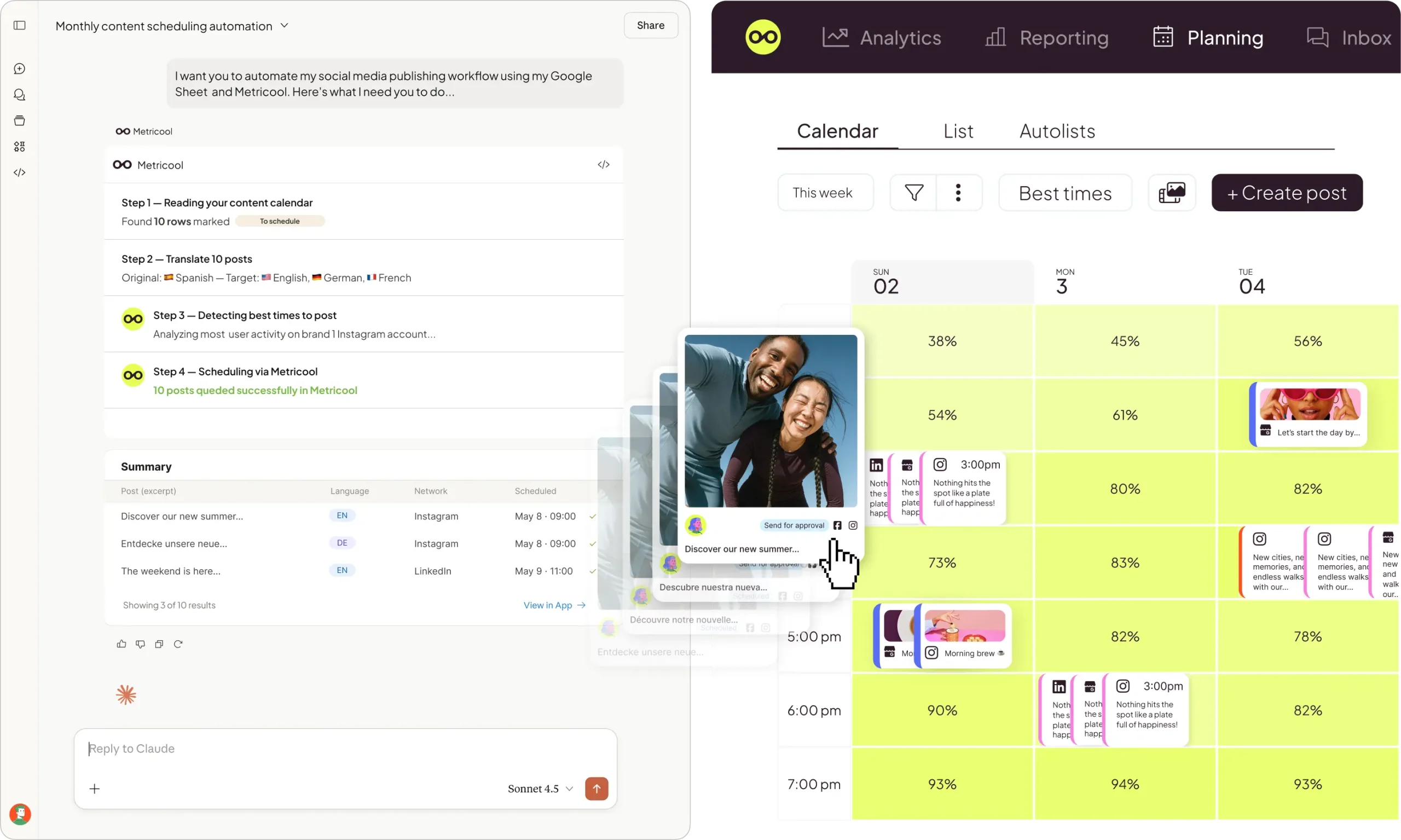
Metricool’s official MCP connects your account to Claude (Code, Desktop, or whichever client you use) and lets the conversation do the work: scheduling posts, reading analytics, checking your best posting times, reviewing competitors — all in plain language, without ever opening the dashboard.
3.5+ million professionals already trust Metricool



















Using Metricool within Claude Code
Metricool’s official MCP connects your account to Claude (Code, Desktop, or whichever client you use) and lets the conversation do the work: scheduling posts, reading analytics, checking your best posting times, reviewing competitors — all in plain language, without ever opening the dashboard.
3.5+ million professionals already trust Metricool
What Is Metricool’s MCP?
Metricool’s MCP is the official server that connects your Metricool account with Claude Code, Claude Desktop, Cursor, ChatGPT, Mistral Le Chat, Make, and n8n. Once connected, you simply ask the mode for whatever you need regarding your social networks, and it communicates with Metricool on your behalf.
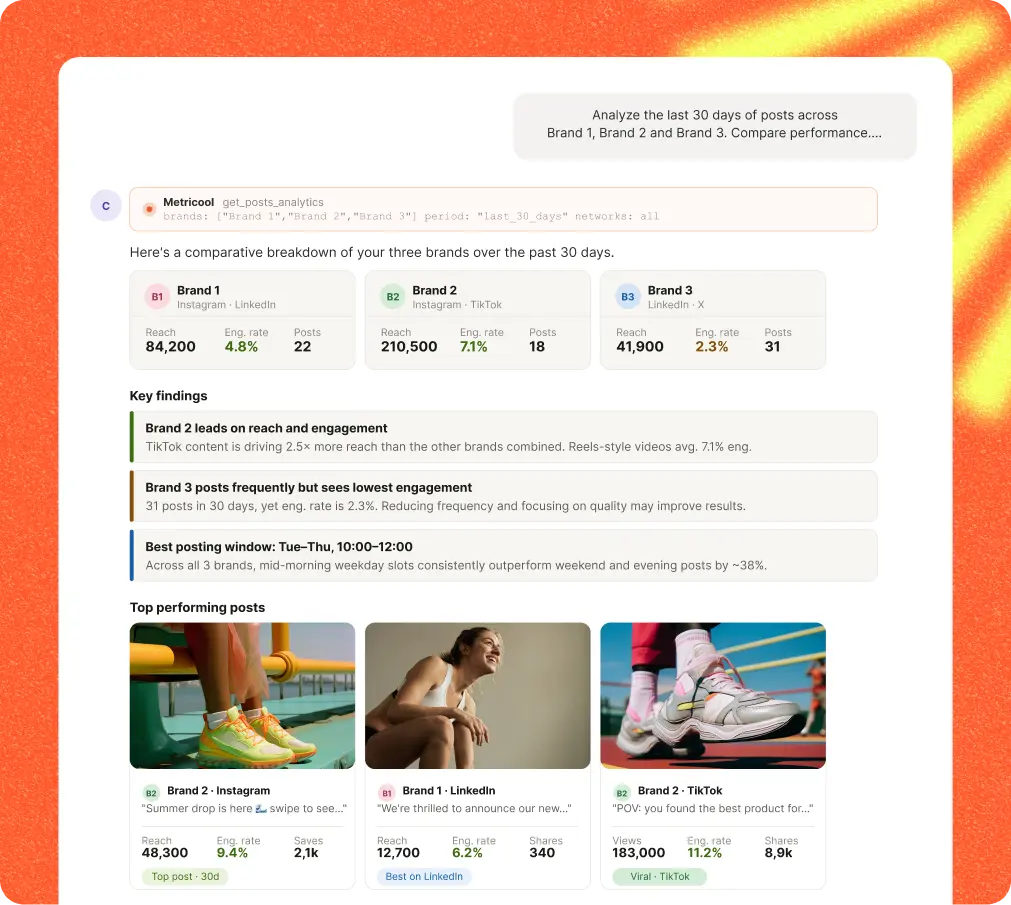
Questions that would normally have you opening five tabs.
These aren’t demos. They’re the questions you already ask yourself every Monday morning when you sit down to plan your week. Each one becomes a single message in Claude.
Questions that would normally have you opening five tabs.
These aren’t demos. They’re the questions you already ask yourself every Monday morning when you sit down to plan your week. Each one becomes a single message in Claude.
How to connect
Five minutes and no switching tabs.
Metricool is available as an official Claude connector
To install the connector, go to your Claude account settings and find Metricool in the list.
Or, easier still, open the connector by clicking here:
Ten networks, one conversation.
Everything you already manage in Metricool — now accessible through simple conversation.






Over 20 tools, each one explained.
You don’t need to memorize any of the tools below. Claude figures out which tool to use based on what you ask. We’re sharing them for transparency — and because it can be handy to know what’s happening behind the scenes.
This list is updated alongside the MCP server. The most up-to-date version is always in Metricool’s public GitHub repository.
What people ask us
If your question isn’t here, reach out and we’ll add it.
FAQs
What exactly is Metricool’s MCP?
It’s Metricool’s official MCP server. It acts as a bridge between your Metricool account and any client that supports the Model Context Protocol (Claude Code, Claude Desktop, Cursor, ChatGPT with Developer Mode, Mistral Le Chat, Make, n8n). Once connected, those clients can read and act on your Metricool data on your behalf.
Do I need to know how to code?
No. The connection is made via URL or a command you copy and paste once. After that, you just talk to Claude in plain language: “check my Reels from the last month” or “schedule this post for tomorrow at 10am.
Which social networks does it support?
Instagram (posts, reels, stories), TikTok, LinkedIn, Facebook (posts, reels, stories), X (Twitter), YouTube, Pinterest (pins and boards), Threads, Bluesky, and Twitch. Plus campaign data from Meta Ads, Google Ads, and TikTok Ads.
Does it work on Claude Desktop as well as Claude Code?
Yes. The MCP works with Claude Code, Claude Desktop, Cursor, ChatGPT (Developer Mode), Mistral Le Chat, Make, n8n, Smithery, and Gemini CLI. The way you add it varies slightly depending on the client, but it’s the same server throughout.
Which Metricool plan do I need?
The MCP works with any Metricool plan, including the free account. The limitations that apply are those of your current plan. For example, with the free account you can’t access data older than 30 days or schedule more than 20 posts. Paid plans expand those limits.
How do I authenticate?
There are two options: via OAuth, by authorizing through a browser tab, or with your METRICOOL_USER_TOKEN and METRICOOL_USER_ID, which you can find in your Metricool account settings.
Do posts publish instantly or get scheduled?
It’s entirely your call. You can ask for it to go out right away, schedule it for a specific date and time, or use the optimal time based on your account data.
Can I manage multiple brands?
Yes. If your Metricool account has multiple brands, Claude lists them (using get_brands) and works with whichever one you specify in each conversation.
Can I edit already-scheduled posts?
Yes. Using update_schedule_post you can change the text, date, or platform of a scheduled post within the same conversation.
Is my data secure?
The MCP uses the same permissions and authentication as your Metricool account. You can revoke access at any time from your settings. Your data is not stored in the model.
Is it open source?
Metricool’s MCP server is publicly available in the metricool/mcp-metricool repository on GitHub. It’s also published as a package on PyPI.
Try it with your Metricool account
The MCP works with any Metricool plan, including the free one. If you already have an account and a Claude client, you’re five minutes away. If not, create a free account and try it out before committing.
https://ai.metricool.com/mcp
Free
€0/month
-

Manage 1 brand
-
Manage all your brands’ social networks (except LinkedIn and Twitter)
-
Schedule up to 20 posts per month
-
Analyze 5 competitor profiles
-
Access 30 days of analytics
-
AI social media assistant
-
Metricool MCP
-
Starter
From €16/month
Includes everything in the FREE plan, plus:
-
Manage up to 10 brands
-
Unlimited content publishing*
-
Analyze up to 100 competitors
-
Access to the X add-on
-
Access to the Advanced Analytics add-on
-
LinkedIn connection
-
Limited access to Campaign Dashboards and Metricool Studio
-
PDF and PPT reports
-
Multiple link-in-bio
-
Analytics with unlimited history
-
Access to Flows
-
Google Drive and Canva integration
-
-
Advanced
From €43/month
Includes everything in FREE and STARTER plans, plus:
-
Manage up to 50 brands
-
Team and client management
-
Role management
-
Post approval system
-
Complete Twitter/X analytics
-
Customizable report templates
-
Data Studio connector
-
Metricool API (Zapier, Make)
-
Custom
Let’s talk!
Includes everything in FREE, STARTER, and ADVANCED plans, plus:
-
Custom number of brands
-
Metricool integration in your business
-
White Label
-
Dedicated account manager
-
Custom AI assistant credits
-

Free
$0/month
-
Manage 1 brand
-
Manage all your brands’ social networks (except LinkedIn and Twitter)
-
Schedule up to 20 posts per month
-
Analyze 5 competitor profiles
-
Access 30 days of analytics
-
AI social media assistant
-
Metricool MCP
-
Starter
From $20/month
Includes everything in the FREE plan, plus:
-
Manage up to 10 brands
-
Unlimited content publishing*
-
Analyze up to 100 competitors
-
Access to the X add-on
-
Access to the Advanced Analytics add-on
-
LinkedIn connection
-
Limited access to Campaign Dashboards and Metricool Studio
-
PDF and PPT reports
-
Multiple link-in-bio
-
Analytics with unlimited history
-
Access to Flows
-
Google Drive and Canva integration
-
-
Advanced
From $53/month
Includes everything in FREE and STARTER plans, plus:
-
Manage up to 50 brands
-
Team and client management
-
Role management
-
Post approval system
-
Complete Twitter/X analytics
-
Customizable report templates
-
Data Studio connector
-
Metricool API (Zapier, Make)
-
Custom
Let’s talk!
Includes everything in FREE, STARTER, and ADVANCED plans, plus:
-
Custom number of brands
-
Metricool integration in your business
-
White Label
-
Dedicated account manager
-
Custom AI assistant credits
-
Free
€0/month
-
Manage 1 brand
-
Manage all your brands’ social networks (except LinkedIn and Twitter)
-
Schedule up to 20 posts per month
-
Analyze 5 competitor profiles
-
Access 30 days of analytics
-
AI social media assistant
-
Metricool MCP
-
Starter
From €20/month
Includes everything in the FREE plan, plus:
-
Manage up to 10 brands
-
Unlimited content publishing*
-
Analyze up to 100 competitors
-
Access to the X add-on
-
Access to the Advanced Analytics add-on
-
LinkedIn connection
-
Limited access to Campaign Dashboards and Metricool Studio
-
PDF and PPT reports
-
Multiple link-in-bio
-
Analytics with unlimited history
-
Access to Flows
-
Google Drive and Canva integration
-
-
Advanced
From €54/month
Includes everything in FREE and STARTER plans, plus:
-
Manage up to 50 brands
-
Team and client management
-
Role management
-
Post approval system
-
Complete Twitter/X analytics
-
Customizable report templates
-
Data Studio connector
-
Metricool API (Zapier, Make)
-
Custom
Let’s talk!
Includes everything in FREE, STARTER, and ADVANCED plans, plus:
-
Custom number of brands
-
Metricool integration in your business
-
White Label
-
Dedicated account manager
-
Custom AI assistant credits
-
Free
$0/month
-
Manage 1 brand
-
Manage all your brands’ social networks (except LinkedIn and Twitter)
-
Schedule up to 20 posts per month
-
Analyze 5 competitor profiles
-
Access 30 days of analytics
-
AI social media assistant
-
Metricool MCP
-
Starter
From $25/month
Includes everything in the FREE plan, plus:
-
Manage up to 10 brands
-
Unlimited content publishing*
-
Analyze up to 100 competitors
-
Access to the X add-on
-
Access to the Advanced Analytics add-on
-
LinkedIn connection
-
Limited access to Campaign Dashboards and Metricool Studio
-
PDF and PPT reports
-
Multiple link-in-bio
-
Analytics with unlimited history
-
Access to Flows
-
Google Drive and Canva integration
-
-
Advanced
From $67/month
Includes everything in FREE and STARTER plans, plus:
-
Manage up to 50 brands
-
Team and client management
-
Role management
-
Post approval system
-
Complete Twitter/X analytics
-
Customizable report templates
-
Data Studio connector
-
Metricool API (Zapier, Make)
-
Custom
Let’s talk!
Includes everything in FREE, STARTER, and ADVANCED plans, plus:
-
Custom number of brands
-
Metricool integration in your business
-
White Label
-
Dedicated account manager
-
Custom AI assistant credits
-
The prices indicated do not include any applicable VAT.
The corresponding VAT will be calculated before signing.
* Unlimited scheduling may be limited by our Fair Use Policy.
**Cost of add-on +$5 per connected account
*** Metricool Studio and Campaign Dashboards available at no extra cost for a limited time.
****Limits per plan may apply