

How to Recover a TikTok Account
 Gretchen Oestreicher
06 August 2025
Gretchen Oestreicher
06 August 2025 
If you’re stuck trying to get back into your TikTok account and not sure what to do next, don’t worry—you’re not alone. There are a few common reasons why you might be here:
- Your account is blocked or suspended.
- You’ve forgotten your password.
- You’ve deleted your account and want it back.
Before giving up on your original account and creating a new one, there are steps you can take to potentially regain access. Here’s how to recover your TikTok account different ways.
How to Reset Your TikTok Password
If you forgot your password, you’ll need access to the email or phone number linked to your account. Here’s how to reset your password and regain access to your TikTok account using your username, email address, or phone number.
TikTok account recovery with a username or email
If you want to reset your password and recover your TikTok account with a username or email, follow these steps:
- Open the TikTok app
- On the login screen, tap Use phone / email / username
- Choose Email / username
- Enter your username or email
- Tap Forgot password?
- Pick how you want to reset it—via phone number or email
- Enter the code sent to you
- Set a new password
TikTok account recovery with a phone number
You can recover your TikTok account by signing in with the phone number associated with your account.
To recover your TikTok with a phone number follow these steps:
- Open the TikTok app
- On the login screen, tap Use phone / email / username
- Choose Phone
- Enter the phone number linked to your account
- Tap Send Code
- Type in the 6-digit code sent to you
- Once you’re in, go ahead and change your password if needed
How to Recover a TikTok Account without an Email or Phone Number
If you’ve lost access to both your phone number and email address linked to your TikTok account, don’t worry – there’s still a way to recover it. You’ll need to report an issue to TikTok support and provide them with the necessary details.
Here’s how to recover a TikTok account without an email or phone number:
- Go to the TikTok ‘Report a problem’ page.
- Choose the right topic, and provide an email address, your TikTok username, and any additional details.
- You can also add any screenshots or additional media.
- Review the declarations, check the box to confirm, and click ‘Submit’.
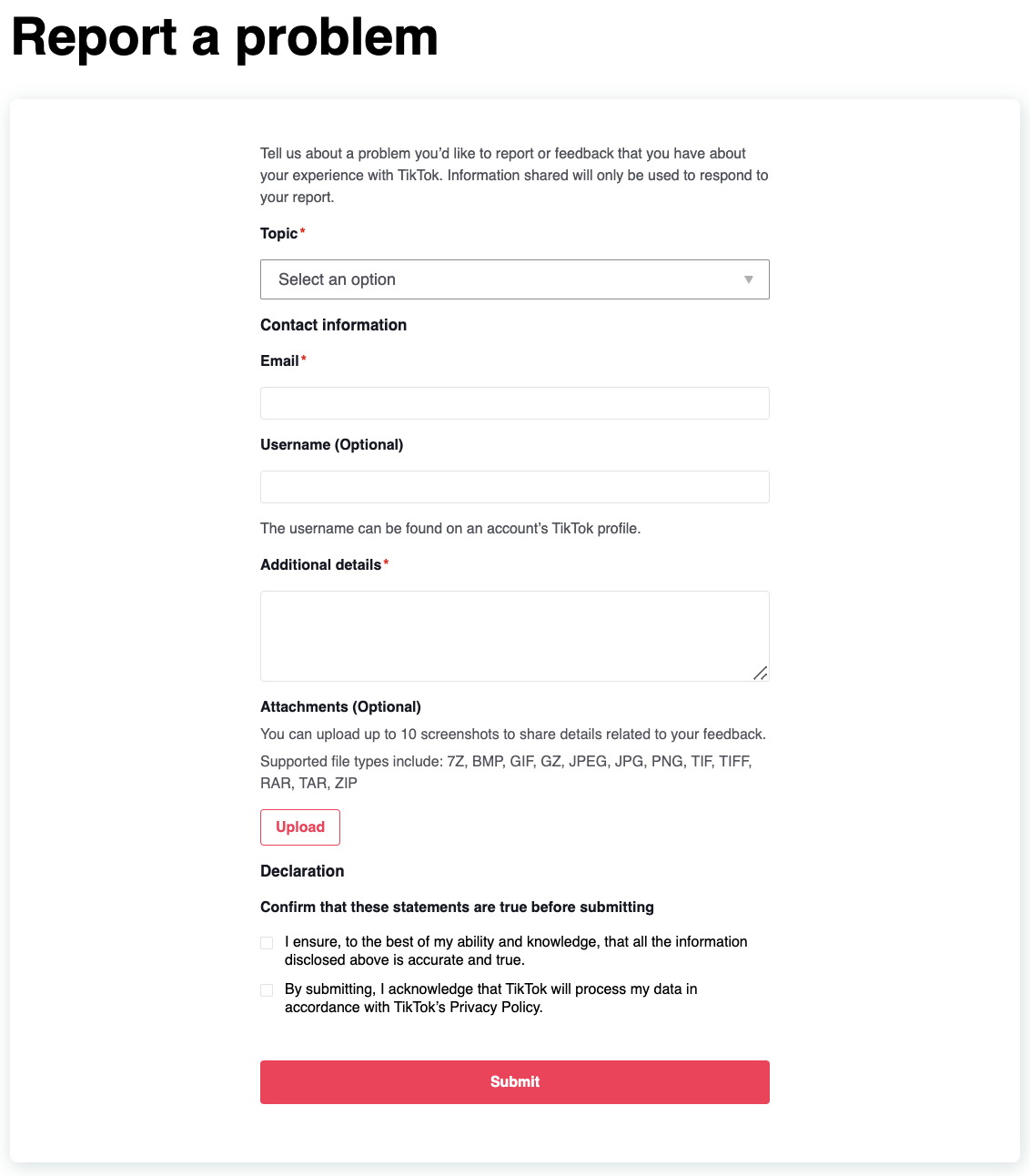
TikTok might take a few days to get back to you, so hang tight—and try to include as much detail as you can to speed things up.
How to Recover a Banned TikTok Account
If you find yourself locked out of your TikTok account due to a ban the first thing you’ll see when you try to log in is a message explaining that your account has been banned. This will pop up when you open the app, making it clear that your account status has changed.
If you think it was a mistake, you can appeal it.
Here’s how to recover a banned TikTok account:
- Open the ban notification when you see it. It should have an ‘Appeal’ button you can tap.
- Tap ‘Appeal’ to start the appeals process. Follow the instructions carefully as you go through the steps. Be sure to explain your case thoroughly and provide any evidence you have that the ban was unjustified.
- Once your appeal is submitted, it will be reviewed by TikTok. If they determine the ban was a mistake, your account and content will be restored (as long as you didn’t delete anything in the meantime). Any strikes on your account related to the ban will also be removed.
How to Recover a Suspended TikTok Account – Business Accounts
If you’re using TikTok for Business or Ads and your account’s been suspended, it could be due to things like an unapproved website link, missing info, or incorrect tax details.
To reactivate your suspended business or advertising account, you’ll have to file an appeal.
Here’s how you can submit an appeal to recover a suspended Business account through TikTok’s customer support system:
- Click on the question mark icon located in the top right corner of Ads Manager to see the drop-down menu.
- Select “Advertiser Support” from the options provided.
- Choose “Account Review” from the menu.
- Finally, select “Account Suspension Appeal” to begin the process of appealing the suspension of your business or advertising TikTok account.
How to Recover a Deleted TikTok Account
When you delete your TikTok account, you have a 30-day grace period to reverse your decision and recover it. During this month-long window, all you need to do is log back into TikTok using your original login details to restore your account. However, once this 30-day period elapses, your TikTok account is permanently erased and cannot be recovered.
Additional TikTok Recovery Scenarios
Still locked out? Don’t stress—there are different ways to handle things depending on your situation.
Recovering with Two-Factor Authentication (2FA)
Two-Factor Authentication (2FA) is an essential security feature that adds an extra step to the login process, usually requiring a code sent to your phone or generated by an app like Google Authenticator or Authy. But what happens if you lose access to your 2FA method?
Steps to Recover Your TikTok Account with 2FA Enabled:
- Use Alternative 2FA Options:
- If you cannot access your primary 2FA method, check for backup options. TikTok may send a code via email or a backup phone number, so explore these possibilities.
- Recover Linked Contact Methods:
- If you’ve lost access to your email or phone number linked to 2FA, start by regaining control of those accounts. Many email providers and mobile carriers offer dedicated recovery processes.
- Contact TikTok Support:
- Navigate to TikTok’s Help Center and select the “Report a Problem” option.
- Provide your TikTok username, an alternative email, and detailed information about your issue.
- Clearly explain the 2FA method you cannot access and include proof of account ownership, such as screenshots or transaction receipts (if applicable).
Pro tip: After you get back in, set up more than one 2FA method or save your backup codes (if available).
TikTok Account Recovery with Third-Party Logins
If your TikTok account was created using platforms like Facebook, Google, or Apple ID, the recovery process is slightly different.
- Log in via the Third-Party Platform:
- On TikTok’s login page, select ‘Continue with [Platform]’ (e.g., Continue with Google).
- Enter your credentials for the linked account (e.g., Google email and password).
- Update Your Account Details:
- Once logged in, go to Settings and add a recovery email and phone number to your TikTok account.
- This ensures you can regain access even if you lose access to the third-party service.
- Recovering a Lost Third-Party Account:
- If you can’t access the third-party account (e.g., Facebook, Google, or Apple ID), you’ll need to follow that platform’s recovery process before attempting to log in to TikTok again.
Recovering a Hacked TikTok Account
If you suspect your TikTok account was hacked, it’s important to act fast. Here’s what to do:
- Reset Your Password:
- Use the ‘Forgot Password?’ option on the login screen.
- If the hacker changed your password, use the associated email or phone number to initiate the reset process.
- Review Account Settings:
- Check for any unauthorized changes to your email, phone number, or linked social media accounts. Update them immediately.
- Enable Two-Factor Authentication:
- After regaining access, enable 2FA to add an extra layer of security.
- Report the Issue to TikTok Support:
- Use the ‘Report a Problem’ page or email TikTok directly.
- Provide details about the suspicious activity, such as unfamiliar login attempts, and include screenshots if possible.
- Be prepared to verify your identity by providing additional information or documentation.
Pro tip: Keep an eye on your email and phone activity too just to make sure other important accounts weren’t also affected.
Tips for Preventing Future TikTok Account Recovery Issues
Taking a few simple precautions can save you the headache of account recovery later on. Here’s how to keep your TikTok account secure:
- Use a Strong, Unique Password:
- Avoid using common phrases, birthdays, or sequences like “123456.”
- Incorporate a mix of letters, numbers, and symbols.
- Enable Two-Factor Authentication (2FA):
- Add an extra layer of protection by requiring a secondary code to log in.
- Regularly Update Your Recovery Information:
- Ensure your email and phone number are current and accessible.
- Remove outdated contact methods to avoid potential issues.
- Be Cautious with Third-Party Apps:
- Avoid granting permissions to unverified apps that request access to your TikTok account.
- Regularly review the list of apps connected to your TikTok account in the settings.
- Watch Out for Phishing Scams:
- Ignore emails, messages, or links that claim to be from TikTok but look suspicious.
- Always verify the sender’s email address and never enter your login details on untrusted websites.
- Schedule content in advance:
- Being locked out of your TikTok account doesn’t have to mean your content stops working for you. You can make sure your content production doesn’t slow down while you’re trying to regain access to your account by scheduling your content with Metricool. Don’t have an account yet? Sign up below:
🚨 And remember: Metricool will never ask for your social media login details.
By staying on top of your account settings and knowing what to do when something goes wrong, you’ll save yourself a lot of stress later. A little maintenance now is way easier than trying to recover your account from scratch.
