

TikTok Nearby Launches in the US: Big News for Local Businesses
 Kata
12 February 2026
Kata
12 February 2026 
Just as Google doubles down on local content in its Discover feed, TikTok is rolling out Local Feed in the United States, also known as TikTok Nearby. If you’ve seen it in countries like Germany, the UK, France, or Italy, you already know the concept: a dedicated (optional) tab to discover content and businesses near you.
Google and TikTok are both pushing local visibility, which is great news for local businesses because it’s a chance to get discovered more easily. This is social SEO getting another significant push. So, what does this update mean for your TikToks as a creator or brand? How do you activate Local Feed and optimize for local reach? Let’s dive in.
What is TikTok Nearby or Local Feed?
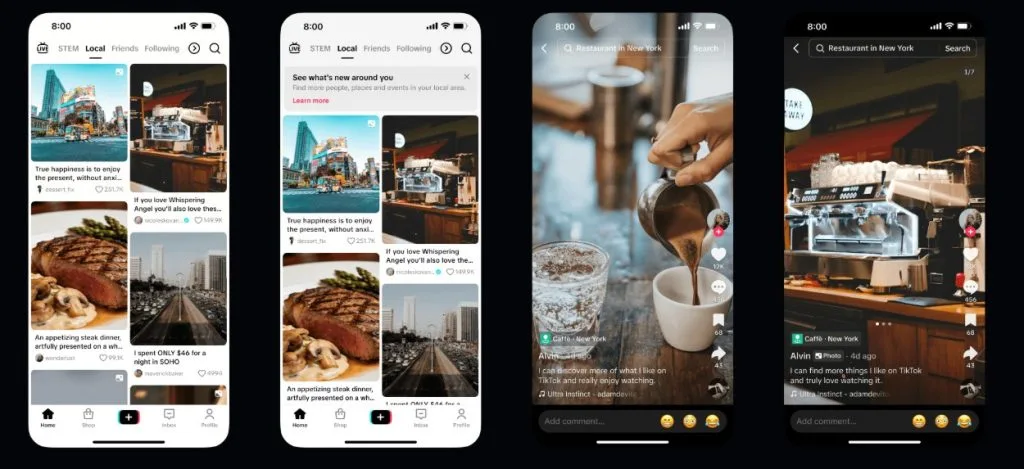
Local Feed (also called “TikTok Nearby” in other markets) is a new dedicated tab in TikTok that makes it easier for users to discover content, businesses and services near them. It’s a win-win: users find hidden gems around them, and businesses gain organic visibility by smartly posting on TikTok.
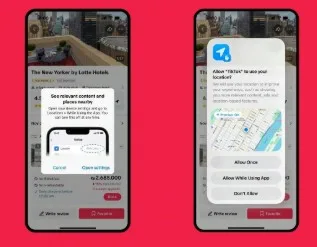
This feature will be turned off by default, and for those who opt-in, Local Feed will appear as a tab in their home screen. According to TikTok’s US Privacy Policy announcement, a pop-up will ask whether you want to share your precise location, and if you opt-in and later change your mind, you can turn it off in settings.
How it Works
Imagine someone waiting for the bus, scrolling through TikTok’s Local Feed to find a cozy café nearby to kill time. If your video pop ups and hooks that person, you’ve just won a potential loyal customer – organically. All that’s left is “just” making sure he gets an experience worth coming back for.
So how does TikTok decide which content to show? Posts in Local Feed are surfaced based on:
- User location
- Content topic / relevance
- Recency (when the content was posted).
The algorithm prioritizes fresh, nearby content that matches what users are actually looking for in their area.
This isn’t TikTok’s first try going local. Last year, the platform launched TikTok Go, which made it easiest for creators to monetize their travel content and for businesses to partner with creators for local promotion. Local Feed takes that strategy even further.
Who Can Appear in TikTok’s Local Feed?
Only content from public accounts is eligible to appear in Local Feed. According to TikTok, you won’t see content from:
- Accounts belonging to users under 18 years old
- Private account
- Posts with privacy settings set to ‘Friends’ or ‘Only You
Privacy Concerns: What Local Feed Means for Your Data
Local Feed relies on location signals, and in some cases precise location, to decide which nearby content and businesses to show users. The key point is that this experience is optional: location-based features like Local Feed are off by default, and you can choose whether to turn them on in your settings.
TikTok’s Privacy Policy explains that you can review and adjust your location settings at any time, including whether precise location is allowed while using the app. If users prefer not to share precise location, they can keep it disabled and still use TikTok as usual, just without the full hyper-local experience.
As TikTok states,
“In the coming weeks, we’ll be introducing the option for you to choose whether or not you want to share your precise location with TikTok to help power discovery of local content, creators, and businesses.”
For privacy-conscious users, it’s good practice to:
- Regularly review your TikTok privacy and location settings
- Enable precise location only when you want more local recommendations
- Remember you can switch these permissions off at any time in your device and TikTok settings
How to Use TikTok Local Feed to Grow Your Local Business
If you own a small business, TikTok Local Feed can be a powerful discovery and growth engine if you use it strategically. Currently, 7.5 million businesses with 28 million employees are active on TikTok. And the numbers speak for themselves. According to the Small Business & Entrepreneurship Council TikTok cited in their announcement:
- 84% of TikTok small business users say the platform helped grow their business.
- 75% say TikTok helped them reach customers beyond their local area.
- 74% say TikTok helps them connect with their local community.
So, how do you get started?
I assume you already have a TikTok business profile set up. If you don’t, this guide will help you get up and running:
1. Opt Into Local Feed and Enable Location
Go to your TikTok profile settings, turn on precise location services, and opt into the Local Feed (under Privacy > Location). This makes your content eligible to appear in nearby users’ feeds when they enable the feature.
2. Optimize Profile for Local SEO
Add your business name, local keywords (e.g., “Salts Lake City Café”), address, and contact info to your bio. Use a clear profile picture and link to your site or Google Maps – this helps with discoverability.
For more tips on how to make the search engines work for you on TikTok, take a look at our article:
3. Create Location-Relevant Content
Post authentic videos like behind-the-scenes tours, local event highlights, customer testimonials, or challenges tied to your area (e.g., #BostonEats). Always add geo-tags to your exact location and use 3-5 local hashtags (#YourCityBusiness).
4. Post Consistently with Scheduling Tools
Aim for 3-5 posts per week using Metricool to schedule TikToks in advance. Metricool lets you plan content calendars across TikTok and Instagram, preview posts, and analyze best times for audience engagement, which is ideal for busy small teams. Test it for free 😉
5. Boost Engagement and Trends
Respond to comments, collaborate with local creators, join viral challenges with a local twist, and use trending audio. Track performance in TikTok Analytics to refine what drives Local Feed views.
These steps prioritize free organic tactics; for faster results, test low-budget TikTok ads with location targeting once organic momentum builds.
Google Gives More Visibility to Local Content
Google Discover is also shifting toward local, contextual, and interest-based content. Public TikTok videos are indexed by Google and can sometimes appear in Discover results.
While there’s no confirmed technical link between TikTok Local Feed and Google Discover rankings, high-quality, geotagged local content has a better chance of gaining visibility across platforms, including potential exposure in Google Discover.
The takeaway? Creating strong local content on TikTok is not only good for TikTok but it also helps your overall digital presence.
FAQ
How to get Local Feed on TikTok?
TikTok’s Local Feed (also called Nearby Feed in some regions) accessible from the home screen as a dedicated ‘Local’ tab that shows content from around your current location. It’s opt-in by default. Enable it by going to Settings > Privacy > Location, and toggle on precise location sharing when prompted (for users 18+). This prioritizes nearby businesses, events, and content based on GPS data.
Why is my TikTok feed so local?
Your For You Page (FYP) or Local Feed may emphasize local content if you’ve enabled precise location services, engaged with nearby creators, or used location tags/hashtags. TikTok’s algorithm boosts hyper-local recommendations using IP, carrier data, or exact GPS (if opted-in), especially after the US rollout in early 2026, to surface relevant shops, events, and community posts.
How do I change TikTok to local?
Tap the Local tab on the home screen to see nearby content. If you don’t see it, check that location permissions are enabled. TikTok currently bases Local Feed mostly on your real location rather than manual region selection.
How do I add a new location in TikTok?
For Local Feed eligibility, make sure your account and posts are public and that you’ve enabled location permissions; Local Feed will then use your upload location to decide who may see the post locally.
