

Bluesky Drafts Are Finally Here: This is How to Use Them
 Kata
30 March 2026
Kata
30 March 2026 
If you’ve been building your presence on Bluesky, the decentralized X alternative, here’s a feature that deserves a drumroll: drafts. Rolled out earlier this year, it’s one of the most requested additions to the platform and according to many users, long overdue. X and Threads have had drafts for years, so it’s nice to see Bluesky close that gap. Here’s everything you need to know about how it works and how to make the most of it.
What Are Bluesky Drafts?
Drafts let you save a post mid-creation and come back to finish it later. And you don’t even have to be a perfectionist or overthinker (Bluesky’s words, not ours 😉 ) to see how this enhances your workflow.
If you’ve ever lost a half-finished thought because the timing wasn’t right, or had to copy-paste from your notes just to save an idea, you know why it matters. Before this update, Bluesky had no native way to save in-progress posts. You either published or you lost it. Now you can write, save, refine, and publish whenever you’re ready.
The feature is available on iOS, Android, and the Bluesky web client, and you can store multiple drafts at the same time.
How to Use Bluesky Drafts
It’s about as simple as it gets:
- Open Bluesky and tap “New Post”
- Start writing – add text, images, or links
- When you’re not ready to publish, tap the “Drafts” button in the top-right corner of the composer to save
- To return to a draft, open the composer again and tap “Drafts”
- Select the post you want to edit, finish it up, and hit “Post”
You can also just write your post and click “Cancel” in the top left corner. A popup will then ask you if you want to save your post as a draft for later. That’s it. Your drafts are stored locally on your device, so they’re private until you choose to publish.
Where to Find Your Saved Drafts
To find your saved drafts, just open a new post and click “Drafts” without typing anything. Here you’ll see a list of all your drafts and you can select to work on them, publish them or simply discard some of them by hitting the three-dots button to the right of the draft.
Why This Matters for Social Media Marketers
As Bluesky matures, drafts are an important milestone. For anyone managing a Bluesky account professionally, they change the workflow in a few meaningful ways:
- Batch your content. Write several posts in one sitting, save them as drafts, and publish at the right times throughout the week.
- Write better. When you’re not under pressure to publish immediately, you tend to write more carefully. Drafts give you space to come back with fresh eyes or share something with a colleague for a quick review before it goes live.
- Capture ideas on the go. Inspiration doesn’t always come at the right moment. Now you can save a thought the moment it hits and come back to it later without losing it.
- Reduce mistakes. For brand accounts, sensitive updates, or anything that needs a second read, drafts are a simple safeguard against publishing something you immediately regret.
A Few Things Worth Knowing
Drafts are stored locally on your device for now, which means a draft saved on your phone may not automatically appear on desktop. If you switch between devices regularly, keep that in mind and double-check before assuming a draft is accessible everywhere.
If you use a third-party Bluesky client, support for drafts will depend on whether that app has implemented the feature. Not all clients have caught up yet.
Part of a Bigger Picture
Drafts are part of Bluesky’s broader push to close the feature gap with X and Threads. The platform’s 2026 roadmap also includes improvements to the post composer, support for longer videos, faster uploads, and the ability to share more than four photos at once.
With 43 million users and a growing reputation as a reliable alternative to X, Bluesky is worth taking seriously as part of your social media mix, and having the right tools in place makes that easier.
Manage Your Bluesky Strategy with Metricool
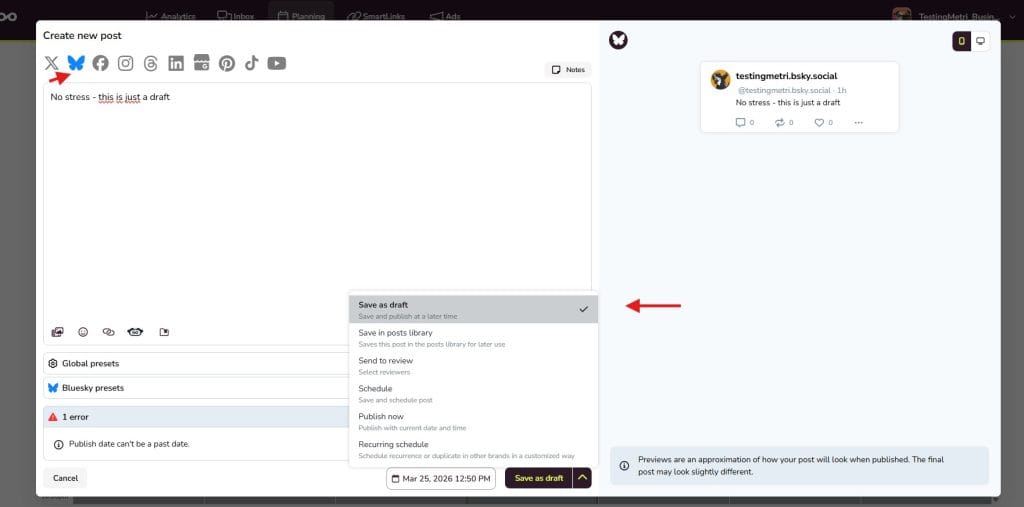
Bluesky’s native drafts are a good place to start. But if you want to schedule posts in advance, track performance, and manage Bluesky alongside all your other platforms, Metricool has you covered.
- Plan everything in one place. Schedule Bluesky posts or save them as drafts alongside Instagram, TikTok, LinkedIn, and more.
- See what works. Analyze your Bluesky performance by tracking follower growth, engagement, top posts, etc.
- Manage multiple brands without having to jump between tabs and spreadsheets.
The Bottom Line
Bluesky drafts are simple, useful, and a welcome addition for anyone using the platform seriously. Write when the ideas come, publish when the timing is right and stop losing good content to bad timing.
If you haven’t used the feature yet, open the post composer and look for the Drafts button in the top-right corner. If you decide to give Metricool a go, register for free and plan everything from one dashboard.
