

Metricool Hashtag Tracker: Measure Hashtag Analytics
 Gretchen Oestreicher
22 June 2026
Gretchen Oestreicher
22 June 2026 
Hashtags still play a role on social media, but the rules around them keep shifting. Instagram capped them at five per post in late 2025, removed the option to follow hashtags the year before, and Adam Mosseri has said multiple times that hashtags don’t push reach. That leaves one question more useful than the rest: what are your hashtags actually doing for your posts? Hashtag analytics give you the answer. With the Metricool Hashtag Tracker, you can see how your hashtags perform on X and Instagram, get Instagram hashtag insights for your own account, and use that data to shape what you do next.
What a Hashtag Tracker Tells You
A hashtag tracker pulls together everything happening around a tag, so you can see whether it’s earning its place in your posts. With Metricool, that means data on:
- Reach: How many people saw posts using a specific hashtag. A signal for whether a tag is helping you get in front of new people.
- Usage: How often a hashtag gets used, which tells you how active it is and whether it’s worth joining.
- Conversations Generated: The replies, comments, and back-and-forth a hashtag sparks. Useful for community-building hashtags.
- Origin: Where people are using a hashtag, by location and audience, so you can shape content for the groups most engaged with your brand.
- Active Users: The accounts using a hashtag most. A shortcut to finding the people already in the conversation you want to be part of.
- Influence: The reach and engagement a hashtag generates, so you can spot the ones worth doubling down on.
None of this is about tracking everything. Track what helps you make a decision: keep the tag, swap it, or build a campaign around it.
Types of Hashtags Worth Tracking
Not every hashtag does the same job, and the ones worth tracking depend on what you want to find out. There are four types to know.
Broad Hashtags
The high-volume ones tied to wide topics, like #fitness, #marketing, or #photography. They have reach, but they also have noise. Tracking a broad hashtag is useful for spotting trends in your category, though they don’t usually deliver much engagement on their own. Better treated as research input than as a posting tactic.
Niche Hashtags
Smaller, more specific tags like #yogateachers, #b2bsaas, or #freelancersofparis. They reach fewer people, but the people they reach are more likely to care. Tracking niche hashtags helps you see which sub-conversations match your audience, and which ones already have an active community you can join.
Branded Hashtags
The ones tied to your business, your campaign, or your community, like #ShareACoke or your own #YourBrandName. They group everything connected to you in one place, which makes them the easiest hashtags to measure. Tracking yours tells you who’s using it, what they’re saying, and whether your community is showing up.
Event Hashtags
Tags built around a specific moment: a conference, a launch, a webinar, a product drop. They have a short shelf life, but they’re useful while they’re live. Tracking an event hashtag during the day gives you:
- Live Updates from Attendees: A running feed of what people are saying in real time, which you can save, share, and react to as the event happens.
- A Pool of UGC: Photos, videos, and posts gathered under one tag, ready to reshare during the event or repurpose later.
- Engagement Data for Sponsors: Reach and participation numbers that make it easier to bring sponsors back next year, or sell the slot for the first time.
- A Longer Tail: The conversation can keep going for days after the event ends, so the hashtag keeps working past the closing keynote.
If you’re planning an event hashtag, keep it short (15-20 characters), make it easy to spell, check that nobody else is already using it, and put it everywhere from the registration page to the speaker slides.
Instagram Hashtag Insights: What Changed in 2026
Instagram is the platform where hashtags have changed the most, and the one where most people still wonder if they should be using them at all. Here’s where things stand.
- The five-hashtag cap came in late 2025.
- The option to follow a hashtag was removed in late 2024.
- Adam Mosseri has said multiple times that hashtags don’t push reach.
Metricool’s 2026 Instagram Study found that posts using hashtags get 31% fewer views and 33% fewer interactions than posts without them. That’s a striking gap, though it’s worth flagging it as a correlation rather than a proven cause: accounts leaning heavily on hashtags may simply be less active in other ways that matter to the algorithm. Either way, the direction lines up with what Instagram itself has been saying.
Hashtags aren’t dead, but their role has shifted. They’re closer to a categorization tool now, while the words in your caption do most of the discovery work.
In practice:
- Use Fewer Hashtags: One or two is the safe play on Instagram now. You can go up to five, but more rarely helps.
- Write Search-Friendly Captions: Instagram’s search reads captions, and since July 2025 public posts also show up in Google and Bing. The keywords you used to put in hashtags belong in the caption now.
- Track What Sticks: Instagram analytics in Metricool show you views, likes, comments, and post counts per hashtag for your own account. That’s how you find the ones helping you.
The upside is that less time spent on hashtag stuffing means more time on the part of the post that matters: the content itself.
How to Use the Metricool Hashtag Tracker
The Metricool Hashtag Tracker monitors specific hashtags on X (Twitter) and Instagram. It runs on a pay-per-use model, separate from the subscription plans, so you can use it for a single campaign without committing to anything extra.
Step 1: Open the Hashtag Tracker
Log into your Metricool account, free or paid. Go to Reporting > Hashtag Tracker in the top menu. You’ll see your dashboard, where you can start a new session, buy credits, and review your saved hashtags.
Step 2: Buy Credits
The tool runs on credits. Each network uses one day of balance per day of tracking, so monitoring both X and Instagram at once uses two. Pricing is €25 per day per social network, and for every 4 days of credit you buy, you get 1 extra day free.
A single day of balance covers up to 25,000 posts on X or 10,000 posts on Instagram for one hashtag.
Step 3: Check the Requirements
Before you start a session:
- Connect Your Networks: X and Instagram need to be connected to your Metricool account.
- Enable the X Addon: If you want to track on X, the addon has to be on. The tracking button will be greyed out if it isn’t.
Step 4: Set Up a Session
From the dashboard:
- Add the Hashtag: Type in the tag you want to track.
- Pick the Network: X, Instagram, or both.
- Set Start Date and Duration: Pick when to start and how many days to monitor.
- Confirm: Start the session.
Data updates every 8 hours, and you can also refresh it manually up to 3 times a day if you want a more recent snapshot. If you change your mind, you can cancel for a refund as long as the session hasn’t started yet.
Differences Between X and Instagram Tracking
The two platforms work differently, and the tool reflects that.
X (Twitter):
- Track hashtags (with #), keywords (without #), or specific accounts (with @).
- Access historical data going back up to 7 days before you set up the session.
- Add multiple hashtags or keywords in one session, though the data gets combined. For separate analysis, create separate sessions.
Instagram:
- One hashtag per session.
- Tracking starts from the day you set it up. No historical data.
- Posts and Reels are covered. Stories are not.
Real-Time Displays
The tool also has live screens that update on their own, which work well during events or active campaigns. You can brand them, share the link, and watch the data come in. There are five:
- Summary: A short overview of the whole session.
- Most Active Participants: A ranking of the top posters.
- Potential Impressions: Who’s reaching the biggest audience.
- Recent Posts: The latest posts using the hashtag on X.
- Recent Images: The latest images posted on X.
Your Hashtag Analytics Dashboard
This is where everything you’ve tracked lives. You can come back to any saved session whenever you want.
What You See for X
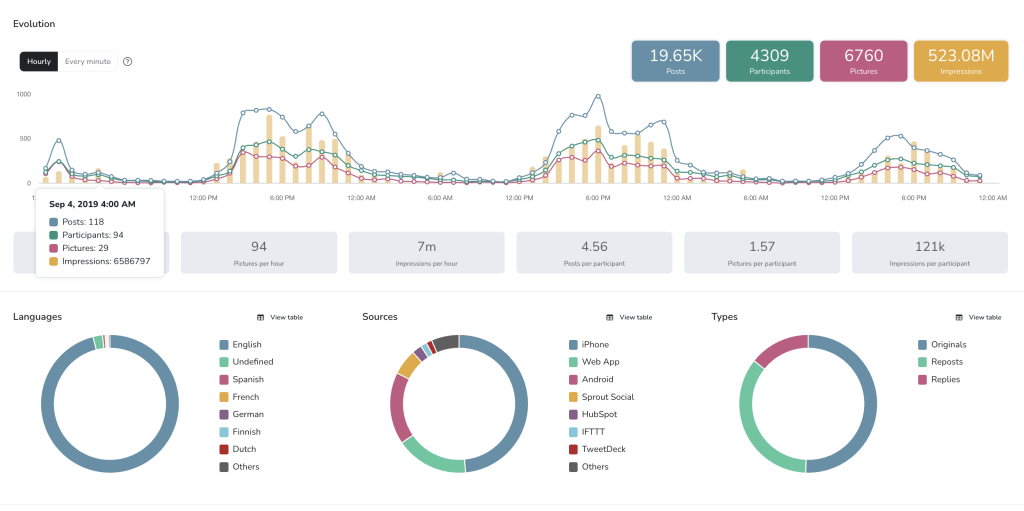
- Evolution: Posts, participants, pictures, and impressions over time, with breakdowns by hour and participant.
- Languages: Share of posts by language.
- Sources: Share of posts by device or app.
- Types: Original, repost, or reply.
- Participant Countries: A heat map showing where the conversation is happening.
- Top 100 Participants: The most active accounts, with follower counts, posts, and engagement data.
- Top 100 Posts: The posts with the biggest reach and engagement.
- Related Hashtags: A word cloud showing which other tags appear alongside yours.
- Pictures: The images posted under the hashtag, sortable by impressions and engagement.
What You See for Instagram
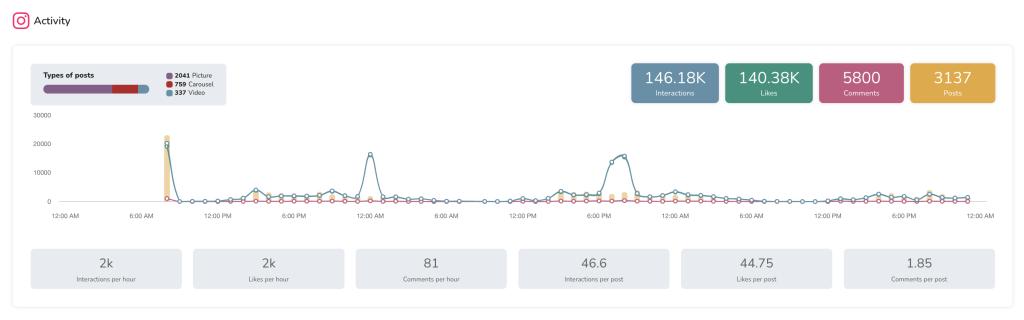
- Post Types: A breakdown of pictures, carousels, and videos using the tag.
- Activity: Total interactions, likes, comments, and posts.
- Top 100 Posts: The most engaging content tied to the hashtag.
- Related Hashtags: Other tags showing up alongside yours.
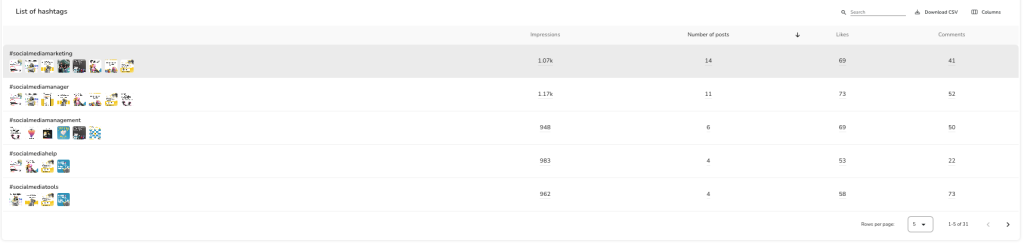
For your own account specifically, the Instagram Analytics tab gives you:
- Views: How many times your posts with the hashtag were seen. Instagram replaced impressions with views in April 2025.
- Posts: How many you’ve published with each hashtag.
- Likes and Comments: Engagement per hashtag, so you can see which tags pull their weight.
This is where you find your actual Instagram hashtag insights, the ones tied to your own account, not just the ones happening in the wider conversation.
The Metricool Hashtag Generator
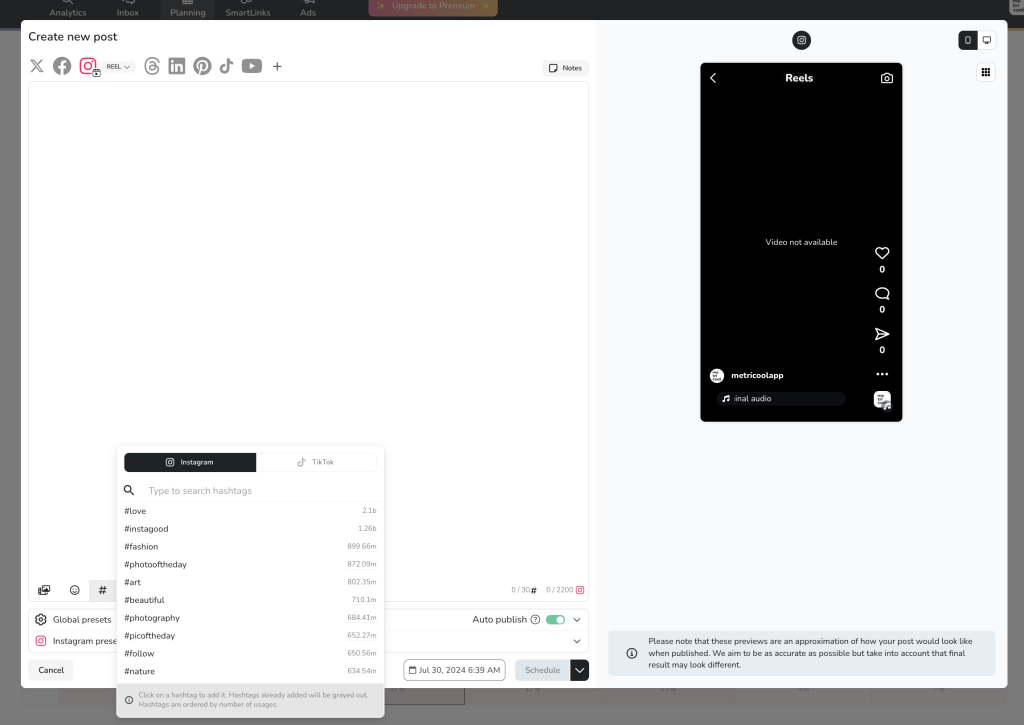
If you’re stuck on which hashtags to use in the first place, Metricool also has a generator for Instagram and TikTok that suggests popular and relevant tags based on a keyword. To find it:
- Open Your Dashboard: Log in and go to Planning.
- Create a Post: Click “+ Create post” or pick a slot from the calendar.
- Upload Your Content: Image or video, plus a caption.
- Click the # Button: Pick Instagram or TikTok, type a keyword, and pick from the suggestions.
From there you can schedule, publish, save as a draft, or send for review.
Best Practices for Using Hashtags in 2026
How you use hashtags has changed, and a few habits are worth keeping.
Do’s
- Use Relevant Hashtags: Tags tied to your content reach people who care about the topic. Anything else dilutes the post.
- Keep the Number Low: One or two relevant hashtags is the safe play. Instagram allows up to five, and you can pair a broader tag with a niche one.
- Write Keyword-Rich Captions: Instagram indexes captions through search, and public posts now show up in Google and Bing too. Natural keywords help people find you on and off the platform.
- Build Branded Hashtags: Tags for your brand or campaigns give your community a place to gather and a way to find each other.
- Track What Works: A hashtag analytics tool lets future choices come from data instead of guesswork.
- Capitalize Multi-Word Hashtags: #FlashbackFriday reads more clearly than #flashbackfriday, and screen readers handle it better too.
- Use Trending Hashtags When They Fit: If a relevant tag is trending, create something that adds to the conversation. If it doesn’t fit, skip it.
- Watch What Your Niche Is Doing: The hashtags strong accounts in your space use can give you ideas worth testing.
Don’ts
- Skip Irrelevant Tags: Tags that don’t match your post confuse people and pull engagement down.
- Don’t Overload Your Posts: Too many tags reads as spammy, and the Instagram cap means stacking them isn’t even possible anymore.
- Stay Away from Banned Hashtags: Some tags are blocked on certain platforms, and using them can get your posts hidden.
Track Your Hashtags with Metricool
Hashtags aren’t the reach engine they used to be, but they’re still useful for organizing conversations, building community, and joining bigger moments when they fit. The ones worth keeping in your strategy are the ones you can measure.
The Metricool Hashtag Tracker gives you that view across X and Instagram, with hashtag analytics that show what’s working and what isn’t. You can use it on a free or paid plan, pay only for the days you need it, and start tracking your next campaign as soon as you’re ready.
