

How To Use Spoilers on Threads (Without Ruining The Surprise)
 Gretchen Oestreicher
16 February 2026
Gretchen Oestreicher
16 February 2026 
Spoilers are not just for movies or match results. On Threads, they are a simple way to make posts more interactive while giving people control over what they see.
The spoiler feature lets you blur text, photos, videos, or GIFs. Nothing is revealed unless someone taps. That small choice changes how people experience your content. Instead of forcing information on them, you invite them in.
In this guide, we will walk through how spoilers work on Threads, how people are using them today, and practical ways to include them in your content without annoying your audience.
What Spoilers On Threads Do
The spoiler feature is about choice. You decide what parts of your post are optional for your audience.
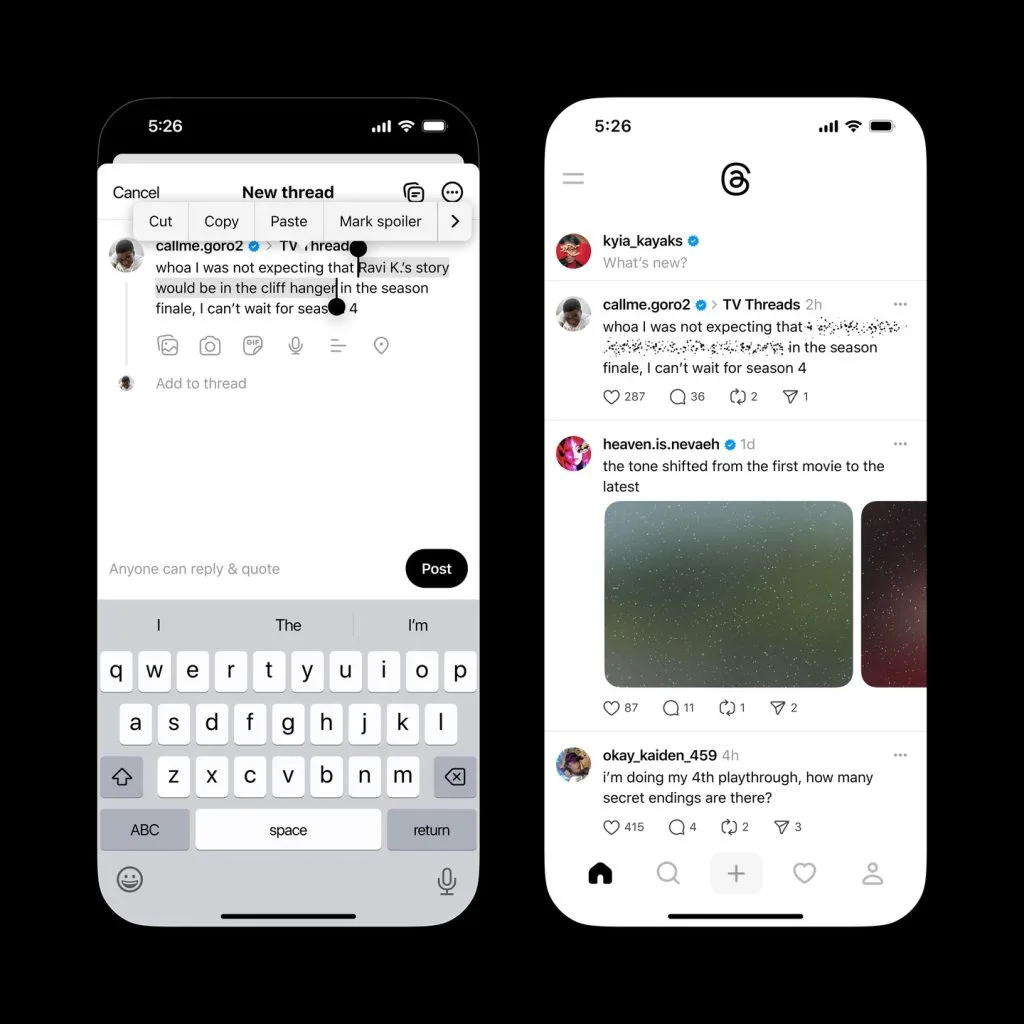
- Text: Highlight words, sentences, or full paragraphs and mark them as spoilers. They appear blurred and are only revealed when tapped.
- Media: Photos, videos, and GIFs can also be marked as spoilers. They show a blurred preview with a spoiler label until someone chooses to reveal them.
Spoilers work on both mobile and desktop, and they are available to personal, creator, and brand accounts.
More than hiding content, spoilers signal respect. You are saying, “This part is here if you want it.” That builds trust and may lead to more thoughtful engagement.
Why Spoilers Were Created
Threads designed the spoiler feature to make conversations more comfortable and inclusive. Not everyone watches the same show at the same time. Not everyone catches a live event. And not everyone wants to see strong opinions without warning.
Some of the main reasons spoilers were created for Threads include:
- Entertainment Conversations: People can talk about TV episodes, movies, or live sports results without spoiling the experience for others.
- Time-Sensitive Content: Users can participate in conversations even if they watch shows, movies, or live events later.
- Controlled Sharing: Spoilers give your audience the choice to see sensitive or opinion-heavy content on their own terms.
By giving people control over what they reveal, Threads encourages deeper discussions while respecting the needs of followers who are catching up.
How People Are Using Spoilers Today
Spoilers are not only for plot twists or sports results anymore. Many communities, creators, and brands use them in creative ways:
- Entertainment Accounts: Brands like Netflix or Marvel use spoilers to share episode recaps, memes, or fan questions while keeping surprises contained.
- Live Events: Sports scores, award results, or competition endings are hidden so followers can participate later without missing anything.
- Soft Spoilers: Some creators blur news updates, strong opinions, or even punchlines to create curiosity and encourage people to tap to reveal.
- Educational Content: Teachers, coaches, or creators hide advanced tips or answers behind spoilers, inviting followers to think or interact before revealing the full content.
The common thread is intention. Spoilers protect the experience while giving people a reason to interact.
How to Do Spoilers on Threads
Posting spoilers on Threads is straightforward and works similarly on both mobile and web:
- Compose your post as you normally would.
- Type the full text, including the part you want to hide. For example, “Here is what happened in last night’s episode: [spoiler].”
- Highlight the text you want to hide.
- Select “Mark spoiler” from the menu. The text will appear blurred in the composer so you can see what is hidden.
- For media: Add a photo, video, or GIF, tap the three-dot menu on the media, and choose “Mark spoiler.”
- Publish your post. In the feed, the hidden section or media will appear blurred. Users tap to reveal it.
- Edit later if needed: You can remove the spoiler mark by selecting the text again and unmarking it once editing is available.
Avoid marking entire posts as spoilers. Keep the post scannable so users know what they will get if they choose to reveal it.
How to Use Threads Spoilers For Marketing
Spoilers can be more than just protective blur. They can create interactive experiences that increase engagement, curiosity, and participation.
- Product Launches and Reveals: Hide product names, features, or visuals to tease upcoming releases. For example, “We are dropping a new collection next week. Want a sneak peek? Tap the spoiler.”
- Gamification Campaigns: Spoilers are a natural fit for light games. Quizzes, “guess before you tap” posts, or hidden discount codes turn your post into a moment, not just an update.
- Event Coverage: For live events, spoilers help you include everyone. You can blur results, announcements, or behind-the-scenes content so followers can catch up when they are ready.
- Case Studies and Results: Share the context, challenge, and approach openly, then hide metrics like ROAS, conversions, or reach behind a spoiler. People who care about the details will tap, and those who don’t can keep scrolling without friction.
- Educational Content: Spoilers work well for learning. Hide templates, final steps, or full answers so people pause, think, or comment before revealing everything. This makes educational posts feel more interactive and less like a download dump.
Spoilers can also add a layer of anticipation and interaction that makes content feel more engaging and participatory.
Tips For Spoiler-Driven Posts
A spoiler only works if the visible part of the post does its job. Before hiding anything, make sure the setup is clear and helpful on its own.
- Start With a Clear Hook: Use one to three visible lines to explain the value. For example, “We tested three hooks on Threads yesterday. One outperformed the others. Tap the spoiler to see which one.”
- Hide Only What Matters: Mark only the sections that truly require it. Use spoilers for outcomes, not context.
- Use Clear CTAs: Simple cues work best. Invite users to reveal spoilers with messages like “Tap to see the full results” or “Open if you watched episode 3.”
- Respect Audience Expectations: Only hide content that makes sense to hide. Avoid using spoilers as clickbait.
- Observe Engagement: Look at comments such as “just tapped” or “thanks for hiding this” to understand audience response and improve future posts.
Examples For Brands And Creators to Use Spoilers
Here are some ways to use spoilers creatively on Threads:
- Interactive Polls: Hide poll results so followers can guess before revealing the outcome.
- Hidden Offers: Use spoilers to share exclusive discount codes, rewarding engaged followers.
- Event Highlights: Blur behind-the-scenes photos or award results for fans who missed live coverage.
- Storytelling Hooks: Hide climaxes, reveals, or punchlines to maintain suspense and encourage interaction.
- Step-By-Step Guides: Hide advanced tips or templates to guide readers through a learning experience gradually.
Using Spoilers on Threads with Intention
Spoilers work best when they are planned, not improvised.
They give people control, but they also ask you to think one step ahead. What should stay visible? What adds value when revealed? And how does this post fit into everything else you are publishing that week?
This is why planning matters.
With Metricool, you can schedule Threads posts that include spoilers, preview how they will appear, and see how people interact with them over time. Instead of guessing whether a spoiler actually sparked curiosity, you can look at the engagement and adjust your approach.
When spoiler posts on Threads are part of a clear content plan, they help your posts feel more thoughtful and less intrusive.
