
TikTok Foundations and Your First Post
1.2 Create a Strong and Cohesive Profile
Before someone decides to follow you on TikTok, they usually take a quick look at your profile. This is the moment when they decide whether your content is worth seeing again. In most cases, that decision happens in just a few seconds.
Think of it as your digital storefront. It should clearly show who you are, what you do, and why someone should stick around.
Pro Tip: Before you start posting, spend a few minutes optimizing your profile. A clear photo, a simple bio, and a working link can make a big difference in how many people decide to follow you.
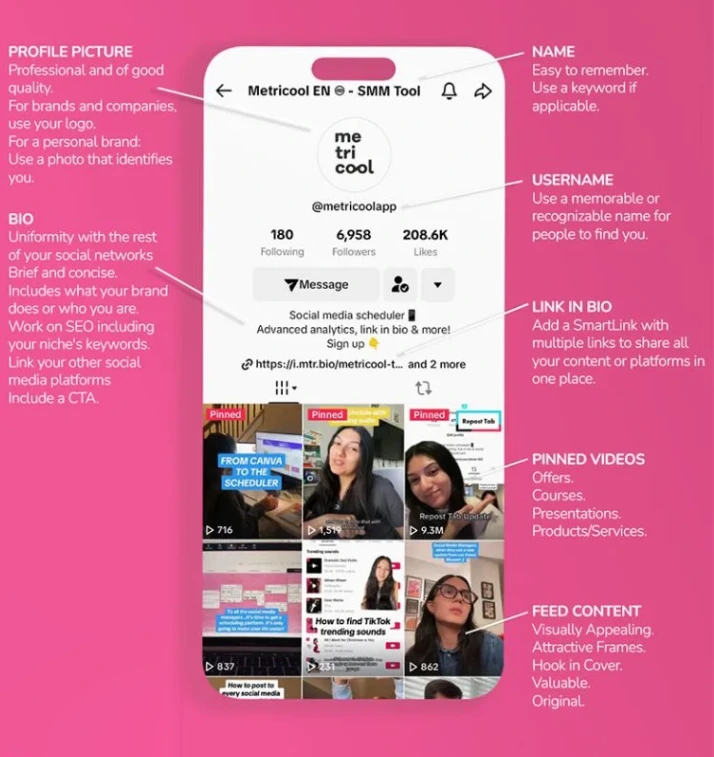
1. Profile picture
Your profile photo is one of the first elements people notice. It should be simple, clear, and easy to recognize, even at a small size.
If you’re a brand, your logo or a recognizable product image usually works best. If you’re a creator, choose a well-lit portrait with a neutral or uncluttered background. Avoid busy images or photos where your face is too far away, since they reduce recognizability.
Using the same profile photo across your social media platforms also helps people recognize you instantly, especially if they discover you through different channels.
2. Username
Your username, the one that includes the “@” symbol, is how people find you on TikTok and even through search engines like Google.
You can change it every 30 days, and it can only contain letters, numbers, and underscores. Even though it’s flexible, it’s a good idea to choose a username you won’t need to change often.
If possible, try to keep the same username across all your social platforms. This makes it easier for people to find you, and it keeps your brand identity consistent wherever your audience interacts with you.
3. Bio
Your bio is small, but it’s one of the most important parts of your profile. In just a few words, it should explain what you do and who your content is for.
Instead of writing something vague, try to be clear and specific. A simple structure works well:
Who you are + What you share + The benefit
For example:
Adding a few relevant keywords can also help people find your profile through search inside TikTok.

People follow experts. Make sure your bio shows them why you’re one.
Add a link to your bio
TikTok allows you to add one clickable link to your profile. This is especially useful if you want to send traffic to a website, landing page, or online store.
Current requirements:
If you want to share multiple links, you can use a link-in-bio page. Metricool is one streamlined option that allows you to manage your links and measure their performance alongside your social content.
Add other social media links
If you already have an audience on platforms like Instagram, YouTube, or Pinterest, it’s a good idea to connect those accounts to your TikTok profile.
This makes it easier for people who discover you on TikTok to explore more of your content elsewhere. It also helps you grow faster across platforms, especially if you’re just starting out on TikTok.
4. Create playlists
TikTok allows you to group videos into playlists, similar to YouTube or Spotify. This makes your content easier to navigate and encourages people to watch more than one video in a row.
For example:
Note: Playlist access depends on account eligibility and the features available in your region.
Your Learning Journey
Explore what’s next and stay on track. You’re in control of your progress!
Let’s keep learning!
Ready to move!