

YouTube Shorts Strategy Guide: Tips to Boost Your Views
 Kalum
06 August 2026
Kalum
06 August 2026 
YouTube Shorts can no longer be ignored. While it was initially seen as a copycat, designed to rival TikTok’s dominance in the short-form video space, it is now a serious marketing channel that warrants attention. Our 2026 YouTube Study, where we analyzed 799,718 videos from 71,177 accounts, found that Shorts views increased by 127% over the last year. This shouldn’t be surprising; we’ve all found ourselves scrolling through endless Shorts, even after we’ve promised ourselves we would ignore this part of the app.
If you did double-take at the increase in views mentioned above, it’s probably because you’ve seen your Shorts aren’t getting the love you think they deserve from the masses. This is why we’ve created this YouTube Shorts strategy guide, full of tips to boost your content and keep your subscribers coming back for more.
How are Shorts Performing on YouTube in 2026?
Before we get into the ways to improve your Shorts performance, is it worth it? Let’s take a look at some key figures from our YouTube Study:
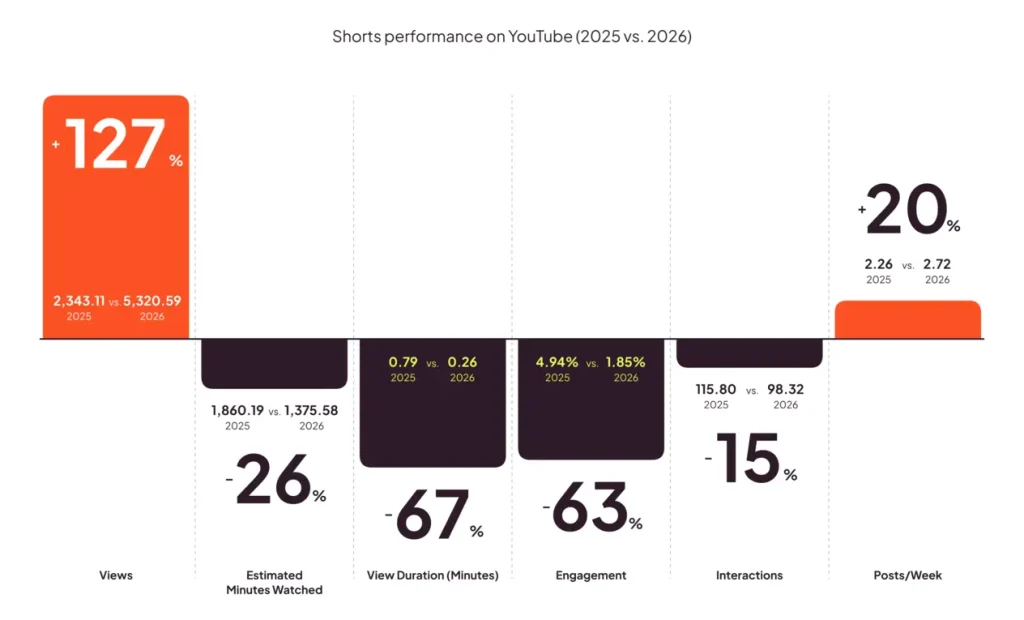
We see that views have increased massively, while watch time, view duration, engagement, and interactions are all down. This may lead you to think that Shorts may not be worth your time. However, the views figures show that people still want to watch Shorts, but optimizing your strategy is paramount if you want them to engage and interact.
7 Practical YouTube Shorts Tips to Boost Views and Engagement
A successful publishing workflow requires tactical adjustments to how you script, edit, and package your vertical videos. Here are actionable YouTube Shorts tips designed around real audience behaviors that we found in our study:
1. Engineer the First 1.5 Seconds for the Feed Experience
With 61% of total views originating directly from the swipeable Shorts feed, you do not have the luxury of a slow buildup. Viewers make instantaneous decisions about whether to stay or swipe. Eliminate intro logos, verbal greetings, or vague title cards. Open immediately with dynamic movement, on-screen text, or an intriguing question that establishes clear value in the opening frame.
2. Aim for an Optimal Runtime Between 15 and 20 Seconds
Metricool’s data shows that average view duration dropped by 67.43% down to 0.26 minutes (roughly 15.6 seconds). Pushing videos past 45 seconds often results in sharp viewer drop-off, which harms your completion percentage. Structuring your scripts around a concise 15-to-20-second window aligns with real consumption habits, maximizing your chances of achieving an improved average retention rate.
3. Create Seamless Visual and Audio Loops
When a video loops seamlessly from its final frame back into its opening line, viewers often watch the beginning twice before realizing the clip has restarted. Because YouTube rewards videos that achieve high watch-time ratios relative to total length, crafting smooth audio and visual transitions is an effective way to trigger broader feed recommendations.
4. Prioritize High-Contrast On-Screen Captions
A significant portion of feed scrolling occurs in public or sound-sensitive environments where audio may be turned off. Using bold, animated on-screen captions ensures that your message reaches viewers regardless of their sound settings, keeping them visually focused on the screen.
5. Drive Audience Action via Pinned Comment Prompts
With overall engagement rates down -62.61% across the platform, relying on passive viewer interaction is no longer enough. Pin a comment on your video that asks a clear, debate-provoking question or directs viewers toward a related resource. Encouraging users to open the comment section pauses the background video loop, increasing total watch time while boosting interaction counts.
6. Repurpose content from other social networks
We know that you can’t be 100% every day with creativity and endless ideas filling your head for Shorts…
In this case, we recommend reusing content that you have uploaded on other social networks, such as TikTok or Instagram Reels. This is known as the art of repurposing content. As people in the social media field, learning this art is vital. By doing this, you are not only saving yourself loads of time, but you are also posting one idea to many different audiences as well.
7. Use Built-In YouTube Shorts Tools
Fortunately, you do not need sophisticated equipment or expensive video editing software to create high-quality YouTube Shorts. Using your smartphone and the native features available inside the app, you can achieve strong results in just a few minutes. Here are some of the built-in functions you can use:
- Trim and Cut: Record in segments and stitch clips together to add clear pacing and rhythm to your videos.
- Speed Control: Fast-forward footage or add slow-motion effects for emphasis.
- Timer: Set a hands-free recording delay to adjust your visual framing before recording begins.
- Audio Library: Add official music tracks and trending audio from YouTube’s sound library to bring energy to your Short.
- Text Overlays: Insert on-screen text to highlight key takeaways and maintain viewer attention.
- Green Screen: Swap out your real background using custom images or video clips as your backdrop.
Advanced YouTube Shorts Marketing Strategies
Building a high-performing video channel requires integrating short-form assets into your broader digital marketing operations. While they may not directly boost individual shorts’ performance, these advanced strategies can help expand your audience reach and improve workflow efficiency:
Link Shorts Directly to Long-Form Videos
YouTube allows creators to attach a clickable “Related Video” link directly inside the native Shorts player. Use short-form clips as engaging trailers for your detailed long-form tutorials, case studies, or podcast episodes.
By pulling curious viewers from the high-volume Shorts feed into your long-form video library, you convert short attention spans into long-term channel watch time and subscriber loyalty.
Establish a Batched Content Workflow
Publishing between 2 and 7 Shorts per week requires efficient production processes. Set aside dedicated days to script, film, and edit vertical content in batches rather than producing videos on a daily basis.
Record multiple short-form concepts in a single studio session, apply standardized caption styles, and queue your finished videos weeks in advance inside your scheduling calendar.
Analyze Audience Retention Curves
Pay close attention to the retention graphs inside your video analytics. Identify the exact second where viewer drop-offs occur across your uploads.
If you notice a consistent drop at second four, examine your editing pacing, audio transitions, or visual framing at that mark. Continuous, small adjustments to your pacing based on real retention data will help keep viewers on your videos longer over time.
Boost Your Shorts with Metricool
Metricool serves as a centralized management center and intelligent performance interpreter for all your video content. By connecting your YouTube channel directly to the same workspace that coordinates your organic social profiles and paid ad campaigns, the platform removes the hassle of managing isolated software tools.
- Map out your YouTube Shorts scheduling on a visual calendar
- Monitor audience comments in a unified inbox
- Track performance metrics side by side.
- Transform complex video view metrics and retention numbers into clear, executive-ready presentation assets in seconds with Metrocool Studio
Building an Analytic-Driven Short-Form Strategy
Succeeding on YouTube Shorts requires balancing creative experimentation with rigorous data analysis. While distribution algorithms offer massive potential reach, shorter attention spans and lower default engagement rates mean every second of video editing counts.
By structuring your content around a 15-second runtime, optimizing your visual hooks for the feed experience, maintaining a consistent weekly publishing schedule, and leveraging centralized management software, you can turn raw view counts into predictable audience growth. Rely on performance statistics to guide your creative decisions, refine your production workflows based on real retention trends, and build a video strategy that delivers lasting commercial results.
