

YouTube Shorts Guide 2026
 Kata
07 September 2026
Kata
07 September 2026 
If social media is your bread and butter, you probably know that video is one of the most engaging content formats out there. And with the growth of TikTok and other short-form platforms, audiences have become pretty much hooked on quick, easy-to-watch videos.
YouTube has been a driving force in online video since 2005. In 2020, it joined the short-form race with YouTube Shorts. Easy to create and consume, Shorts are a powerful format that creators and social media managers can use to reach new audiences.
So, how do YouTube Shorts work, and how can you use them to grow your channel? Let’s break it down.
What are YouTube Shorts?
YouTube Shorts are short, vertical videos designed for mobile viewing. Creators can record and edit Shorts directly in the YouTube app or upload videos they’ve created elsewhere.
The format is built around quick, engaging content that viewers can discover as they scroll through the Shorts feed.
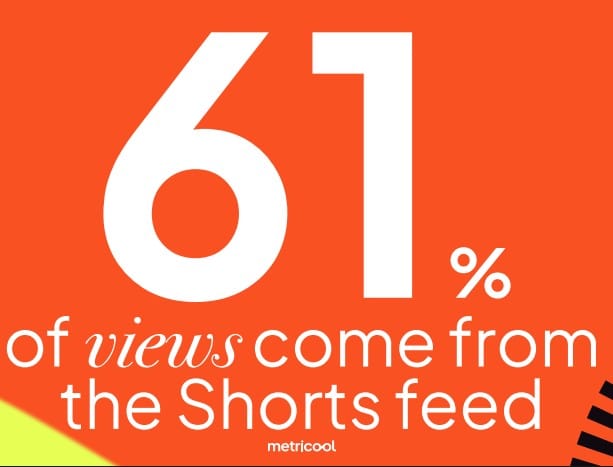
According to Metricool’s 2026 YouTube Study, 61% of all organic YouTube views now come from the Shorts feed, making it the platform’s biggest discovery engine, ahead of subscribers, search, and channel visits combined.
That’s a big opportunity for creators. Shorts can help you reach people who have never interacted with your channel before and turn those viewers into subscribers over time.
YouTube also gives you plenty of built-in tools to make your Shorts more engaging, including music, text, speed controls, timers, and other editing features.
How to Make a YouTube Short
YouTube Shorts are far from hard to create. You don’t need subscribers or an established audience to get started.
To create a Short directly in the YouTube app:
- Open the YouTube app on your phone.
- Tap the + button.
- Select Short.
- Record your video or upload existing footage.
- Add any edits, music, text, or other elements.
- Publish your Short.
You can also upload a Short from your computer through YouTube Studio. Sign in, click Create, and select Upload videos.
Turn a Long-Form Video Into a Short
Already have long-form videos on your channel? Repurpose them into Shorts to give your content a second life and promote it across different formats and channels.
Find the video you want to use, select Create, and choose Edit into a Short. It’s a simple way to get more mileage from content you’ve already created.
How Often Should You Post Shorts?
Unlike long-form videos, Shorts don’t have the same performance ceiling. According to 2026 data, 2–4 Shorts per week is the sweet spot for individual post performance.
That doesn’t mean you have to stop at four. Since Shorts live in an infinite-scroll feed, every new upload is another opportunity to get discovered. The key is finding a posting frequency that lets you stay consistent without sacrificing quality.
In other words, consistency matters, but there’s no need to post just for the sake of it.
Want More YouTube Insights?
Using Audio in Your Shorts
You can enhance your YouTube Shorts by adding audio from existing videos. Here’s how to do it:
- Find the Audio: Start by locating the Short that features the audio you want to use. Click on the bottom right corner to view other Shorts that have utilized the same audio.
- Use the Audio: Once you’ve found the desired audio, click “Use this audio” and then follow the previous steps to film and upload your Short.
If you prefer to use audio from a regular YouTube video instead of a Short, simply find the video, tap “Create”, and follow the same process.
Creative YouTube Shorts Features
You can also boost your Shorts with a variety of creative features:
- Music and Audio: To add music, click “Add music” and choose a track from the available options. Make sure to select music that is suitable for personal use to avoid any copyright issues.
- Text: Utilize the Text option to add captions to your video. You can choose when the text appears and disappears using the Timeline feature.
- Speed: Adjust the speed of your video to create dynamic and engaging content.
- Timer: Set a timer to control when you start and stop recording, making it easier to capture the perfect moment.
YouTube Short Trend Ideas
Looking for inspiration? Trends can be a great starting point, but the best Shorts are the ones you can adapt to your niche and audience.
Here are a few formats worth testing:
- Funny Shorts: Humor is evergreen. Try funny moments, relatable situations, fails, or jokes that make sense for your audience.
- Motivational Shorts: Share an inspiring message, personal story, or quick piece of advice that resonates with your audience.
- Educational Shorts: Teach your audience something useful in a quick, digestible format. Tutorials, tips, facts, and how-tos all work well here.
- Product Reviews: Share quick reviews, comparisons, or first impressions of products that are relevant to your audience.
Don’t copy a trend just because it’s popular. Instead, think about how you can put your own spin on it and make it relevant to your brand.
Don’t Sleep on Shorts
Shorts aren’t just a standalone content format. They can also help support your long-form strategy.
Metricool’s 2026 data shows that channels posting around five Shorts per month average 46% more views on their long-form videos than channels that don’t post Shorts at all. But more isn’t always better: channels posting 35+ Shorts per month see that long-form boost disappear.
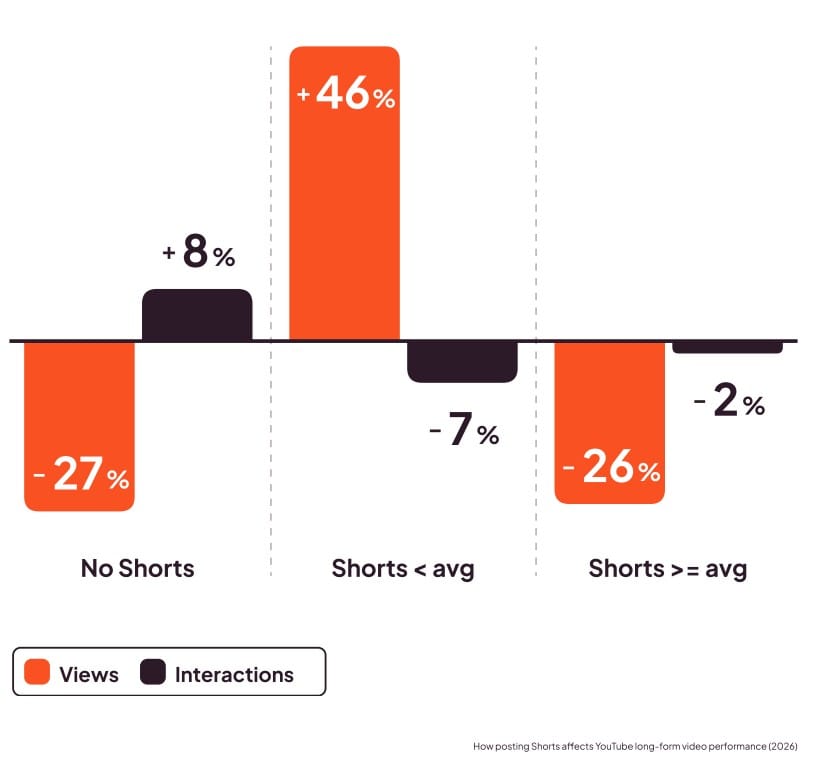
The takeaway? You don’t need to flood your channel with Shorts. A moderate, consistent posting schedule can be a better strategy than going all-in.
Smaller channels can benefit from Shorts, too. Accounts with fewer than 10,000 subscribers are currently seeing some of the strongest Shorts growth, with views up more than 200% and interactions up around 42%.
That’s because Shorts give you a chance to reach viewers based on how they respond to your content — not just how many subscribers you already have.
YouTube Shorts Monetization
So, what happens if your Shorts take off? Can you make money from them?
Yes. But you’ll need to meet YouTube’s eligibility requirements for the YouTube Partner Program.
You can qualify through one of these routes:
- 1,000 subscribers + 10 million public Shorts views in the last 90 days, or
- 1,000 subscribers + 4,000 public watch hours from long-form videos.
Shorts monetization works differently from traditional YouTube video monetization. Revenue from ads shown between Shorts is pooled and distributed among eligible creators, with a portion also going toward music licensing costs.
You can also monetize your Shorts outside of YouTube’s revenue-sharing system. Brand deals and sponsorships are common options, particularly once you’ve built an engaged audience.
Understanding the YouTube Shorts Algorithm
The YouTube Shorts algorithm works differently from the recommendation system for long-form videos.
With regular YouTube videos, viewers typically choose what they want to watch. With Shorts, they swipe through a feed where YouTube decides what to show them next.
Metricool’s 2026 data shows that the Shorts feed accounts for 61% of all YouTube views. Subscribers account for another 11%, while YouTube Search contributes around 9%. Only 3% of viewers actively visit a channel page to find videos.
In other words, most people aren’t actively looking for your channel. YouTube is putting your content in front of them. That’s why understanding viewer behavior and creating content that grabs attention quickly is so important.
Viewer behavior is changing, too. The average Short is now watched for around 16 seconds, while interactions per Short are down about 15% year over year.
Views may be increasing, but attention is getting harder to earn. That’s why your opening matters more than ever. Give viewers a reason to keep watching within the first few seconds.
YouTube Shorts Collab Feature
YouTube Shorts Collab lets you record a Short alongside another Short or YouTube video.
To create a Collab:
- Find the Short or YouTube video you want to use.
- Tap Remix in the bottom-right corner.
- Select Collab.
- Record your Short alongside the original content.
And with that, we’ve reached the end of our YouTube Shorts guide. Hopefully, you’ve picked up a few ideas you’re excited to put into your strategy.
And if you want to take your Shorts strategy a step further, check out these 7 tips to boost your YouTube Shorts views in 2026:
FAQ
How Long Have YouTube Shorts Been Around?
YouTube Shorts haven’t been around for that long. They were first introduced in the United States in 2020 and have grown rapidly ever since.
Where Should You Put Hashtags on YouTube Shorts?
You can add hashtags to either the title or description of your YouTube Short. You may also see the option to add #shorts when uploading.
But do hashtags actually help your Shorts perform better?
Not in the way you might think. 2026 data shows that Shorts with at least one hashtag get around 10% fewer views than those without, but nearly 9% higher engagement. Hashtags aren’t a magic growth lever. Instead, they can help connect your content with a smaller, more relevant audience.
If you use them, stick to 1–5 hashtags that are genuinely relevant to your content.
Where Is the Description Box on YouTube Shorts?
To view the description of a YouTube Short, open the Short and tap the three-dot menu. From there, you can access the description.
How Does YouTube Count Shorts Views?
YouTube Shorts views aren’t simply counted every time someone scrolls past your video. YouTube also provides metrics that help you understand whether viewers chose to watch or swipe away.
The Viewed and Swiped Away metrics can give you a better idea of how well your Short captures attention.
Should You Delete and Repost a Short If It Doesn’t Take Off?
No. There’s no need to immediately delete and repost a Short just because it didn’t perform as expected.
Instead, take a look at the data and learn from it. Did viewers swipe away quickly? Was the hook strong enough? Use those insights to improve your next Short and keep experimenting with different content.
