

Monitor Competitor Facebook Ads: How to Use the Meta Ad Library
 Gretchen Oestreicher
07 January 2026
Gretchen Oestreicher
07 January 2026 
Keeping an eye on competitors’ Facebook ads can feel uncomfortable at first. You want to stay original, respect your own strategy, and avoid chasing whatever shows up in your feed that day. That hesitation is healthy.
That’s where the Meta Ads Library helps. It gives you a clear view of competitor Facebook ads across Facebook, Instagram, Messenger, and Threads, all in one place. Over time, this view reveals patterns around formats, messaging, placements, and creative pacing.
In this guide, you’ll learn how to review competitors’ Facebook ads using the Meta Ad Library, what signals are worth paying attention to, and how to turn those observations into ideas you can test thoughtfully. You’ll also see how Metricool helps you keep everything organized, so competitor research supports your work instead of taking over your time.
Why Monitor and Analyze Competitors’ Facebook Ads?
Competitor ads show you the environment your ads exist in. They reflect what audiences already see, what brands repeat, and which messages stay visible long enough to matter.
This context helps you make decisions with less second-guessing. Instead of working in isolation, you’re responding to a real landscape.
Monitoring competitor ads can help you:
- Understand common creative and messaging patterns in your industry
- Avoid repeating angles that feel overused
- Set realistic expectations for ad formats, cadence, and timing
- Plan tests with clearer intent
This is especially useful when budgets are tight, timelines are short, or you manage multiple accounts and need faster clarity.
Identify Effective Ad Formats and Draw Inspiration
Ad formats often reveal more than individual messages.
When you scan competitor ads regularly, you’ll notice certain structures appear again and again. These formats tend to stick around because they communicate clearly and fit how people scroll.
Common patterns include:
- Short video ads with captions that explain the message on screen
- Carousel ads that break information into simple steps or sections
- Static visuals paired with concise, direct copy
- Multiple creative variations built from the same base concept
The Meta Ads Library makes these patterns easier to spot because you can search by creative type or theme, not just brand name. You can also see where each ad appears, whether that’s Facebook Feed, Instagram Reels, Messenger, or Threads.
When the same format appears across several brands and placements, it usually signals steady performance. The goal is not repetition, but understanding which structures help messages land across Meta’s ecosystem.
Use Competitor Ads as Performance Benchmarks
Exact performance metrics are still not public, but benchmarking has become more precise.
Ads in the Meta Ad Library now include estimated engagement tiers, which makes it easier to compare how different creatives perform relative to one another. While these ranges are directional, they help you prioritize which ads deserve closer attention.
Pay attention to:
- How long ads remain active
- How frequently creatives are refreshed
- How many variations exist within the same campaign
The Ad Library also groups variants under shared campaigns, which makes testing behavior easier to spot. When brands run many versions of the same message, it usually signals ongoing experimentation or automation.
Spot Gaps in Messaging and Creative Approach
Competitor ads show what brands prioritize, but they also show what gets skipped.
When many advertisers focus on the same angle, gaps start to appear. These gaps might relate to audience segments, stages of awareness, or how clearly products are explained.
Common gaps include:
- Heavy emphasis on promotions with little context
- Feature-focused ads that skip daily use cases
- High production video with limited clarity
- Broad messaging that avoids specific problems
These spaces are often where your ads can feel clearer and more grounded, without taking unnecessary risks.
Learn About Audience Direction Without Seeing Targeting Settings
You cannot see exact targeting settings, but ads still reveal who they are meant to reach.
Look closely at:
- Language and tone
- Visual cues and environments
- References to routines, roles, or challenges
- Geographic or cultural details
In Europe, ad transparency labels now make sponsor identity, funding, and targeting type easier to interpret. This helps you understand whether competitors rely more on custom audiences, engagement-based reach, or broader interest signals.
Many advertisers now combine:
- Engagement-based audiences
- Lookalike audiences from existing data
- Broader reach supported by clear creative
Observing how competitors speak helps you estimate how narrow or wide their audience focus is and whether your approach feels aligned or distinct.
Account for AI and Automation in Creative Analysis
Automation now plays a larger role in how ads are built and scaled.
Many brands use AI-powered creative tools and automated variation systems that generate multiple versions of the same ad. This shows up in templated visuals, similar copy structures, or repeated hooks with small changes.
When reviewing competitor ads, it helps to note:
- Whether creatives feel highly standardized or more custom
- How many variations stem from a single idea
- Whether tone stays consistent across versions
This does not make creative choices better or worse, but it does explain why certain ads appear frequently with slight differences. Understanding this helps you set realistic expectations for testing volume and creative refresh cycles.
Understand Budget and Timing Signals
Timing often reflects strategy.
Competitor ads show:
- When brands increase ad activity
- How long campaigns run
- How often creatives change
These signals help you plan launches, seasonal pushes, and promotions with more confidence. Instead of reacting late, you can anticipate busy periods and prepare assets in advance.
How to Find Competitor Ads Using the Meta Ad Library
The Meta Ad Library is a free, public tool that shows ads running across Facebook, Instagram, Messenger, and the Audience Network. It’s a simple way to see how other brands are communicating with your shared audience and to spot patterns you can test in your own campaigns.
Here’s how to use it step by step.
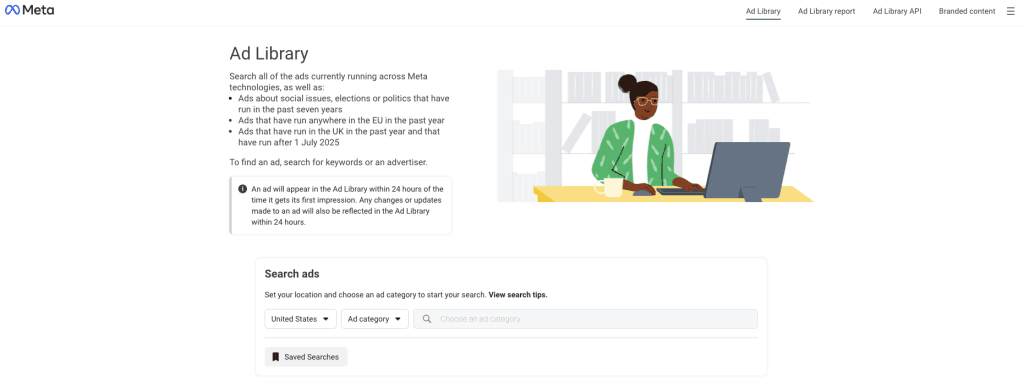
1. Access the Meta Ad Library
Open the Meta Ad Library in your browser. No login is required.
2. Choose Your Market
Select:
- A country to focus on a specific audience
- An ad category, usually “All ads”
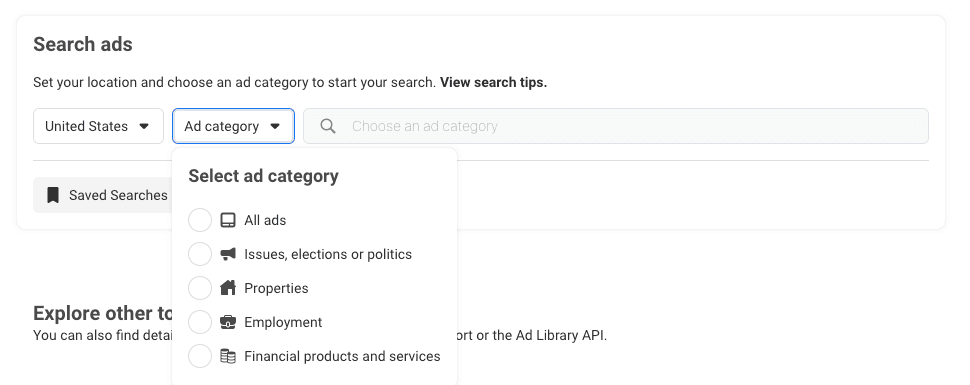
This step matters if you manage accounts across different regions, especially within Europe.
3. Search for Brands or Themes
Use the search bar to explore:
- Competitor brand names
- Product or service keywords
- Creative formats or themes
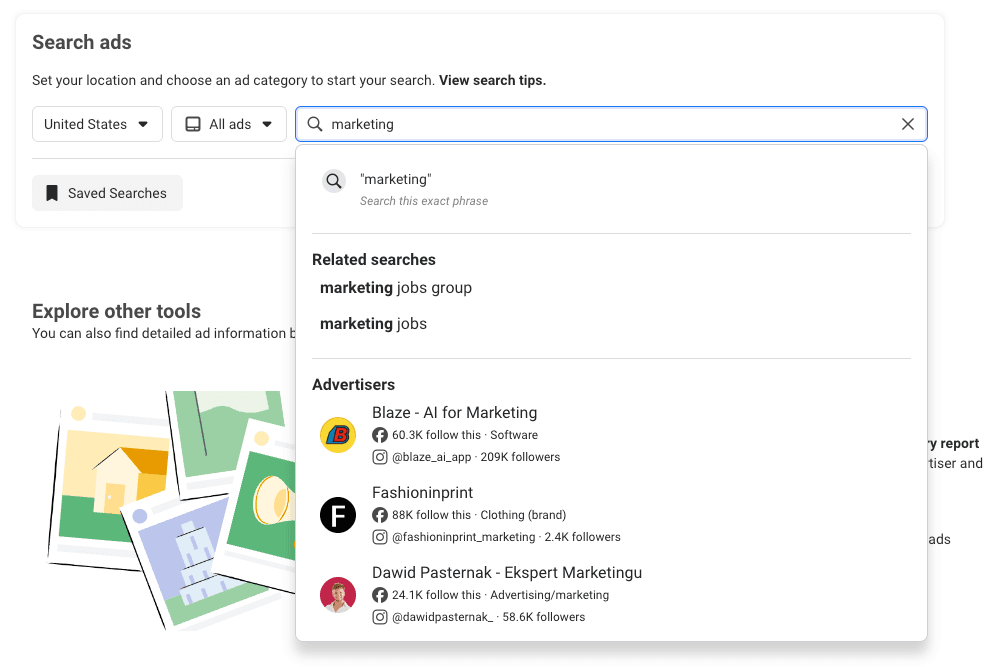
Results appear by Page, which makes it easier to review campaigns as a whole.
4. Review Ad Details
Click into individual ads to see:
- Visual assets
- Primary text and headlines
- Calls to action
- Start dates and variations
- Platforms where the ad appears (Instagram, Facebook, Messenger, Threads)
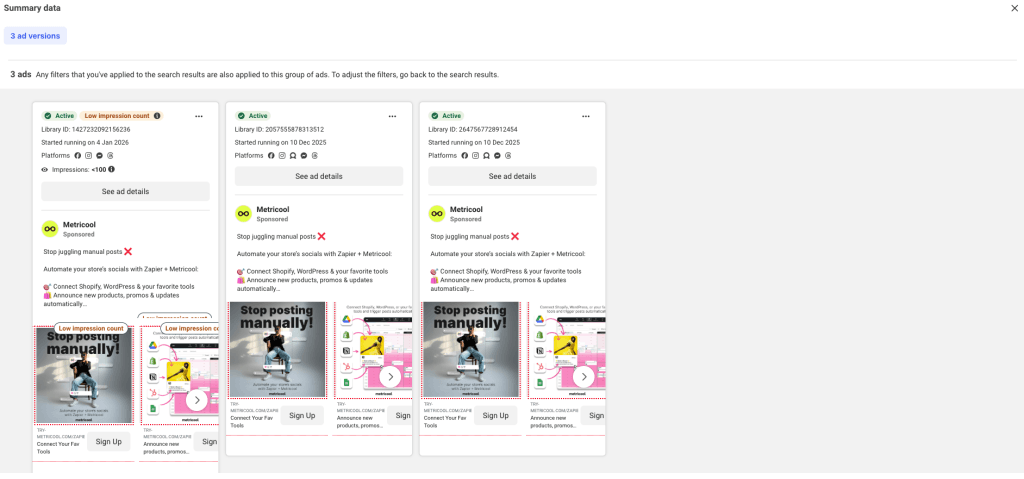
Multiple versions often signal active testing or automation.
5. Refine Results with Filters
Filters help narrow your search to the ads that matter most. You can filter by:
- Country to focus on a specific market
- Platform to see which ads appear where
- Estimated engagement ranges like high, medium, or low engagement
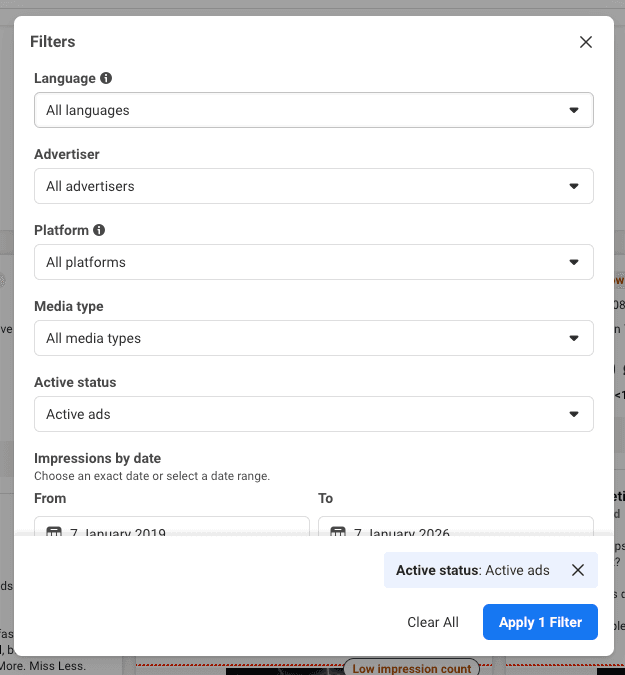
These refinements make it easier to spot trends and patterns across competitors without spending hours manually reviewing ads.
What Insights Are Worth Tracking Over Time?
The real value comes from reviewing ads together and revisiting them regularly. Observing patterns over time helps you understand what works, what audiences respond to, and how to make informed decisions for your own campaigns.
Creative Patterns
Notice:
- Consistency in Style: Notice if images or graphics follow a common theme or if your competitors are changing things up.
- Repeated Formats: Carousels, videos, or static posts can show what formats resonate with audiences.
- Automated vs. Custom Visuals: Some ads are clearly templated or AI-generated, while others show more handcrafted storytelling.
Tracking these patterns helps you see where competitors invest creative energy and where there’s room to stand out.
Copy Direction
Ad copy shows how brands position themselves.
Some focus on outcomes. Others explain processes or routines. When similar phrasing appears across competitors, the language of the market becomes clear.
That clarity helps you decide whether to match expectations or adjust tone so your message feels easier to understand.
Landing Page Experience
Clicking through ads shows how brands guide users from interest to action. Pay attention to:
- Alignment between ad message and page content
- Mobile experience and load speed
- How quickly value is communicated
These details often influence results as much as the ad itself.
Placement Choices
Where ads appear also matters.
Some brands concentrate on Instagram placements, while others spread ads across feeds, Stories, and Reels. Consistent visuals across placements suggest a focus on recognition across Meta platforms.
Tips and Tricks to Maximize Your Facebook Strategy with Competitor Ad Analysis
Analyzing your competitors’ Facebook ads can provide a wealth of insights, but how you apply these findings to your own strategy is key to gaining a competitive edge. Here are some tips and tricks to help you maximize your Facebook campaigns by learning from others.
- Focus on High-Performing Ads: Identify ads that have been running for a while or have been repeated, as these often indicate successful strategies. Look for patterns that resonate with audiences and apply similar tactics to your own ads.
- Adapt, Don’t Imitate: Use competitor ads for inspiration, but tailor their successful elements to align with your unique brand voice and objectives, rather than copying them directly.
- Experiment with Ad Formats: Test different ad formats, like video or carousel ads, based on what competitors are doing successfully. This will help diversify your approach and engage various segments of your audience.
- Spot Seasonal Trends: Track how competitors adjust their campaigns for seasonal events, holidays, or industry milestones, and use these insights to prepare for peak times or changes in consumer behavior.
- Refine Your Targeting: Analyze competitors’ audience segmentation strategies and identify any gaps or opportunities to enhance your own targeting, ensuring your ads reach the right people with the right message.
- Centralize Insights: Use a tool like Metricool to store your observations so patterns are easy to review over time.
How to Improve Your Ads Strategy with Metricool
Metricool helps you turn insights into action, making it easier to plan, run, and track your ads while keeping your social media strategy on point.
Plan and Launch Your Ads
Use Metricool to create your campaigns from start to finish. Upload images, add your logo, write headlines and descriptions, and preview how your ad will look. You can set your audience, define locations, and choose interests to reach the people who matter most. The platform also guides you through budget and schedule setup, helping you launch campaigns quickly and confidently.
Track and Refine Performance
Once your ads are running, Metricool shows daily synced metrics like reach, impressions, clicks, CTR, CPC, and conversions. You can see performance at the campaign, ad set, and ad level, so you know what’s working and what needs attention.
You can monitor results in real time, track conversions, and see how your campaigns evolve over time. This helps you make decisions confidently, without juggling multiple platforms or spreadsheets.
