

How to Humanize AI Content So It Sounds Like Your Brand
 Kata
20 October 2026
Kata
20 October 2026 
We’re so flooded by AI content that the other day, when I told someone I’m a content writer and actually write for a living, they were surprised my kind still exists. Happily so, I’d say, for the sake of humanity.
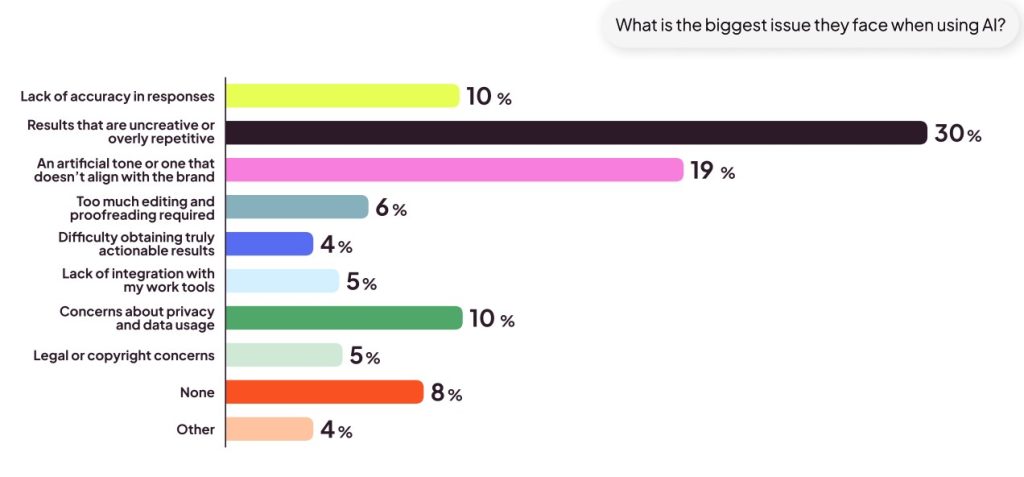
And it’s easy to see where that sentiment comes from. Plenty of brands lean on AI content without much judgment because it’s cheaper and faster to create. But that’s a sure way to blend in and sound like everyone else. And audiences notice. According to our latest AI in Social Media Report, 30% of respondents said AI-generated content feels uncreative or repetitive, and 19% said an artificial tone is their biggest issue.
Search engines have noticed too. Whether you’re working on classic SEO or social SEO, Google’s latest guidance puts weight on the human touch. It says the quality of a page’s main content is critical, and it judges that quality by effort, originality, talent or skill, and accuracy. One of the signals it looks for is first-hand experience, which is exactly what AI can’t fake.
So keep the human spirit in your content and hand AI only the parts that don’t need your personal touch. If you’re wondering how to humanize AI content, here are some practical ways to do it, from the ideas you start with to the final check before you hit publish.
1. Humanize AI Content From the Start: Begin With Your Own Ideas
The easiest way to humanize AI content is to make sure the ideas are yours to begin with. If you open a chat and type “write a post about social media trends”, you’ll get the same post as everyone else who typed it.
Start with raw material instead. Record a voice note on your way to work, write a messy brain dump, or ask a colleague five questions about something they know inside out. Then give that to the AI and ask it to structure, tighten or reformat it. That way the thinking is yours, and the AI just cleans it up.
Try a prompt like: “Here’s a transcript of my voice note about [topic]. Turn it into a LinkedIn post. Keep my examples and opinions, and don’t add any claims I didn’t make.”
2. Take a Stance
Don’t outsource your thinking to AI. Practice some critical thinking and share your opinions. People follow people with opinions. So ask yourself:
- What common advice in your industry do you disagree with?
- What would you do differently?
- What have you stopped doing, and why?
Put that in your post, even if it’s only one line. The more genuine it sounds, the more human you’ll sound.
You can also use AI to sharpen your view. Share your opinion and ask it to argue against you. You’ll find the weak spots before your audience does. And it’s worth the effort, because opinions tend to get far more comments than summaries.
3. Add Proof Only You Have
AI has crawled most of the internet, but it hasn’t run your business. Your results, screenshots, client stories and experiments (including the ones that flopped) are things no model can come up with on its own. That’s also what Google means by first-hand experience.
Compare these two:
- “Posting consistently helps improve your reach.”
- “When we moved from three to five Instagram posts a week, our reach grew 40% in two months.”
The second one sounds like a person because it comes from one. If you’re short on data, look in your Metricool analytics for your best-performing posts, your best times to post or your fastest-growing network. There’s usually a story in there.
4. Use AI to Humanize Your Tone of Voice
Most “robotic” AI content comes down to a weak brief. Ask an AI for “a caption about our new product” and you get the average of the internet. The fix is to teach your tools how you sound once, so you don’t have to explain yourself every time you try to humanize AI-sounding content.
Start by writing your voice down. Before you open any tool, put together:
- 3 to 5 traits that describe how you sound (for example: warm, a bit cheeky, never salesy), or look for your brand book or writing manual
- Words and phrases you love, and ones you’d never use
- Your habits: sentence length, emojis, how you open and close a post
- 3 to 5 real posts you’re proud of, ideally your best performers
Then put it somewhere the AI sees it every time.
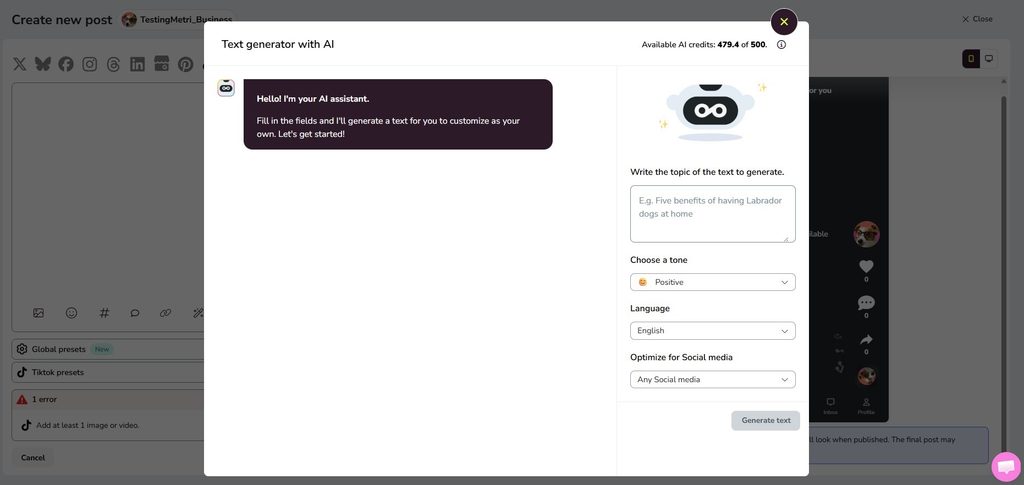
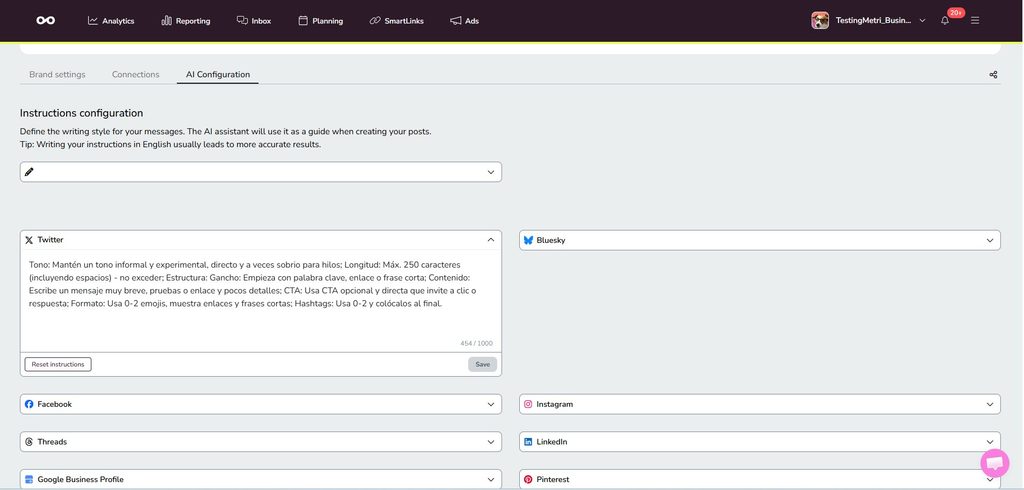
- Metricool’s AI Assistant: You pick the topic, the tone and the platform, and it returns a post tailored to each social media platform, with shortcuts to refine the tone and style. You can also set custom instructions for your tone, style and more, even per network, in your AI configuration settings.
- Claude, ChatGPT or Make through Metricool’s MCP: Connect your account and the AI can read your actual performance data. Try asking something like: “Analyze my posts from the last 30 days, find my best performers, and write three new posts in the same style.” That way, the voice it learns is the one your audience already responds to.
- Saved instructions: Most AI assistants let you store your voice guide (custom instructions, Projects or GPTs) so it applies to every chat.
- Skills: Claude and ChatGPT both support Skills, reusable instruction sets you save once and call up whenever a task needs them. For a head start, Stephanie Hills’ Anti-AI Writing Skills Pack has 10 ready-to-copy writing Skills, including a Humanizer, a “Sound Like Me Skill” that works from your own writing samples, and a banned-words list of common AI vocabulary you can add to.
💡 Pro tip: Give the AI examples, not adjectives. “Write like these three posts” will get you much further than “write in a friendly tone.”
Last step: edit and feed it back. Fix whatever sounds off and keep your corrections, since they’re how the tool learns what “you” means. Then add the one thing no agent has: a personal detail, an opinion or a behind-the-scenes moment. An agent can copy your style, but not your experience, and that’s the part people notice.
5. Spot and Remove AI Slop
If your AI agents or skills did their job well, you can probably skip this point because they already humanized your AI content. But if you prefer to proofread manually, watch out for AI slop. People can spot AI writing in seconds now, and once they do, chances are they’ll stop reading. Beware of:
- Openers like “In today’s fast-paced digital world” or “In the ever-evolving landscape of…”
- Buzzwords such as delve, elevate, unlock, leverage, seamless and game-changer
- The “It’s not just X, it’s Y” structure
- Ideas always grouped in threes
- Em dashes in every other sentence (though the debate is never-ending, and the only ones suffering are English grammar and the em dash itself 😉 )
- Emoji bullet lists
- Words like “genuinely” or “honestly”
- A wall of hashtags under every post
One of these on its own isn’t a problem. When they pile up, your content starts to sound robotic, and that breaks the flow. Keep a banned-words list with your own pet peeves on it, and give it to your AI tools so they avoid them from the first draft.
6. Read It Out Loud
This is the simplest test on the list. Read your post out loud. If you wouldn’t say it to a friend over coffee, rewrite it.
Reading aloud catches what your eyes skip over: sentences that are all the same length, stiff phrasing, words nobody uses in real life. Mix short sentences with longer ones, use contractions, and ask a question now and then.
7. Always Review Before Publishing
Whatever the format (a blog article, a social media post or a whitepaper), give it one last review before it goes out. AI already sounds polished and grammatically correct, but polished doesn’t equal good content. Fixing typos and smoothing awkward sentences is part of it, but the real check is whether the content gives your audience something useful.
Google’s guidance doubles as a handy checklist. When reviewing your content, ask:
- Does it provide original information, analysis, or a perspective that isn’t already everywhere else?
- Does it offer substantial value compared with other content on the same topic?
- Does it demonstrate first-hand experience or genuine expertise?
- Would someone actually want to bookmark, share, or recommend it?
- Are the facts accurate and easy to verify?
- Will someone finish reading it feeling like they’ve learned enough to achieve what they came for?
One more question is worth keeping in mind when you work with AI: what human effort went into this? Google notes that using generative AI to produce large amounts of text without manual oversight or curation represents little to no effort. It also warns against fake author profiles or credentials used to make AI-generated content look human.
So before you hit publish, ask yourself, “Would I be happy putting my name and brand behind this?” That’s what keeps your content AI-assisted rather than AI-generated.
