

How the Instagram Algorithm Works: 2025 Updates
 Kalum
17 December 2025
Kalum
17 December 2025 
Instagram is a religion for many of us, and the feed is our church. This may be a dramatic analogy, but understanding how the Instagram algorithm works in 2025 is that important. It can be the difference between success and failure for many businesses that rely on the platform for visibility.
With its constant changes and updates, dominating the Instagram algorithm is no longer just about creativity. You need a deep technical understanding of how it works for sustainable growth. This guide breaks down the latest changes, including the September 2025 Instagram algorithm update, and provides actionable steps for increasing your reach.
What is the Instagram Algorithm?
Instagram’s algorithm is a series of formulas and signals that allow the network to collect user information and organize what content appears in their feeds. Based on the user’s interests, behaviors, and past interactions, the algorithm shows content they are most likely to engage with.
Instagram doesn’t use just one algorithm, but a variety of algorithms for the optimal user experience. This means that each section of the app – Feed, Explore, Reels – has its own ranking system.
Just from this, you can understand the complexity of Instagram’s algorithm. However, by understanding how each algorithm works and what signals to be aware of, you can create content that aligns with your users’ interests, search intents, and aspirations.
Instagram Algorithm 2025 Updates
The September 2025 Instagram algorithm update introduced several significant changes that marketers must account for. These updates were designed to make the platform more equitable for creators of all sizes.
Supporting Smaller Creators
Historically, accounts with millions of followers had a massive advantage in the discovery sections. The September update refined a new ranking input that gives smaller creators a fairer chance at going viral. If a piece of content performs well with a small initial group of viewers, the algorithm now pushes it to a wider audience more aggressively, regardless of the creator’s total follower count.
The Shift to Semantic Search (SEO)
One of the most impactful parts of the September update was the move toward “semantic search.” Instagram is increasingly acting like a search engine, which makes SEO vital.
- Keywords Over Hashtags: While hashtags still help with categorization, the algorithm now prioritizes keywords found in your captions, on-screen text, and even the “Alt Text” of your images.
- Visual Recognition: The AI-powered system now “reads” the visuals in your videos and photos. It can identify objects, locations, and themes without you explicitly labeling them, helping your content show up in niche search results.
Greater Control for Users
Users now have more power to change their Instagram algorithm with topic control features. For creators, this means it’s more important than ever to refine your content and make sure it is clearly aligned with your target audience’s interests.
How Does The Instagram Algorithm Work?
Each section of the app works differently. For example, in the Stories feed, users want to view content from friends, family, or brands they feel close to, while in the Explore page, users want to find inspirational content from new accounts.
As mentioned above, Instagram uses various “signals” to gather information and predict how likely users will interact with content. There are thousands of signals, and it’s impossible to predict each of them. However, by focusing on the top signals for each Instagram algorithm, you can create algorithm-friendly content and push your rankings.
Want to know how each one works? 👇🏻
How the Instagram Algorithm Works for Feed and Stories
In the Instagram Feed and Stories, you can find content from a mix of the accounts you follow, recommended content from Instagram, and Ads in photo, video, and carousel formats. The idea of the algorithm is to have a balance between content from those profiles you follow, and content from those profiles you don’t, but that may interest you.
Feed and Stories follow the same algorithmic processes, as these behave extremely similarly. This algorithm is based on several factors: what content is posted, what account has posted it, your user preferences, and the content format. In other words, the algorithm receives “signals” based on what content you like, share, save, etc., and then shows related content in your feed.
Your Instagram Feed and Stories content is generated according to these factors, and in this order of importance:
- Your activity: The content you have liked, shared, saved, or commented on helps the algorithm understand what interests you.
- Information about the post: The popularity and relevancy of the post, based on the number of likes, and how quickly users have interacted with the content. This also considers the content format, location, and when it was posted.
- Information about the creator: This indicates the relevancy of the person who published the content. One of these signals could be how many times you have interacted with them in the last few weeks.
- History of interactions with a user: How interested you are in seeing content from a particular person or topic.
- Visit history: For the social network, the frequency with which you view stories from specific users is key to prioritizing content.
- Participation history: This is the frequency with which you interact with an account such as leaving a like, or replying with a direct message or reaction.
- Closeness: Check the relationship between the author of the story, and if you are connected as friends.
Generally speaking, Instagram uses your activity on the social network (likes, comments, shares, and saves) and who has posted, to sort the content as it appears in the feed.
These predictions are based on which posts you spend more time on, which posts you interact with, if you click on a user’s profile, etc. The more likely you are to perform these actions with a post, the higher it will appear in your feed.
✅ TIP: As you can see, the key factors on Instagram to position content are related to user behaviors, but also how the brand or content creator can work to optimize content.
User activity, the relevance of content, the importance of the account, and user history, are all aspects that you can focus on, to boost your content and have it appear at the top of the feed. A few ways you can do this include strengthening relationships with your community, looking at interaction data, and optimizing your account and profile.
The way Stories are sorted on Instagram depends on what you have viewed or interacted with via comments, responses, likes, or shares. Based on these factors, Instagram predicts the Stories you are most likely to be interested in and will display these at the top of your Stories feed. This prediction is made on the chances that you will participate in a story, reply, or swipe to the next one.
✅ TIP: You must be consistent when posting Instagram Stories, to increase interactions and appear at the top of your follower’s feed. Click HERE for 7 tips and tricks for IG Stories.
Take advantage of Instagram story options such as polls, questions, or GIFs, to encourage users to respond and interact with your content.
Instagram Story Views Algorithm
Instagram’s algorithm story views depend primarily on your interactions with other users’ content to determine the order of your story views. It also accounts for the likes, comments, and shares on their posts and the direct messages you send and receive.
How Instagram’s Explore Section Algorithm Works
The ‘Explore’ section is the ‘magnifying glass’ of a lifetime, where you can search for new users to follow or explore the content the app recommends.
In this case, ‘Explore’ works like the usual feed, showing related posts to your interests and posts you have interacted with. In addition, users can now search for content by keywords, hashtags, or tags.
To find out what content you might be interested in, Instagram looks at your previous activity: what you have liked, saved, shared, and left comments on. The social networks keep track of the content that may interest you, and order this according to how interactive you are with each one of them.
What factors are involved in whether or not content appears in the Explore section?
- Information about the post: The popularity of the post, the number of likes, and how quickly interactions have been achieved. As you can see, these factors have already appeared in other sections such as the feed or stories, but in the Explore section, they are much more important.
- Your activity: Instagram takes into account the posts you interact with and those you have interacted with in the past on the Explore page. If, for example, you have interacted with a type of post, Instagram will try to show you similar content.
- History with the user who uploaded content: The interest you have with the content creator who uploaded the post.
- Creator information: The number of times you have interacted with that person in the last few weeks.
To sort the posts that appear in the ‘Explore’ section, Instagram uses the post information, your previous activity on Explore, and information about the owner of the content.
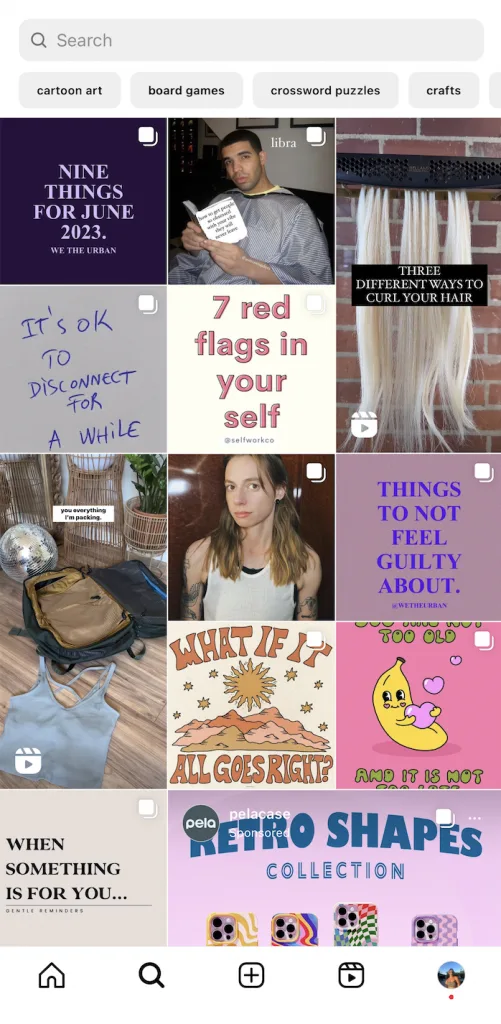
✅ TIP: As a brand, your goal is to appear in the Explore section to reach people who don’t know you yet.
Keep in mind how Instagram recommends content in the ‘Explore’ section, to try to get your posts featured here. To do this, it’s important that you provide engaging content and that the text accompanying the post relates to your niche. This way, the algorithm works to identify the search keywords and lead to your post having more importance.
Keyword research is essential on all active social media platforms, as it aligns your content marketing strategies with what your audience is looking for. Follow this guide to build your SEO plan:
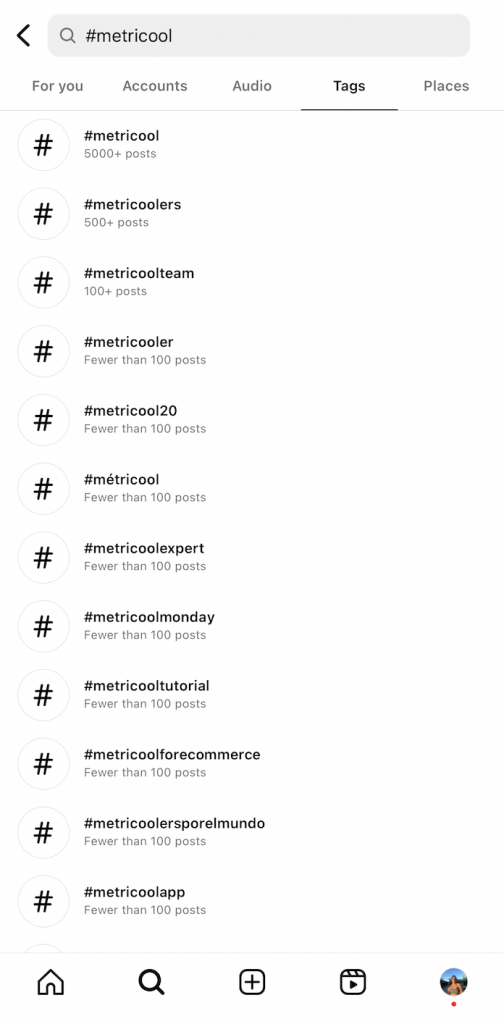
Tags are key for your profile to appear when the user searches through hashtags. However, this will depend on the interactions with your posts and the competition of the tag.
Locations are also a key part of the algorithm in the Explore section. Add the location so that Instagram can locate it and, if someone searches by location, your content will be easier to find. If there are a lot of posts with this location, you will need to compete with others to have a presence on this page.
How the Algorithm Works for Instagram Reels
Instagram Reels have become a very popular way to create video content on Instagram. It’s a great alternative to make longer or more engaging content.
As I mentioned with the feed and the Explore page, Instagram’s algorithm is based on the interest of users and the interactions that the post has obtained. Also, on showing videos from accounts you don’t follow.
So the process is similar to reels. Instagram looks for videos you might like and then sorts them according to those interest levels.
In fact, in many suggested reels, you will see two options at the bottom, showing I’m not interested or Yes, I’m interested. The social network tries to predict what content you may like, based on the likelihood that you will share a reel, watch it until the end, leave a like, or even go to the audio page.
So, what factors are involved in the positioning of reels?
- Your activity: The interactions you have made with reels and your other recent content interactions.
- User interaction history: Even if the video was uploaded by someone you don’t follow if you have interacted with their content before, this triggers the network that you have shown interest in the user’s content.
- Reel information: The relevance and popularity of the reel’s video content quality, audio, and visual elements.
- Information about the creator: The prevalence of the user, including number of followers or the average engagement levels with their content.
✅ TIP: To get the most out of your content in reels, you can optimize them to boost their presence on your profile.
In reel format, you can add a preview in your feed that will entice the user to watch the entire length of the video, add hashtags related to the content, or share it in your stories so they can access the content with a click.
This is how Instagram’s algorithm has been behaving in 2023, and how you can optimize content to appear in the top sections of the app.
For a deep dive of information about Instagram Reels, click the button below:
TikTok vs Instagram Algorithm: The 2025 Comparison
Tiktok vs Instagram algorithm is a natural comparison for creators to consider. In 2025, the differences have narrowed, but the primary objectives remain distinct.
- Discovery Velocity: TikTok’s “For You” page is still considered the gold standard for rapid discovery. Its algorithm is highly sensitive to immediate engagement signals, often leading to faster viral growth.
- The Relationship Factor: Instagram still holds the crown for community building. While TikTok is excellent for reaching strangers, Instagram’s multi-format approach (Reels for reach, Stories for intimacy, and Feed for retention) makes it better for turning a casual viewer into a loyal customer.
- Engagement Quality: In 2025, TikTok’s algorithm favors “watch-depth” and completion rates. Instagram, while also valuing watch time, places a higher premium on “Saves” and “Shares,” viewing them as signals of long-term value rather than just fleeting entertainment.
Resetting Your Instagram Algorithm
If you want to reset your algorithm and give your Instagram feed a clean slate, try these steps.
- Let Instagram know what you like to see: Select “Not Interested” on posts that you don’t like.
- Unfollow users that no longer serve you: Cleanse your following list frequently to keep it relevant.
- Delete your search history: Your search history also affects what you see on your explore page, so remember to clean it regularly.
- Clear your cache on the Instagram app: This will remove some of your past information like engagement.
Check out our complete guide on how to reset your Instagram algorithm with the button below.
How to Clear Instagram Algorithm Recommendations
If you want a completely fresh start, Instagram has introduced a native “Reset Suggested Content” feature. This is the most effective way to clear Instagram algorithm data without starting a new account.
- Open your Profile: Tap your profile picture in the bottom right.
- Access Settings: Tap the three horizontal lines (Menu) in the top right.
- Content Preferences: Select “Content preferences” from the list.
- Reset Suggested Content: Tap on “Reset suggested content.”
- Confirm: Review the prompt, which explains that this will clear your history across Explore, Reels, and Feed recommendations, then tap to confirm.
5 Tips to Improve Your Instagram Presence
Optimizing and auditing your social media content frequently will allow you to see what has worked well, and what you can improve. However, there are also small things you can do to improve interactions and strengthen the community of your followers.
Pay attention to keywords
Keywords are a major element of how the algorithm ranks content, and how users can find your content. You can appear among search results from interested users by embedding keywords in your content.
Keyword tools such as Keywordtool.io, SemRush, and Google Trends allow you to analyze keyword analytics such as search volume, competition, CPC, trend, and related keywords.
Diversify content
If there is something that Instagram prioritizes on the app, it’s fresh, original content. We saw this with IGTV, and of course with the famous launch of Reels. Since these changes, Instagram has changed the layout of the ‘Explore’ section to include Reels, which users were encouraged to use.
Mix up your content to create a dynamic feed. This also means showing different aspects of your brand, products, and resources.
Analyze your content performance with Metricool
Now, these tactics won’t work without looking at the data. Therefore, an excellent way to know how your content has performed is by analyzing it. With Metricool, you can view your overall profile growth, audience demographics, competitor analysis data, and a list of your top-performing posts. With this data, you can replicate strategies that bring you the most visibility.
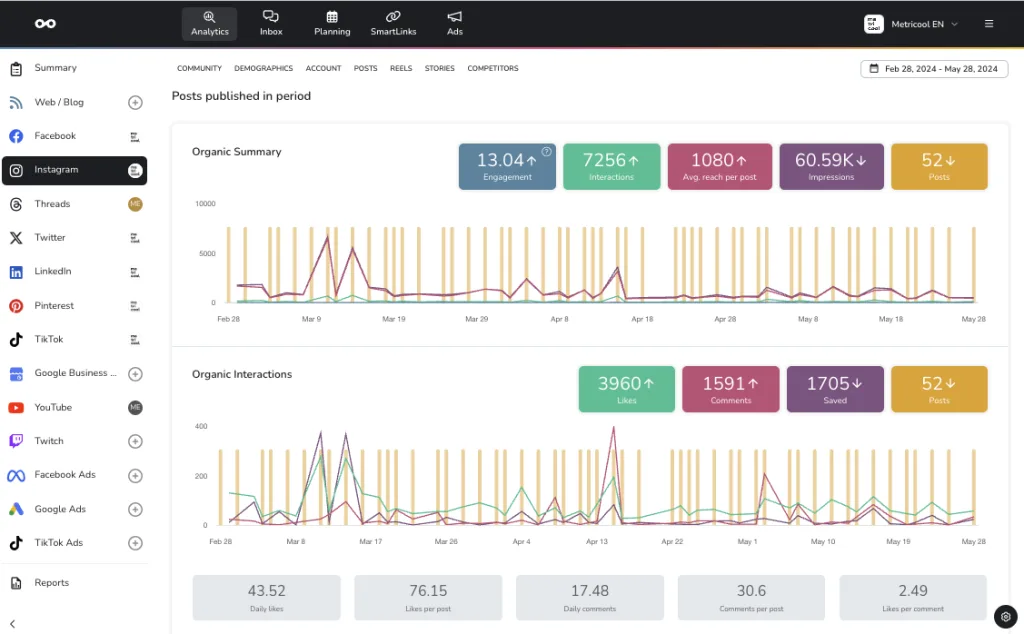
Metricool offers aggregate scheduling, analytics, inbox, advertising, and link-in-bio tools, all from the same platform. Instead of jumping between multiple tools, you can tackle all your Instagram (and other social media platform) management in one place.
While building your Instagram marketing strategy, you can use Metricool to stay on track and monitor your growth. The best part is you can get started for FREE to access Instagram scheduling, analytics, inbox management, and more. So, what are you waiting for?
Create a hashtag strategy
Hashtags are key to reaching new users and communities on Instagram. If you want to optimize your hashtags, preparing a strategy is encouraged to organize your thoughts and align with your overall business goals. Rather than adding these in randomly, researching and choosing the recommended hashtags can boost your content.
Many tools and applications can assist in hashtag research and recommendations, such as the app, Hashtags for Instagram, available on iOS and Android. Within Metricool, you can also see your top-performing hashtags on Instagram, to see which hashtags receive the most impressions in your posts:
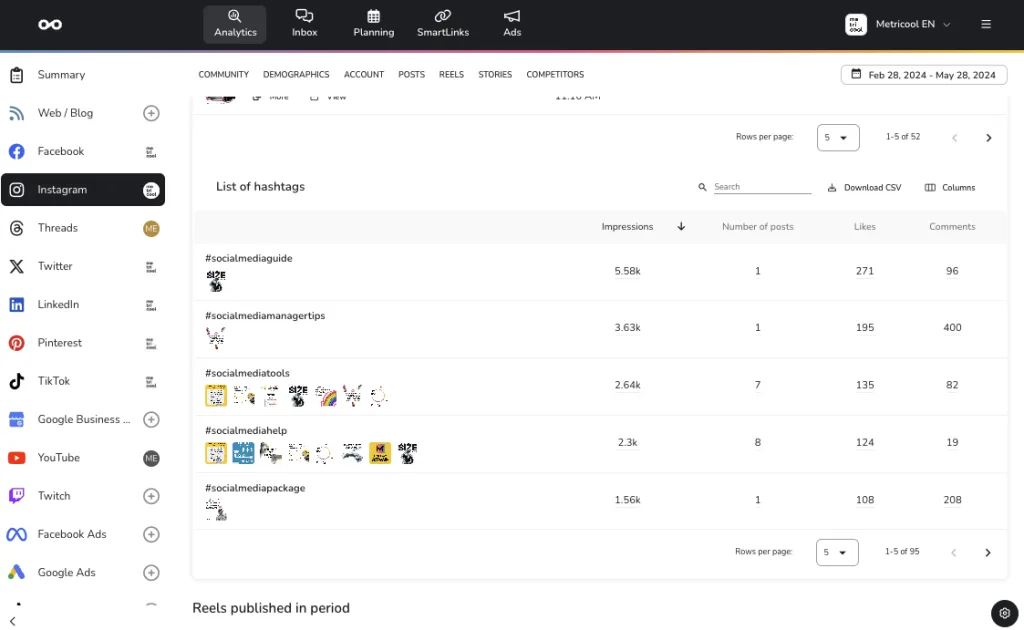
If you want to find new hashtags, use Metricool’s Instagram hashtag search engine. Search for terms related to your content, and the tool will generate the top hashtags on the network.
Cross-promote content
One way to increase interactions in your Instagram content is to share it across multiple sections of the app. For example, if you have uploaded a Reel, update your followers in Stories to know you have a new video. Alternatively, you can also cross-promote content across multiple networks to bring more visibility to your Instagram page.
If you have active Instagram and Facebook accounts, here is a guide to crossposting:
Instagram Algorithm FAQs
As the Instagram algorithm becomes more sophisticated, several common questions persist among professionals trying to maintain their reach. Here are the definitive answers based on the latest platform behaviors and official updates.
Why is my Instagram algorithm so bad?
If your feed feels irrelevant or unengaging, it is usually because the algorithm is over-prioritizing old data. If you spent a week researching a specific topic (like home repairs or a specific travel destination), the system might continue to serve that niche long after your interest has passed. Also, following too many accounts can “dilute” your feed, making it harder for the algorithm to surface the content you truly value. Follow the how to reset your Instagram algorithm steps mentioned above to fix a stagnant or “bad” feed.
Does the Instagram algorithm favor faces?
There is no official “facial recognition boost” in the code, but the algorithm favors engagement. Historically, posts featuring human faces receive higher engagement rates (likes and comments) than static objects or text-only graphics. Because the algorithm follows the lead of the users, it “learns” that people enjoy seeing other people. Therefore, while the system doesn’t explicitly look for a face to give a boost, the resulting human interaction usually leads to higher visibility.
Does the Instagram algorithm favor new accounts?
This is a common myth with a kernel of truth. The algorithm does not technically “favor” a new account over an established one. However, when an account is brand new, the system has no historical data on who its audience is. To gather this data, Instagram often provides a “trial” period where it pushes your first few posts to a wider, more diverse group of people to see what sticks. This can create the illusion of a “new account boost,” but it is actually just the algorithm’s initial testing phase. Sustainable growth still requires consistent, high-quality posting over the long term.
