

YouTube Premium Lite 2026: Cost, Features & Comparison to Premium
 Kata
10 March 2026
Kata
10 March 2026 
You’re watching a meditation video, fully immersed in your zen moment. And suddenly… a toothpaste ad interrupts your session. We’ve all been there. YouTube Premium Lite promises to fix exactly that: an ad-free (with a few trade-offs) viewing experience at a more affordable price. It rolled out in the US in 2025, and by 2026 it’s available in 20+ countries with some fresh new features added. Let’s break down whether it’s actually worth it.
What is YouTube Premium Lite?
Think of it as the “essentials only” version of YouTube Premium.
You get rid of most ads but without the YouTube Music bundle that comes with full Premium. It launched at $7.99/month in the US – half the price of the full plan.
In 2026, Lite levelled up a bit. You can now watch “most non‑music videos” ad‑free, in the background, and even offline. That’s a solid upgrade from when it first launched.
The catch? You’ll still see ads on music-heavy videos, Shorts, and while browsing or searching. So if you’re someone who lives on music videos and DJ sets, Lite might leave you frustrated.
Quick note on what counts as “music content”: We’re talking official music videos, lyric videos, covers, remixes, dance videos built around a track; basically anything where music is the main point. Those still get ads under Lite.
💡 Want the full breakdown of all YouTube Premium plans? Check out our article:
Who is Premium Lite for?
Premium Lite is ideal for you if you use YouTube casually rather than a professional tool or your primary music platform. If you mainly watch vlogs, tutorials, documentaries, reviews or cooking content without needing a built-in music streaming app, this plan makes sense for you.
If you’re already using Spotify or Apple Music and you just want YouTube to stop interrupting your videos every three minutes, Lite does the job at a lower price.
YouTube puts it simply: Premium Lite is best “for those who want to watch most videos ad-free, whether it’s gaming, comedy, cooking, or learning”. Slightly vague, but you get the idea.
How Much Does it Cost?
Here’s the quick breakdown for the US:
- Premium Lite: $7.99/month
- Premium Individual: $13.99/month
- Premium Family: $22.99/month (up to 6 people)
- Premium Student: $7.99/month (with verification)
Lite is available in 20+ countries including the UK, Canada, Australia, Germany, France, Japan, India, the Philippines, and Turkey with local pricing that varies by region.
Comparison: YouTube Premium Lite vs. YouTube Premium
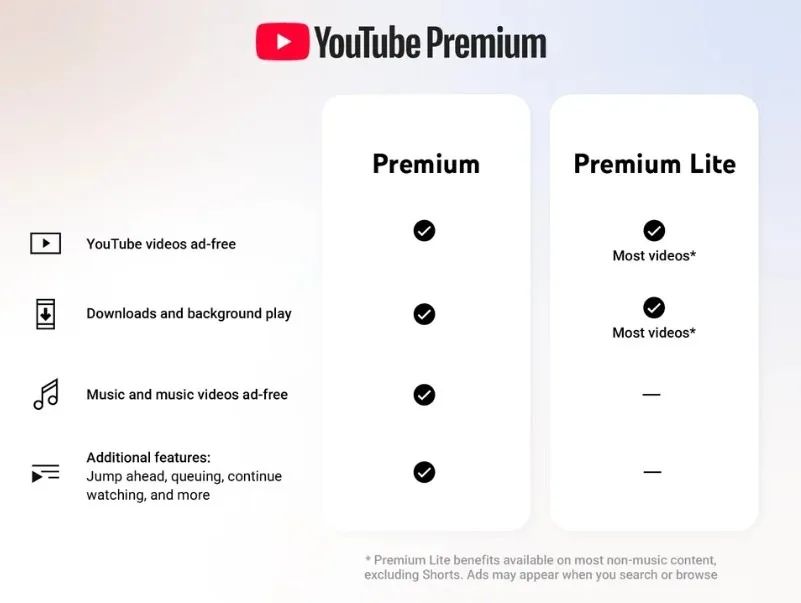
YouTube Premium is the all-inclusive package: completely ad-free across all YouTube videos, including music videos and Shorts, background play (your video keeps playing even if you lock the screen or switch apps), offline downloads (download almost anything to watch or listen offline) and access to YouTube Music Premium.
Lite focuses gives you the core stuff like ad‑free viewing on most non-music content, background play and downloads, at a lower price. But you’ll still see ads on music videos, Shorts, and while searching or browsing.
Not sure which one’s right for you? Most regions offer a free trial, so you can test it before committing.
In the table below, you’ll find a quick overview of all the features compared.
| Feature | YouTube Premium Lite | YouTube Premium |
| Ad-free viewing | Most non-music videos | Everything |
| Background play | ✅(most non‑music videos) | ✅ |
| Offline downloads | ✅(most non‑music videos) | ✅ |
| YouTube Short without ads | Limited, ads can still appear | ✅ |
| YouTube Kids without ads | Limited, depends on content regionally | ✅ |
| YouTube Music without ads | ❌ | ✅ |
| Price | $7.99/month | $13.99/month |
| Best suited for | Casual viewers | Regular users |
Features and pricing can vary slightly by country and device, so always check the current offer in your YouTube account before subscribing.
How to Subscribe and Cancel Your Subscription
Is YouTube Premium right for you? Follow these three steps to subscribe to YouTube Premium Lite.
How to subscribe to YouTube Premium Lite
➡️ Open YouTube on desktop or mobile and log in to your Google account.
➡️ Tap your profile picture and go to “Purchases and memberships” or “YouTube Premium,” depending on what you see.
➡️ If Premium Lite is available in your country, you’ll see it listed. Select it, review the price, and complete the payment.
How to cancel or upgrade
Head back to “Purchases and memberships”, select your Lite membership, and either cancel or switch to a different plan. Changes usually apply at the end of your current billing period, so you can keep Lite benefits until your subscription renews.
Even without features like background play and downloads, YouTube Premium Lite strikes a balance between free YouTube with ads and a fully ad-free experience. You can try it free for a month to see if it fits your needs!
Is YouTube Premium Lite Worth It?
If ads are your main frustration and you don’t need YouTube Music, Lite is a solid middle ground. For roughly half the price of full Premium, you get a noticeably cleaner viewing experience on most of the content you actually watch day-to-day.
If YouTube is basically your second home and you want zero ads across the board, including Shorts and music videos, or you want YouTube Music as your go-to streaming app, the full Premium plan is the better long-term investment.
But if you’re somewhere in between? Give Lite a shot. There’s usually a free trial waiting for you.
