

Instagram’s Auto Scroll for Reels: Swipe No More!
 Kata
27 January 2026
Kata
27 January 2026 
If all you ever wanted from Instagram was a never-ending loop of Reels, check your Reels tab: Instagram made it possible. The auto scroll feature on Instagram started as a test last year and was quietly rolled out to most users without much fanfare.
So let’s dive into how it works and what it means for the Reels you’re creating.
What is the Instagram Reel Auto Scroll Feature?
In the mood to binge some Reels? This simple toggle lets users watch one after the other automatically, without having to lift a finger.

When it comes to its usefulness, reactions are mixed. Some users say it’s handy when you can’t scroll (a.k.a. you’re cooking or getting your nails done) but still want your Reels to keep rolling. Others argue it’s making doomscrolling even worse and has less to do with genuine engagement and more to do with creating passive viewing habits.
Until now, auto scroll was something you could only get with third-party apps or browser extensions, but Instagram has now made it native. If auto scroll sounds familiar, it’s no coincidence; YouTube and TikTok have their own versions of auto play for a while now.
The auto scroll feature is likely not available to everyone just yet, some users report seeing it appearand then disappear again. So if you don’t see the option yet, don’t worry; it’s probably still being rolled out gradually.
Doomscrolling vs. More Views of Your Videos
Auto scroll changes how people move through the Reels feed: instead of actively swiping to the next video every time, Instagram automatically serves the next video once the previous one ends. That means users can end up passively consuming more content in one sitting, which potentially increases overall reach and the number of times Reels are shown.
However, more “chances to be seen” doesn’t automatically translate into meaningful results for every creator. If people are in a passive doomscrolling mode and quickly lose interest, you might see your reach go up while your actual engagement (likes, comments, shares, follows) stays flat.
What’s the Impact of Auto Scroll for Creators?
For creators, auto scroll mainly increases opportunities: your Reels can be surfaced to more people as they let the feed run without swiping manually. But whether that extra exposure turns into views, watch time, and interaction still depends on how strong your hook and content are.
Instagram’s algorithm continues to reward Reels that maintain high average watch time and completion rates, along with signals like engagement and relevance. If viewers keep skipping away from your video early (even in an auto-scrolling environment), the algorithm has no reason to push your content further.
How to Optimize Your Reels for Auto Scroll
To make the most of auto scroll, focus on how long people stay and how quickly they decide to move on. Two key ideas here are watch retention (how much of your video people watch) and early skips (how many people scroll away in the first seconds).
As a practical baseline, aim for an average watch time that goes clearly beyond those first seconds; for very short Reels, that often means high completion rates, and for longer videos, at least a solid fraction of the total length. The stronger your hook in the first few seconds and the more engaging your content throughout, the better your Reels will perform, whether viewers are actively swiping or letting auto scroll do the work.
How to Enable Auto Scroll on Instagram
Want to turn on auto scroll? Here’s how:
- Open and update Instagram and head to the Reels tab
- Tap on any Reel to start watching
- Tap the three dots (menu icon) at the bottom right of the screen
- Look for the ‘Auto scroll’ option
- Toggle it on
Once enabled, Reels will automatically jump to the next one when the current video ends.
How to Turn Off Auto Scroll on Instagram
Not a fan? Turning it off is just as easy:
- While watching a Reel, tap the three dots at the bottom right
- Find the ‘Auto scroll’ toggle
- Switch it off
You can change this setting anytime, so feel free to experiment and see what works best for you.
Auto Scroll on Instagram: iPhone vs. Android
The auto scroll feature works the same way on both iPhone and Android devices. Whether you’re using iOS or Android, you’ll access it through the same three-dot menu while watching Reels. Keep in mind that availability may vary depending on your region and whether Instagram has rolled out the feature to your account yet.
Instagram’s auto scroll function is part of a wave of recent UX upgrades from the platform, just like that handy new feature where you can play Spotify song previews directly in Stories.
How to Analyze Your Reels Performance in Metricool
Now that auto scroll is changing how users watch Reels, understanding your video performance is more important than ever. That’s where Metricool comes in.
One key metric to track is view rate (though Instagram plans to replace it with skip rate down the line).
What Is View Rate and Why It Matters with Auto Scroll
View rate is the percentage of people who actually viewed your Reel compared to how many saw it in their feed (reach or impressions). In other words, view rate shows you how many people stopped to watch versus how many just scrolled right past.
Your Reel might appear on someone’s screen and start playing automatically. Instagram counts an organic Reel view after around 3 seconds of watch time.
So if your reach is high but your view rate is low, that’s a clear signal that your opening needs work, especially in an environment where Reels are being fed to viewers automatically.
Auto scroll can boost your reach faster because your content shows up in more feeds automatically, without people actively choosing it. That makes your view rate an even sharper filter: it tells you whether your Reel actually hooks people when it lands in front of them, or whether they just let the feed roll past you.
Struggling with your opening? Try these hooks:
How to Check These Metrics in Metricool
To check how your Reels are doing in Metricool:
- Create a free Metricool account
- Connect your Instagram account with Metricool.
- Navigate to the Analytics tab and see Instagram on the left side.
- Head to the Reels section.
- Check your view rate to see the percentage of people who actually watched versus just scrolled past.
- Compare view rates across different Reels to identify what type of content truly stops the scroll.
Review these metrics to see how long people keep watching and how many scroll away in the first seconds.
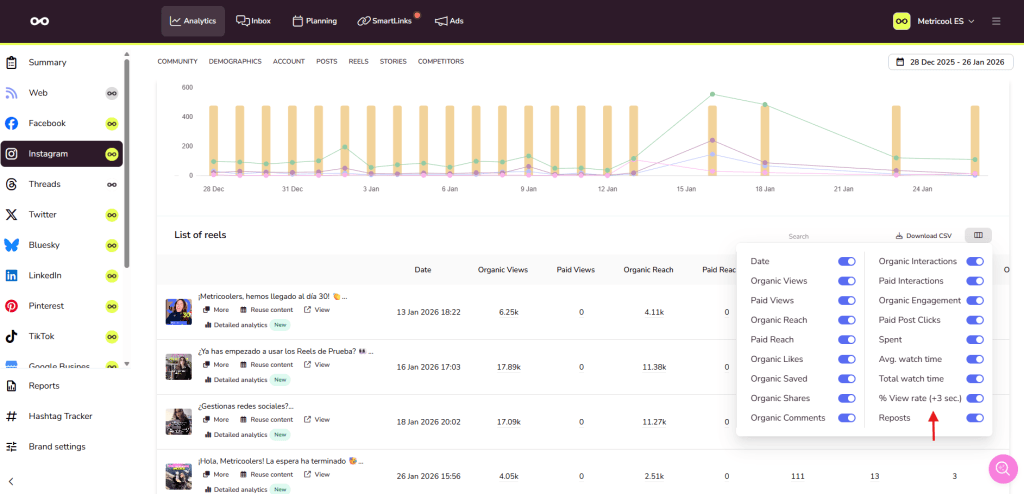
Compare these metrics across different Reels to identify which hooks, formats, and topics truly stop the scroll; and which ones lose viewers quickly.
This insight lets you fine-tune your content strategy — creating Reels that not only auto scroll into view but actually make people stop, watch, and engage. Because in the end, raw views mean far less if no one is really paying attention.
