

How to Use Instagram Creator Marketplace to Land Brand Deals
 Kata
05 March 2026
Kata
05 March 2026 
A match made in heaven Instagram between creators and brands – that’s what Instagram Creator Marketplace is all about. It makes it easier for both sides to be found and launch branded content or partnership ads together. The marketplace was recently revamped with smarter recommendations, a redesigned homepage, and new discovery tools. Let’s see what you need to know to land your next brand deal.
What is Instagram Creator Marketplace?
It’s a platform in the Meta ecosystem that pairs creators with the brands that make the most sense for their audience – and since its recent glow-up, it’s now available globally, way beyond the 19 countries it was previously limited to.
How to Set Up Your Creator Marketplace Profile
Before anything else, make sure you have a Creator or Business account on Instagram. You can easily switch your personal profile to a Creator account. Check out our quick guide on how to do that:
To be eligible for Instagram’s Creator Marketplace, you also need to be:
- at least 18 years old
- based in an eligible country
- and in good standing with Instagram’s Community Guidelines, Partner Monetization Policies, and Branded Content Policies.
As for followers, there’s no official minimum. Brands typically filter for creators with at least 1,000, but don’t wait until you hit a magic number to set up your profile.
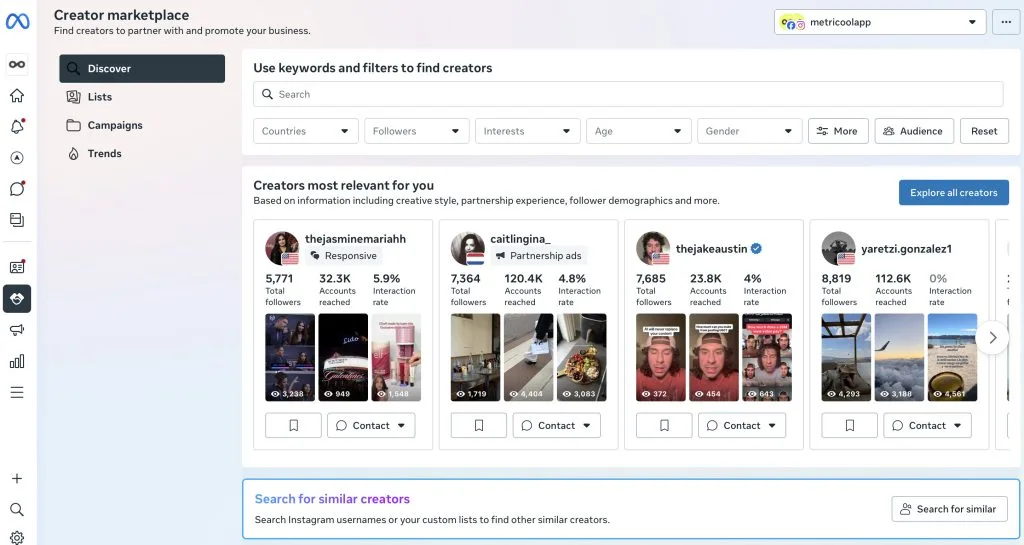
Once that’s sorted, here’s how you get started:
- Open the Instagram app and go to your Professional Dashboard (you’ll see it at the top of your profile if you have a Creator or Business account. Brands access the marketplace from Meta Business Suite or Ads Manager, but as a creator you always join from inside Instagram.).
- Scroll down to Branded Content Tools and tap “Join Creator Marketplace” if it’s available in your region.
- Check your eligibility. Go to Settings → Account → Account Status to check for any issues that could make you ineligible. If everything looks okay, you should see a “Get Started” button.
- Set up your profile by adding basic info, niche tags, and selecting the types of brand deals you’re interested in (for example: UGC, short‑term campaigns or long‑term ambassadorships).
- Add your interests. Select up to 10 interests from categories like beauty, fitness, gaming, food, parenting, etc.). The more specific you are, the more relevant your matches and brand recommendations will be.
- Build your creator portfolio. Share a quick overview of who you are and what you do, highlight previous work, and showcase brands you’ve worked with. This acts like a mini media kit inside Instagram.
- Mark your favourite brands. Once your profile is live, mark brands as your favourites, so they know you’re interested in working with them – a small move that makes it easier for them to find you.
That’s pretty much it. Once you’re in, brands can discover your profile and send you opportunities for paid collabs. You can also apply to open projects that brands publish inside Instagram Creator Marketplace.
How It Works: The 4 Tabs
In your dashboard, you’ll find four tabs; here’s what happens in each of them:
Discover tab
This is where brands and agencies look for creators to kick off new partnerships. Make sure your profile is optimized here to show up in searches and AI recommendations for campaigns that fit your niche.
What brands can do here here:
- Filter creators by follower count, location, niche, audience demographics, and more.
- See AI-powered suggestions for creators, plus those who have tagged, followed, or shown interest in the brand.
- View detailed creator profiles: follower count, engagement rates, audience breakdowns, and past content.
What creators should do here:
- Select relevant brand categories and up to 10 topics of interest so you show up in the right searches. .
- Build your portfolio: highlight your best Reels, carousels, branded content, and partnership ads so brands see your value right away.
Lists tab
A place for brands to save and organize creators they’re interested in, think of it like a “shortlist” system. Lists are how brands move from “interesting creator” to “shortlisted for a specific campaign”. Your job is to look like an easy, low‑risk choice once you’re in that shortlist.
What brands can do here:
- Create multiple lists of creators (e.g., “Spring launch,” “Always‑on UGC,” “High‑engagement micro‑creators”) and save profiles they find in Discover.
- Compare creators side by side with key stats (followers, audience, engagement, niche).
- Share lists internally between team members or admins so everyone works from the same pool of vetted creators.
What creators should know:
- Being added to a list means you’re already on the brand’s radar, even if they don’t reach out immediately.
- Make sure your profile, rates, and portfolio stay updated; brands may revisit lists months later when a budget or brief opens up.
- If a brand has viewed or saved your profile multiple times, that’s a strong signal to proactively pitch them.
Campaigns tab
The project and campaign management hub where brands create briefs, send offers, and track deliverables.
What brands can do here:
- Create campaign projects with objectives, deliverables, required formats (Reels, Stories, posts), deadlines, and compensation details.
- Send briefs directly to selected creators, or publish an open brief that eligible creators can apply to.
- Manage all creator responses, approvals, and content under one campaign, including partnership ad permissions and usage rights.
- Track campaign analytics to see which creators and pieces of content performed best.
What creators can do here:
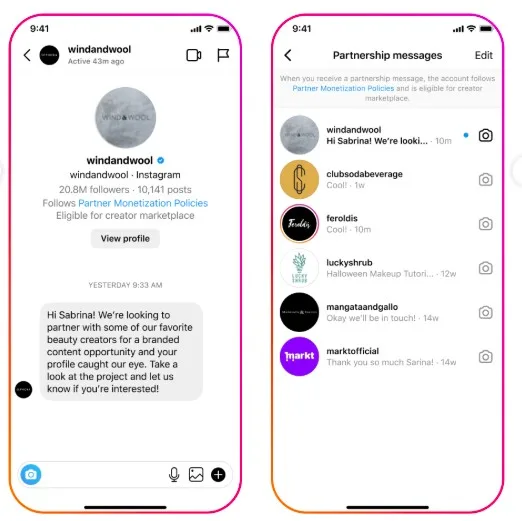
- Receive campaign invitations and briefs in the Partnership Messages inbox (separate from regular DMs), and review scope, deliverables, and proposed rates.
- Apply to open campaigns that match your niche.
- See all active and past collaborations in one place, making it easy to stay on top of deadlines and ongoing relationships.
Trends tab
A newer insights area that shows creators what’s working right now in terms of topics, formats, and content styles. It’s designed to inspire your content and sharpen your pitches.
What brands can see:
- Insights on which niches, formats, and content types are driving strong engagement for collaborations in their region.
- Example creators and partnership ads in top-performing categories to benchmark campaigns.
What creators can do here:
- Spot emerging collaboration trends in your niche like a spike in partnership ads around skincare routines, gym challenges, or “day in the life” content.
- See which formats are getting picked for partnership ads (educational, comedic, testimonial, POV) and tailor your portfolio accordingly.
- Use trends data to pitch smarter: “I can produce Reels similar to the top-performing style in [X category]” comes across differently than a generic pitch.
Partnership Messages Inbox
All brand outreach from Creator Marketplace lands in a dedicated inbox, separate from your regular DMs. Responding quickly and professionally here signals that you’re easy to work with, which matters more than most creators realise.
Note: The Partnership Messages inbox will only appear once you’ve received at least one message from a brand.
7 Tips to Make The Most of the Marketplace as a Creator
Getting on the platform is the easy part. But getting discovered takes a bit more intention. Here are come tips to set yourself up for success:
- Optimise your profile fully. Select up to 10 interests and the most relevant brand categories. The more specific you are, the more likely Instagram’s algorithm surfaces you for the right campaigns.
- Build a strong portfolio. Indicate your interests in the creator marketplace to get relevant projects and back them up with a portfolio that shows real results.
- Mark your favourite brands. This signals intent and puts you on their radar without having to reach out cold.
- Respond fast. Brands expect a response within 24 hours when they reach out through Partnership Messages.
- Stay authentic. Followers can tell right away when a partnership is out of character. Partnering with brands that genuinely fit your niche leads to better content, better performance, and more repeat deals.
- Check the Trends tab regularly. Use it to align your content strategy with what brands are actively buying; and reference it in your pitches.
- Keep everything updated. Brands revisit saved lists months after first discovering a creator. Stale rates or an outdated portfolio can cost you a deal you didn’t even know was on the table.
Following these tips consistently is much easier when you have the right tool backing you up; and that’s exactly where Metricool comes in.
How Metricool Helps You Succeed in the Creator Marketplace
Standing out as a creator worth hiring takes more than just great content and that’s where a tool like Metricool can step in and help.
To land brand deals, your content needs to perform. And to know if it’s performing, you need reliable data. Metricool pulls insights directly from Instagram, so you can track what’s working and what’s not – from engagement and reach to follower growth and Reels performance – all in one place.
Know your numbers before brands ask
Brands vet creators based on engagement and audience fit. Metricool gives you a full breakdown of your Instagram metrics, such as follower growth and demographics, Reels analytics, and Story performance, so you always know where you stand. Use these to back up your media kit with real proof of performance.
Post consistently, at the right time
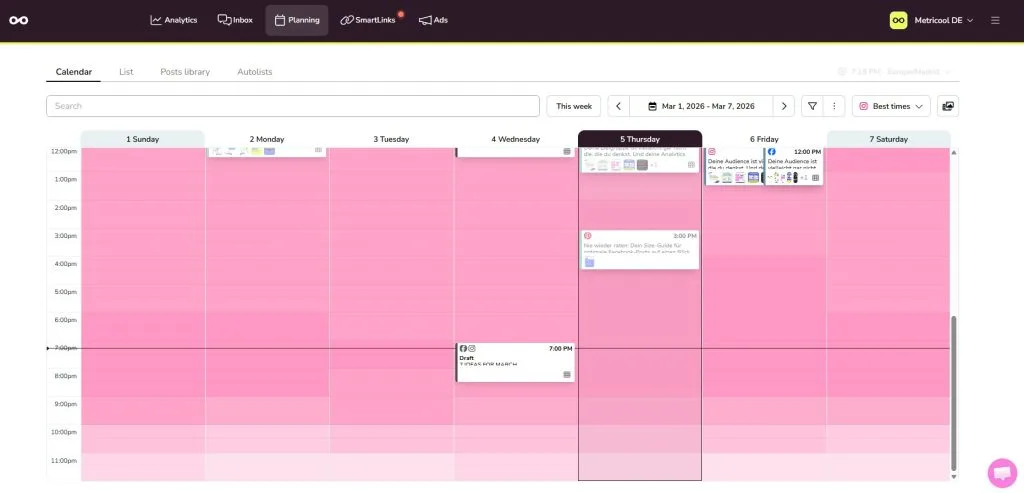
The dashboard shows you the best times to post based on when your audience is most active. Stack that with the scheduling tool, and you can plan your content in advance. Consistency signals professionalism.
Keep an eye on the competition
The tool helps you track your competitors and stay ahead of trends on Instagram. See what’s working for them and adapt your content accordingly to keep your edge.
Manage everything without the chaos
Schedule posts across all your platforms, find your best times to post, and manage all your content from one place. Less time juggling tools means more time creating the content that gets you noticed.
What’s New in Instagram Creator Marketplace?
Now that you know how to make the most of the Creator Marketplace (and the tools that can help) here’s a quick look at what’s changed on the platform recently:
- Ads performance indicator badge: Creator profiles now show a badge that flags creators likely to drive stronger ad results for specific brands.
- Better creator recommendations: Brands now get recommendation rails showing creators who’ve already tagged them in content or shown interest in collaborating. There are also suggestions based on prior ad experience and predicted performance so the matches get smarter over time.
- “Similar creators” search: Search by name or handle to find creators similar to ones you’ve already worked with, or get recommendations based on your top-performing past collabs.
- Redesigned homepage: Creator recommendations now come with explanations of why each creator was suggested.
All of this builds on updates from December 2025, when Meta rolled out enhancements to its Partnership Ads Hub to make it easier to use organic creator content in paid campaigns across Facebook and Instagram.
The creators who win in Instagram’s Creator Marketplace are intentional, data-driven, and niche-specific. Set up your profile, keep your content consistent, and let the data do the talking.
Try Metricool for free and give brands a reason to choose you.
