

Weekly Social Media Routine: How I Do It in 15 Minutes with Claude
 Kata
09 May 2026
Kata
09 May 2026 
It’s 9 AM on Monday. I sit down to go through my morning social ritual, which always includes at least 10 different documents and tabs. Checking Instagram, LinkedIn, TikTok, X, YouTube, Meta Ads, Google Ads; Metricool in another tab to pull data; then a Notes app to draft posts; a calendar to make sure I didn’t forget any important event. By 10 AM, I already feel overwhelmed and I haven’t written a single post yet. I still copy numbers into a doc, checking which Reel stood out, running behind on planning this week’s content…
Content ideas live in random screenshots and in a special shelf in my brain. One day I think to myself: it’s time to change this mess. The irony? The biggest social media manager productivity problem isn’t strategy, it’s the admin friction that eats a big chunk of every Monday. Then I discovered a different approach, and now my Monday mornings look completely different.
Why I Started Using Metricool’s MCP
I didn’t wake up wanting an MCP integrated, simply because… I didn’t know it existed. I just wanted Monday mornings to stop feeling like my time is spent doing admin stuff. Then I found out I could connect Claude, which I was already using, directly to my Metricool account.
To put it simply, Metricool’s MCP is the bridge that lets Claude talk directly to my Metricool account. Instead of me opening the dashboard, clicking through each network, and exporting reports, I just ask Claude things like “Which Reel performed best last month?” and it pulls the data from Metricool, organizes it, and helps me act on it in the same chat where I also draft and schedule posts.
My Monday 9:00–9:15 SMM Routine [Prompts Included]
These are the kinds of prompts I use now to switch myself into strategy mode instead of losing my energy to tiny organizational details. I stay in one conversation and use Metricool’s MCP as my assistant who handles the tools in the background – and it’s how I plan my social media for the week without opening a single analytics tab.
First, I connected Claude.ai with my Metricool account. Here’s how I did it step by step:
Once the connection is live, here’s a breakdown of what I ask Claude to do for me..
9:00–9:03: Quick performance snapshot
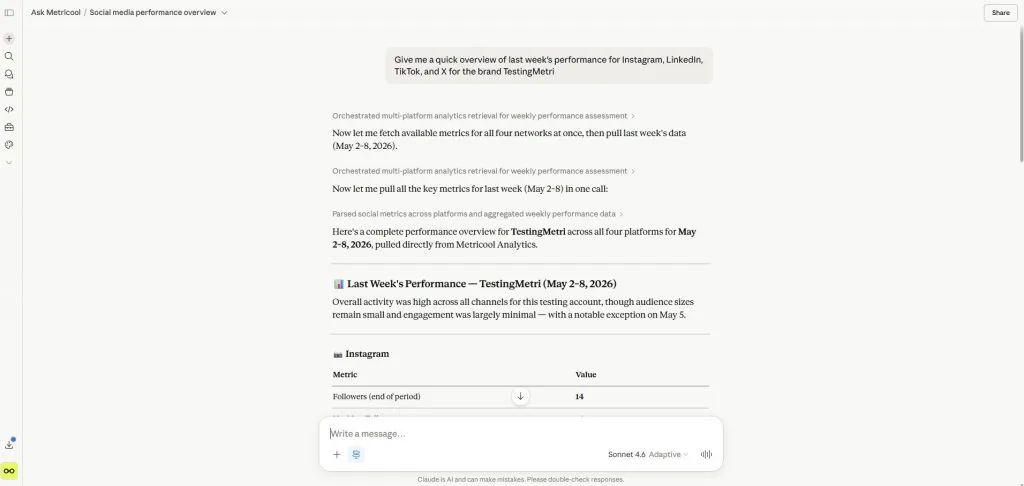
I start by asking for an overview of how things went last week.
Prompt 1: weekly overview
- “Give me a quick overview of last week’s performance for Instagram, LinkedIn, TikTok, and X for the brand [Brand Name].
- Highlight anything that clearly went up or down compared to the previous week.
- Keep it short and plain language, 5 bullet points max.”
This replaces the old ritual of opening each platform, checking analytics, and trying to figure out what changed. Now I get a summary that still comes directly from my actual metrics.
Prompt 2: top-performing content
“From my content for the last 30 days on Instagram, LinkedIn, and TikTok for [Brand Name], list:
- Top 3 posts by engagement for each network
- For each, tell me what you think made it work: format, hook, topic, or timing.
- Keep it concise.”
This is where the MCP does its best work: it pulls the data (reach, engagement, etc.), and Claude turns that into patterns: “Reels with quick tips and a strong first line perform best” or “Carousels with a before/after structure are doing better than inspirational quotes.”
9:03–9:07: Best times and content angles for the week
Once I know what worked, I set the “constraints” for this week: when to post and what angle to lean into.
Prompt 3: best times to post
“Using my Metricool data, tell me:
- The best times to post this week for Instagram, LinkedIn, and TikTok for [Brand Name].
- Suggest 2–3 specific time slots per day where performance is usually strong.
- Just give me a simple list by network and day.”
I used to stare at heatmaps and manually pick times. Now I get a text version that fits how my brain works on Mondays: simple and prescriptive.
Prompt 4: content angles based on what worked
“Based on my top-performing posts from the last 30 days:
- Suggest 5 content ideas for this week that follow the same patterns.
- Mix: 2 educational, 2 behind-the-scenes, 1 opinion-style post.
- For each idea, specify which network it’s best suited for and why”.
Here, I’m asking for real examples of what worked in my own account, using Metricool’s data as the base.
9:07–9:12: Drafting and scheduling posts
With ideas and timing set, I move straight into content creation and scheduling, still inside the same chat.
Prompt 5: draft platform-specific posts
“From those 5 content ideas, draft:
- 1 Instagram caption (Reel)
- 1 LinkedIn post
- 1 TikTok video script (bullet points only)
for [Brand Name]. Keep the brand voice: [2–3 bullet points about tone]. Don’t make them perfect; I’ll edit them.”
I always frame it as a first draft so I don’t get stuck in perfectionism. I usually skim and tweak the tone, but the structure and hooks are there.
Prompt 6: schedule directly via Metricool
Once I’m happy with the copy, I ask Claude to schedule them using the MCP:
“Schedule these posts in my Metricool account for [Brand Name]:
- Instagram Reel caption: ‘[paste text]’: schedule tomorrow at one of my best times.
- LinkedIn post: ‘[paste text]’: schedule Wednesday at one of my best times.
- TikTok script: ‘[paste text]’: schedule Thursday at one of my best times.
- Use the best times you pulled earlier. Confirm the scheduled times back to me.”
The MCP uses Metricool’s scheduling tools in the background. I don’t open the dashboard, but the posts appear in Metricool’s queue like any other scheduled content.
If something feels off, I fix it in the same chat:
“Shorten the LinkedIn post by 30%, keep the same idea and hook, and update the scheduled post for Wednesday with this new version.”
That uses the “update scheduled post” capability instead of me clicking around the calendar.
9:12–9:15: Competitors and quick checks
If there’s time left, I use it for competitor awareness and a sanity check on my plan.
Prompt 7: competitor snapshot
“For the competitors saved in my Metricool account for [Brand Name], summarize last week:
- Who posted the most?
- Any posts with unusually high engagement?
- Any clear pattern in formats or topics?”
This keeps me from doomscrolling competitors’ feeds. I get a filtered summary based on data.
Prompt 8: weekly plan recap
“Recap my publishing plan for this week (Instagram, LinkedIn, TikTok):
- What’s scheduled already (days + type of content)?
- Where do you see gaps (e.g., too many similar posts or empty days)?
- Suggest 2 more posts to balance the week.”
By 9:15, I usually have:
- A clear view of last week’s performance
- 2–3 posts drafted and scheduled
- A sense of what competitors are doing
- A simple, written weekly plan I actually understand
And I’ve barely touched the dashboard.
What I Stopped Doing
Since moving this 9:00–9:15 block into Claude + Metricool, here are the things I almost never do manually anymore:
- Opening every social network’s analytics tab one by one “just to see how it’s going”
- Copy-pasting metrics from platforms into a spreadsheet or doc to find patterns
- Guessing posting times by eyeballing heatmaps instead of using my real best-time data
- Manually recreating the same weekly report format from scratch each Monday
- Switching tabs 20 times just to schedule the same post on Instagram, LinkedIn, and TikTok
None of these tasks were hard in the classical sense, but they were exactly the kind of friction that made it easy to postpone planning.
What Claude Cannot Do But I Can
Don’t get me wrong, this new workflow doesn’t put my social media work on autopilot and make me redundant (I’m not working against myself). There are tasks I deliberately keep human:
- Final tone and message checks. I always read the posts and tweak references, examples, and nuances so they sound like the brand and not a generic template.
- Visuals and creative direction. Claude and Metricool help me decide what to post and when, but I (or the design team) still choose visuals, edit videos, and approve thumbnails.
- Strategic decisions. Things like “Should we talk about this sensitive topic?” or “Do we pause posts because of X news?” are human decisions, not prompts.
- Priority setting. I still decide which campaigns or products get priority that week and tell Claude what to focus on. You’re still steering the wheel, the AI is just there to fill in operational tasks.
Final Reflection
The biggest change is simpler than it sounds: between 9:00 and 9:15 on Monday, I spend my time making decisions instead of clicking through dashboards.
I spend 15 minutes in one conversation using Metricool’s data through Claude to make decisions and put them into action straight away. It’s become the foundation of my weekly social media routine.
What hasn’t changed is that I’m still responsible for the judgment calls: what matters this week, which messages are on-brand, and when not to post at all. The MCP just removed the friction.
If you’re starting from scratch, the main thing to get right first is your constraints: which networks actually matter, how often you want to post, and what your non-negotiables are (brand tone, topics to avoid, and so on). Once that’s clear, a 15-minute SMM routine with Claude + Metricool is enough to keep your week structured and your browser free of 20 open tabs.
Start with the analytics snapshot. Three minutes. It’ll change what you thought you knew about last week and probably about how you spend your Mondays.
Smarter Social Media Management With Metricool’s MCP
Bring your analytics, scheduling, and reporting into one AI-powered workflow and spend less time switching between tools.
