

Product Updates – May 2026
 Kalum
02 June 2026
Kalum
02 June 2026 
New section, new features: Campaign dashboards and Metricool Studio
We hinted at this earlier in the month, and here it is: a new Reporting section in Metricool.
- One home for all: Reports, 🆕 Campaign Dashboards, 🆕 Metricool Studio, Data Studio now share one home. Whatever kind of output you need, there’s a tool for it under one roof.
- Pick the tool that best fits your needs: Reporting gives you four ways to analyse, each for a different need. Go generic with Reports, zoom into a specific campaign with Campaign Dashboards, run deep-dive analysis with Metricool Studio, or build custom BI views with Data Studio.
- Answer the specific questions, not the generic ones: Stop scrolling through a wall of data. Reporting is where you can clearly see: how did my Black Friday campaign land? How is brand A pacing against brand B?
Metricool Studio and Campaign Dashboards are available on Starter and Advanced plans for a limited time*
*Afterwards they’ll be a paid add-on for Starter or Advanced

Add trending audio to Reels and trial Reels

This was one of the most requested features, Metricooler. You can now schedule Reels and Trial Reels with trending audio directly from Metricool without touching your phone.
- Find the audio you’re looking for: Access a library of music plus original sounds uploaded by other creators. Choose the audio that best fits your Reel.
- Choose with no surprises: For each audio, you’ll see the title, artist, duration, cover thumbnail, and a preview to listen to before adding it to your Reel.
- Schedule and forget about your phone: Organize your Reels and publish them with the audio already included. No more opening Instagram right after posting to add audio by hand.
Threads competitors
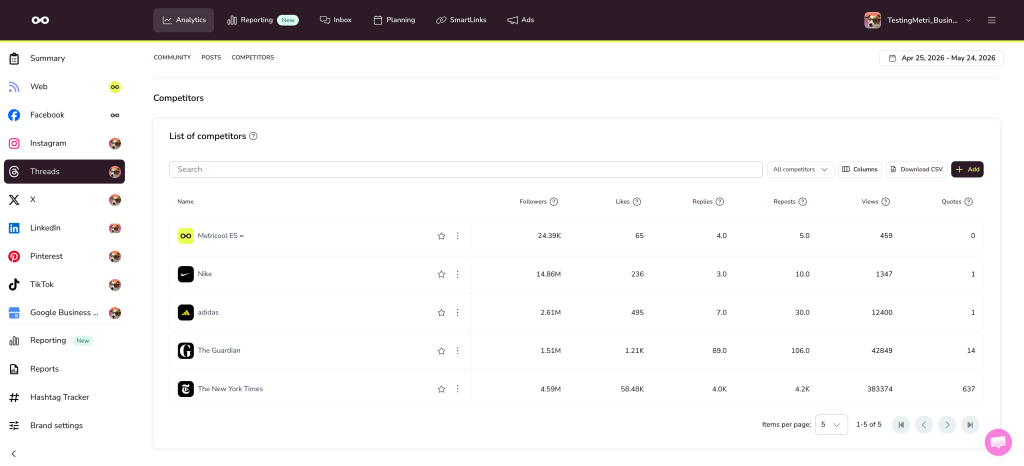
If you’ve been waiting to analyze your competition on Threads, here it is. You can add your Threads competitors in the Analytics section. Competitor data is also available in Data Studio, so you can drop it straight into your reports.
Other important updates
Content approval
Pick the language for the reviewer’s email and approval page
You can now choose the language of the review email and approval page for each reviewer.
Planner
Post library tab
You can now access the post library from the tab menu above the Planner too.
Planner | Competitors
Stop ALT text generation
You can now stop the AI while it’s generating the ALT text for an image.
Remember that you can always send your feedback, we really read it all! We use it to decide our next steps 👀
