

How to Run Ads on Threads in 2026
 Kata
27 April 2026
Kata
27 April 2026 
Just like all new kids on the block, Threads promised an ad-free experience. But then revenue models kicked in and here we are. Ads on Threads launched a year ago and are now available to all eligible Meta advertisers worldwide. So if your audience is already there, you’ve got a new way to reach them without having to learn a new tool, because if you already run Meta ads, you’ll find everything inside your Meta Ads Manager.
Are Threads Ads Worth It?
Before we get into the setup itself, let’s see some arguments first. Although it’s still a young platform, it’s growing fast. Here are a few reasons it’s worth paying attention to:
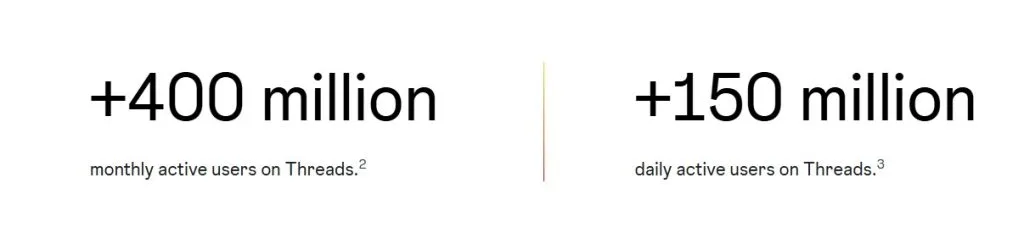
- You can reach up to +400 million monthly active users who tend to be younger, mobile‑first and text‑driven.
- Threads ads are fully integrated into Meta’s ad tools, so setup is straightforward.
- Ad competition is still relatively low, which makes it a great place to test new creative formats before scaling elsewhere.
- All eligible advertisers globally can now run Threads ads; it’s no longer limited to select brands.
What You Need Before You Start
Three things need to be in place before you start:
- A Meta Business Account with access to Meta Ads Manager.
- A business Instagram profile connected to your Meta Business Suite.
- Matching Threads and Instagram usernames so placements and attribution work smoothly.
Once that’s sorted, Threads will appear as a placement inside your existing campaigns, or you can build a dedicated Threads-only ad set. When you run a campaign in Meta Ads Manager, you’re opted into Threads by default, so your ads will show in the Threads feed placement automatically.
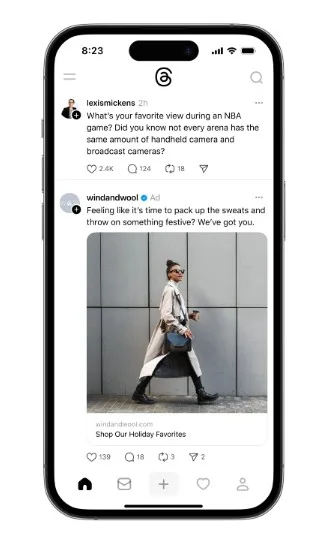
Once your image or video ads are live, they’ll appear in the Threads home feed alongside organic posts, the same experience you’re used to on Instagram and Facebook.
Setting Up Your First Threads Ad
Once you got the basics right, follow these steps to set up your first ad set.
Step 1: Choose the right objective
Threads supports the same core objectives as other Meta placements:
- Awareness
- Traffic
- Leads (website‑based only)
- Sales / conversions
Start with traffic or sales if you want concrete results, and awareness if you’re testing creative and audience fit.
Step 2: Select Threads as a placement
Inside your ad set:
- Choose Manual Placements.
- Enable Threads Feed as a placement.
If you use Advantage+ campaigns, Threads can be included automatically, but it’s still worth checking that the feed is activated and content‑sensitivity filters are set.
Step 3: Set budgets and schedule
Meta recommends starting small with Threads:
- Assign a small test budget (e.g., 10–20% of your core Instagram/Facebook budget).
- Run the test for 1–2 weeks before scaling.
Formats and Specs
Threads supports three ad formats:
- single image
- single video
- image carousels (including catalog-style product feeds).
Creative specs for 2026:
- Aspect ratios:
- 1:1 (1080 x 1080 px)
- 4:5 vertical (1080 x 1350 px) recommended for feed‑first visibility.
- File size limit: up to 30 MB (JPG/PNG recommended; MP4 for video).
- Primary text: 80–160 characters.
- Headline: up to ~40 characters.
- Hashtags: OK, but keep them minimal and contextual.
A few creative tips worth keeping in mind: Threads is a micro-blogging platform, so copy carries more weight than visuals. Keep in-image text to a minimum, write captions that feel natural in a text-heavy feed, and avoid repurposing an Instagram Reel or Story without adapting it first.
How to Target Threads Users
Threads runs on Meta’s full targeting stack, so there’s nothing new to learn if you’re familiar with Meta ads. You can use:
- Custom audiences (website visitors, app users, customer lists, engagement audiences).
- Lookalike audiences based on your best‑converting segments.
- Detailed targeting (interests, behaviors, demographics).
Smart targeting ideas for Threads:
- Interests related to startups, tech news, online learning, and your niche.
- Lookalikes based on existing Threads‑driven traffic or engagement.
- Engagement‑based audiences (people who regularly interact with your Instagram/Facebook content).
- Minimal restrictions: let Meta’s algorithm explore who converts, especially in early tests.
Reporting and Optimization
Because Threads is part of Meta’s unified reporting, you can track Threads ads in the same place as Instagram and Facebook. Key metrics to watch:
- Impressions and reach on Threads
- CPC and CPM vs Instagram/Facebook
- Link‑clicks, landing‑page views, and conversions
- Engagement rate (likes, replies, forwards)
Post‑launch routine:
- Let each ad set run 3–7 days to collect data.
- Pause low‑performing creatives and double down on strong formats.
- A/B test different angles, like educational vs humor‑driven text‑heavy posts.
The platform is still finding its footing, and so is the ad inventory. That’s usually a good time to show up, and Metricool makes it easier to stay consistent while you test.
Schedule and Manage Your Threads Content with Metricool
Running ads is one part of your Threads strategy. The other is showing up consistently with organic content, and that’s where Metricool comes in.
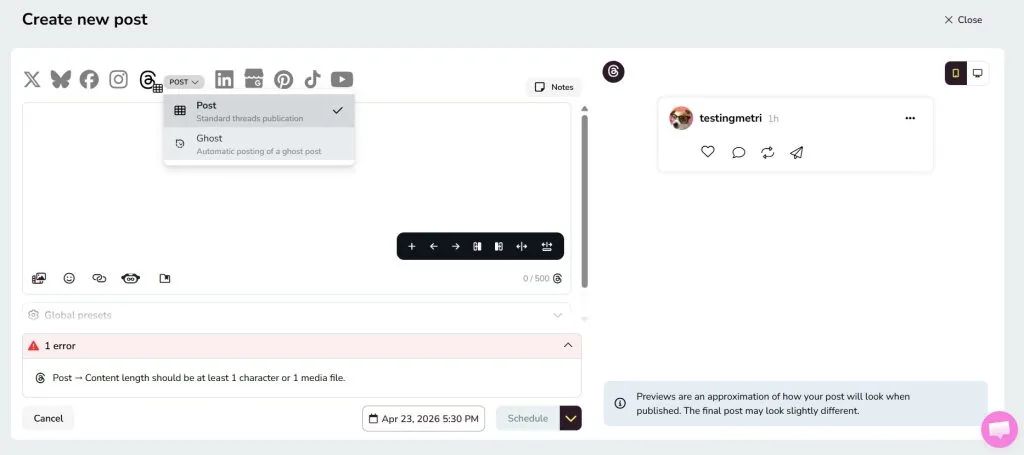
With Metricool, you can plan, schedule, and auto-publish your Threads posts from the same dashboard you use for the rest of your social media. Track how your content performs, spot what’s working, and build a posting cadence that keeps your profile active without eating up your week.
One place for your content calendar, your analytics, and your results; Threads included.
