

How to Do Affiliate Marketing on Facebook in 2026
 Kata
06 May 2026
Kata
06 May 2026 
As more and more people shop online based on the recommendations of creators they follow and trust, affiliate marketing is not just a side gig for creators anymore. If you’re building a presence on Facebook, affiliate partnerships let you earn from your content while pointing your audience toward products or services worthy of their attention.
Whether you’re new to affiliate marketing or already running campaigns on other platforms, this guide covers everything you need to know to make it work on Facebook.
What is Affiliate Marketing?
Affiliate marketing is a type of digital marketing where you promote a product or service using a tracking link. When someone makes a purchase through your link, you earn a commission.
On Facebook, those links can live in your posts, Reels, Groups, or Pages. While Facebook doesn’t have a separate affiliate program for creators in the classic sense, there are a couple of ways to use affiliate links to earn from your content. This is not the same as Meta’s own affiliate program, which is designed to promote Meta’s own products.
If you’re new to affiliate marketing, check out our affiliate marketing guide with tips and tricks for 2026.
How to Get Started With Affiliate Marketing on Facebook
Before you start posting links, let’s set up the right foundation.
1. Switch to Professional Mode
If you’re using a personal profile, switch to Professional Mode so you can unlock monetization features, creator tools, insights, and access to eligibility checks. If you’re running a Page, make sure it’s set up and managed as a professional brand presence.
2. Check your monetization eligibility
Not every account is eligible for every monetization feature. In general, Meta looks at things like:
- your country or region,
- your account age and standing,
- compliance with Meta’s Partner Monetization Policies,
- compliance with Community Standards,
- and whether your content is original and authentic.
If you want to use affiliate-style features or product tagging, your account needs to be in good standing and active enough to qualify for creator tools.
3. Join affiliate programs
Sign up for affiliate programs that fit your niche, such as:
- Amazon Associates,
- brand-specific affiliate programs,
- retailer affiliate networks,
- or creator commerce programs that allow direct product tagging.
And think of the golden rule: promote products you’d genuinely recommend. One skipped promotion is better than losing your audience’s trust.
4. Set up your links
How you share affiliate links on Facebook depends on what you’re promoting and which affiliate programs you’re working with.
If you’re using Facebook’s native Affiliate Partnerships (available with partners like Amazon and Shopee), you can tag products directly in your posts and Reels as a clickable banner (we’ll walk you through exactly how that works below). This is the most seamless option and the one worth prioritizing in 2026.
For affiliate programs that aren’t yet part of Facebook’s native system, the older methods still apply:
- directly in Facebook posts
- in Reels captions where appropriate
- in a pinned post
- in your Page bio or About section
- via a landing page that organizes multiple offers
A landing page is especially useful if you’re running paid promotion, since programs like Amazon and ClickBank don’t allow you to boost posts with direct affiliate links via Facebook Ads.
5. Use disclosures
Always disclose that your content contains affiliate links. A simple line like “This post contains affiliate links” or “I may earn a commission if you buy through my link” is usually the safest approach. Transparency matters for both trust and compliance.
If you’re eligible for Facebook’s native affiliate tools, the process looks a little different, and a lot smoother. Here’s how it works.
Earn with Facebook Affiliate Partnerships
Even if you’ve been doing affiliate marketing for years, the way it works on Facebook has changed significantly in 2026, so it’s worth understanding how the native tools work before you start posting links.
In the past, creators often had to send people to a link-in-bio page, ask them to comment for the link, or redirect them elsewhere before they could buy. That friction is now gone.
Depending on account eligibility and available tools, creators can now tag products directly in Facebook posts and Reels. That makes it easier for your audience to buy, and easier for you to earn.
Facebook Affiliate Partnerships launched in March 2026 and partners include Amazon in the U.S. and Shopee in Singapore, Vietnam and Brazil among others. Connecting an affiliate account unlocks a clickable banner that appears on your content, allowing followers to tap through to the product page. Partners set the commission rate, and creators earn when a purchase is made through their post.
A note on platform-specific rules
Even with native tagging available, some restrictions still apply depending on which affiliate program you’re using.
With Amazon Associates, you can add affiliate links to organic Facebook posts but you cannot boost those posts with Facebook Ads. If you do and get caught, you risk being banned from the program. The workaround: create a blog post or landing page with your affiliate links and promote that with ads instead.
With ClickBank, direct promotion of links on Facebook posts or ads isn’t allowed. The same applies here: your best route is to create content you own, like a blog post or landing page, and drive traffic to that.
How to add affiliate products to Facebook posts or Reels
Now, let’s see how you can actually add the affiliate links to your posts. If you go through these steps, you’ll unlock an affiliate banner that makes it possible for your audience to shop directly from your content.
Before you start, don’t skip the basics.
Affiliate banners will only appear on your Facebook Reels or posts if you have an account with one of Facebook’s affiliate partners (like Amazon or Shopee) and have connected it to your Facebook account. You can only add one affiliate banner per post or Reel.
Your content also needs to meet these requirements:
- Products must appear in your content so your audience knows what they’re buying
- The products you promote must be available. If a linked product sells out, the affiliate banner may be removed
- Reels must be longer than 10 seconds
- Viewers must be in the same country as the creator to see the affiliate banner
- You must post directly on Facebook. Crossposts from Instagram won’t carry the affiliate banner.
- Affiliate banners are not currently supported in Groups or Live videos
On Desktop
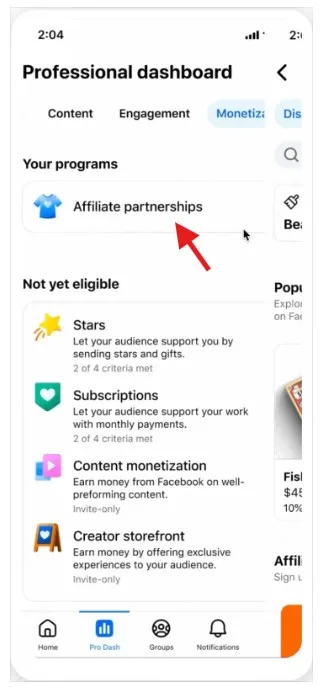
- Go to your Facebook Page or Professional dashboard.
- Open Monetization for posts or Earn Money for Reels.
- Select Affiliate partnerships.
- Search for the product you want or browse with Choose Products.
- Pick the product you want to feature.
- Click Create post and choose Add to new post or Add to new reel.
- Create your content, then click Next.
- For posts, select Monetization to confirm the affiliate link. For Reels, select Earn money.
- Publish by clicking Post or Share now.
On Mobile
- Create your reel, photo post, or text post as usual.
- Tap Next.
- Go to Monetization for posts or Earn Money for Reels.
- Tap Add product links.
- Paste the product URL, and optionally add a link name or promo code.
- Tap Save, then Share now or Post.
Meta requires branded content to carry the appropriate paid partnership label. Make sure your disclosures are clear. As the content is commercial, your audience should know that.
Best Content Formats for Affiliate Marketing on Facebook
Affiliate content works best when it feels useful, not salesy. A good rule of thumb is the 80/20 split: 80% of your posts educate or entertain, 20% promote. That balance keeps your audience engaged and makes them far more receptive when you do share a recommendation.
Some formats that tend to perform well:
- product reviews
- tutorials
- before-and-after demonstrations
- “top picks” lists
- comparison posts
- unboxings
- short-form video demos
- and Reels with a clear recommendation angle.
Video performs particularly well on Facebook, which makes Reels and short demos a strong fit for affiliate content. And where it makes sense, you can repurpose the same content across Facebook and Instagram to get more out of what you’ve already made.
Facebook Ain’t Dead
If you’ve written Facebook off as a platform that peaked years ago, the numbers tell a different story.
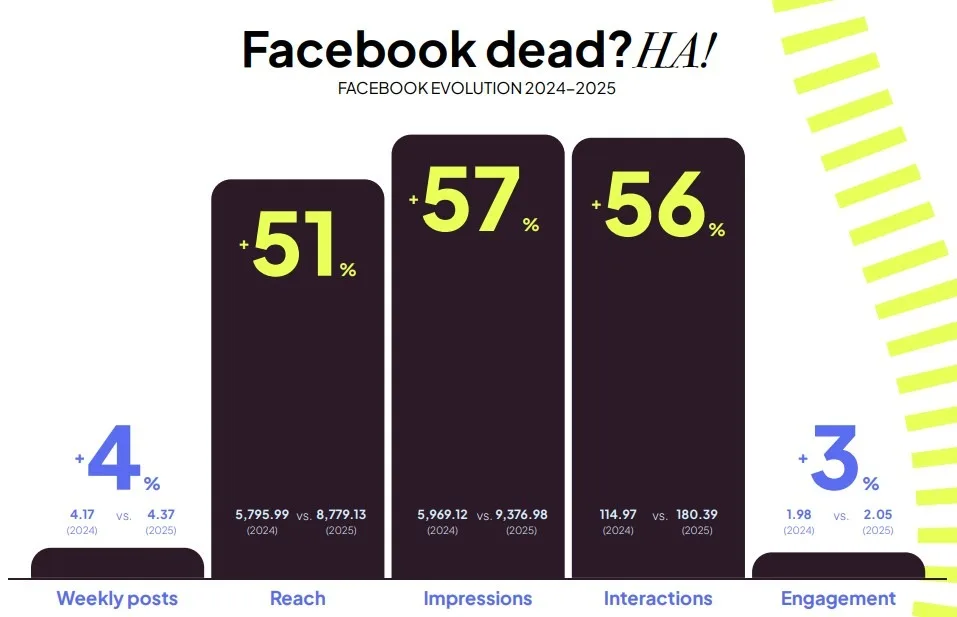
Based on data from Metricool’s Social Media Study 2026, Facebook has over 3 billion monthly users, making it the platform with the largest global reach. Reach, impressions and interactions all doubled in 2025 compared to the previous year. Video is driving most of the growth, with video posts increasing by 71%.
With rising metrics and easier ways to place affiliate links, Facebook affiliate marketing could be your next big opportunity, whether you’re just getting started or looking to add a new channel to an existing strategy.
Want to earn by recommending Metricool?
Check out our own affiliate program and start earning commissions for every new user you bring in.
FAQ
How much can I make a day with affiliate marketing?
There’s no fixed number. Beginners can realistically expect to earn between $0 and $1,000 per month in their first year, with most reaching around $300–$500 monthly by month twelve. From there, intermediate marketers typically earn $1,000 to $10,000 per month, and advanced marketers can reach $10,000 to $100,000. The average across all experience levels sits around $8,038 per month, but that number is heavily skewed by a small group of top earners. What actually moves the needle is your niche, the size and quality of your audience, and how consistently you show up.
How do I use affiliate links in Facebook Reels?
With Facebook Affiliate Partnerships, you can now add a native affiliate banner directly to your Reels without needing a link-in-bio workaround. You’ll need an account with one of Facebook’s affiliate partners (like Amazon or Shopee) connected to your Facebook profile. From there, go to your Professional Dashboard, open Earn Money for Reels, select Affiliate Partnerships, search for the product you want to feature, and add it to a new Reel. The banner will appear as a clickable overlay on your content, letting viewers tap through to the product page. A few things to keep in mind: your Reel must be longer than 10 seconds, the product needs to appear in the video, and you can only add one affiliate link per Reel. For the full step-by-step, check the “How to add affiliate products” section above.
Where can I promote affiliate links for free?
The majority of serious affiliates drive their traffic through free, organic channels, so you don’t need a budget to get started. The most effective free options besides your Facebook Page are your own blog or website, other social media platforms like Instagram, TikTok, Pinterest, and LinkedIn, YouTube videos and Shorts, email newsletters, and community platforms like Reddit and Quora where you can add genuine value before dropping a link.
