

Instagram Launches Content Protection to Fight Copycats
 Kata
19 November 2026
Someone reposted your Reel and passed it off as their own? Instagram now has a tool for that.
Content Protection has just been announced, a new feature that automatically flags when someone else posts a copy of your video on Instagram or Facebook.
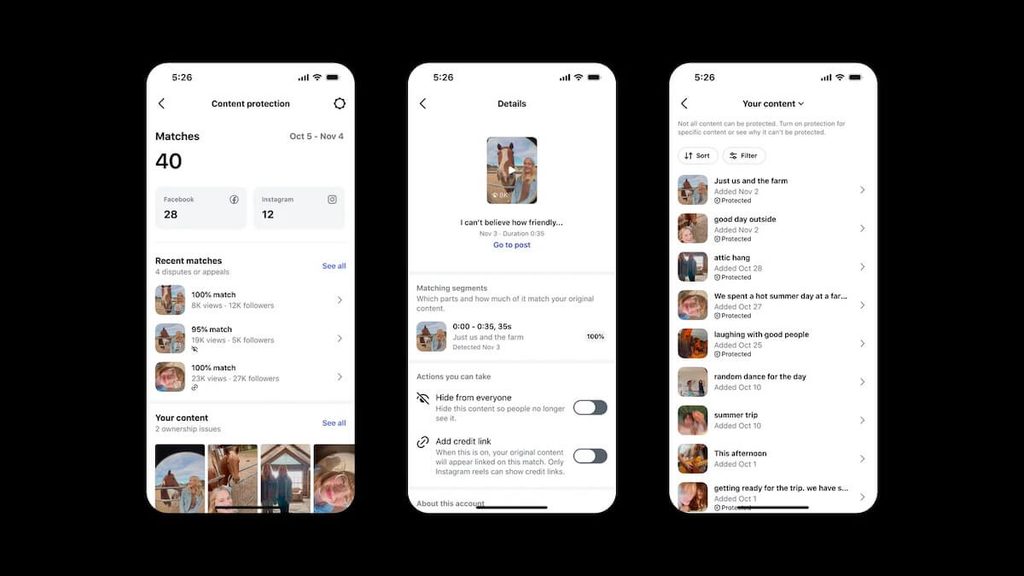
When it finds a match, you decide what happens: track how the copy performs, hide it, add credit back to your original, or leave it alone.
Meta is also testing ways to catch copies that are harder to spot, like videos that reuse your script with AI-generated footage swapped in.
What Is Instagram Content Protection?
Content Protection is a creator tool that scans Instagram and Facebook for videos that visually match yours. Once you turn it on, every new original video you post on Instagram is covered automatically. Older videos can be added manually.
If the tool finds a match, you’ll get a notification with the copied video.
What Happens When Instagram Finds a Copy
Content Protection doesn’t remove anything on its own. You choose one of four options:
- Track: The copy stays up, and you can see how it’s performing
- Hide: The video is no longer visible on Instagram or Facebook
- Add credit: An “Original from” label is added, linking back to your video or profile
- Release: You drop the claim, and the copy stays up with nothing showing it isn’t original
Track is the default, so change it in your settings if you’d rather handle copies another way. Before you choose, you can check details about the copy, like its views and how many followers the posting account has.
Hiding a copy limits its reach across Meta’s platforms, but the account that posted it isn’t penalized.
You can also set up an allowlist. If you’ve given a brand, a collaborator, or your second account permission to use one of your videos, Instagram won’t flag their post as a copy.
How to Turn On Content Protection
Want to switch it on right away? Here’s how. In the app, go to:
- Home
- Tools
- Professional tools
- Tap Content Protection to turn it on
If you have access, Instagram will also send you a notification.
From that tab, you can:
- Review the matches Instagram finds
- Manually add older videos you want to protect
- Choose whether to track, hide, credit, or release each copy
The feature is still rolling out, so you might not see it on your account yet.
AI-Generated Copies Are Next
Instagram’s announcement also hinted at where this feature is headed: AI copies.
With AI, someone can take your script, your words, even your personal stories, and turn them into a brand-new video that looks nothing like yours.
Instagram confirmed it’s testing a system that compares the spoken words in your original video, even when the visuals have been replaced with AI-generated content. That means the tool will eventually catch more than straight download-and-reupload copies.
Instagram Is Doubling Down on Original Content
Content Protection is Instagram’s latest step toward rewarding original creators.
Instagram had already updated its recommendation system to favor original content and show less from accounts that mostly repost other people’s videos.
