

LinkedIn Marketing Guide for Businesses 2026
 Sara Martín
04 May 2026
Sara Martín
04 May 2026 
LinkedIn is the leading professional social network. Beyond connecting with colleagues and scrolling through industry news, it’s a powerful platform for building your brand, finding new clients, hiring talent, and establishing authority in your field.
But if you’re only using it to accept connection requests, you’re not fully leveraging its potential.
LinkedIn is different from other social networks in one important way: everything here is built around the professional world. If you want to get the most out of it from a marketing perspective, here’s everything you need to build a LinkedIn strategy that works in 2026.
Getting Started With Your LinkedIn Strategy
Most people are on LinkedIn for one of two reasons:
▶️ They have a personal profile and are actively looking for a job or want to grow their personal brand.
▶️ They’re representing a company and want to increase its visibility and reach.
Either way, you’ll need a strategy to make it work. Here’s how to build one from scratch.
💡8 Tips to Grow Your LinkedIn Profile
Create your company page
Your LinkedIn Page is your brand’s window to the professional world. It’s where prospective customers, potential partners, future employees, and people interested in what you do come to learn more about your business.
📝 LinkedIn Guide for Beginners
These pages should help your marketing strategy and include all the relevant information about your brand or company. Take it as if it were your cover letter to capture the attention of future customers.
A LinkedIn company Page allows you to include updates to promote and show your audience the products or services that you are offering.
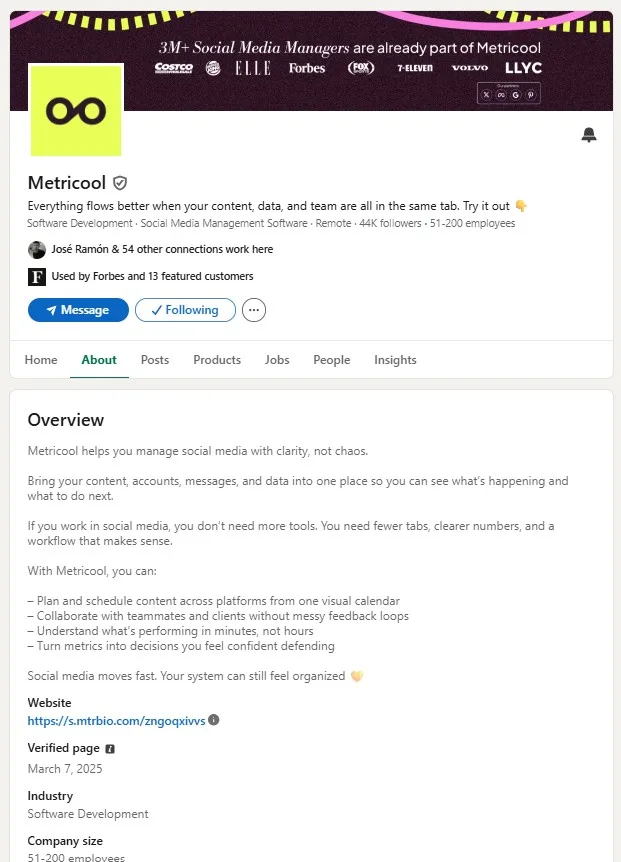
Having a LinkedIn Company Page brings a lot of advantages to your marketing strategy…
🔥 People interested in your company can learn more about it by entering your Page profile.
🔥 You can post job offers and hire new staff.
🔥 You can create a communication plan to introduce your products and services.
🔥 Help improve your content rankings and position on LinkedIn.
Personal Profile vs. Company Page
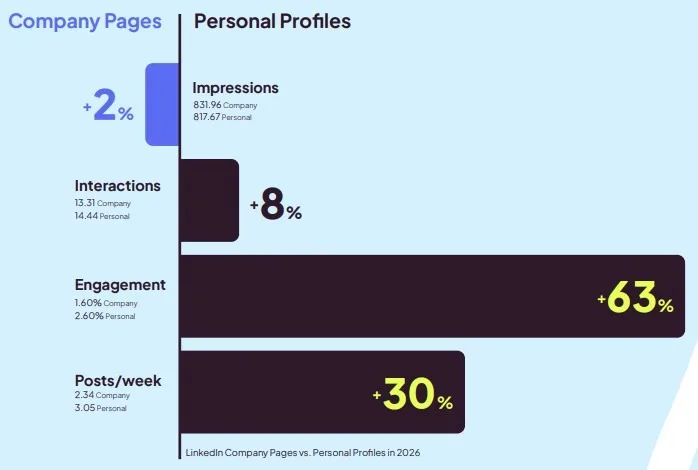
When we think about LinkedIn strategy, the Company Page is usually the first thing that comes to mind. But our recent data tells a different story.
If you’re deciding where to focus your energy — your Company Page or the personal profiles of your leadership team — the data points to personal profiles. In 2026, Personal Profiles generate 63% higher engagement than Company Pages at almost every account size. People comment on people, not on brands. That said, Company Pages get shared nearly 15x more, so the smartest strategy is using your personal profile to start conversations and your Company Page to amplify them.
In the next step, we will tackle how to optimize your account, improve the position of your page, and analyze how your industry competitors are doing.
Optimizing Your LinkedIn Profile
How can you optimize your LinkedIn page? There are a few actions you can focus on to make sure your profile accurately represents your brand, and that it clearly explains what your company does. You want to ensure that viewers are 100% clear about your brand’s purpose when visiting your page.
Strong Profile Picture
LinkedIn is a window to the professional world, a platform to interact with thousands of professionals and companies. This is why your image is crucial for your LinkedIn marketing strategy.
So, it’s necessary to have a profile picture that reflects your brand accurately, whether that’s a brand logo, professional headshot, or an image of your work in action. Whatever you think will best represent your brand, and encompass your brand identity.
Accurate ‘About’ Section
The ‘About’ section is where users find the key information about your company: your description, website, industry, company size, headquarters, and year founded. Keep it updated and make sure it reflects where your brand is today.
Work Samples, Collaborations, Projects
LinkedIn is where you can show off your professional work, so why not flex a little? Post your latest projects, collaborations, or campaigns. With LinkedIn, you can also pin posts to your LinkedIn page, so when viewers navigate to your Home page, they can see this content here.
Proper LinkedIn Image Sizes
Photos and videos are key for your LinkedIn marketing strategy. Each day more users prefer seeing photos over reading text, so your images, videos, and GIFs must be correctly sized
On LinkedIn, the main focus should be on the quality of your profile and content. Therefore, the images that accompany the content must be the right size to keep up with the quality of the content.
7 LinkedIn Marketing Aspects to Consider For Your Strategy
Once your LinkedIn profile is optimized it is time to take a step forward and stand out with your marketing strategy.
1. Understanding the LinkedIn algorithm
Like every social platform, LinkedIn uses an algorithm to decide what shows up in people’s feeds. Understanding how it works gives you a real advantage.
The algorithm has two main priorities: surfacing relevant content and promoting engagement. That means your content needs to be useful and specific to your niche — this isn’t the place for casual or off-topic posts.
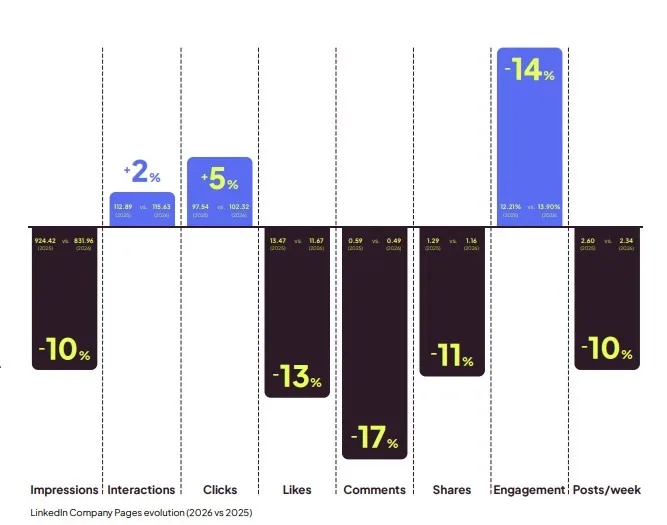
One thing worth knowing: not all engagement on LinkedIn is visible. According to Metricool’s latest LinkedIn Study, clicks on links, carousels, and videos all count as interactions and factor into your engagement rate, even if nobody pressed a like button. In 2026, clicks are up 5% while likes and comments are down, which means people are interacting with content more than the numbers suggest.
2. Increasing your engagement
Engagement is about getting your audience to interact with your content — likes, comments, shares, and replies. LinkedIn actively promotes content that drives engagement, so the more your audience interacts with your posts, the more visibility you get.
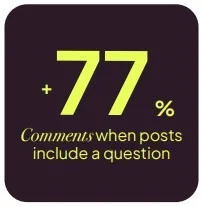
To make that happen, you need content that genuinely resonates. And two simple tactics backed by data make a real difference: posts that include a question get 77% more comments than those that don’t, and posts with a clear call to comment drive significantly more conversation too. If you want engagement, ask for it.
Two quick wins also worth knowing:
- Sharing links in Company Page posts doesn’t hurt reach. In fact, posts with links get 51% more impressions and 41% more interactions than those without. The link isn’t the problem; a weak post around it is.
- Posts with at least one hashtag get 85% more impressions on average, but keep it between 1 and 5 hashtags, and make sure each one is relevant to what you’re posting.
Do you want to know how to measure your engagement on LinkedIn?
🔧 How to Measure LinkedIn Engagement
3. Choosing the right content formats
This is where most LinkedIn strategies leave the most on the table. Image and video account for nearly 75% of all posts on the platform, yet carousels and multi-image posts consistently outperform them on interactions, engagement, and reach.
According to Metricool’s 2026 LinkedIn Study, carousels generate 11x more interactions than images, however, images are still posted 6x more often. Multi-image posts have the highest engagement rate of any format. And polls reach nearly 3x more people per post than any other format, despite being the least used of all. The gap between what most people post and what actually performs has never been wider.
Mix up your content formats. LinkedIn supports carousels, videos, articles, events, newsletters, polls, and documents. Use them, and track which ones your audience responds to most.
4. Improving your LinkedIn Social Selling Index (SSI)
LinkedIn SSI stands for Social Selling Index. What does this mean? LinkedIn gives an index to the accounts about how they position as a personal brand amongst the rest of users, that is, the position that LinkedIn considers that your brand occupies on people’s minds.
This index is a number based on 4 factors:
📌 If you have a complete profile
📌 If you are connecting with the right people
📌 Your LinkedIn activity
📌 Professional relationships and engagement
LinkedIn’s SSI is on a 0 to 100 scale, so ideally you want to have an SSI score of 75 or higher. Pay attention to this index because it can help you with your marketing strategy!
5. Posting job offers on LinkedIn
Are you looking to hire a new employee at your business? One way to find the best candidate is by posting your ad on the professional social network, LinkedIn. You can create new job listings by navigating to the “Jobs” section, and clicking on “Post a free job”. This will take you to a page where you can add the following information:
- Job title
- Company
- Workplace type
- Job location
- Job type
- Job description
6. Scheduling posts on LinkedIn
Consistency matters on LinkedIn, and scheduling your content in advance makes it a lot easier to maintain. With Metricool, you can plan and schedule your LinkedIn posts, set up content autolists, and keep your profile or company page active without having to post in real time every day.Timing matters more than most people realize. Half of a post’s lifetime impressions happen within the first 48 hours — and for Personal Profiles, nearly 40% of all interactions happen on day one. Publishing at the wrong time doesn’t just cost you a few impressions, it costs you the window where your post has the most momentum.
7. Copywriting for LinkedIn
Yes, that’s right, persuasive writing also has a place on LinkedIn, where you convert prospects into customers in the B2B world. By applying an excellent copywriting content strategy, you can succeed in the professional social network and attract new users to convert them into customers.
Of course, you will have to prepare your content well and think about which sections to apply it to: your profile, posts, or resume.
LinkedIn Ads: Give Your Content A Boost
LinkedIn also allows you to invest in ads to increase the visibility of your business and achieve your marketing goals.
This professional platform brings a great advantage for advertising: the possibility of segmenting your audience and therefore, reaching the public that is interested in you or your brand..
LinkedIn lets you make two types of ads:
1️⃣ Sponsored Content: To promote your company and increase your visibility.
2️⃣ Traditional ads: With texts and images, very popular to promote courses, webinars, ebooks, etc.
If you want to learn more about each type of LinkedIn ads and what you can use them for, click on the following article:
🔧 How to Launch LinkedIn Ads Campaigns
Analyzing Your LinkedIn Marketing Strategies
You won’t know how well your LinkedIn page is working if you don’t analyze the numbers. Analyzing your content is vital to understanding what content has worked best, so you can continue to improve your strategy and create content that is valuable for your audience.
Plus, if you don’t know if your strategy is profitable, this might be costly both in terms of time and money. To assess your LinkedIn strategy, you must know the social network well and measure all relevant parameters:
- Community growth
- Engagement
- Interactions
- Reactions
- Shares
- Clicks
- Top-performing content
Within Metricool, you have all of this data at hand. See how your profile has grown, how many people have clicked on your content, where your engagement rate sits, how many people have shared your content, and what posts have performed the best.
One more metric worth tracking: your content’s lifespan. Our data shows that by day three, most posts have already peaked on both impressions and interactions. If you’re not publishing at the right time, you’re giving up the window where your content has the most momentum.
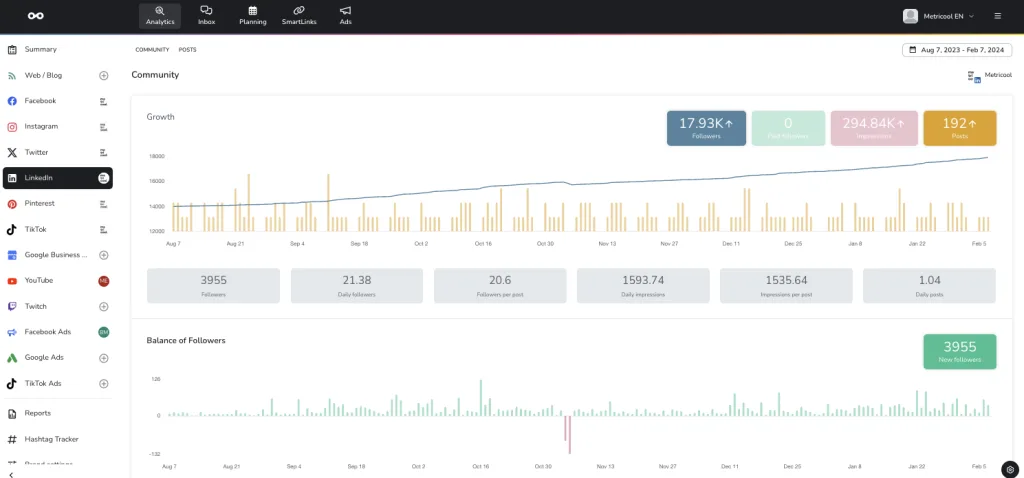
🔧 LinkedIn Analytics with Metricool
B2B Marketing on LinkedIn
Business-to-business, or B2B, marketing refers to a business’s process of promoting products and services to other companies to help them improve their operations. B2B marketing is very important and there are some key components to keep in mind when creating your strategy:
- Know your audience: Narrowing down your audience is very important to know their wants and needs to target the right group of people. LinkedIn offers a wide variety of professional targeting parameters.
- Analyze your competitors: Knowing who your competitors are is not enough, it is important to see what is working and not working for them and how you can do better.
- Set Objectives: Set clear and measurable goals that will drive your business revenue.
- Measure Success: LinkedIn offers very in-depth analytics for you to use on their Business Manager page where you can measure all of your efforts.
- Map out your customer’s journey: B2B content needs to reach the right people in the right context at the right time and right place. Consider: which topics they search, which platforms they utilize, etc.
- Form relationships: Emotion, trust, and real relationships are a vital part of B2B marketing. Rather than competing with other businesses, think about what brand collaborations and partnerships you can form for lasting relationships.
Here is everything about how to create a successful LinkedIn Marketing Strategy. Now is your turn to create one! Metricool is here to help you manage your LinkedIn account and any other social platforms you manage.
Note that LinkedIn connection with Metricool is a Premium feature, but also unlocks a variety of advanced features not available in the Free plan. View all our pricing plans here, and while you’re at it, go ahead and create your Metricool account!
