

5 Planable Alternatives for Social Media Management
 Kalum
25 June 2026
Kalum
25 June 2026 
Planable offers an appealing solution due to its visual mockup engine and interactive feed previews. Users enjoy the visual nature of drafting content on Planable, allowing internal staff and external stakeholders to review accurate depictions of future social media posts. However, some have felt the absence of deep analytical tracking, community management tools, and budget control. If you’re a social media manager or agency professional, you may be looking for Planable alternatives that can combine visual collaboration with advanced performance analysis. We’ve evaluated the top Planable competitors for teams operating on strict budgets or looking to minimize overhead, exploring their features, pros, cons and pricing.
What is Planable?
Planable is a social media collaboration and planning application built specifically to streamline the content review process. The software functions primarily as a visual mockup workspace where marketing teams, copywriters, and clients can gather to draft, comment on, and approve social media posts before they go live.
The system replaces traditional spreadsheets and text-heavy lists with an interactive design that replicates live social media channels. By providing contextual comment threads directly alongside draft image carousels, text blocks, and video files, Planable focuses on reducing feedback loops and eliminating email chains during the content production cycle.
Planable Features
- Multi-View Content Calendar: Allows teams to view their active content pipelines across four distinct layouts, including a standard monthly calendar view, a vertical list view, a multi-column campaign view, and an interactive grid layout.
- Pixel-Perfect Feed Mockups: Renders draft posts exactly as they will look on live mobile and desktop feeds, allowing users to verify text spacing, image cropping, and link formatting before publication.
- Contextual Collaboration Threads: Enables team members and clients to leave feedback comments, tag specific contributors, and attach edit requests directly onto individual social post cards.
- Multi-Level Approval Chains: Features four customizable approval options, including none, optional, required, and multi-stage paths that require explicit confirmation from designated stakeholders before a post can be scheduled.
Supported Platforms and Channels
- Facebook (Pages and Groups)
- Instagram (Business and Creator accounts)
- LinkedIn (Personal profiles and Company pages)
- X (Formerly Twitter)
- TikTok
- YouTube (including Shorts)
- Google Business Profile
Planable Pricing
- Free Plan: An introductory tier providing 1 workspace and a permanent total lifetime cap of 50 posts, allowing users to test the basic review interface with limited features. No analytics. 😲
- Basic Plan: Starts around $33 per workspace per month, restricting teams to 4 social pages and a maximum cap of 60 scheduled posts per workspace each month while offering 2 basic approval types.
- Pro Plan: Costs around $49 per workspace per month, increasing limits to 10 social pages and 150 scheduled posts per workspace each month while unlocking grid layouts and 3 approval types.
- Enterprise Plan: A customized tier featuring custom pricing for groups that require unlimited campaigns, multi-stage approval paths, and dedicated account management.
Why You Might Be Looking for Planable Alternatives
The primary reason professional teams seek out Planable alternatives is the platform’s restrictive pricing structure and feature segmentation. Because the core subscription is billed per individual workspace, teams managing a larger portfolio of clients face rapidly expanding software bills. If you manage 15 distinct brands, you must pay for 15 separate workspaces, causing your base fees to multiply quickly.
Furthermore, the strict caps on monthly post numbers within the Basic (60 posts) and Pro (150 posts) tiers present significant roadblocks for high-frequency campaigns. If you post multiple times per day across Facebook, Instagram, and LinkedIn, you will quickly exhaust your monthly post allowance, forcing an expensive plan upgrade.
User complaints also frequently highlight the weakness of Planable’s native analytics and community moderation. Because data tracking and inbox features require extra monthly fees per workspace, teams are forced to either accept high software costs or use external tools to pull performance reports and reply to customer comments. Finally, Planable provides zero support for tracking paid advertising metrics, meaning your organic post tracking and paid media campaigns remain completely disconnected.
Planable Alternatives
1. Metricool
Metricool operates as a comprehensive digital operations center that unites organic social media scheduling, deep data analytics, competitor benchmarking, and multi-network paid advertising management within a single interface. Built with an emphasis on visual scannability and deep data integration, the platform removes the hassle of jumping between separate apps, allowing marketing teams to execute multi-channel campaigns with complete financial and strategic transparency.
Metricool Features
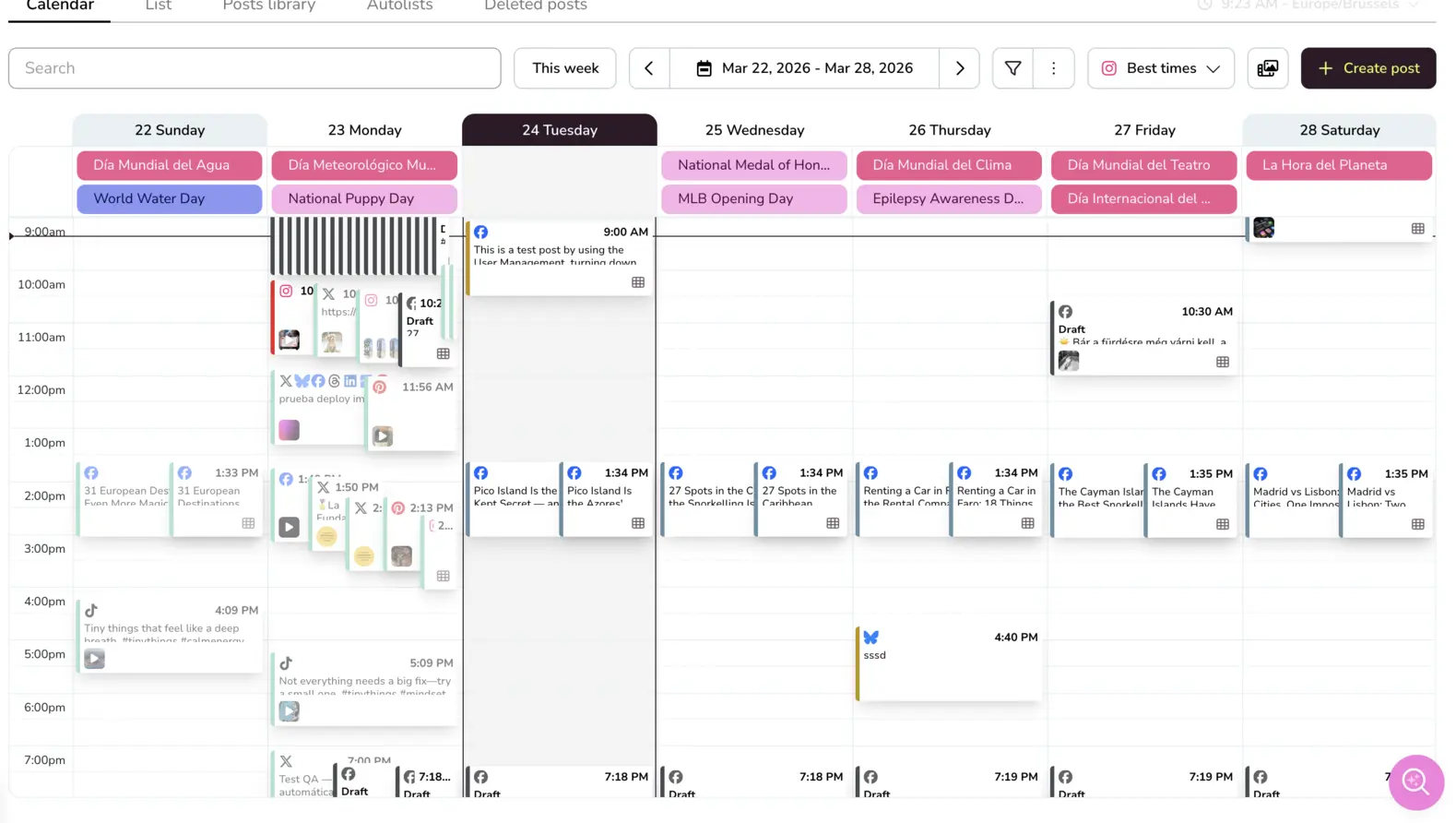
- Interactive Drag-and-Drop Calendar: Features a visual planning matrix equipped with a built-in best-times chart, showing exactly when your specific brand followers are active on each network.
- Unified Paid Ads Management: Consolidates live tracking, budget analysis, and conversion metrics for Meta Ads, Google Ads, and TikTok Ads directly alongside organic social data.
- Competitor Benchmarking Workspace: Allows users to track and analyze up to 100 rival digital profiles simultaneously, monitoring their follower changes, active hashtags, and top content ideas.
- Centralized Moderation Inbox: Gathers direct messages, profile mentions, organic comments, and public business reviews into an assignable workspace equipped with custom tracking labels.
- Automated Data Studio Connectivity: Streams live, continuous channel performance metrics directly into external corporate dashboards, bypassing the limits of traditional static reports.
Best for: Metricool is built for social media managers, growing digital marketing groups, independent freelancers, content creators, and multi-brand corporate operators who need highly accurate data analysis and a predictable billing structure that scales cleanly with business growth.
Supported Platforms & Channels
- Instagram (Business and Creator accounts)
- Facebook (Pages and Groups)
- TikTok (Personal and Business profiles)
- LinkedIn (Personal profiles and Company pages)
- X (Formerly Twitter)
- YouTube (Channels, Shorts, and Videos)
- Google Business Profile
- Twitch
- Personal Websites and Blogs (via native tracking code or WordPress plugin)
Metricool Pricing
Metricool provides a permanent Free Plan that includes 1 complete brand bundle, detailed data tracking, a 30-day performance history, and scheduling capabilities for up to 20 posts per month. Premium subscription tiers (Starter, Advanced, and Enterprise) scale predictably based on the absolute number of brands managed, allowing unlimited team access seats on higher tiers without charging extra per-user or per-workspace fees.
- Free
- 1 brand
- Manage all your brands’ social networks (except LinkedIn and Twitter)
- Schedule up to 20 posts per month
- Analyze 5 competitor profiles
- Access 30 days of analytics
- AI social media assistant
- Starter – from $20/month
- Includes everything in the FREE plan, plus:
- Manage up to 10 brands
- Unlimited content publishing*
- Analyze up to 100 competitors
- Access to the X add-on
- Access to the Advanced Analytics add-on
- LinkedIn connection
- Limited access to Campaign Dashboards and Metricool Studio
- PDF and PPT reports
- Multiple link-in-bio
- Analytics with unlimited history
- Google Drive and Canva integration
- Advanced – from $53/month
- Includes everything in FREE and STARTER plans, plus:
- Manage up to 50 brands
- Team and client management
- Role management
- Post-approval system
- Complete Twitter/X analytics
- Customizable report templates
- Data Studio connector
- Metricool API (Zapier, Make, and MCP)
- Custom
- Includes everything in FREE, STARTER, and ADVANCED plans, plus:
- Custom number of brands
- Metricool integration in your business
- White Label
- Dedicated account manager
- Custom AI assistant credits
Metricool vs Planable
The primary difference between Metricool and Planable centers on the balance between content drafting and post-publishing performance tracking. Planable functions excellently as a visual sketchpad and approval network for internal teams, but its capabilities largely stop once a post goes live. Metricool, by contrast, provides a complete workflow loop, offering both an intuitive visual scheduling calendar and an advanced data analytics engine that tracks what happens after publication.
From a financial perspective, Planable’s per-workspace billing structure can quickly become a budget drain for expanding operations. Managing 10 brands on Planable Pro means multiplying that workspace rate 10 times, and adding analytics and engagement tools to those workspaces increases the cost even further. Metricool’s flat, brand-based tiers offer an affordable upgrade path, making it one of the top Planable alternatives for teams looking to protect their margins. Choose Metricool when your workflow requires deep audience analysis, competitor insights, integrated paid ad tracking, and predictable flat-rate pricing.
2. Loomly
Loomly is a structured social media management platform focused on content planning, optimization assistance, and team collaboration. The software helps creators build posts by providing automated post ideas, trending topic notifications, and real-time optimization tips that flag missing links or formatting errors as you type. Loomly also provides dedicated step-by-step approval paths, customizable notification triggers via Slack or Microsoft Teams, and an interactions feed for community message management.
Best for: Loomly is best suited for small to mid-sized corporate communication departments and in-house marketing teams that need structured publishing workflows and want to avoid strict per-user fees.
Supported Platforms & Channels
- Facebook (Pages and Groups)
- Instagram (Business and Creator accounts)
- LinkedIn (Profiles and Company pages)
- X (Formerly Twitter)
- TikTok
- YouTube (Shorts and Videos)
- Google Business Profile
- Threads
- Mastodon
Loomly Pros
- Built-in post ideas and optimization checklists that keep content quality high
- Generous user seat limits on entry plans
- Native notifications via Slack and Microsoft Teams.
Loomly Cons
- The user interface leans heavily on text lists and lacks a true pixel-perfect feed preview
- Analytics dashboards do not include paid advertising performance tracking
- Lacks advanced social listening features
Loomly Pricing
Loomly has 3 pricing models:
- Starter – $49/month
- 12 social accounts
- 3 users
- Unlimited calendars
- AI Assistant chat
- Scheduling
- Approval workflows and roles
- Advanced analytics
- Link shorteners
- Beyond – $249/month – All starter features plus:
- 60 social accounts
- Unlimited users
- Unlimited calendars
- Custom branding
- Custom roles & workflows
- Hashtag manager
- Calendar 2FA enforcement
- Enterprise – Custom pricing – All beyond features plus:
- 61+ social accounts
- Unlimited users
- Unlimited calendars
- Priority support
- “Friendly pricing at scale”
Loomly vs Planable
Loomly and Planable both target team collaboration, but they structure their operational dashboards differently. Planable focuses on a visual mockup feed, making it a great fit for teams focused on visual styling. Loomly takes a more structured, list-and-calendar approach, guiding users through a step-by-step creation process that includes custom optimization tips and content ideas before moving posts into the approval queue.
When evaluating these Planable competitors on cost, Loomly’s billing structure scales more predictably for multi-brand management. Instead of charging a separate fee for every workspace you create, Loomly’s plans give you a total pool of social accounts and user seats to distribute however you like. This flexibility allows you to manage multiple small brands under a single flat monthly price, whereas Planable forces you to buy separate workspace slots for each one. Choose Loomly if your team needs built-in post suggestions and structured, step-by-step collaboration paths.
3. SocialBee
SocialBee is a specialized social media scheduling automation tool built around category-based content organization and evergreen post recycling. SocialBee’s standout asset is its evergreen recycling engine, which automatically republishes timeless updates over time, keeping feeds active without requiring manual daily scheduling.
Best for: SocialBee is an ideal match for bloggers, podcasters, software companies, and online marketers who maintain a large library of timeless educational content and want to drive ongoing organic website traffic automatically.
Supported Platforms & Channels
- X (Formerly Twitter)
- TikTok
- YouTube
- Google Business Profile
- Bluesky
SocialBee Pros
- Highly effective evergreen content recycling that maximizes the lifespan of your posts
- Automated bulk importing via RSS feeds and CSV files
- Direct publishing support for alternative channels like Bluesky.
SocialBee Cons
- The interface is text-heavy and has a steeper learning curve than visual schedulers
- Lacks interactive visual grid planning tools
- Analytical reports lack deep custom modification options
SocialBee Pricing
SocialBee has two separate pricing models, targeted at different types of users. Standard, “for solopreneurs, small businesses, social media managers, teams and agencies”, has the following price plans:
- Bootstrap – $24/month:
- Up to 5 social profiles
- 1 user per workspace – 1 workspace
- 10 content categories
- 10 content sources
- Unlimited AI content generation
- Analytics up to 3 months of data
- Accelerate – $40/month – Everything in Bootstrap, plus:
- Up to 10 social profiles
- 1 user per workspace – 1 workspace
- 50 content categories
- 30 content sources
- Analytics up to 2 years of data
- Advanced analytics
- Hashtag organizer
- Bulk post editor
- CSV uploads
- Post-approval system
- Pro – $82/month – Everything in Accelerate, plus:
- Up to 25 social profiles
- 3 users per workspace – 5 workspaces
- Unlimited content categories
- Unlimited content sources
- Export analytics reports
- Internal notes
SocialBee’s Agency price plans are separated by the number of social profiles you are managing; all other features are identical in all 3 plans.:
- Pro50 – $149/month:
- Connect up to 50 social profiles
- 5 users per workspace – 10 workspaces
- Unlimited content categories
- Unlimited content sources
- Unlimited AI content generation
- Hashtag organizer
- Bulk post editor
- CSV uploads
- Post-approval system
- Advanced analytics
- Analytics up to 2 years of data
- Export analytics reports
- Internal notes
- Pro100 – $274/month
- Pro150 – $374/month
SocialBee vs Planable
The structural split between SocialBee and Planable represents a clear choice between linear content scheduling and automated recycling loops. Planable is designed for linear scheduling: your team creates a specific post, routes it through approvals, schedules it for a single time slot, and the post leaves the active queue once published. SocialBee is built to prevent this repetitive work by turning your content pipeline into an ongoing loop, automatically sending recycled posts back to the end of the line so they can bring in more traffic later.
In terms of workspace focus, Planable prioritizes the design and collaboration phase with interactive feed mockups and real-time comment threads. SocialBee sacrifices these visual previews to focus on automation speed, offering features like “Spintax” to generate caption variations and automated RSS feed distribution. If your primary challenge is managing a constant stream of manual client reviews, Planable is the better tool; however, if you want to automate your publishing calendar using a permanent library of high-value content, SocialBee is a strong choice among Planable alternatives.
4. Agorapulse
Agorapulse is a premium social media management platform focused on deep community moderation, advanced social listening, and detailed performance tracking. The platform features an enterprise-grade unified inbox that transforms organic comments, direct messages, and brand mentions into an organized, trackable ticketing system. Team leaders can automatically assign specific tickets to individual team members, apply custom filters to block spam, and monitor staff response times down to the minute to maintain high customer service standards.
Best for: Agorapulse is designed for established corporate marketing departments, large customer support teams, and busy groups that manage high volumes of daily incoming messages and require absolute control over internal workflows.
Supported Platforms & Channels
- X (Formerly Twitter)
- YouTube
- TikTok
- Google Business Profile
Agorapulse Pros
- Top-tier community moderation inbox with advanced automated filtering rules
- Detailed social listening data
- Professional social ROI dashboards that connect with Google Analytics to track actual website conversions.
Agorapulse Cons
- High entry price point that can strain smaller marketing budgets
- Pricing scales per individual user seat, making team expansion expensive
- The interface can feel intimidating to casual users
Agorapulse Pricing
- Standard Plan – $79 per user, per month:
- Unlimited publishing
- Centralized inbox
- Branded reporting
- Professional Plan – $119 per user, per month: Includes everything in the Standard tier, plus:
- Expanded publishing toolbox
- Paid comment moderation
- Team coordination
- Advanced Plan – $149 per user, per month: Includes everything in the Professional tier, plus:
- Workflow automation
- Shared content calendars
- Upgraded analysis
- Custom Plan – Tailored Pricing: Includes everything in the Advanced tier, plus:
- Unlimited scaling
- Enterprise collaboration
- Full reporting control
- Dedicated account infrastructure
Agorapulse vs Planable
Agorapulse and Planable operate at different ends of the social media management lifecycle. Planable is built to streamline the pre-publishing phase, providing a collaborative environment for drafting and approving content before it goes live. Agorapulse focuses heavily on the post-publishing phase, offering robust tools for community moderation, social listening, and tracking return on investment once your content is out in the world.
This functional difference shows clearly in their interface designs. Planable uses visual feed grids and mockup cards to facilitate quick client sign-offs. Agorapulse uses data charts, message ticketing feeds, and social listening boards to track brand sentiment and response times. Furthermore, their pricing models scale differently: Planable charges per workspace, while Agorapulse charges per individual user seat. Choose Agorapulse over Planable if your primary business challenge is handling a high volume of customer service messages and pulling advanced performance reports, rather than managing creative content approvals.
5. Hootsuite
Hootsuite is one of the most established platforms in the social media management industry, featuring a classic multi-stream dashboard and deep corporate utility tracking. The software allows users to build highly customized monitoring dashboards made up of side-by-side columns that track live search queries, specific hashtags, competitor activities, and profile timelines simultaneously. Hootsuite also includes built-in social listening features through Talkwalker integrations, centralized asset libraries for brand compliance, and advanced multi-channel analytical reporting engines.
Best for: Hootsuite is built for large, established enterprise organizations, corporate marketing groups, and public institutions that need deep social listening streams and formal performance reporting, and have the budget to support premium software.
Supported Platforms & Channels
- X (Formerly Twitter)
- TikTok
- YouTube
Hootsuite Pros
- Highly customizable stream boards that provide deep, real-time social listening capabilities
- Long-standing history of API stability
- Comprehensive data reporting options built for corporate presentations
Hootsuite Cons
- No monthly billing options available, requiring a significant upfront fee (although you can cancel anytime)
- Per-user seat pricing makes it exceptionally expensive to add team members
- The column-based interface can feel cluttered compared to modern calendars
Hootsuite Pricing
- Standard – $99/user per month
- up to 10 social media accounts
- Schedule unlimited social posts*
- Generate posts and images with AI
- Respond to messages from one inbox
- Monitor your brand and competitors
- Professional – $199/user per month – Everything in Standard, plus:
- Unlimited social accounts
- Automate inbox replies and workflows
- Forecast social trends up to 90 days ahead
- Build custom performance reports
- Advanced – $399/user per month – Everything in Professional, plus:
- Review and approve content with your team
- Assign and auto-route messages to the right team members
- Coordinate content and customer care
- Measure team performance and efficiency
- Enterprise – Custom – Everything in Advanced, plus:
- Prove the impact of social with advanced analytics
- Uncover trends across social, digital, and AI with advanced listening
- Secure access with single sign-on (SSO)
- Stay compliant with custom compliance solutions
Hootsuite vs Planable
The comparison between Hootsuite and Planable highlights a clear contrast between a legacy enterprise system and a modern, collaboration-first tool. Hootsuite’s core design is built around its classic column-based stream view, which is excellent for monitoring live web conversations and tracking multiple hashtag feeds at the same time. Planable rejects this text-heavy layout, focusing instead on an interactive calendar and visual feed mockups that prioritize quick content drafting and client sign-offs.
Financially, the two platforms follow entirely different models. Planable charges based on individual workspaces, making it highly accessible for small teams managing a handful of core clients. Hootsuite requires an annual commitment starting at $99 per month for just one user seat, and adding extra team members forces you onto their $249 per month Advanced plan. However, for large organizations that need deep social listening tools and formal performance analytics, Hootsuite offers robust backend capabilities that Planable’s review-focused tool does not provide. Choose Hootsuite if your organization needs deep social listening and advanced corporate reporting over visual feed drafting.
Comparing Planable Alternatives
| Management Tool | Free Tier Availability | Primary Account Billing Model | Paid Advertising Integration | Data Reporting Capabilities | Main Operational Focus |
| Planable | Restricted (50 lifetime post limit) | Per-Workspace Slots (Surcharges for extra client workspaces) | None (Organic metrics only) | Paid Add-on ($14/mo per workspace) | Pixel-perfect live feed mockups and multi-stage client approval chains |
| Metricool | Permanent Free Plan (1 Brand Bundle included) | Flat Brand Bundles (Group all of a client’s channels under 1 slot) | Comprehensive (Meta, Google, and TikTok Ads) | Custom PDF & PowerPoint + Live Data Studio Streams | Integrated organic publishing, paid ad tracking, and competitor audits |
| Loomly | Limited Free Trial Only | Flat Account Pools (Fixed limits for accounts and seats) | None (Organic metrics only) | Standard Performance PDF Exports | Step-by-step content optimization tips and native Slack notifications |
| SocialBee | Limited Free Trial Only | Flat Account Pools (Fixed limits for accounts and seats) | None (Organic metrics only) | Basic Performance Charts | Category-based content automation and evergreen post recycling loops |
| Agorapulse | Limited Free Tier Option | Per-User Seat Licenses (Costs scale per team member) | Basic Google Analytics ROI Tracking | Detailed PPT Reports + Social ROI Dashboards | High-volume community inbox ticketing and team message routing |
| Hootsuite | Limited Free Trial Only | Per-User Seat Licenses (Requires annual contract) | Basic Paid Impression Data | Advanced Custom Report Component Builders | Multi-stream monitoring dashboards and integrated corporate listening |
