

5 SocialPilot Alternatives for Social Media Management
 Kalum
24 June 2026
Kalum
24 June 2026 
For many growing teams, SocialPilot became an early choice for handling high-volume text and link distribution due to its bulk scheduling tools and affordable starting price points. However, you may now be one of the many marketers looking for socialpilot alternatives that offer modern dashboard experiences, unified paid ad tracking, and more collaborative client approval chains.
We’ve evaluated the top industry options to help you align your operational infrastructure with your business growth and financial goals. For teams operating on restricted budgets, finding the right social media management tool can have huge advantages. Let’s get into it.
What is SocialPilot?
SocialPilot is a dedicated social media scheduling and publishing tool built primarily to help professionals distribute online content across multiple networks simultaneously. Established as a high-volume utility, the platform focuses on stripping away complex dashboard elements to give users a fast, direct pathway for queueing up text updates, link shares, and media assets.
The application organizes connected social channels into clean, list-based frameworks, allowing users to apply specific publishing schedules to different account groupings. By offering client onboarding features and basic white-label PDF reports on its higher tiers, SocialPilot positions itself as an operational engine for teams that need to handle a large footprint of digital accounts without the enterprise pricing models associated with legacy software platforms.
SocialPilot Features
- Bulk Scheduling Engine: Allows content managers to upload a single CSV or text spreadsheet containing up to 500 formatted posts, complete with links and publication times, to populate calendars instantly.
- Content Curation Feed: Features a built-in content discovery module that searches the web for trending articles based on specific industry keywords, allowing users to add relevant external links to their publishing queues.
- Branded Client Portals: Provides a secure onboarding portal where external stakeholders can connect their social channels directly to the software without sharing their private passwords or administrative login credentials.
- Native RSS Feed Integration: Automates link distribution by linking external blog feeds directly to social queues, ensuring new website articles publish to social profiles automatically upon release.
Supported Platforms and Channels
SocialPilot supports direct publishing and scheduled distribution across a standard line-up of modern digital channels:
- Facebook (Pages and Groups)
- Instagram (Business and Creator profiles)
- LinkedIn (Personal profiles and Company pages)
- X (Formerly Twitter)
- Google Business Profile
- YouTube (including Shorts)
- TikTok
SocialPilot Pros
- Upload up to 500 formatted posts at once
- Built-in content discovery module
- Secure onboarding portal for external stakeholders
SocialPilot Cons
- Clunky layout
- Inaccurate post previews
- Bulk scheduling only available on most expensive tiers
- No ads analytics
SocialPilot Pricing
- Essentials – $25.50/mo – Built for professionals who work independently:
- 7 Social Media Accounts
- 1 User
- 500 AI Credits
- Content Library
- Tags
- Extra Accounts – $4 per month info-icon
- Standard – $42.50/mo – Designed to empower SMBs and small teams:
- 15 Social Media Accounts
- 3 Users
- 1000 AI Credits
- Social Media Inbox
- Analytics
- Team Collaboration
- Manager Approval
- Extra Accounts – $4 per month info-icon
- Additional User – $5 per month
- Premium – $85.00/mo – Built for growing agencies who want to scale.
- 25 Social Media Accounts
- 6 Users
- 5000 AI Credits
- Bulk Schedule
- Advanced Analytics
- Client Approval
- White Label Reports
- Extra Accounts – $4 per month info-icon
- Additional User – $5 per month
- Ultimate – $170.00/mo – Designed for established agencies and multi-location brands.
- 50 Social Media Accounts
- Unlimited Users
- Unlimited AI Credits
- Advanced Security
- Advanced White Label
- Dedicated Account Manager
- Migration & Onboarding
- Extra Accounts – $4 per month info-icon
- Enterprise – Custom pricing – For enterprises that want to go above and beyond pre-made plans and need custom solutions.
- Includes API Access and Single Sign-On (SSO).
- Custom Accounts
- Unlimited Users
- Unlimited AI Credits
- Unlimited Clients
- Dedicated Account Manager
- Migration & Onboarding
- Single Sign-On (SSO)
- API Access
Why You Might Be Looking for SocialPilot Alternatives
The primary reason professionals look for socialpilot alternatives is the platform’s functional layout, which many users find uninspiring and clunky compared to modern design standards. The visual post preview engine often fails to render exactly how content will look live on modern networks like Instagram or TikTok, forcing managers to double-check their work on native apps.
Additionally, the software enforces hidden functional barriers across its subscription tiers. For instance, the signature bulk scheduling tool is heavily restricted or locked behind more expensive tiers, meaning a business can be forced into an upgrade long before they exhaust their profile limits.
User complaints also highlight the platform’s social inbox, which can struggle to process high volumes of real-time comments and direct messages efficiently. Finally, SocialPilot provides zero integration for paid advertising metrics, meaning your organic output and paid campaigns remain completely separated unless you manually export data into external spreadsheets.
SocialPilot Alternatives
When analyzing the marketplace for alternative options, it becomes clear that different platforms excel at solving distinct operational challenges. Finding the perfect match depends on whether your team prioritizes deep analytical intelligence, pixel-perfect visual previews, automatic content recycling, or modular channel-by-channel pricing.
1. Metricool
Metricool functions as a comprehensive digital operations center that unifies content planning, community management, competitor benchmarking, and multi-channel paid ad tracking into a single, sleek screen. Developed with a focus on data clarity and visual simplicity, the platform eliminates the need for multiple open tabs, allowing teams to run multi-brand campaigns with complete operational transparency.
Metricool Features
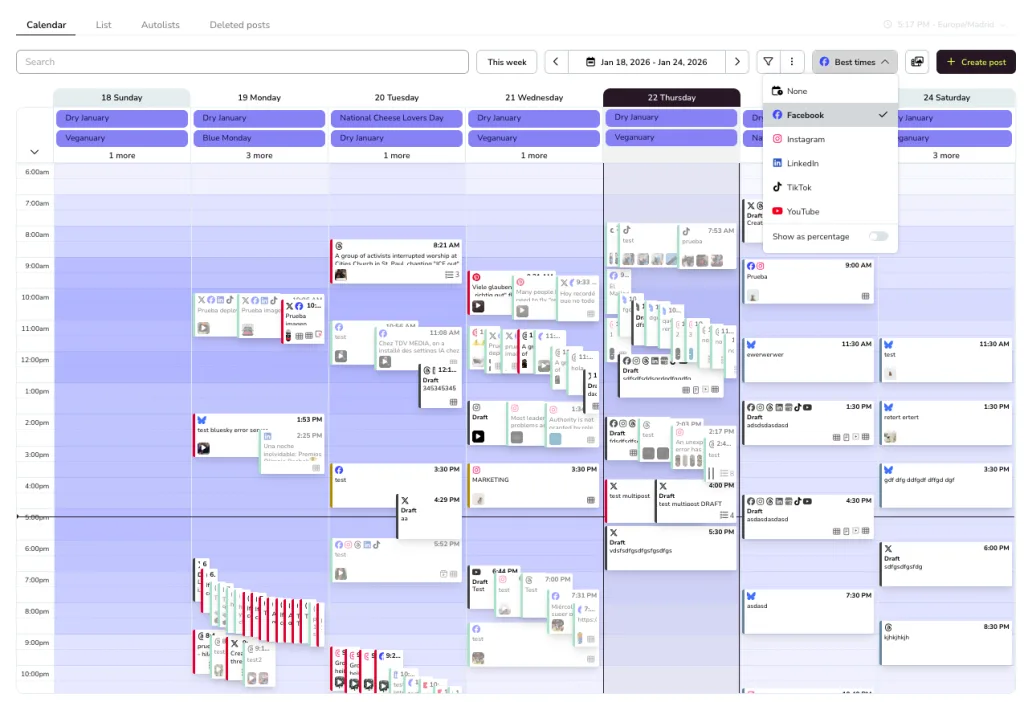
- Unified Drag-and-Drop Planner: Features a highly visual content calendar equipped with a real-time best-times overlay, indicating exactly when your specific audience is online for maximum immediate engagement.
- Integrated Paid Ads Tracker: Consolidates performance tracking for Meta Ads, Google Ads, and TikTok Ads directly alongside your organic social data to present a complete view of your marketing return.
- Competitor Audit Workspace: Allows managers to monitor up to 100 rival digital profiles simultaneously, tracking their audience growth rates, posting frequencies, and top-performing content formats.
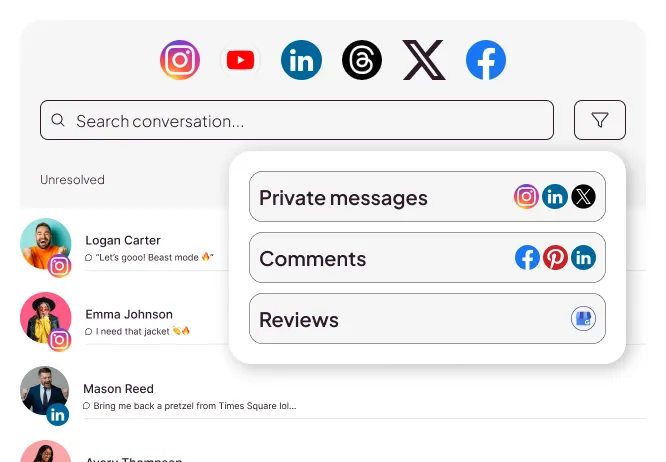
- Smart Inbox Moderation: Unifies direct messages, customer reviews, and organic comments into an assignable ticketing feed that supports fast community resolution.
- Automated Data Studio Connectivity: Streams live, continuous performance data directly into external dashboard frameworks, bypassing the limitations of traditional static PDF reports.
Best for: Metricool is built for social media managers, growing digital agencies, independent freelancers, content creators, and multi-brand operators who require absolute data accuracy and an affordable, predictable method for scaling their businesses.
Supported Platforms & Channels
- Instagram (Business and Creator accounts)
- Facebook (Pages and Groups)
- TikTok (Personal and Business profiles)
- LinkedIn (Personal profiles and Company pages)
- X (Formerly Twitter)
- YouTube (Channels, Shorts, and Videos)
- Google Business Profile
- Twitch
- Personal Websites and Blogs (via native tracking code or WordPress plugin)
Metricool Pricing
Metricool provides an entry-level Free Plan that supports one complete brand bundle, including detailed analytics tracking, a 30-day data history, and scheduling for up to 20 posts per month. The premium plans (Starter, Advanced, and Enterprise) scale predictably based on the absolute number of brands you manage rather than charging hidden fees for individual feature updates or user seat expansions.
Metricool vs SocialPilot
The core difference between Metricool and SocialPilot centers on content visualization and data depth. SocialPilot treats content scheduling as a text-heavy queuing process, whereas Metricool centers your day around an interactive visual calendar. Metricool’s live-render engine displays your posts exactly as they will appear on user screens, reducing formatting mistakes and ensuring your visual branding remains consistent across every network.
From an analytical standpoint, Metricool operates on a level that SocialPilot cannot match. SocialPilot is strictly limited to organic content metrics, while Metricool integrates your paid ad accounts across Meta, Google, and TikTok. This integration allows your team to analyze organic growth alongside paid campaign returns on the same dashboard screen. Additionally, Metricool’s ability to export customized performance data directly to editable PowerPoint files or live Data Studio streams provides a professional corporate presentation that outshines SocialPilot’s basic PDF templates. Choose Metricool when you need a modernized, high-velocity dashboard built for data-backed growth.
2. Planable
Planable is an asset management option designed entirely around real-time team collaboration, visual feedback loops, and multi-tier approval pipelines. The platform replaces traditional list-based entry screens with a fully interactive mockup workspace that mirrors live social feeds. Team members and external stakeholders can leave contextual comments, tag colleagues, request copy edits, and apply formal approval signatures directly onto the post asset itself, creating a highly collaborative review environment.
Planable Features
- Live feed previews
- Real-time client comments
- Bulk posting
- Unified content calendar
Best for: Planable is best suited for visual design studios, creative marketing groups, boutique content production teams, and corporate departments that require an error-free, highly visual system to clear media assets with stakeholders before publication.
Supported Platforms & Channels
- X (Formerly Twitter)
- YouTube
- TikTok
- Google Business Profile
Planable Pros
Highly intuitive, pixel-perfect feed previews that require zero training for external clients; real-time conversational comment threads attached directly to media files; fast approval workflows.
Planable Cons
Analytical reporting tools are exceptionally basic; they lack deep social listening metrics and unified inbox tools for handling high-volume customer service requests.
Planable Pricing
- Free: 50 total posts, limited experience, no access to X, no analytics.
- Basic: $39/month (or $33.50/month paid annually) per workspace for 4 social sets, unlimited users, up to 60 monthly uploads (per workspace), and 2 types of approval.
- Pro: $59/month (or $49/month paid annually) per workspace for 10 social sets, unlimited users, 150 monthly uploads (per workspace), and 3 types of approval.
- Company: A fully personalized plan at a variable price.
Planable vs SocialPilot
Planable and Sendible solve completely different problems within the social media management lifecycle. Sendible is built as an all-in-one operational system that attempts to balance publishing, community moderation, and analytical report building. Planable intentionally leaves out deep community inbox management and advanced report generation to focus entirely on building a frictionless, visual content approval workspace.
3. Later
Later is a visual-first scheduling and asset-organization platform built with a deep historical emphasis on aesthetic imagery and short-form video planning. The application features a centralized media library where users can upload, tag, and categorize high-quality images and video files before dropping them onto a visual calendar canvas. It also includes an interactive Instagram grid preview tool, a customizable link-in-bio page builder, and user-generated content curation tools that find high-performing social assets via creator tags or hashtag lists.
Later Features
- Centralized media library
- Interactive Instagram grid preview
- customizable link-in-bio page
- User-generated content curation tools
Best for: Later is an ideal match for visual lifestyle brands, e-commerce stores, individual content creators, influencers, and boutique social media managers whose primary marketing channels are Instagram, TikTok, and Pinterest.
Supported Platforms & Channels
- TikTok
- X (Formerly Twitter)
- YouTube
- Snapchat
Later Pros
Top-tier visual grid planning for aesthetic platforms; strong built-in media editing tools; excellent link-in-bio customization options that drive website traffic.
Later Cons
Monthly post volume caps exist on lower-paid tiers; poor integration with text-focused networks like LinkedIn; lack of deep corporate reporting options.
Later Pricing
- Starter: $18.75/month: 1 social set, schedule up to 30 posts, link in bio, 90 days of analytics
- Pro: $37.50/month: Everything in Starter plus social inbox, schedule up to 180 posts per profile, 50 AI credits /month, up to 1 year of analytics, UGC collection, custom roles and permissions.
- Scale $82.50 Everything in growth plus custom analytics, competitive benchmarking, future industry insights, brand health, brand Mentions, unlimited scheduling, 100 AI credits /month, up to 2 years of analytics, priority support
Later vs SocialPilot
The comparison between Later and SocialPilot highlights the clear split between visual asset management and text distribution. SocialPilot’s interface is built to handle link shares and text updates across business networks, making it a functional choice for industry content curation. Later, by contrast, is completely optimized for visual assets, offering drag-and-drop media pools that make it simple to curate an attractive, cohesive Instagram grid.
SocialPilot calculates plan usage by counting every single profile connection individually, whereas Later enforces the Social Set model. If you manage a client who only uses Instagram and TikTok, Later forces you to absorb the cost of an entire multi-channel set, whereas SocialPilot allows you to link those two profiles directly. However, for visual brands, Later’s link-in-bio conversion features and asset tagging tools are far more advanced than SocialPilot’s basic publishing tools.
4. Recurpost
RecurPost is a specialized automation scheduler designed to maximize the lifespan of evergreen marketing content through automated loop distribution. The software operates on a content library framework, where users sort their text updates, promotional offers, and educational resources into distinct thematic categories. The system then automatically recycles and republishes these assets over time based on custom queue rules, ensuring your social media feeds remain consistently active without requiring manual daily scheduling.
Recurpost Features
- Content library
- Best times to post
- AI assistance
- Analytics
Best for: RecurPost is built specifically for podcasters, bloggers, online educators, software companies, and marketers who maintain a massive library of timeless, high-value content assets that need to be shared repeatedly with their audience.
Supported Platforms & Channels
- Facebook (Pages and Groups)
- LinkedIn (Profiles and Pages)
- X (Formerly Twitter)
- Google Business Profile
- YouTube
- Bluesky
Recurpost Pros
Powerful evergreen content recycling tools that save significant scheduling time; excellent time-slot customization options; support for emerging networks like Bluesky.
Recurpost Cons
The interface can feel rigid and complex to configure initially; analytics overviews lack advanced corporate depth; limited visual asset enhancement features.
Recurpost Pricing
- Starter: $9/month: 2 social sets, schedule up to 10 daily posts, recurring & one-off posts, best-time scheduler, text & image editors, link-preview, URL shortener, multiple images upload.
- Personal: $25/month: Everything in Starter, plus: 5 social profiles (extra $4 each), 20 daily posts/social profile, social platform-specific features, seasonal libraries, tweet variations, custom fields, chrome extension
- Agency: $79/month: Everything in Personal, plus: 20 social profiles (extra $4 each), 80 daily posts/social profile, dd social profiles through ext. Invite, workspaces, internal and external approval workflow, more than 10 AI features, analytics reports.
- Enterprise: Custom pricing: Everything in Agency, plus: custom social profiles (Min. 100), custom daily posts/social profile, workspaces, internal and external approval workflow, more than 10 AI features, analytics reports, reduced prices for bulk add-on features.
Recurpost vs SocialPilot
While both tools are built to handle high-frequency publishing, RecurPost and SocialPilot manage the creation process through entirely different structural frameworks. SocialPilot operates as a linear scheduling queue; once a post goes live on your profile, it is removed from the active queue, requiring you to manually re-upload or duplicate the asset if you want to share it again later.
RecurPost eliminates this repetitive work by turning your content pipeline into a self-sustaining loop. By organizing your updates into asset libraries, RecurPost automatically pushes older posts back to the end of the line after they publish, ensuring your evergreen content continues to generate organic traffic automatically. Choose RecurPost over SocialPilot if your marketing strategy relies on squeezing maximum ongoing value out of a permanent library of informational content assets.
5. Buffer
Buffer is a long-standing, highly user-friendly social media management platform built around a clean, modular product architecture. The application separates its core functionality into three distinct modules: Publishing (for calendar layout and asset distribution), Analytics (for historical performance tracking and report compilation), and Engagement (for monitoring and responding to community interactions). This modular design allows users to interact with a distraction-free screen optimized entirely for the task at hand.
Buffer Features
- Scheduling
- Analytics
- Content approval workflows
- Hashtag manager
Best for: Buffer is best suited for independent freelancers, small businesses, startup marketing teams, and boutique operators who require a clean, reliable scheduling tool and want to avoid paying for massive enterprise packages they don’t use.
Supported Platforms & Channels
- X (Formerly Twitter)
- TikTok
- YouTube
- Google Business Profile
- Threads
- Mastodon
Buffer Pros
Highly polished, distraction-free user interface; incredibly flexible pay-as-you-grow pricing model; early adoption support for newer networks like Threads and Mastodon.
Buffer Cons
Costs can scale up rapidly if you manage a large volume of profiles across multiple clients; advanced analytics and team collaboration tools require moving to higher paid tiers.
Buffer Pricing
- Free: 3 social channels, 10 scheduled posts, 1 user account, basic analytics
- Essentials: $5/month per channel: Everything in Free, plus: unlimited scheduling, AI assistance, advanced analytics, community inbox, hashtag manager.
- Team: $10/month per channel: Unlimited team members and scheduling, API access, Access levels, approval workflows
Buffer vs SocialPilot
The comparison between Buffer and SocialPilot highlights a clear contrast between design philosophies and billing models. SocialPilot uses a feature-heavy, text-heavy dashboard that includes multiple internal modules on a single screen. Buffer, by contrast, focuses heavily on a minimalist user experience, providing a clean calendar layout that reduces user distraction and shortens the onboarding curve for new employees.
The financial difference is equally clear. SocialPilot forces you into fixed billing brackets where you pay for a block of account connections, even if you only use a fraction of them. Buffer’s modular, per-channel pricing model means you pay only for the exact channels you connect to the dashboard. If you are managing a small operation with a handful of core accounts, Buffer’s pricing and robust free plan offer far better financial alignment than SocialPilot’s entry tiers. Choose Buffer if you prioritize an intuitive, minimalist user experience with flexible, channel-by-channel pricing control.
Comparing SocialPilot Alternatives
| Management Tool | Free Entry Availability | Account Metric Calculation | Advertising Campaign Integration | Performance Document Options | Primary Strategic Focus |
| SocialPilot | None (14-day trial only) | Per-Profile Cap (individual channels) | None (Organic metrics only) | Basic PDF Summary Reports | High-volume linear text and link bulk distribution |
| Metricool | Permanent Free Plan (1 Brand included) | Flat Brand Bundles (unlimited channels per client) | Comprehensive (Meta, Google, TikTok Ads) | Highly Custom PDF & PowerPoint + Data Studio | Integrated organic data, paid ad tracking, and competitor auditing |
| Planable | Free Trial (50 total post lifetime cap) | Per-Workspace / Per-User Scaling | None (Organic metrics only) | Basic Performance Tables | Pixel-perfect live feed previews with real-time comments |
| Later | Highly Restricted Free Plan | Social Set Packages (1 per platform) | None (Organic metrics only) | Standard Performance Overviews | Visual grid curation, asset tagging, and short-form video |
| RecurPost | None (14-day trial only) | Per-Profile Cap (individual channels) | None (Organic metrics only) | Basic Data Dashboards | Automatic looping and recycling of evergreen content libraries |
| Buffer | Functional Free Plan (Up to 3 channels) | Per-Channel Modular Pricing | Basic Paid Impression Data | Modular Report Component Blocks | Minimalist calendar planning and flexible channel scaling |
