



You Can Now Edit an Instagram Story After Posting
 Gretchen Oestreicher
20 November 2026
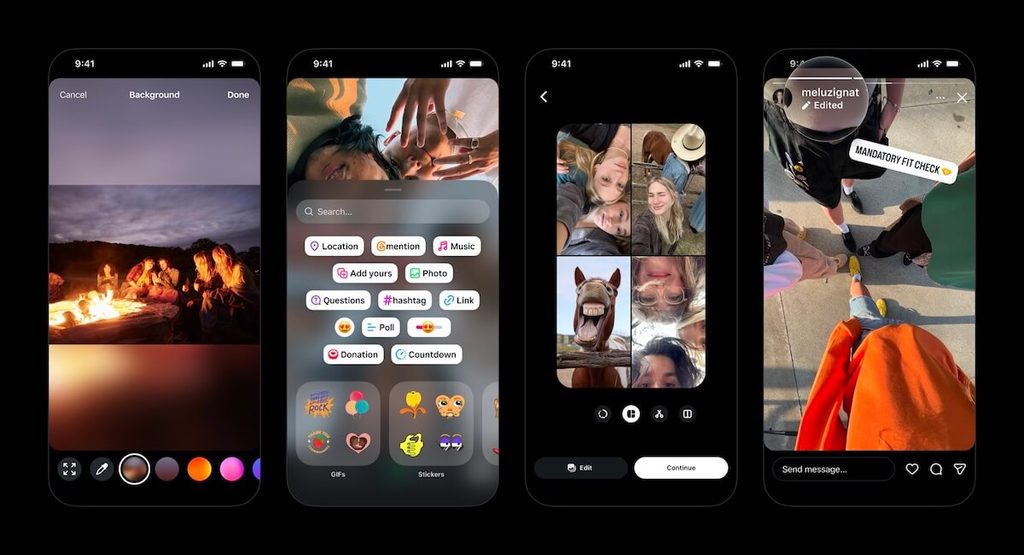
Instagram is rolling out a feature that lets you edit an Instagram Story for up to 15 minutes after you share it. You can change the text, music, stickers, and drawings without deleting anything, and the Story keeps the views, likes, and replies it has already collected. Instagram head Adam Mosseri announced the update on November 18. It comes with three smaller changes to how you build Stories.
What You Can Change After Posting a Story
Story editing covers everything you add on top of your photo or video. Within the 15-minute window, you can correct a typo or a hashtag, add or swap the song, remove a sticker you placed by mistake, and change your drawings. The edited Story keeps the same audience as the original.
Once you edit a Story, it shows an “Edited” label in the top right corner. The label keeps corrections visible to your viewers. If you change something that people act on, like a price or an event time, add a short note in your next slide. That way, anyone who saw the first version knows about the change.
Mosseri said the update came from user requests, writing that “a lot of people have been asking for this.” Instagram had been working on it for months. Reverse engineer Alessandro Paluzzi spotted an early version in April, and some users saw a limited test in May.
How to Edit an Instagram Story
You edit a Story from the Story itself, so there’s no need to open the camera and start over. Within 15 minutes of posting, follow these steps:
- Open the Story that you want to change.
- Tap the three-dot “More” button in the bottom right corner.
- Select “Edit story.”
- Change the text, music, stickers, or drawings.
- Save your changes.
If you don’t see the option yet, give it a few days. The feature started rolling out on November 18 and may take time to reach every account.
What to Check Before You Edit a Story
Most Stories can be edited, but a few details change what happens when you do. The main limits on Story editing are:
- The Photo or Video Itself: Instagram’s announcement covers the text, music, stickers, and drawings on top of your photo or video. Swapping the photo or video itself isn’t part of the update. If you uploaded the wrong clip, deleting the Story and posting it again is still the safest fix.
- Facebook Shares and Some Stickers: Instagram says editing isn’t available on Stories that you cross-posted to Facebook or that contain certain stickers. It hasn’t listed which stickers yet, so give those Stories a final check before you share them.
- Existing Reshares: Editing removes any reshares that the Story already has. If a brand partner or a customer has shared your Story to their own, let them know so they can share the corrected version.
Why Story Editing Helps Brands and Creators
Stories launched in 2016, and for over a decade the only way to fix one was to delete it and post it again. That reset its views, likes, and replies to zero. You’ve been able to edit captions on feed posts and Reels for years, so Stories now work more like the rest of the app.
People are interacting with Stories more than they did a year ago. Story replies are up 88% compared with 2025, and exits have dropped by more than 6%. Since editing keeps a Story’s replies, you hold on to those conversations when you fix a mistake.
Sequences caused an even bigger headache, because Stories play in the order you post them and a reposted slide jumps to the end. If you shared a five-slide product launch and then spotted the wrong discount code on slide two, fixing it meant the launch played out of order. With editing, the corrected slide stays where you put it.
The 15-minute limit matches the window that Instagram gives you to edit DMs and comments. It’s long enough to catch a typo you spot right after posting, so check each Story as soon as it goes live.
Who Benefits Most from Story Editing
Story editing helps anyone who posts Stories, but it saves the most work for people whose Stories are tied to results or deadlines. Those people usually fall into one of these groups:
- Social Media Managers and Agencies: When a client spots a typo on a live Story, you can fix it and keep the views it has collected so far. Your monthly report then shows the whole sequence with consistent numbers, since no slide had to start again from zero.
- Creators with Brand Partnerships: Sponsored Stories usually end up in a report for the brand you’re working with. If you forgot to include #ad or got a campaign detail wrong, you can fix it within 15 minutes and keep the views that go into that report.
- Small Businesses: Local businesses often use Stories for information that changes every day, like opening hours, class times, or today’s specials. A yoga studio that posts the wrong start time for an evening class can correct it in the same Story before more people see the mistake.
Three More Updates to Instagram Stories
Story editing is one of four Stories upgrades that Instagram announced at once. The other three change how you build a Story before you post it:
- Easier Multi-Select: A new layout option makes it simpler to choose several photos and arrange them in one Story.
- Backgrounds for Any Photo Size: Photos that don’t fill the vertical Story frame get new background options, including blur, solid colors, and gradients.
- Fresh Stickers: Stickers have new fonts, colors, and shapes, and the redesigned sticker sheet is easier to browse.
Plan and Track Your Instagram Stories with Metricool
With Metricool’s Planner, you can schedule your Instagram Stories, feed posts, and Reels ahead of time in the same calendar. If you have an Instagram business or creator account, Metricool can publish your Stories automatically. Automatic publishing covers most Stories, except those with elements that Instagram’s API can’t publish, like some links or interactive stickers. For Stories that need one of those, you can schedule them and get a notification to finish publishing from the Instagram app.
Either way, the Story goes live on your account like any other, so you can edit it within the same 15-minute window. However, if a Story goes out while you’re in a meeting or away from your phone, that window can pass before you see it. Scheduling ahead gives you time to read every slide and check the order of a sequence before anything goes live. The edit window then works as a backup for anything you miss.
Once your Stories are live, Metricool’s Instagram analytics track each one in the same dashboard as your posts and Reels. You can see which Stories get the most views and interactions, then use those results in your reports and your next content plan.
Manage Your Instagram Stories in One Place
Plan, schedule, and track every Instagram Story alongside the rest of your content with Metricool.