

Can Facebook Scan Your Camera Roll? Here’s What You Need to Know
 Kata
02 June 2026
Kata
02 June 2026 
Facebook lets you opt in to AI-powered camera roll suggestions. But before you do, it’s worth understanding exactly what you’re agreeing to. The feature surfaces photos and videos you’ve taken and turns them into suggested edits and collages you can then share on Facebook. It started rolling out in the US and Canada in late 2025 and has since expanded to the EU and UK. More countries are expected to follow.
If you haven’t come across it yet, here’s exactly what it does, how it works, and what to watch out for before giving it access.
What Is This Feature About?
This Facebook tool surfaces photos and videos from your camera roll and suggests creative edits and collages, even from images you’ve never uploaded to Facebook. According to Meta, the suggestions are designed to make it easier to share everyday moments without having to spend time creating something from scratch.
The key detail: suggested collages can include photos straight from your camera roll, including ones you’ve never posted anywhere. That’s what makes it worth taking a closer look into before opting in.
How Does It Work?
The feature is optional. When you go ahead and create a Story, a pop-up asks whether you want to “allow cloud processing to get creative ideas made for you from your camera roll”. If you decline, Facebook has no access to your photos.
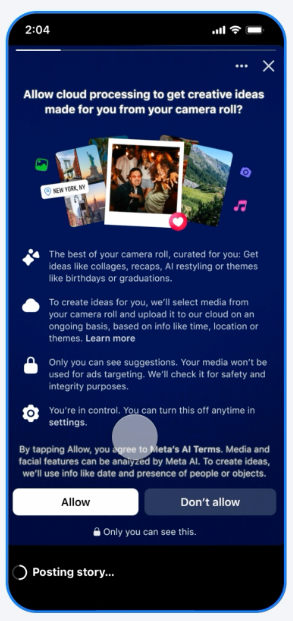
But if you do opt in, you agree to Meta’s AI Terms and Services, which means the selected images from your camera roll are uploaded to Meta’s cloud where the AI scans them to generate suggestions for edits or collages. You may see these recommendations appear in Stories, Feed, and Memories – a Facebook bookmark – for you to review privately before deciding what to share.
Meta spokesperson Mari Melguizio confirmed to The Verge:
“This means the camera roll media uploaded by this feature to make suggestions won’t be used to improve AI at Meta. Only if you edit the suggestions with our AI tools or publish those suggestions to Facebook, improvements to AI at Meta may be made.”
In short: your private photos won’t be used to train Meta’s AI unless you actively edit or share them.
You can manage or disable the feature at any time in your Facebook camera roll settings.
Can Facebook Access My Camera Roll Without Permission?
No; this feature requires explicit opt-in. Without your consent, Facebook cannot access your camera roll.
Meta has also confirmed that photos and videos from your camera roll are not used for ad targeting, and are not used to improve AI at Meta unless you choose to publish or share them in interactions with a Meta AI feature.
This distinction matters for social media managers and creators handling sensitive content: Meta cannot train AI models on your private photos automatically. Only images you actively edit or share fall under that possibility.
Where Is It Available?
Facebook’s camera roll suggestions feature has rolled out in the following regions:
- United States and Canada: October 2025
- EU and UK: April 2026
- More countries expected to follow
Should You Opt In?
That depends on your workflow. If you regularly create Stories or want a quicker way to turn camera roll photos into shareable content, the feature can save time. The privacy protections are clearly stated: no ad targeting, no AI training unless you choose to share.
If you manage a brand account or handle sensitive content professionally, it’s worth reviewing your Facebook camera roll settings before enabling it and making sure anyone else with access to the account understands how the feature works.
Either way, the opt-in requirement means nothing happens without your explicit choice. If you change your mind after enabling it, you can turn it off at any time from your camera roll settings.
How to Check Your Facebook Camera Roll Settings
Whether you want to enable the feature, review what you’ve already agreed to, or turn it off, here’s where to find it.
There are two separate levels of camera roll access on Facebook. It’s worth knowing the difference before changing anything:
- Basic camera roll suggestions: Facebook uses metadata from your photos (when they were taken, which ones you’ve favorited, media type) to suggest what to share while you browse. No photos are uploaded to the cloud.
- Camera roll cloud processing: A separate, additional opt-in that uses Meta AI to generate customized creative edits and collages from your actual photos.
You can turn either on or off at any time. Here’s how:
From Settings:
- Tap Menu in the top left of Facebook
- Tap Settings & privacy, then tap Settings
- Below Preferences, tap “Camera roll sharing suggestions”
- Turn “Get camera roll suggestions when you’re browsing Facebook” on or off
When creating a Story:
- Tap Create at the top of Facebook, then tap Story
- In the top right, tap Settings
- Tap Camera roll settings
- Turn “Get camera roll suggestions when you’re browsing Facebook” on or off
When creating a post:
- Tap “What’s on your mind?” at the top of Facebook
- In the bottom left, tap Gallery
- In the top right, tap Settings
- Turn “Get camera roll suggestions when you’re browsing Facebook” on or off
📝 Note: If you use Facebook on multiple devices, your camera roll suggestions setting applies to all devices on which you’ve granted Facebook camera roll access. You can also control what the Facebook app can access in each device’s individual settings.
