

Facebook Rolls Out Your Algorithm to Let Users Shape Feeds
 Kata
16 October 2026
Kata
16 October 2026 
Facebook has been teasing users with more personalisation options for a while. And now it’s rolled out “Your Algorithm” that lets you choose the kind of content you want to see in your Feed and Reels and what you’d rather skip entirely.
What is Your Algorithm on Facebook?
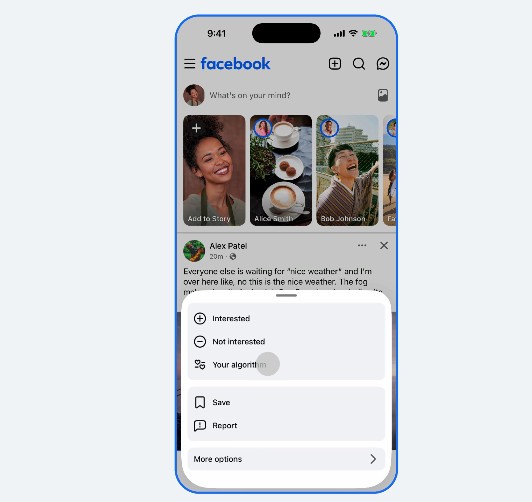
It’s an AI-powered recommendation system that lets you pick the topics that show up in your Feed and Reels. You’ll find it in the three-dot menu of any post. “Your Algorithm” sums up the topics you’ve been into lately, based on your recent activity and interactions on Facebook, and lets you add new ones to an “Interested in” and “Not interested in” box.
Your Algorithm landed on Instagram first. Meta tested and launched it there earlier and has tweaked it a couple of times since, adding new ways for people to take back control of their feeds.
New Feedback Options
Besides adding topics and removing the ones you’ve lost interest in, Facebook has added more ways to give feedback.
Say you come across a post that really annoys you. You can tap “Not interested”, and the system may ask a few follow-up questions to get your preferences right. You can then describe in your own words what you didn’t like about the post. Facebook says its recommendation engine updates your preferences in real time.
More Personalization as a Social Media Trend
For many people, social media feels like a predetermined stream of endless posts rather than a feed that reflects their interests. Remember when your friends’ birthday party pictures were the first thing you saw when you opened Facebook? Once algorithms took control, those days seemed gone for good. But people want more control, and apps are responding with features like Your Algorithm on Instagram and now Facebook, Dear Algo on Threads or Your Custom Feed on YouTube.
For social media managers and creators, the takeaway is to position yourself and your brand clearly within your niche and stay focused on your key audiences. That way, the algorithm is less likely to put your content in a box where it doesn’t belong.
To learn more about how Facebook’s algorithm works in 2026, check out our guide:
