

Product Updates – August 2026
 Kalum
26 August 2026
Kalum
26 August 2026 
Metricool Studio and Campaign Dashboards
Metricool Studio
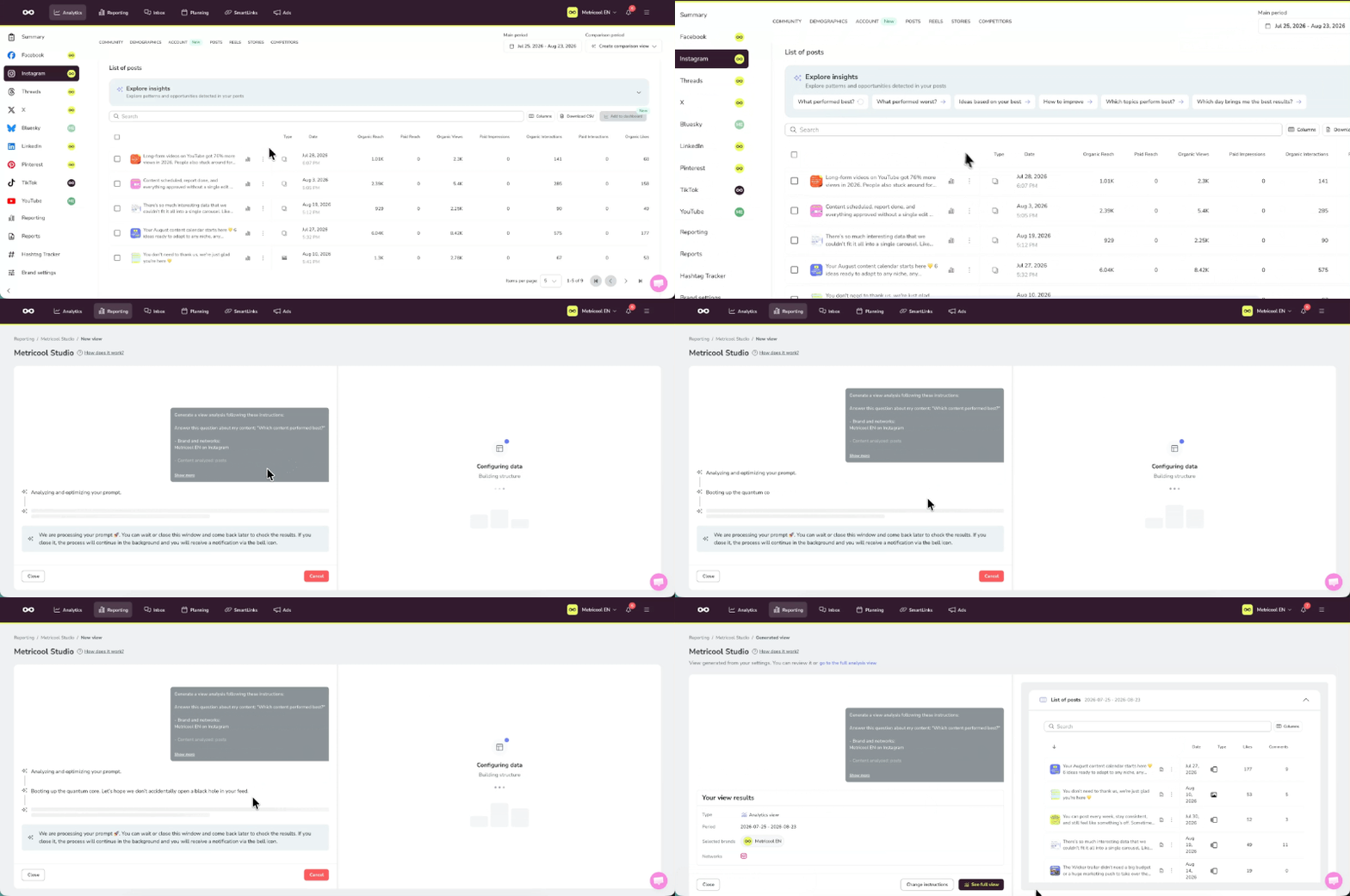
- Explore insights straight from your Analytics tables: A new button, “Explore insights”, sits above your tables. Open it and pick a question: which content performed best, which performed worst, what patterns keep coming up, which format drives the most engagement, what you should be posting more of, or what has changed compared to the previous period. Metricool Studio builds the view with the answer and opens it in a new tab, with no need to go step by step or prompt from scratch mode.
- New top content visualization: Answers now show your standout posts as cards with a thumbnail, a title and the key metrics (engagement, views, reach and saves), instead of a list of numbers.
- A helper bar for writing prompts in expert mode: Below the text field you can see what makes a good prompt (brand, networks, period, and the type of chart or text). Metricool Studio spots each element as you type and marks it in green with what it found.
- Error notifications now take you to the affected view: One click and you are exactly where the problem happened.
Metricool Studio now handles SmartLinks questions reliably: On their own or combined with a social network (Instagram + SmartLinks, for example). You can also find SmartLinks templates now.
Campaign Dashboards
- See all your content with all of its metrics: The top posts block gets a new “View posts” button, which opens a subpage with every piece of content published in the dashboard (posts, reels and stories) and every metric Analytics stores. You get tabs per network, a filter by content type, a column selector to choose which metrics you see, and sorting by any column. Anyone opening the public link sees exactly the same list.
- Advertising content with its metrics: Google Ads, Meta Ads and TikTok Ads now show up in those same tables, right next to the organic networks.
Kanban Board in Library and More Control Over Posts
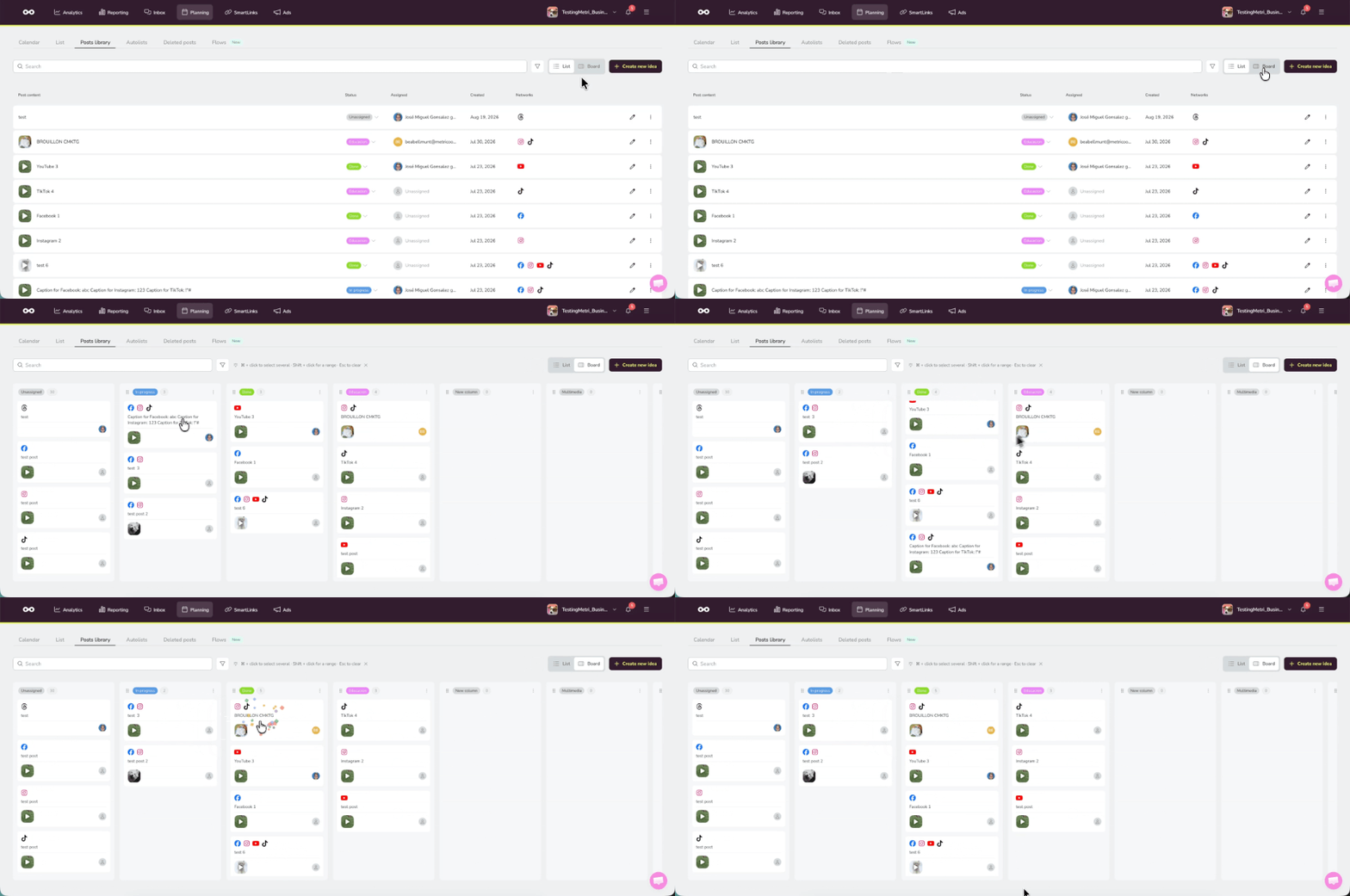
- Kanban board view in the post Library: One column per status in your brand’s workflow. Drag a card to change its status, or hold Ctrl (Windows) or Cmd (Mac) to move several at once. Every change is logged in the post history, and you can assign posts to other people to work on them together.
- The Library goes from 50 to 250 posts per brand: A higher limit on every plan. Five times more room for your bank of content ready to publish.
- External reviewers can now comment without rejecting (Advanced only): In the approval portal, reviewers can leave a comment on any post, whether they approve it or not, and you see it in real time. No more rejecting a post just to suggest a small change.
- Label your content as AI-generated: A new selector when you create posts for Instagram (image, reel or carousel), TikTok Business and YouTube.
- Facebook now supports up to 35 images: Your posts can carry up to 35 images, up from 10.
- Recurring scheduling, redesigned: Two tabs, “Step by step” and “Prompt from scratch”, just like in Metricool Studio. Whatever you set up in Step by step is kept when you switch tabs, so you never start over.
- “Duplicate to other brands” got smarter: If the target brand doesn’t have one of the original post’s networks connected, you now choose whether to skip that network (the default) or include it anyway.
- Preset ratios in Resize: Pick 1:1, 1.91:1, 16:9, 4:3 and more, and the width and height fill in on their own with the ratio locked while you edit an image.
- Instagram trial reels in CSV: The downloadable template now supports this post type. You can also add the column that decides how the reel is shared with your followers once the trial period ends.
- Rich text in Planner notes and Inbox: Notes now support bold, italics, headings, bulleted and numbered lists, and links, using the same editor as the dashboard insights.
New Metrics and Tables Built Your Way
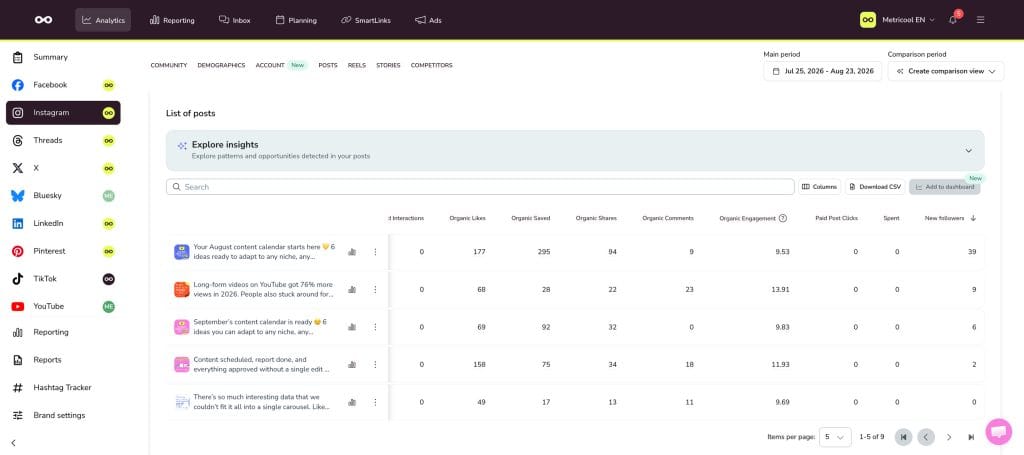
- Reorder the columns in your analytics tables: Drag a header and drop it wherever you want. Your order is remembered per brand and per table, and the menu takes you back to the default order whenever you like.
- New followers metric on Instagram: In the content analytics for your feed posts, you can now see how many accounts started following you because of that specific post.
- Followers timeline on X: The X posts section now includes a chart of followers gained and lost per post, so you can see at a glance how each one moved your follower count.
- A saves card in X engagement: Saves now sit next to likes, reposts and replies, and they count towards the engagement chart, its tooltip and the total.
Connecting X is available on the Starter plan and above by adding the X add-on.
Other Important Updates
Metricool
Consistent dropdowns across the whole site
Text fields, dropdowns, text areas and autocomplete fields now follow a single design, with the same states everywhere, and labels always sit outside the field.
Brand settings
AI instructions only for the networks you have connected
In Brand settings, AI configuration, the custom instructions per social network now only show the networks connected to that brand. Connect a new network and its block appears on its own, disconnect one and it is hidden, but your instructions are saved in case you connect it again. General instructions stay visible at all times.
If you’ve got questions about your account or Metricool, check out our Help Center or hit us up in the chat.
Remember that you can always send your feedback, we really read it all! We use it to decide our next steps 👀
