

Social Media Management with Claude: The Complete Guide
 Kalum
04 September 2026
Kalum
04 September 2026 
For years, social media managers have been the bridge between creative ideas and technical execution, spending hours manually moving text from a document into a scheduling tool, or checking spreadsheets to figure out which post actually performed well. In 2026, that friction is disappearing.
With the arrival of the Model Context Protocol (MCP) and sophisticated AI models like Claude, the relationship between your strategy and your tools has changed. Why stress yourself out with the heavy lifting of data entry when you can simply talk to your tools? This guide will show you how to use Claude for social media management using the Metricool MCP integration, turning your AI into a truly active member of your team.
Why Use Claude for Social Media?
While many AI models are good for creating basic text like Instagram captions, Claude, developed by Anthropic, has gained a reputation for having a more nuanced, human tone of voice.
- Nuance and Brand Voice: One of the biggest hurdles in managing social media with AI is the boring, robotic text it often produces. We’ve all seen the generic captions, full of em dashes (–), that we can instantly tell were made with AI. Claude excels at picking up on subtle brand guidelines. If you tell Claude your brand is “helpful but slightly sarcastic,” it can maintain that balance across a twenty-post thread without sounding too cheesy or monotonous.
- Context Interpretation: Social media management involves a lot of context. You might have a 50-page brand guide, a history of six months of performance data, and a list of current industry news. Claude can process all of this information at once, ensuring that the post it writes for you on Tuesday is consistent with the strategy you defined six months ago.
- Safety and Ethics: For agencies and entrepreneurs, brand safety is paramount. Claude is designed with “Constitutional AI” principles, which means it is less likely to generate harmful or off-brand content compared to more unrestricted models. This provides a layer of security when you are automating your presence.
Which Social Media Tasks Can I Use Claude for?
For our 2026 AI in Social Media Report, we asked more than 700 professionals how they use AI tools in their work:
- 59% use AI for analytics and reporting
- 66% use AI for adapting content for different platforms
- 23% use AI for community management
Additionally, you can also use Claude for:
- Scheduling posts
- Content auditing
What is the Model Context Protocol (MCP)?
For a long time, if you wanted an AI to help you, you had to copy your analytics from Metricool and paste them into the AI chat. This was slow and often led to errors.
The Model Context Protocol (MCP) is an open standard that acts as a universal adapter. It allows Claude to “see” inside your Metricool account (with your permission). Instead of you being the bridge, the MCP creates a direct connection. This makes it possible to schedule social media posts with Claude directly from the chat interface.
How to Use Claude for Social Media
The Setup
Before you can start managing your brands with AI, you need to connect Claude to Metricool.
- Install Claude Desktop: The MCP features are currently most powerful within the Claude Desktop app (Mac or Windows). Download and install it from the Anthropic website.
- Connect through Metricool’s connector: Search for Metricool in the connector list or access the connector directly here.
- Authenticate Your Brand: Once the connection is established, Claude will ask for permission to access your Metricool account. You will log in once via OAuth2, and from that point on, Claude will be able to fetch your brands, your metrics, and your content calendar.
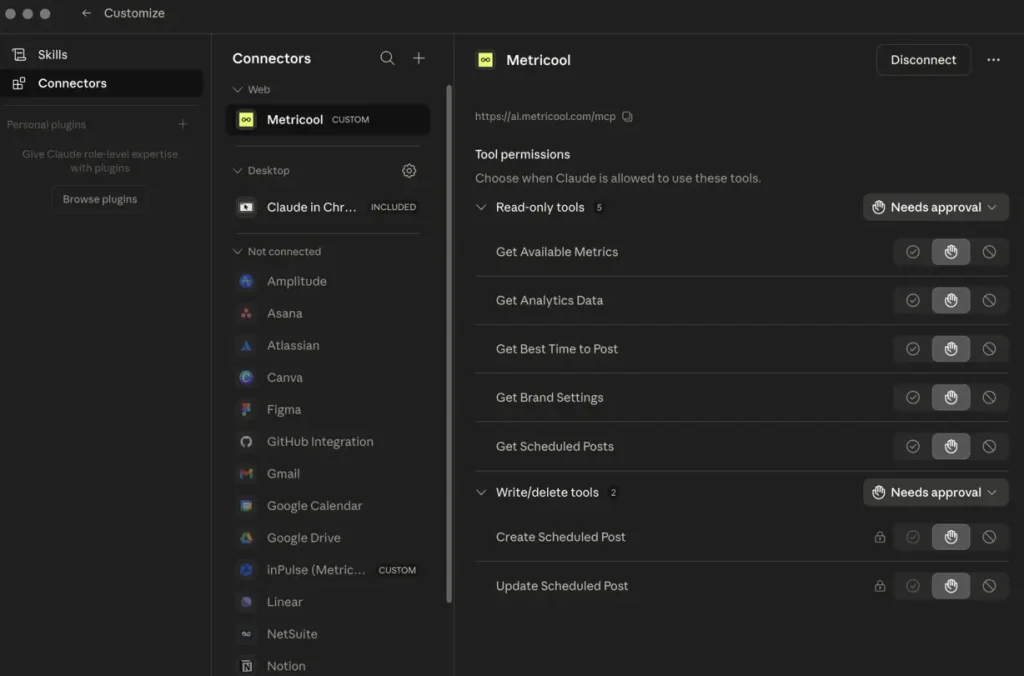
- Edit Permissions: Once you’ve connected your Metricool account to Claude, you can decide which tasks it can automate for you (see below).
Scheduling Social Media Posts with AI: The Workflow
The old way of scheduling was a manual, linear process:
- Write the caption in a Doc.
- Edit the image in another tool.
- Open the scheduler.
- Paste the text.
- Select the time based on a separate chart.
- Click save.
When you schedule social media posts with AI via the Metricool MCP, that six-step process collapses into a single conversation. All you need to do is tell Claude what to do.
Using Metricool’s Best Posting Times Feature with Claude
Metricool tells you the best times to post, with color coded time slots on the planner. With the MCP, Claude can access this data in real-time. You can say:
“Claude, write a post about our new product launch for Instagram and schedule it for the best time tomorrow.”
Claude won’t just write the post; it finds the peak hour for your specific audience, and then uses the create_post tool to lock it into your calendar.
Cross-Platform Adaptation
One of the most exhausting parts of the job is rewriting the same message for LinkedIn, X (formerly Twitter), and Instagram. Claude can handle the formatting for each, for example:
- LinkedIn: Focuses on professional value and uses bullet points.
- X: Keeps it punchy, uses hashtags, and stays within the character limit.
- Instagram: Adds relevant emojis and focuses on a visual call to action.
By asking Claude to “Schedule this message for all my connected platforms,” you ensure each network gets a version of the post that is optimized for its unique environment.
Managing Social Media with AI: Beyond Just Posting
Social media management is about more than just filling a calendar. It is about listening to your audience, analyzing your competition, and adjusting your strategy based on what is actually working. Here are some ways you can manage your social media with AI, plus prompts you can use.
Automated Performance Analysis
Instead of spending your Monday morning digging through charts, you can ask Claude to do the analysis for you.
“Claude, look at my Instagram performance from the last 30 days. Which three posts had the highest engagement rate, and what do they have in common?”
Because Claude can “read” your Metricool analytics directly through the MCP, it can provide a grounded summary of your growth. It might notice that your “behind the scenes” videos are outperforming your product shots by 40%, allowing you to shift your creative energy toward what works.
Community Management and Sentiment
If you are managing an account with thousands of comments, it is easy to miss a frustrated customer or a glowing review. You can use Claude to analyze the sentiment of your recent comments and help you draft personalized, helpful responses that stay true to your brand voice.
Performance Comparison
“Compare my engagement rate to my three main competitors on Instagram over the last 30 days.”
“Which of my competitors gained the most followers this month, and how does that compare to my growth?”
“Show me how my average reach per post compares to [competitor name] for the past two weeks.”
Content Patterns
“What content formats are my competitors posting most on TikTok, and which ones are getting the highest engagement?”
“Show me the top 5 posts from my competitors this month ranked by interactions.”
“Are my competitors posting more Reels or static posts on Instagram, and which performs better for them?”
Timing and Frequency
“How often are my competitors posting each week, and does posting frequency correlate with their engagement rates?”
“What days are my competitors’ highest-performing posts published on?”
Strategic Gaps
“Based on my competitors’ content data from the last month, what topics or formats are they covering that I’m not?”
“Where is my engagement rate weakest compared to my competitors, and on which platform is the gap biggest?”
Best Practices for Prompting Claude
To get the most out of your Manage social media with AI strategy, your prompts need to be clear and grounded.
- Give Persona: “You are a senior social media strategist with 10 years of experience in the SaaS industry.”
- Define the Audience: “Our audience consists of small business owners who are overwhelmed by technology.”
- Set Constraints: “Do not use more than two hashtags per post and avoid using exclamation points.”
- Use the MCP Tools Explicitly: “First, check my Metricool account for the best posting times on Friday. Then, schedule the following post for that time.”
Strategies for Managing Different Platforms with Claude
When you schedule social media posts with Claude, you can instruct the AI to follow platform-specific blueprints.
- Goal: Professional authority and lead generation.
- Claude Prompt Tip: Ask Claude to use the “PAS” (Problem, Agitation, Solution) framework for your LinkedIn posts. This creates a narrative that resonates with professionals looking for solutions to their challenges.
- Goal: Visual storytelling and community bond.
- Claude Prompt Tip: Instruct Claude to write three different versions of an Instagram caption: one short and witty, one educational, and one personal story. This gives you options to choose from based on the visual content you have.
Carousels are great for your engagement on both LinkedIn and Instagram. Here’s how to design and schedule them with Claude alongside Metricool:
X (Twitter)
- Goal: Real-time engagement and news.
- Claude Prompt Tip: Ask Claude to turn a single blog post into a “thread” of 7 punchy tweets. Claude can ensure each tweet flows into the next and ends with a strong call to action.
- Goal: Meaningful interaction and community building.
- Claude Prompt Tip: In 2026, Facebook rewards content that sparks conversation rather than passive scrolling. Ask Claude to generate five interactive poll questions or discussion prompts for your Facebook Group based on a recent industry trend. This shifts the focus from broadcasting to facilitating a community.
TikTok
- Goal: Discovery, virality, and search intent.
- Claude Prompt Tip: TikTok is increasingly used as a search engine. Ask Claude to analyze your video transcript and generate three distinct three-second “hooks” that address specific emotional pain points. You can also ask it to organize your content plan using the 70-20-10 rule: 70% entertainment, 20% education, and 10% promotion.
YouTube
- Goal: Educational depth and long-tail search traffic.
- Claude Prompt Tip: Provide Claude with your video transcript and ask it to write a keyword-rich description and a set of “Chapters” with timestamps. This helps the algorithm index your content for specific search queries, ensuring your long-form videos continue to gain views months after they are published.
Claude X Metricool: Practical Examples
To visualize how this looks in practice, let’s look at three common scenarios for a social media professional.
A Multi-Platform Campaign
You have a new e-book launching. You provide Claude with the PDF of the e-book.
- Prompt: “Claude, read this e-book and create a 10-day content plan for LinkedIn and X. Schedule the posts for the best times over the next two weeks using Metricool.”
- Result: Claude extracts the best quotes, turns them into formatted posts, finds the optimal times, and populates your Metricool planner. You only need to log in to Metricool once to do a final visual check.
A Performance Audit
Your client wants to know why engagement dropped last month.
- Prompt: “Claude, compare our Metricool analytics for August versus September. Identify any changes in posting frequency, content type, or audience activity.”
- Result: Claude identifies that you posted 20% fewer videos in September and that your audience was most active on Thursdays, but you didn’t post on Thursdays. You now have a data-backed plan to fix the drop.
Content Repurposing
You have a high-performing YouTube video.
- Prompt: “Claude, I’m giving you the transcript of this video. Turn it into three Instagram Reels scripts, five X posts, and a LinkedIn article. Use my Metricool brand settings for the tone.”
- Result: You have a week of content generated from a single piece of “hero” content, all formatted and ready for the scheduler.
Claude Social Media Management FAQ
Does Claude post directly to my social media?
When you use the Metricool MCP, Claude sends the post data to Metricool. Depending on your settings and the social network’s requirements, Metricool then publishes the post automatically or sends you a notification to publish it manually (as is the case for some types of Instagram Stories).
Is my data safe when using Claude with Metricool?
Yes. The MCP integration requires your explicit authorization via OAuth2. Claude only sees the data that Metricool provides through its official API. Furthermore, Anthropic (the creators of Claude) provides robust privacy controls for their users.
Can I use Claude to schedule videos?
Absolutely. You can provide Claude with the link to your video file or upload the file directly to the chat. Claude can then use the Metricool create_post tool to include that media in your scheduled post.
What if Claude makes a mistake in a post?
This is why the Metricool Planner is so important. Even when you schedule social media posts with Claude, those posts appear in your Metricool calendar first. You have the opportunity to review, edit, or delete them before they ever go live.
Do I need a paid Claude account?
To use the most advanced MCP features and the higher-performing models like Claude 3.5 Sonnet, a professional subscription is recommended. This provides higher usage limits and faster response times for complex management tasks.
Do I need a paid Metricool plan?
No. You can connect using OAUTH with your free account. However, limits may be applied.
Smarter Social Media Management With Metricool’s MCP
Bring your analytics, scheduling, and reporting into one AI-powered workflow and spend less time switching between tools.
