

How to Connect Claude to Instagram
 Kalum
27 August 2026
Kalum
27 August 2026 
All the best social media pros use AI tools. This isn’t an assumption; in our 2026 AI report, we found that 95% of participants receive AI assistance, with 65% saying it saves them between 1 and 6 hours a week. If you’re here, it means you’re probably not yet enjoying these benefits and are still struggling to manage your Instagram presence manually. But not for long. Learning how to connect Claude to Instagram transforms your AI workspace from a passive drafting assistant into an active control center for your brand. This guide explains how Claude AI Instagram integration works, explores the technical pathways for connecting these tools, and demonstrates why using Metricool’s Model Context Protocol (MCP) server provides the fastest, most reliable connection for managing your account.
Step-by-Step Instructions: How to Connect Claude to Instagram Using Metricool MCP
Setting up a functional connection between Claude and your Instagram account using Metricool takes less than five minutes and requires zero coding expertise. Follow these direct steps to complete the installation:
Step 1: Ensure Your Accounts Are Prepared
Before initiating the connection, verify that you have two core prerequisites ready:
- An active Metricool account (the MCP integration works across all plan tiers, including the free plan).
- An Instagram Business or Creator account connected to your Metricool dashboard.
Step 2: Connect Claude to Metricool
- Go to Customize > Connectors and type “Metricool” in the search bar or search directly in the Claude Directory.
- Click Connect with Claude using the button in the top right corner. A Metricool login window will appear.
- Log in and click Grant Access.
Step 3: Authenticate Your Workspace
Once you launch Claude with the Metricool configuration active, Claude will prompt you to complete a one-time authentication step.
A pop-up or browser link will direct you to log into your Metricool account. Select the brand profiles you wish to grant Claude access to, authorize the permission request, and return to your chat window.
Step 4: Test the Active Connection
Verify that your Claude Instagram connector is operating correctly by typing a direct request into your Claude chat window:
“Check my connected Metricool accounts and show me my latest Instagram performance metrics.”
Claude will access the Metricool MCP server, retrieve your account data, and confirm that it can read your live Instagram analytics.
Practical Applications: Managing Your Instagram Account Inside Claude
Once your connection is live, you can perform complex social media management tasks directly inside your conversational thread. Here is how to handle key operational workflows:
1. Analyzing Content Performance and Account Insights
Rather than logging into your analytics dashboard, exporting CSV spreadsheets, and building custom pivot tables, you can ask Claude to evaluate your content performance instantly.
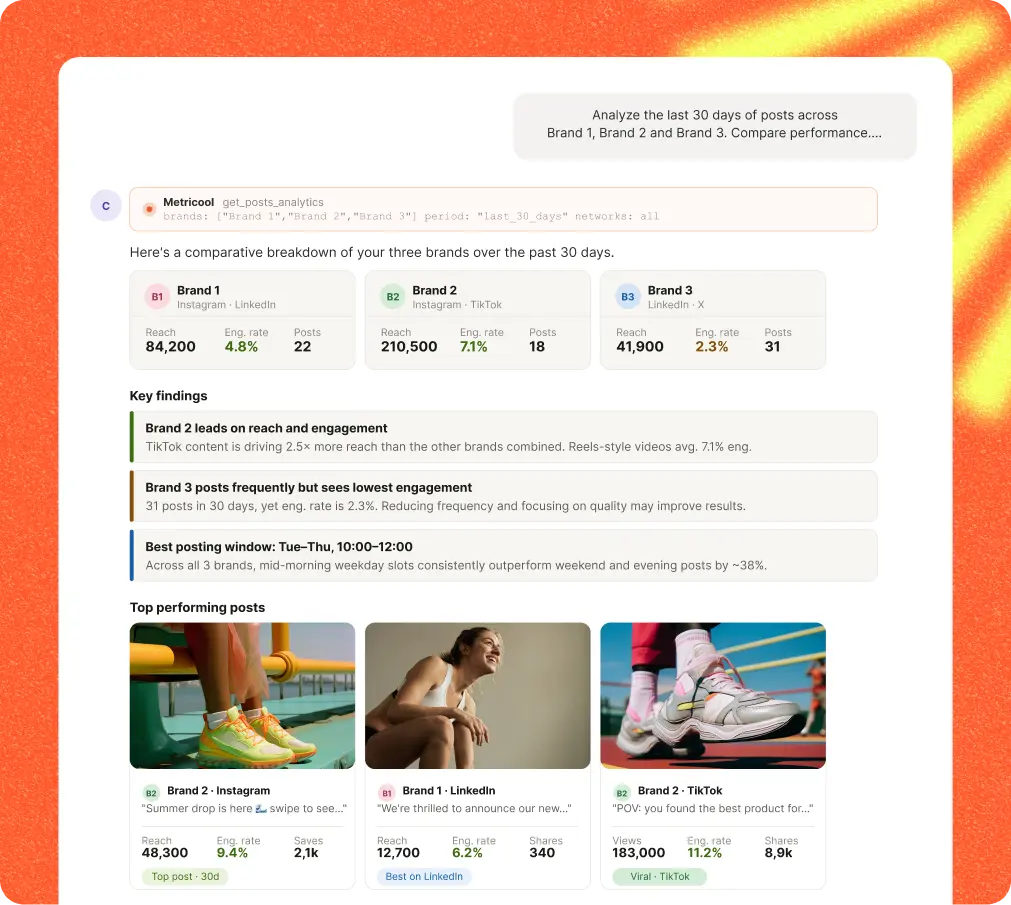
Claude reads real engagement data, reach numbers, and follower retention metrics directly from your account.
Example Prompts for Performance Audits:
- “Which three Instagram Reels generated the highest reach over the last 30 days? Explain what visual or structural elements they had in common.”
- “Calculate my average engagement rate per post for this month compared to last month. Break down interactions by likes, comments, and saves.”
- “Show me the distribution of my audience viewing habits. What days of the week consistently deliver our highest impression spikes?”
Because Claude retains context across the conversation, you can ask immediate follow-up questions, such as requesting a list of specific content takeaways based on your top-performing posts.
2. Automating Post Scheduling at Optimal Peak Times
Drafting content and scheduling it manually across multiple days is time-consuming. Through the Metricool MCP connection, Claude can convert generated text and image files directly into scheduled calendar posts.
Metricool’s platform continuously calculates your unique audience activity heatmaps. When you ask Claude to schedule a post, it references Metricool’s best-time-to-post data to ensure your upload goes live when your followers are active.
Example Prompts for Content Scheduling:
- “Take this draft caption about our new product feature, optimize it for Instagram with line breaks and five relevant hashtags, and schedule it for my best time to post tomorrow.”
- I have uploaded three carousel slides into our chat. Write a hook-driven caption for an Instagram Carousel and queue it for publication this Thursday during our highest active audience window.”
- “Review my scheduled posts calendar for next week. Are there any multi-day gaps where we don’t have an upload queued for Instagram?”
3. Competitor Benchmarking and Market Analysis
Understanding how your brand performs relative to competitors is essential for maintaining audience market share. If you have already configured competitor profiles inside your Metricool account, Claude can pull competitor data side by side with your own metrics.
Example Prompts for Competitor Analysis:
- “Compare my Instagram engagement rate from last week against the three competitor profiles tracked in my Metricool account.”
- “Analyze the publishing frequency of my top competitor over the last 14 days. Are they posting more Reels or multi-slide Carousels?”
- “Identify which competitor posts achieved outlier reach last month and summarize the core themes they covered.”
4. Tracking Meta Advertising Campaigns
If you run paid campaigns on Instagram, keeping track of ad spending, click-through rates, and conversion costs often requires digging through complex advertising panels. The Metricool MCP server connects to your ad accounts, allowing you to run conversational campaign check-ins.
Example Prompts for Ad Tracking:
- “Give me a summary of active Meta ad campaigns on Instagram this week. What is our current cost per click?”
- “Which ad creative variant is delivering the lowest cost per engagement in our retargeting campaign?”
For a full visual walkthrough showing this automated workflow in action, watch our step-by-step video guide on connecting Claude to Instagram to see how you can transform your raw social data into scheduled content.
Claude Instagram FAQs
Can Claude access Instagram links?
Standalone Claude cannot directly open, scrape, or read private Instagram links due to platform authentication requirements and anti-bot measures. However, when connected to an MCP server like Metricool, Claude can access post metrics, account performance numbers, and public content data through official API endpoints rather than relying on raw web page links.
Can Claude create Instagram posts?
Claude can draft complete Instagram post assets, including hook-driven captions, structured carousel outlines, line breaks, call-to-action statements, and relevant hashtags. While Claude generates the copy and content strategy, visual graphics or image files must be attached from your local storage or connected cloud drives like Google Drive.
Can Claude make Instagram reels?
Claude can write full Reel scripts, outline visual storyboard directions, plan scene transitions, and suggest trending audio ideas. It cannot edit or render final MP4 video files directly. Once you edit your video file and upload it to a connected cloud folder, Claude can pull that file and schedule it as a Reel using Metricool.
Can Claude post on Instagram?
Native Claude cannot publish directly to Instagram on its own because it lacks direct network access to social platforms. By connecting Claude to Metricool via the Model Context Protocol (MCP) server, Claude gains secure publishing permissions to queue, schedule, and publish posts directly to your Instagram profile.
