

Instagram Automated Replies for Comments, DMs, and Stories
 Kalum
17 September 2026
Kalum
17 September 2026 
Managing an Instagram account today often feels like running a marathon where the finish line keeps moving. Your audience drops a comment on a Reel asking for a product link, sends a DM asking for your business hours, or responds to a Story with a quick question. Every single interaction represents an opportunity to build a personal connection, capture a lead, or close a sale.
However, sitting on your phone 24/7 manually typing the exact same responses is simply not sustainable.
This is where Instagram automated replies step in to save your time, your sanity, and your conversion rates. By setting up targeted Instagram automated messages, you ensure that no follower is left waiting for an answer, whether they reach out at noon or midnight.
Metricool has introduced a dedicated automation tool designed to solve this exact community management challenge: Flows. With Metricool Flows, you can build seamless, personalized response systems that turn Instagram comments, direct messages, and story replies into organized, high-converting customer pathways.
In this guide, we will break down everything you need to know about setting up an efficient Instagram auto-reply bot strategy using Metricool Flows, defining strategic story reply terms, and creating authentic messaging sequences that grow your brand.
4 Reasons Why You Need Instagram Automated Replies
Users are increasingly moving away from public feed discussions and heading into direct messages to ask questions, discover products, and make purchasing decisions.
Implementing Instagram automated replies helps you adapt to this behavioral shift in several key ways:
1. Instant Response Times Drive Conversions
In digital marketing, speed matters immensely. A prospective client asking for a link in a comment or Direct Message is in a high-intent state. If you reply three hours later, their attention has moved elsewhere, or they may have purchased from a competitor. Automated replies deliver the requested link or answer within seconds, capitalizing on peak interest.
2. Boosted Organic Engagement Signals
Instagram’s algorithm favors content that generates fast, two-way interaction. When your automated workflow replies publicly to a post comment and simultaneously sends a Direct Message to the user, it creates multiple positive engagement signals on your account. This increased interaction helps signal to the platform that your content is valuable, boosting its visibility across feed rankings and Explore pages.
3. Removal of Conversion Friction
In traditional Instagram marketing, brands instruct users to click the link in their bio, navigate to a landing page aggregator, and hunt for a specific article or product. Every extra step causes lost conversions. By asking users to comment a simple trigger word, you deliver the exact destination link straight to their inbox, eliminating extra steps entirely.
4. Significant Time Savings for Community Managers
Answering routine questions about pricing, event schedules, shipping times, or download links takes up valuable time every single day. Automating these repetitive answers frees up your schedule to focus on creative strategy, high-level content production, and complex client inquiries.
Introducing Metricool Flows: Your Instagram Automation Command Center
Metricool Flows is designed specifically to centralize and simplify how you build, launch, and manage your automated responses on Instagram. Rather than jumping between separate software platforms or configuring overly complicated code, Metricool Flows provides an intuitive interface that connects directly to your Instagram profile.
With Flows, you can design automated response paths across three core Instagram channels:
- Post and Reel Comments: Automatically reply publicly to comments on your feed posts and Reels while concurrently sending a private Direct Message containing links or resources to the commenter.
- Direct Messages: Identify specific keywords or phrases sent directly to your inbox and immediately respond with helpful information, downloadable files, or external links.
- Story Replies: Detect designated story reply terms when users respond to your ephemeral Instagram Stories, delivering instant resources straight to their inbox.
By unifying these three engagement entry points under one single dashboard, Metricool Flows gives you absolute control over your interactive campaigns without requiring technical coding knowledge.
Step-by-Step: How to Set Up Instagram Automated Replies with Metricool Flows
Setting up your first automated flow in Metricool takes only a few minutes. Follow this step-by-step process to build a high-performing automation setup for your account.
Step 1: Connect Your Instagram Professional Account
Ensure your Instagram profile is configured as a Business or Creator account and connected to your Metricool brand space. Because Metricool integrates directly through Meta’s official API, your account remains completely safe and compliant with platform policies. Not signed up to Metricool yet? Create your free account here:
Step 2: Access the Flows Feature in Metricool
Log in to your Metricool dashboard and navigate to the Flows section. Here, you will see a clean overview of your active automation pathways, total execution metrics, and options to build new flows from scratch or customize existing templates.
Step 3: Select Your Trigger Event
Choose the specific action that will initiate your automated reply:
- Comment Trigger: Fires when a user comments on a specific post, Reel, or any future post matching your target criteria.
- Direct Message Trigger: Fires when a user sends a DM to your inbox containing specific trigger words.
- Story Reply Trigger: Fires when a user replies to an Instagram Story using your specified story reply terms.
Step 4: Define Your Target Keywords
Enter the primary keywords that will activate your workflow. Inside Metricool Flows, you can add multiple variations to account for common typos, plurals, or simple capitalization (for example: LINK, LINKS, GETLINK).
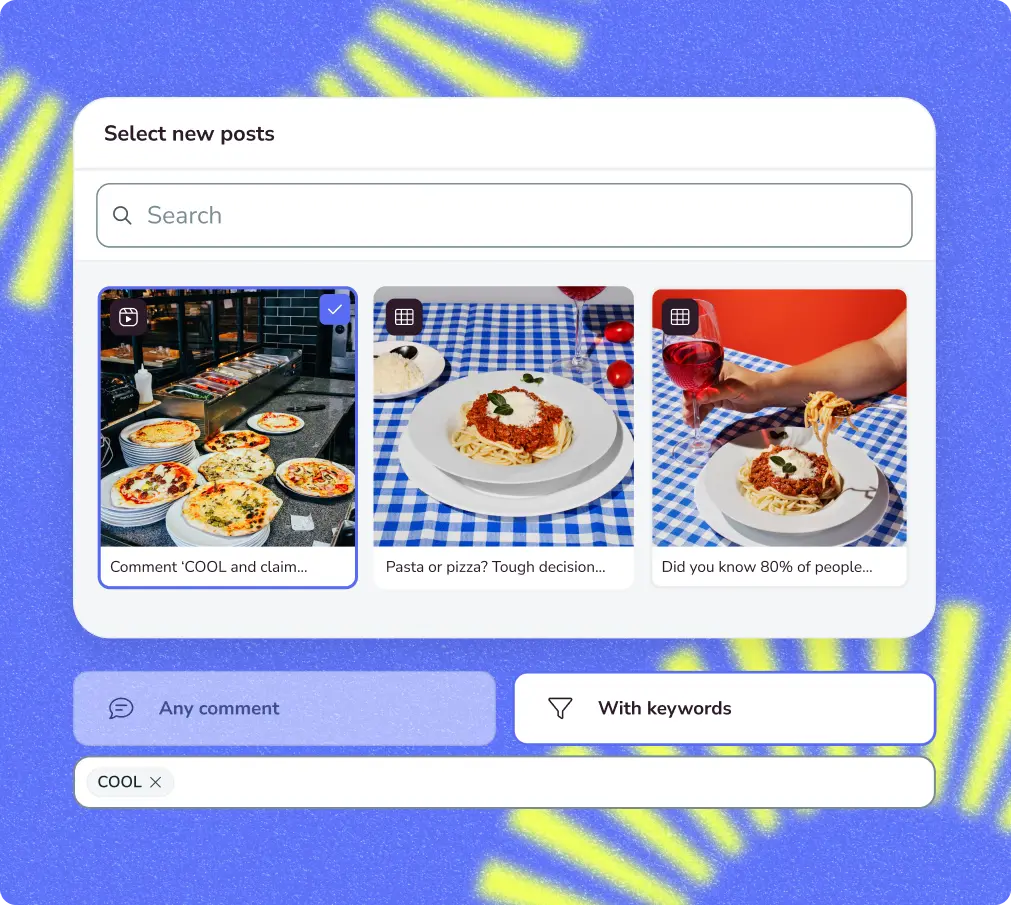
Keywords and Story Reply Terms
When setting up Instagram automated messages, you define specific rules based on the exact phrases your audience submits.
You might publish a carousel showcasing a new downloadable PDF guide and say, “Reply with the word GUIDE to receive your free copy instantly!”
In this scenario, “GUIDE” acts as your designated story reply terms trigger. The moment a user sends a Story reply containing that word, Metricool Flows recognizes the match and dispatches the corresponding message to their inbox.
To maximize trigger efficiency, consider these fundamental guidelines:
- Choose Concise Words: Stick to single, easy-to-spell words like LINK, PLAN, INFO, or VIP.
- Avoid Overly Common Vocabulary: Avoid setting triggers for generic everyday words like “the”, “hello”, or “yes”, as this can cause accidental automated replies during normal conversations.
- Provide Clear Directions: State your trigger word explicitly across post captions, graphic overlays, and Story text stickers so your audience knows exactly what to type.
Step 5: Draft Your Response Messages
Design the exact actions your flow will perform upon triggering:
- Public Comment Reply: Draft a warm, public comment response letting the user know their request was processed (e.g., “Just sent you the link in your DMs! Check your inbox.”). You can create multiple comment variations so your public responses remain dynamic and varied.
- Private DM Response: Write the main direct message that delivers the core value. Include clear copy, hyperlinked buttons, promotional codes, or direct file downloads.
Step 6: Test and Activate
Use Metricool’s built-in preview functionality to verify that your message logic and links are functioning as intended. Once confirmed, activate your flow. Your Instagram auto-reply bot setup is now active and operating automatically around the clock.
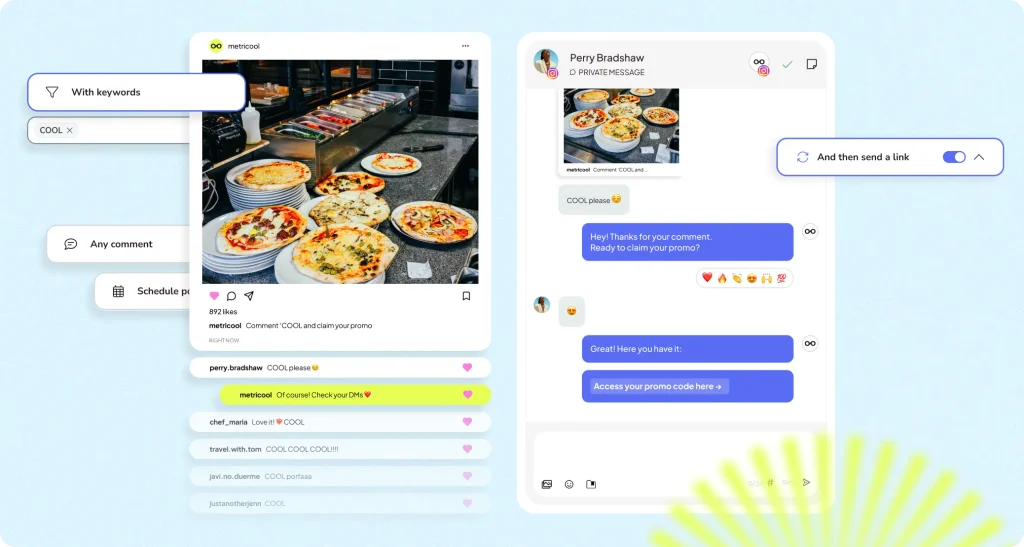
Comment-to-DM Automation for Posts and Reels
The comment-to-DM flow is one of the most impactful engagement strategies used by modern social media managers. Instead of relying on bio link navigation, you turn every post comment section into a direct lead generation tool.
Imagine publishing a Reel highlighting five marketing strategies. At the end of your video, you include a call to action: “Want my complete 20-page strategy template? Comment TEMPLATE below and I will send it to your inbox immediately!”
User Comments “TEMPLATE” on Reel
- Metricool Flows posts dynamic Public Comment Reply: “Check your DMs! Your template is waiting.”
- Metricool Flows sends Private Direct Message:
“Here is your marketing strategy template link!”
This sequence provides major operational advantages:
- Improved interaction: Viewers are far more likely to type a single keyword in the comments than to leave the app and manually search for a link.
- Algorithm amplification: A sudden spike in comment activity alerts Instagram’s ranking system that your content is generating high audience interest, expanding its reach across feeds.
- Direct contact initiation: The moment your automated message lands in their inbox, a private direct messaging thread is opened. This establishes an open channel where you can continue the conversation, answer follow-up questions, and cultivate a long-term connection.
Check out our video for more info on how to automate Instagram DMS from comments with Metricool:
Automating Instagram Direct Messages for 24/7 Customer Support
Your Direct Message inbox functions as the primary customer support channel for prospective buyers, existing clients, and brand partners. Leaving questions unanswered for hours often results in lost opportunities.
By building automated DM sequences with Metricool Flows, you create an always-available virtual receptionist capable of resolving common inquiries instantly.
Practical DM Automation Scenarios
- Answering FAQs: Set up triggers for common terms like “hours”, “pricing”, “location”, or “booking”. When users message these words, Metricool Flows instantly replies with exact operating hours, price guides, or booking calendar links.
- Delivering lead magnets: When prospective leads send a direct message containing keywords like “EBOOK” or “CHECKLIST”, automatically deliver direct download links while capturing ongoing dialogue in your inbox.
- Welcoming first-time inquirers: Construct greeting workflows that guide new inbox visitors through a menu of choices, helping them locate popular products, support resources, or team contact forms.
When crafting automated DMs, always maintain a friendly tone. Clearly indicate that the initial message is an automated reply, keep information clear and concise, and provide an obvious way for users to request human assistance if their question requires detailed attention.
Story Reply Automation and Story Reply Terms
Instagram Stories are inherently conversational and personal. Because Stories vanish after twenty-four hours, they create natural urgency that drives immediate viewer responses.
Integrating targeted story reply terms into your regular Story posts allows you to turn passive viewers into active prospects.
High-Converting Story Reply Campaigns
- Exclusive VIP access: Preview an upcoming product release or service launch on your Story. Add text directing followers to reply with the word VIP to get early access links sent directly to their inbox.
- Event registrations: Share a graphic about an upcoming webinar or live video session, instructing viewers to reply with REGISTER to receive their access link.
- Interactive content recommendations: Publish a Story asking a poll question, followed by a slide telling viewers to reply with RECOMMENDED to get personalized product suggestions based on their answers.
Metricool Flows monitors your incoming Story interactions in real time. As soon as a viewer submits a response matching your active story reply terms, the tool initiates the automated DM sequence, maintaining the initial momentum generated by your Story content.
Best Practices for Writing Conversational Automated Messages
While technology handles the delivery of your messages, human connection drives results. Your automated replies should never sound cold, robotic, or transactional. Follow these best practices to ensure your automated communications feel dynamic and natural:
1. Maintain Your Brand’s Authentic Voice
Write your automated replies using the exact tone, language, and personality found in your regular organic posts. If your brand voice is casual and humorous, incorporate that lighthearted energy into your automated messages. If your brand is polished and formal, keep your messaging professional and concise.
2. Implement Multiple Comment Reply Variations
When configuring public comment replies inside Metricool Flows, add three to five message variations. Metricool will rotate through these options when responding to comments on your posts:
- Variation A: “Check your DMs! I just sent over the link.”
- Variation B: “Sent straight to your inbox! Let me know if you have any questions.”
- Variation C: “All set! Check your messages for full details.”
Rotating your public replies keeps your comment section looking varied, natural, and engaging.
3. Maintain Complete Transparency
Honesty fosters long-term brand trust. Acknowledging automation with a brief, friendly opener (such as “Hey there! This is an automated delivery for your requested link…”) sets clear expectations while keeping the exchange transparent.
4. Provide Direct, Actionable Next Steps
Keep your inbox messages clear and focused. Provide a direct destination link, a clear promo code, or a single follow-up question so the recipient immediately understands what action to take next.
Common Pitfalls to Avoid in Instagram Automation
Even with advanced automation tools, certain operational missteps can reduce the effectiveness of your messaging strategy:
| Automation Mistake | Potential Impact | How to Prevent It |
| Overly Complex Triggers | Users fail to activate the flow due to typos or confusion. | Use simple, single-word trigger phrases like LINK or PLAN. |
| Ignoring Non-Trigger DMs | Prospects asking unique questions feel neglected. | Use Metricool’s unified inbox to monitor and answer custom human inquiries manually. |
| Outdated External Links | Recipients receive broken or expired links. | Regularly review and update active Flows when promotional campaigns conclude. |
| Aggressive Upselling | Followers feel spammed and unsubscribe or unfollow. | Focus messages strictly on delivering the requested information or resource. |
Measuring Your Automation Performance in Metricool
To ensure your automated reply system achieves real business objectives, monitor key performance metrics inside your Metricool dashboard:
- Trigger execution totals: Track how frequently your chosen keywords are submitted across comments, DMs, and Stories to assess overall audience interest in specific offers.
- Click-Through Rates (CTR): Monitor the percentage of DM recipients who click on the links provided within your automated messages.
- Conversion metrics: Evaluate how many sales, email newsletter signups, or consultation bookings originate from traffic guided through your automated comment and Story funnels.
- Time savings: Calculate the hours saved on manual community management tasks, allowing you to reallocate time toward high-level strategy and creative development.
Instagram Automated Replies FAQs
Will using an Instagram auto-reply bot get my profile shadowbanned or suspended?
No, provided you use an official Meta Business Partner tool like Metricool. Metricool Flows communicates exclusively through Meta’s approved API endpoints. Account issues only arise when using unauthorized, non-compliant third-party tools that scrape data or violate platform usage limits.
Can I set up temporary story reply terms for short promotional campaigns?
Yes. Inside Metricool Flows, you can activate, edit, pause, or archive response flows at any time. This flexibility allows you to set up temporary triggers for a weekend event, flash sale, or limited-time product drop, and deactivate them once the promotion ends.
How quickly do Instagram automated replies trigger once a comment or Story response is posted?
Metricool Flows processes incoming interactions rapidly through Meta’s API, typically delivering public comment responses and private Direct Messages within seconds of the user’s action.
