

Meet Metricool Flows: The DM Automation Tool that Turns Comments into Customers
 Gretchen Oestreicher
04 September 2026
Gretchen Oestreicher
04 September 2026 
Most of the people who’ll ever buy from you show up in your comments first. They watch a Reel, like what they see, and drop a word to say so. What happens in the next few minutes decides whether that interest turns into anything, and for most brands it comes down to whether someone’s online to catch it.
Flows is Metricool’s new DM automation tool, and it’s built for that moment. It watches your Instagram and TikTok comments and messages and sends the reply for you, so interest turns into a conversation while the person is still paying attention.
What is Metricool Flows?
Flows sets up automations that kick in when someone interacts with you, so a quick comment can turn into the first step toward a sale instead of a notification you never get around to.
Say someone reacts to your content on Instagram or TikTok, and Metricool answers for you, just the way you set it up. For example:
- Someone comments a keyword on your Reel.
- Metricool sends them an automatic message you set up ahead of time.
- That message can include a link, a button, or an automatic reply.
- You decide the text, the wait time, and when it runs.
It all runs on one simple pattern: a trigger, then an action. Something happens on a network, and Metricool responds on its own.
What Flows Is For
Flows automates your replies so you can turn interested followers into customers. Someone can grab a resource, check out your product, or ask for more the moment they comment, without waiting on you to get back to them.
| What For | How Flows Helps |
|---|---|
| Send a resource by DM | Automates sending links when someone comments a keyword |
| Reply to repeat messages | Creates automatic replies for DMs with specific words |
| Run Instagram campaigns | Turns comments into direct messages |
| Automate Instagram comments | Replies in public or in private depending on the Flow |
| Moderate TikTok comments | Hides comments with banned words or phrases |
| Reply fast on TikTok | Posts automatic replies when it detects a keyword |
For example, you can post a Reel saying “comment GUIDE and I’ll send you the link.” When someone comments, Flows detects the word, starts the DM conversation, and delivers the resource without you doing it by hand.
Automation works best when it’s part of a plan. Before you build a Flow, decide what you want to happen after someone comments, then work back from there to the post that earns the comment and the reply that keeps it going.
What Flows Does for Your Business
Past the day-to-day uses, Flows tends to pay off in three ways.
- Lead Generation: Offer something worth having, a guide, a checklist, a discount code, and ask people to comment for it. Each automatic DM goes out with a name attached, so you’re building a list of people who raised their hand rather than cold contacts you bought.
- Direct Selling: When you show a product in a Reel or TikTok, the link can go straight to the people who ask about it rather than sitting in your bio for them to dig out. Shortening the distance between wanting something and having it in hand is usually what tips someone toward buying.
- Comment Management: Automatic replies can field the questions that come up over and over and keep unwanted comments off your videos, so your inbox and your posts stay manageable as you grow.
Where to Find Flows in Metricool
To create a Flow, open your Metricool account and go to Planning, then Flows.
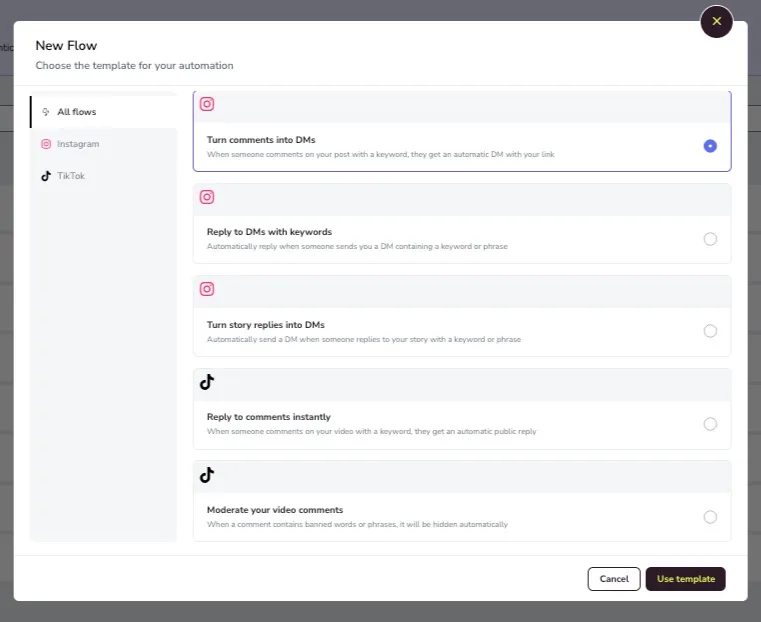
From there you can see every automation you’ve created, its status, and a summary of its metrics. You can also start a new one from + New Flow, choose the network, pick a template, and set up the steps.
How Flows Works Step by Step
Each template has its own fields, but the general process is the same.
- Open Planning, then Flows.
- Click + New Flow.
- Filter by network: Instagram, TikTok, or all Flows.
- Choose a template.
- Name the Flow.
- Set up the trigger.
- Write the automatic reply.
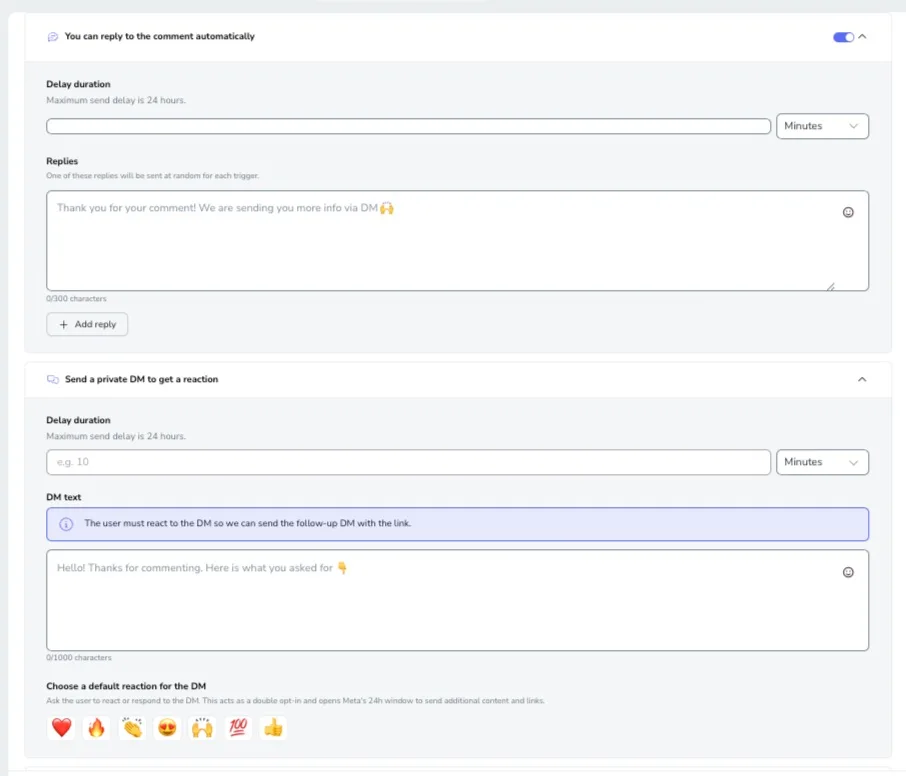
- Add delays if you want to space out the sequence.
- Check the mobile preview.
- Turn the Flow on or save it as a draft.
Delays can be set in seconds, minutes, or hours. On the steps that allow it, the longest delay is 24 hours.
Flows on Instagram
Instagram DM automation with Flows covers replies to comments, direct messages, and story replies. To use it you need:
- A professional Instagram account connected to Metricool.
- User permission to edit Flows.
- A Facebook page linked to the Instagram account if you want the comment-to-message Flow.
Templates Available on Instagram
| Template | Trigger | What It Does |
|---|---|---|
| Turn comments into direct messages | Someone comments on your post | Sends an automatic DM with your message or link |
| Reply to direct messages with keywords | Someone sends a DM with a specific word or phrase | Replies to the message on its own |
| Turn story replies into direct messages | Someone replies to your story | Sends an automatic DM |
Turn Comments into Direct Messages
This Flow works for campaigns where you want to deliver a resource, an offer, a guide, a coupon, or a signup page. You can set it to trigger on any comment, or only on comments that include a specific keyword.
From there you can add an optional public reply and a message sequence. The first private message asks for a reaction or a reply, and once the person responds, you send the follow-up with the link.
Reply to Messages with Keywords
This Flow runs when someone sends you a DM that contains a specific word or phrase. It automates frequent replies to words like Price, Guide, Course, Booking, Info, or Catalog, and you can include text, a button, and an optional link.
Turn Story Replies into Messages
This Flow runs when someone replies to a story with text or an emoji. You can apply it to any story or just a scheduled one, and set it to trigger on a specific word or reaction. It doesn’t run on Close Friends replies or story likes.
Flows on TikTok
Flows on TikTok handles comment moderation and comment replies. To use it you need:
- A TikTok Business account connected to Metricool.
- User permission to edit Flows.
Templates Available on TikTok
| Template | Trigger | What It Does |
|---|---|---|
| Moderate your video comments | Someone comments on your video | Hides comments with banned words |
| Reply to comments right away | Someone comments with a keyword | Posts an automatic reply |
| DM to DM | Someone sends a DM | Sends an automatic reply by DM |
Moderate Comments on TikTok
This Flow hides comments that contain banned words or phrases on its own. It applies to any video, a published one, or a scheduled one, and it helps keep the conversation clean on high-comment videos or campaigns with sensitive words.
Reply to Comments Right Away on TikTok
This Flow posts an automatic reply when someone comments a keyword. If someone comments “info,” for example, the automation answers with a line you set up ahead of time.
Replies that Sound Like You
You can set up to three different replies for the same Flow, and it rotates through them at random. Two people who comment on the same post won’t get the identical copy-pasted message, so the exchange reads like a brand paying attention rather than a copy-paste script. Your tone stays yours.
How to Measure Flows
Automation makes sense once you know whether the strategy is working. In your Flows list under Planning, you can see the automations you’ve created, their status, and their metrics.
Look past how many messages a Flow sends and check what happens next. If the goal was a guide download, check downloads. If it was traffic to a landing page, check visits. If it was starting a conversation, check replies.
Tips for Flows that Work
A Flow works when the promise in your content matches the automatic reply. A few things that help:
- Use keywords that are easy to type.
- Skip accents or tricky spellings when you don’t need them.
- Tell people in the post which word to comment.
- Write messages the way you would say them, not the way a machine would.
- Add a short delay so the reply doesn’t feel instant and robotic.
- Automate only where it saves you work, not everywhere.
- Review the results after each campaign.
Why DM Automation Matters
Social teams field more messages than ever, spread across platforms and arriving at all hours, and audiences expect a reply fast. When it all gets handled by hand, leads go cold, questions sit unanswered, and follow-ups slip. Automating the first reply keeps conversations moving, so the interest your content earns doesn’t go to waste.
Automation works best when it opens the conversation and hands off to you for the replies that need a person. Paired with organized inbox management, it keeps your DMs and comments in one place, so staying responsive scales with your account instead of eating your day.
Automate Your Replies with Flows
As a DM automation tool, Flows helps you reply faster, deliver resources by DM, moderate comments, and manage campaigns without keeping an eye on every interaction one by one.
The goal is to take repetitive work off your plate so you can spend more time on what needs judgment, like creating good content, checking results, and looking after the conversation with your community.
Stop Pasting the Same Link All Day
Metricool Flows automates your comment and message replies on Instagram and TikTok, even when you’re not online.
