

Instagram Instants: How to Use the New Snapchat-Style Feature
 Kata
18 August 2026
Kata
18 August 2026 
Instagram rolled out a new feature called Instants – also available as a standalone app – and if it reminds you of Snapchat, you’re not wrong. Tucked into the bottom-right corner of your DM tab, it’s a fun way to send unfiltered snapshots to your followers. Although it’s more geared towards everyday users, there are still smart ways to use it as a creator. Let’s get into it.
🚨 New: You can now record and send short videos with Instants, not just photos. Previously, the Instants camera only captured photos. The update is rolling out gradually, so if you haven’t seen the option yet, keep an eye out for it.
What Are Instagram Instants?
Instagram Instants is a disappearing photo and video feature available either in your Instagram DMs or as a standalone app on iOS or Android that lets you send unfiltered, spontaneous moments directly to mutual followers.
The feature evolved out of Instagram’s experimental “Shots” tool, which quietly tested BeReal and Snapchat-style photo sharing in select regions last year. It’s now been repositioned, rebranded, and pushed to more users.
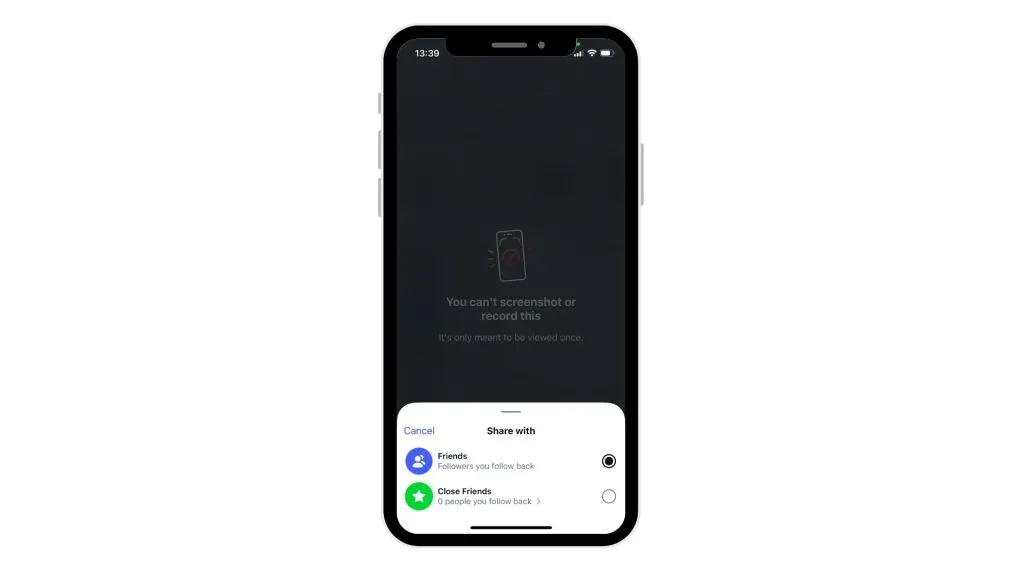
You open an Instant and it vanishes. If it’s not opened, it automatically expires after 24 hours. You can only send Instants to mutual followers, and you cannot edit photos before sending. One privacy detail worth knowing: Instants cannot be screenshotted or screen-recorded, so what you share stays between you and the recipient. It’s meant to be a spontaneous, raw snapshot of your day.
How to Get Instagram Instants
Instants is only available on mobile, not on browser. Here’s how you’ll find it:
- Open Instagram on your phone
- Go to your DM tab
- Look for the star-shaped icon in the bottom-right corner
- Tap it to open Instants
- If you don’t see it yet, update your app to the latest version on iOS or Android and log out and back in
Instagram will also prompt you with a pop-up once the feature becomes available on your account, so keep an eye out for that.
How to Use Instagram Instants
Once you’re in, here’s how it works:
- Tap the camera button to take a photo
- Add a caption (note that unlike Stories, you add the caption before sending, not after)
- Choose who to share with: Close Friends or mutual followers
- Tap the white button to send, an undo button appears immediately after, so you can take it back before anyone sees it if you change your mind
- Friends receive your Instant as a stack of photos in the bottom-right corner of their inbox; it disappears once opened and can’t be seen after 24 hours
Where Can I View Instants on Instagram?
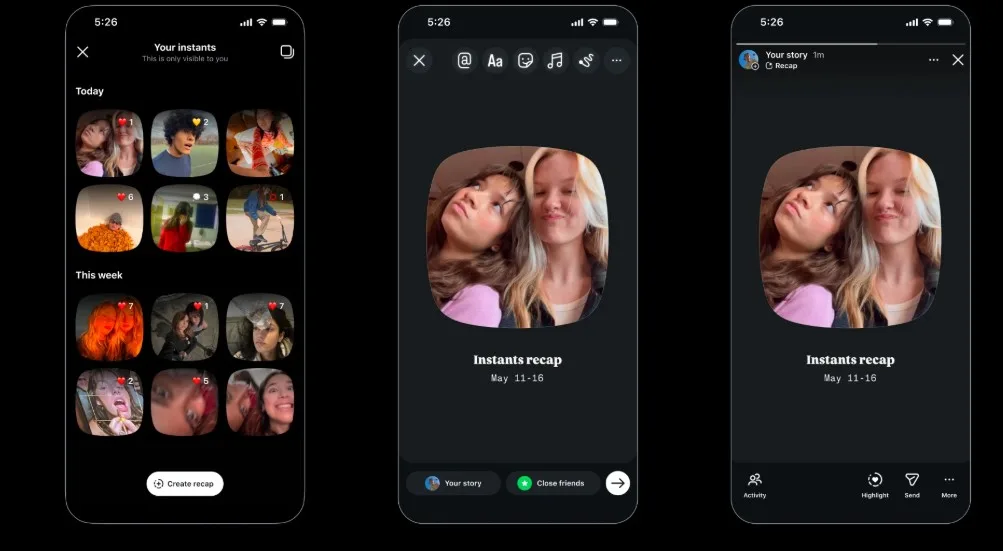
There’s an icon in the top-right corner of the Instants interface that takes you to your archive of all the Instants you’ve shared. From there, you can view, download, or delete your sent content.
Received Instants show up in your DMs, but they disappear once opened. So if you want to revisit something, save it before it’s gone.
For creators, this archive is handy for keeping track of what you’ve shared with your community, especially if you’re using Instants for behind-the-scenes content or product previews.
Instagram Instants Archive and Recap to Stories
Every Instant you send gets stored in your private archive automatically. You can access it from the top-right corner of the Instants interface to review, download, or delete anything you’ve shared.
There’s also a Recap to Stories feature: you can compile Instants from your archive into a recap and post it directly to your Stories for all your followers to see. Just tap “Create recap” in your archive.
For creators, this is a useful bridge between the intimacy of Instants and the broader reach of Stories. You can share raw, in-the-moment content with your closest followers first, then turn the best moments into a Story highlight for everyone else.
The Standalone Instants App
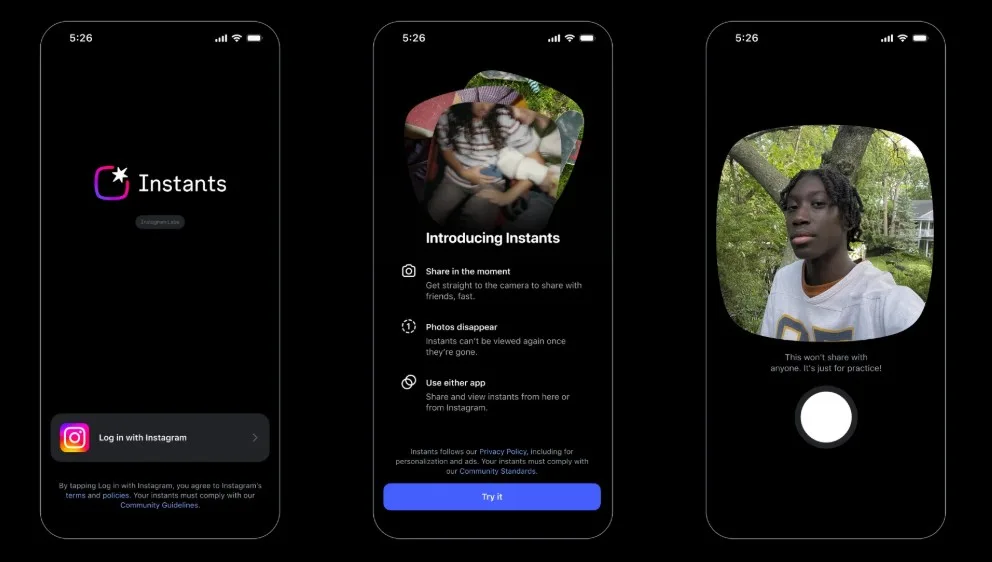
Instagram also launched a separate Instants app (available on iOS and Android in select countries) for users who want quicker camera access without opening the main Instagram app.
You log in with your existing Instagram account, and any Instants you share through the standalone app show up for friends on Instagram, and vice versa. It’s the same feature, just with a faster entry point.
Can You See Who Viewed Your Instants?
No, you can’t see a viewer list like you can with Stories. You choose whether to share with all mutual followers or just Close Friends. They get a notification, they can open it, but you won’t know who viewed it unless they react or reply.
When Should You Use Instants?
Instants works best for unfiltered content. Here’s when it makes sense to use it:
- Behind-the-scenes moments: Share something raw and real with your closest followers without it living on your profile permanently.
- Event coverage: At a launch, conference, or live event? Instants is a low-effort way to share the vibe in real time.
- Community building: For creators and brands with a tight-knit community, Instants can feel more personal than a Story. It goes directly to people who follow you back. You can also limit who receives your Instants to Friends or Close Friends only; useful if you want to share something more personal with a tighter circle.
- Testing content: Share an unfiltered idea or product preview and see how your most engaged followers respond.
That said, Instants is a complement to your content strategy, not a replacement for it. Reels and Stories still win when it comes to reach and saves.
How to Turn Off Instagram Instants
If Instants isn’t for you, or you’d rather not have it clutter your inbox, you can turn it off entirely:
- Go to your profile and tap the three-line menu in the top-right corner to open your settings.
- Scroll down to Content Preferences.
- Toggle on Hide Instants in Inbox.
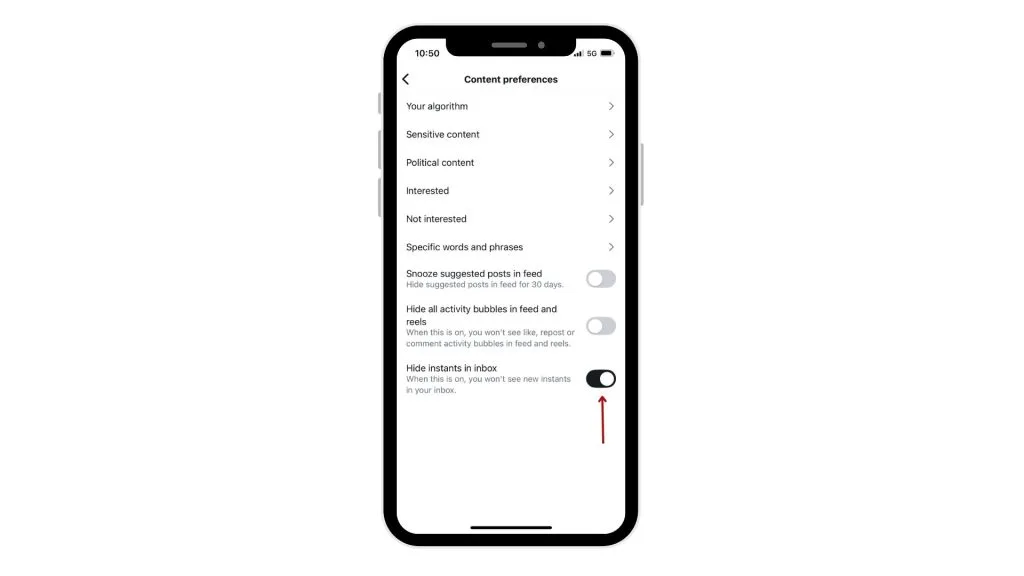
Once enabled, Instants will disappear from your inbox entirely – you won’t see the feature, and you also won’t see any Instants that people send you.
If you don’t want to turn it off completely but just need a break, use the Snooze feature instead: hold down the stack of Instants in your inbox and swipe right to temporarily stop seeing them. Swipe left on the same spot to bring them back whenever you’re ready.
Will It Take Off?
When Shots first launched, some analysts were sceptical, calling it a minor addition that might never reach mainstream adoption. But sentiment was similar when Stories were first announced, and that feature has since become one of Instagram’s most-used tools.
Whether Instants finds its footing is still an open question. But if you’re a creator or social media marketer, it’s worth understanding how it works.
If you want to keep your full Instagram strategy tight – Reels, Stories, feed posts and their analytics – Metricool lets you schedule, analyze, and manage everything in one place.
FAQ
Do Instants disappear immediately?
Not exactly. Photos vanish after the recipient opens them. If the Instant isn’t opened, it automatically expires after 24 hours. So they’re not gone the second you send them, they just have a short shelf life either way.
Can I control who sees my Instants and stop receiving them from certain people?
Your Instants are only visible to the people you choose to share them with, either your Close Friends or mutual followers. If you don’t want to receive Instants from specific accounts, you can Mute, Block or Restrict them at any time. Or use the Snooze feature: hold down the stack of Instants in your inbox and swipe right to temporarily stop seeing them. Swipe left to bring them back. All of Instagram’s usual safety tools apply too, so Block, Mute, and Restrict all work the same way here.
Can Instants be screenshotted?
No, Instants cannot be screenshotted or screen-recorded. This applies both on the Instagram app and on the standalone Instants app.
How many views do Instagram Instants get?
There’s no official data yet since Instants is still rolling out. What we do know is that Instagram’s algorithm already tracks immediate engagement signals, and features like Instants encourage real-time reactions that fit neatly with how the platform measures content worth surfacing. As a creator, think of Instants as a low-stakes way to gauge how your most engaged followers respond to raw content before investing in a full production.
Can you delete Instagram Instants?
Yes. Head to your Instants archive (top-right corner of the Instants interface), find the content you want to remove, and delete it from there. You can also delete an Instant from your archive to unshare it with friends who haven’t opened it yet.
Is there a standalone Instants app?
Yes, Instagram launched a separate Instants app in select countries on iOS and Android. It gives you immediate camera access without opening the full Instagram app. You log in with your existing Instagram account and Instants shared on the app appear for friends on Instagram, and vice versa.
