

5 Publer Alternatives for Social Media Management
 Kalum
29 June 2026
Kalum
29 June 2026 
Finding the right social media management tool for your business or clients can take you from struggling to stay afloat to struggling to handle the demands of yearly growth. Publer has been the right choice for many social media managers, helping it become one of the most recognized names in the space. However, as needs change, client lists grow, and budgets get tighter, it’s always smart to be aware of all available options so that you can choose the best one for you.
If you’re looking for Publer alternatives after using the tool and feeling the need for change, look no further. We’ve researched the best options on the market, analyzing their features and price plans, as well as the pros and cons of each tool to help you make the right decision.
What is Publer?
Publer is a cloud-based social media scheduling and publishing platform built to help individual creators and businesses coordinate their digital content distribution. The application acts as a centralized dashboard where users can draft captions, upload media assets, and assign future publication times across major social networks.
The system is designed with an emphasis on visual scheduling workflows, utilizing a standard interactive calendar and platform-specific mockup screens. It provides basic team collaboration options, content categorization tags, and automated text adjustments, positioning itself as a clean digital workspace for creators handling a small, focused list of personal or corporate channels.
Publer Features
- Platform-Specific Post Previews: Renders real-time mockups of upcoming posts to show how images, link attachments, and blocks of text will appear on specific desktop and mobile feeds.
- Bulk Content Upload Matrix: Allows users to upload up to 500 media assets or text updates simultaneously via CSV files, RSS feeds, or direct multi-file imports to populate content queues quickly.
- Conditional Spintax Variations: Enables the creation of flexible text templates that rotate specific words or phrases automatically, helping to keep repetitive text updates fresh across different networks.
- Multi-Workspace Separation: Groups social profiles into separate, isolated sub-dashboards to keep client accounts distinct and prevent accidental cross-posting errors.
Supported Platforms and Channels
- Facebook (Pages and Groups)
- Instagram (Business and Creator profiles)
- LinkedIn (Personal profiles and Company pages)
- X (Formerly Twitter)
- TikTok
- YouTube (including Shorts)
- Google Business Profile
- Telegram (Channels and Groups)
- Mastodon
Publer Pricing
- Free:
- 1 user
- 1 workspace
- 3 social accounts (except 𝕏)
- 10 scheduled posts per account
- 25 saved drafts
- 24-hour post history
- Free trials on paid features
- Professional: $3.52/month (prices multiply with each social account and additional member):
- Everything in Free
- Unlimited scheduling & drafts
- Schedule 1st comments & threads
- Unlimited media storage
- Unlimited workspaces
- Unlimited RSS automations
- Eternal posts history
- Trending posts & news
- Twitter / X integration
- Business: $7.04/month (prices multiply with each social account and additional member):
- Everything in Professional
- Unlimited AI prompts
- Analytics insights & reports
- Best times to post
- Competitor analysis
- Hashtag suggestions & analytics
- Spintax-powered post recycling
- Access to Publer API
- Enterprise: Custom pricing:
- Everything in Business
- Higher volume discounts
- 1:1 onboarding
- Prioritized support
- Unlimited daily posting
- Early access to new features
- Expedited feature requests
- Bank/wire transfer payments
Why You Might Be Looking for Publer Alternatives
The primary driver behind the search for reliable Publer alternatives is the compounding financial cost associated with its variable pricing structure. Because the platform charges separate monthly fees for every individual profile and user seat added beyond the single base account, growing organizations face rapidly inflating bills. If your business scales to manage 25 separate social channels across 5 distinct clients with a small team of 5 editors, your monthly base rate jumps from $10 to nearly $180 per month on the Business tier.
Beyond the pricing structure, user complaints frequently target the strict feature gating found between the tiers. Restricting standard performance analytics entirely to the highest Business plan means users on the Professional tier are forced to manually collect network data or pay for external reporting tools.
Furthermore, Publer provides zero native support for tracking paid media or tracking ad account spends. This means teams running balanced organic and paid social strategies are left with a split workflow, unable to see their complete return on investment within a single dashboard. Finally, users report that its social inbox features lack the deeper automated filtering and comment-assignment rules needed to successfully manage high volumes of customer support messages.
Publer Alternatives
1. Metricool
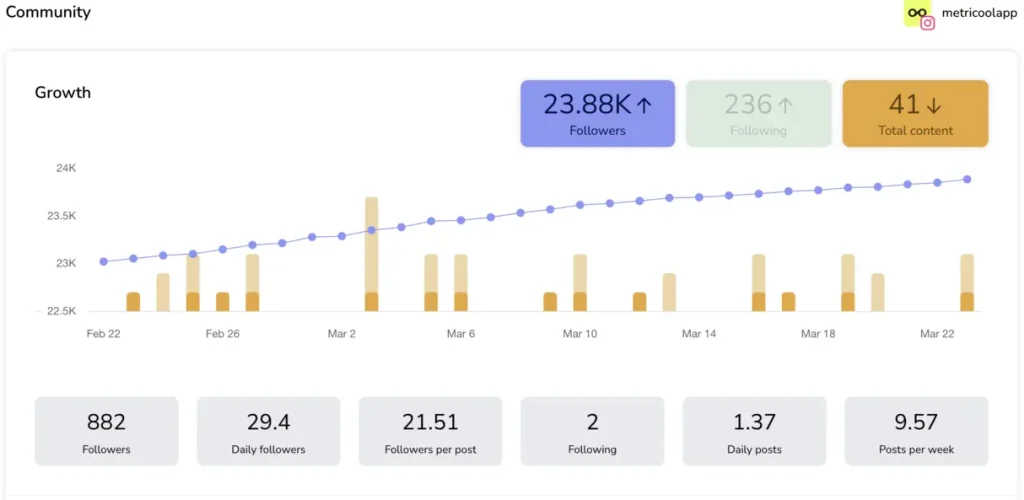
Metricool serves as a comprehensive, data-driven digital command center that unifies organic social media scheduling, detailed performance analytics, multi-network paid ad monitoring, and competitor benchmarking within a single dashboard. Built to provide clear, actionable visibility across all digital touchpoints, the platform removes the complexity of utilizing disconnected marketing applications, allowing teams to plan, execute, and analyze multi-channel campaigns without software friction.
Metricool Features
- Unified Cross-Platform Scheduling Calendar: Features an interactive drag-and-drop planning board equipped with real-time best-times overlays, indicating exactly when your specific brand followers are active on each network.
- Integrated Paid Advertising Dashboard: Collects and analyzes live conversion data, audience reach, and spend metrics for Meta Ads, Google Ads, and TikTok Ads right alongside your organic social performance metrics.
- Competitor Benchmarking Matrix: Allows users to store and monitor up to 100 rival corporate profiles simultaneously, tracking their follower growth, top-performing hashtags, and core publishing frequencies.
- Centralized Community Moderation Inbox: Consolidates direct messages, profile mentions, public reviews, and post comments into a single multi-user inbox featuring custom tracking labels and internal assignment controls.
- Automated Data Studio Integration: Streams live, continuous channel performance data directly into your external agency dashboards, completely removing the need to build manual spreadsheet reports.
Best for: Metricool is built for professional social media managers, expanding digital agencies, independent freelancers, content creators, and multi-brand corporate teams who need highly reliable data analytics and a predictable, stable billing structure that handles account scaling effortlessly.
Supported Platforms & Channels
- Instagram (Business and Creator accounts)
- Facebook (Pages and Groups)
- TikTok (Personal and Business profiles)
- LinkedIn (Personal profiles and Company pages)
- X (Formerly Twitter)
- YouTube (Channels, Shorts, and Videos)
- Google Business Profile
- Twitch
- Personal Websites and Blogs (via native tracking code or WordPress plugin)
Metricool Pricing
Metricool provides a permanent Free Plan that includes 1 complete brand bundle, detailed data tracking, a 30-day performance history, and scheduling capabilities for up to 20 posts per month. Premium subscription tiers (Starter, Advanced, and Enterprise) scale predictably based on the absolute number of brands managed, allowing unlimited team access seats on higher tiers without charging extra per-user or per-workspace fees.
- Free
- 1 brand
- Manage all your brands’ social networks (except LinkedIn and Twitter)
- Schedule up to 20 posts per month
- Analyze 5 competitor profiles
- Access 30 days of analytics
- AI social media assistant
- Starter – from $20/month
- Includes everything in the FREE plan, plus:
- Manage up to 10 brands
- Unlimited content publishing*
- Analyze up to 100 competitors
- Access to the X add-on
- Access to the Advanced Analytics add-on
- LinkedIn connection
- Limited access to Campaign Dashboards and Metricool Studio
- PDF and PPT reports
- Multiple link-in-bio
- Analytics with unlimited history
- Google Drive and Canva integration
- Advanced – from $53/month
- Includes everything in FREE and STARTER plans, plus:
- Manage up to 50 brands
- Team and client management
- Role management
- Post-approval system
- Complete Twitter/X analytics
- Customizable report templates
- Data Studio connector
- Metricool API (Zapier, Make, and MCP)
- Custom
- Includes everything in FREE, STARTER, and ADVANCED plans, plus:
- Custom number of brands
- Metricool integration in your business
- White Label
- Dedicated account manager
- Custom AI assistant credits
Metricool vs Publer
The major operational difference between Metricool and Publer centers on the long-term lifecycle of your social campaigns. Publer is built primarily as a pre-publishing scheduler, meaning its design and tools focus on getting a post drafted and approved. Once that post goes live, its analytical tools offer limited depth, especially if you are not paying for the highest tier. Metricool, conversely, treats publishing as just the first step in a complete feedback loop, supporting your workflow with a visual calendar alongside a deep data engine that tracks post metrics, ad spends, and competitor movements.
From a financial perspective, Publer’s variable pricing system creates ongoing friction for growing businesses. Adding a single new client with five social channels requires paying for five distinct account additions, causing your monthly subscription fee to climb continuously. Metricool’s flat brand packaging delivers a transparent, budget-friendly growth path, establishing it as one of the top Publer alternatives for professional teams focused on maintaining healthy operating margins. Choose Metricool when your workflow demands deep competitor insights, integrated paid advertising analytics, and clear flat-rate billing.
2. Buffer
Buffer is a streamlined social media management application focused on clean publishing lines, simple calendar scheduling, and core channel landing page creation. The application centers its workspace around an intuitive, uncluttered queue layout that allows users to set up predetermined time slots for content distribution across different social channels. Buffer also features a lightweight start-page creator tool, basic team approval workflows on its upper tiers, and an isolated analytics dashboard that tracks key post engagement trends.
Best for: Buffer is a solid option for solopreneurs, boutique brands, and small internal marketing teams that favor a minimalist workspace design over deep data tools.
Supported Platforms & Channels
- X (Formerly Twitter)
- TikTok
- YouTube
- Google Business Profile
- Threads
- Mastodon
Buffer Pros
- Highly intuitive, minimalist user interface that requires zero staff training time
- Simple, uncrowded post queue system
- Useful standalone link-in-bio page builder
Buffer Cons
- Per-channel billing model scales up quickly for businesses managing multi-platform brand bundles
- Analytics tracking remains separated from the publishing dashboard on older plan types
- Social inbox features are limited compared to deep moderation platforms
Buffer Pricing
- Free: 3 social channels, 10 scheduled posts, 1 user account, basic analytics
- Essentials: $5/month per channel: Everything in Free, plus: unlimited scheduling, AI assistance, advanced analytics, community inbox, hashtag manager.
- Team: $10/month per channel: Unlimited team members and scheduling, API access, Access levels, approval workflows.
Buffer vs Publer
Evaluating Buffer alongside Publer reveals two distinct approaches to modular subscription billing. While Publer begins with a low base price and charges variable rates for every added channel or user seat, Buffer applies a linear, flat per-channel cost structure across its plans. For teams running a very small operation—such as a single brand with three profiles—both tools remain relatively affordable, but they diverge as your channel count grows.
In terms of features, Publer offers advanced native publishing variables like Spintax text recycling, direct system bulk uploads, and deep multi-workspace structural separation out of the box. Buffer deliberately avoids these technical layers to maintain an uncomplicated, minimalist user experience. If your team requires deep formatting options and complex text adjustments, Publer holds the edge; however, if you value clean dashboard simplicity and want an easy tool for training new editors, Buffer is an alternative worth exploring.
3. PostPlanify
PostPlanify is an automated social media scheduler designed for content creators, independent brands, and agile teams looking to simplify multi-platform content publishing. The tool provides a centralized hub featuring integrated AI-driven caption generators, visual feed layout previews, and direct cloud media importing options. PostPlanify prioritizes speed and simplicity, enabling users to move from raw media files to optimized, platform-ready social posts with minimal dashboard clicks.
Best for: PostPlanify is best suited for high-volume content creators, independent entrepreneurs, and fast-moving teams that want to schedule large blocks of content across multiple accounts without managing account limits.
Supported Platforms & Channels
- X (Formerly Twitter)
- TikTok
- YouTube
- Google Business Profile
PostPlanify Pros
- Flat-rate agency plan offers unlimited connected social accounts for a predictable fee
- Native Canva and Google Drive media integration tools
- Fast AI text generators.
PostPlanify Cons
- Analytical reporting tools lack the deep performance tracking found in enterprise dashboards
- Community messaging and social inbox features are completely missing
- Brand workspace segregation options are basic.
PostPlanify Pricing
PostPlanify offers four main subscription brackets:
- Growth – $99/month:
- 15 Social Accounts
- 5 Workspaces
- 3 Users
- Unlimited Posts
- Analytics
- Reply to Comments + DMs
- Bulk Schedule
- Media Library
- Shared Calendar
- Link in Bio
- Full API + MCP Access
- AI Assistant
- Custom Integrations*
- Premium – $199/month – Growth features plus:
- 30 Social Accounts
- 15 Workspaces
- 6 Users
- Advanced Analytics
- Reports
- Post Approvals
- Team Comments / @Mentions
- Roles & Permissions
- AI Training & Knowledge
- 400 AI Images/month
- Scale – $349/month – Premium features plus:
- 100 Social Accounts
- 50 Workspaces
- 12 Users
- White-Label PDF Reports
- 800 AI Images/month
- Priority Human Support
- Dedicated Onboarding & Migration
- Enterprise – Custom pricing – Scale features plus:
- Custom Social Accounts
- Unlimited Workspaces
- Unlimited Users
- Unlimited AI Images/month
- 1:1 Onboarding Call
- Priority Feature Requests
- Private WhatsApp Support
PostPlanify vs Publer
The choice between PostPlanify and Publer comes down to a preference for structured control versus unlimited account capacity. Publer focuses on detailed platform features, providing things like individual workspace configurations, multi-stage approval structures, and deep caption formatting tricks. PostPlanify strips away these granular workspace settings to offer a streamlined scheduling engine focused on creation speed.
The biggest differentiator between these two Publer competitors is found on the pricing page. Publer’s per-profile billing model can penalize expanding agencies by raising costs for every single channel addition. PostPlanify addresses this pain point with its $69 Premium plan, which removes profile limits entirely. If your team needs deep corporate approval workflows and handles complex client hierarchies, Publer is the logical selection; however, if your goal is to publish a high volume of content across dozens of accounts without paying per profile, PostPlanify offers an affordable alternative.
4. SocialBee
SocialBee is an automation-first social media scheduling tool designed around category-based content organization, automated feed importing, and evergreen post recycling loops. The application lets users sort their creative updates into distinct thematic categories—such as company blogs, promotional updates, or curated industry news—and build complex publishing timetables for each bucket. SocialBee’s standout asset is its evergreen content engine, which automatically spins and republishes timeless updates to keep social feeds continuously active without manual human entry.
Best for: SocialBee is an excellent match for software companies, digital creators, professional bloggers, and content teams that maintain a massive archive of timeless resources and want to drive ongoing website traffic automatically.
Supported Platforms & Channels
- X (Formerly Twitter)
- TikTok
- YouTube
- Google Business Profile
- Bluesky
SocialBee Pros
- Highly sophisticated evergreen content recycling infrastructure that maximizes the lifespan of your posts
Automated bulk importing via RSS feeds - Direct support for emerging alternative platforms like Bluesky
SocialBee Cons
- The dashboard interface is text-dense and features a steep initial learning curve
- Lacks interactive live visual grid planning feeds
- Analytics dashboards exclude paid advertising metrics
SocialBee Pricing
SocialBee has two separate pricing models, targeted at different types of users:
- Bootstrap – $24/month:
- Up to 5 social profiles
- 1 user per workspace – 1 workspace
- 10 content categories
- 10 content sources
- Unlimited AI content generation
- Analytics up to 3 months of data
- Accelerate – $40/month – Everything in Bootstrap, plus:
- Up to 10 social profiles
- 1 user per workspace – 1 workspace
- 50 content categories
- 30 content sources
- Analytics up to 2 years of data
- Advanced analytics
- Hashtag organizer
- Bulk post editor
- CSV uploads
- Post-approval system
- Pro – $82/month – Everything in Accelerate, plus:
- Up to 25 social profiles
- 3 users per workspace – 5 workspaces
- Unlimited content categories
- Unlimited content sources
- Export analytics reports
- Internal notes
SocialBee’s Agency price plans are separated by the number of social profiles you are managing; all other features are identical in all 3 plans.:
- Pro50 – $149/month:
- Connect up to 50 social profiles
- 5 users per workspace – 10 workspaces
- Unlimited content categories
- Unlimited content sources
- Unlimited AI content generation
- Hashtag organizer
- Bulk post editor
- CSV uploads
- Post-approval system
- Advanced analytics
- Analytics up to 2 years of data
- Export analytics reports
- Internal notes
- Pro100 – $274/month
- Pro150 – $374/month
SocialBee vs Publer
When analyzing Publer vs. SocialBee, you are evaluating two entirely different approaches to content schedule organization. Publer is built for linear scheduling workflows, meaning your editors craft a specific post for a fixed spot on the calendar, the post goes live, and it leaves the active calendar pipeline. SocialBee operates as a circular content repository, allowing you to build permanent libraries of content that automatically recycle themselves over time based on custom variations.
This structural split impacts how each tool feels to use. Publer’s workspace emphasizes visual feed mockups, direct drag-and-drop calendar slots, and quick, manual text adaptations per channel. SocialBee focuses heavily on automation variables, bulk importing scripts, and automated category distributions, which can feel less visual and more data-heavy to casual creators. If your business focuses on running unique, highly visual campaigns that require strict client review steps, Publer is a natural fit. If your primary goal is to keep multiple social channels active using an automated evergreen library, the Publer vs. SocialBee comparison tips heavily in SocialBee’s favor.
5. Later
Later is one of the most established platforms in the social media management industry, featuring a classic multi-stream dashboard and deep corporate utility tracking. The software allows users to build highly customized monitoring dashboards made up of side-by-side columns that track live search queries, specific hashtags, competitor activities, and profile timelines simultaneously. Later also includes built-in social listening features through Talkwalker integrations, centralized asset libraries for brand compliance, and advanced multi-channel analytical reporting engines.
Best for: Later is tailored for e-commerce brands, visual content creators, retail shops, and social media managers who prioritize visual aesthetics and Instagram grid curation above all else.
Supported Platforms & Channels
- X (Formerly Twitter)
- TikTok
- YouTube
Later Pros
- Top-tier visual media asset manager equipped with customizable labels and storage folders
- Exceptional interactive drag-and-drop Instagram grid planner
- Reliable link in bio customizable integrations
Later Cons
- No monthly billing options available, requiring a significant upfront fee (although you can cancel anytime)
- Per-user seat pricing makes it exceptionally expensive to add team members
- The column-based interface can feel cluttered compared to modern calendars
Later Pricing
- Starter: $18.75/month: 1 social set, schedule up to 30 posts, link in bio, 90 days of analytics.
- Pro: $37.50/month: Everything in Starter plus social inbox, schedule up to 180 posts per profile, 50 AI credits /month, up to 1 year of analytics, UGC collection, custom roles and permissions.
- Scale $82.50 Everything in growth plus custom analytics, competitive benchmarking, future industry insights, brand health, brand Mentions, unlimited scheduling, 100 AI credits /month, up to 2 years of analytics, priority support.
Later vs Publer
The competition between Publer and later highlights the difference between a functional text scheduler and an image-centric brand builder. Publer treats text formatting, multi-platform variation adjustments, and technical link variables as its core strengths, making it an effective choice for multi-network text optimization. Later approaches scheduling from an aesthetic perspective, making the visual media asset library the center of its entire user experience.
This difference shows clearly in how both platforms manage their storage pipelines. Inside Publer, you start by creating a text caption and then attach your media files. With Later, you upload your media files first into a shared creative pool and then pull those assets onto a visual calendar to generate your captions. Furthermore, when comparing Publer vs later on cost scaling, Later uses flat multi-channel “Social Sets,” while Publer uses a strict per-profile billing matrix. Choose Later if your marketing strategy centers on curated visual feeds like Instagram and TikTok; choose Publer if your workflow requires text optimization and multi-network formatting.
Comparing Publer Alternatives
| Social Media Tool | Free Tier Availability | Account Billing Structure | Paid Advertising Analytics | Native Workspace Organization | Main Operational Focus |
| Publer | Yes (Capped at 10 pending posts; excludes X) | Per-Account & Per-User Tiers (Costs multiply with every profile addition) | None (Organic metrics only) | Isolated Multi-Workspace Slots | Visual mockup post previews and conditional caption Spintax variations |
| Metricool | Permanent Free Tier (1 Brand Bundle included) | Flat Brand Bundles (Connect all of a client’s channels in 1 slot) | Comprehensive (Full Meta, Google, and TikTok Ad tracking) | Centralized Multi-Brand Frameworks | Integrated organic scheduling, paid ad management, and competitor tracking |
| Buffer | Yes (Limited to 3 channels total) | Per-Channel Billing (Linear price increases per profile) | None (Organic metrics only) | Simple Separate Channel Queues | Minimalist queue organization and simple link-in-bio page building |
| PostPlanify | Limited Free Trial Only | Flat Subscription Packaging (Unlimited accounts on Premium) | None (Organic metrics only) | Basic Shared Calendars | High-speed AI content generation and direct Canva media importing |
| SocialBee | Limited Free Trial Only | Fixed Account Packages (Capped at 5, 10, or 25 channels) | None (Organic metrics only) | Thematic Content Categories | Automated category-based scheduling and evergreen post recycling |
| Later | Limited Free Trial Only | Flat Social Sets (Groups of 6 profiles per set) | Basic E-Commerce Click Tracking | Visual Asset Media Storage Folders | Drag-and-drop Instagram grid curation and visual asset management |
