

How to Create Better Instagram Posts with AI in 2026
 Kata
25 August 2026
Kata
25 August 2026 
Creating a great Instagram post with AI is more than outsourcing everything to ChatGPT. The most successful posts are built around a clear strategy, tailored to the right audience, and optimized for engagement.
In this guide, you’ll learn how to use AI to create Instagram posts that increase reach, drive clicks, and stay true to your brand. We’ll walk you through practical prompts, real-world examples, and the latest insights from our Instagram Study 2026.
Start With Your Goal
Before you ask AI to write your first caption, ask yourself one simple but essential question:
What do I want to achieve with this post?
Your objective shapes every aspect of your content from the tone of your caption to the format you choose and the time you publish. A post designed to drive website traffic will look very different from one that is supposed to increase engagement or build brand awareness.
For example:
- Want to reach more people on Instagram? Focus on Reels with strong hooks, engaging visuals, and quick pacing.
- Looking to generate leads? Create educational posts that share valuable insights, data, or actionable advice.
💡 Pro tip: Metricool makes it easy to identify the content your audience responds to most. You can quickly see whether educational carousels, fun Reels, or visual tips generate the highest engagement, helping you make more informed content decisions.
Choose the Right Platform
The platform you choose is just as important as the goal you’re trying to achieve. Before creating content, take a moment to confirm that you’re using the platform that best aligns with your audience and objectives. While Instagram may be the right choice, it’s always worth thinking twice before deciding if it’s the best fit.
Before generating your content, ask yourself:
- What is my primary goal (reach, engagement, leads, or clicks)?
- Who am I trying to reach?
- Which platform is best suited to this audience and why?
Once you have clear answers, you’re ready to let AI do what it does best: generate content tailored to your strategy and optimized for the platform you’ve chosen.
Writing Copy with AI & How to Make It Better Than Everyone Else’s
Once you’ve decided what you want to achieve with your social media post and where, you can bring AI into the process.
AI can write captions in seconds, but good captions need context. Most mistakes happen because users give the AI too little information, which can result in interchangeable text with no character.
The trick lies in the briefing. If you explain to the AI who you’re writing for, what goal you’re pursuing, and how you want to sound, you’ll get text that’s already about 80% there.
Good Prompt vs. Bad Prompt
❌ Write an Instagram caption about social media.
✅ Write an Instagram caption for social media managers about common content marketing myths. Use a casual, humorous tone, include a call to action at the end, and keep it under 120 words.
The more specific your prompt, the better the Instagram post AI can create.
AI Tools Worth Using
Different AI tools excel at different tasks. Here are a few worth considering:
- ChatGPT: Great for brainstorming ideas, creating outlines, and writing first drafts.
- Canva Magic Write: Ideal for short captions and social media copy.
- Metricool AI Assistant: Generates platform-specific posts complete with hashtag suggestions.
💡 Pro tip: Ask the AI to generate multiple versions of your caption. For example, one humorous, one informative, and one more emotional. Compare the results and choose the version that best reflects your brand voice.
One of the biggest advantages of Metricool’s AI Assistant is that you can create, refine, and adjust the tone of your social media posts without ever leaving the platform where you schedule your content. There’s no need to copy and paste between different tools, saving you time and keeping your workflow seamless. You can also preview how your post will appear in your feed and quickly adapt it for different social media platforms before publishing.
Creating an Instagram Post with AI: A Step-by-Step Example
Now let’s put everything into practice.
Imagine you want to create an Instagram post that helps your audience come up with better Reels ideas.
Your Brief
- Goal: Increase reach and engagement
- Target audience: Social media managers and content creators
- Tone: Casual, encouraging, and informative
- Format: Carousel or Reel
Your Prompt
Create an Instagram caption that shares three creative Reels ideas to increase reach. Write for content creators, use a casual and motivating tone, include emojis, end with a short call to action, and add three relevant hashtags.
Example AI Caption
🚀 Need fresh Reels ideas? Try these three proven formats:
✨ Show what happens behind the scenes when creating your product or service.
🔥 Put your own spin on a trending topic while staying true to your brand.
🎥 Explain what you do in 15 seconds or less – simple, authentic, and easy to understand.
Which one will you try first? Let us know in the comments! 👇
#ReelsTips #SocialMediaStrategy #ContentMarketing
Now all that’s left is to pair your caption with a strong visual.
Image Creation
With tools like DALL·E or Canva AI, you can generate images that match your topic. For example, a behind-the-scenes workspace or a stylized smartphone displaying an Instagram Reel.
💡 Pro tip: Use Metricool’s feed preview to see exactly how your post will look before it goes live. You can also crop your visuals and make final adjustments without leaving the platform.
Don’t Forget Carousels
Reels get most of the AI content hype, but don’t overlook carousels. According to our Instagram Study 2026, they outperform single-image posts across every key metric: more reach, more interactions, and far more saves. Yet, they’re still used much less often because they take more time to create.
That’s exactly where AI can help.
Ask your AI tool to draft the copy and outline for a carousel, whether it’s a list of tips, a step-by-step guide, or a before-and-after comparison. Then use Metricool to design, preview, and schedule it. A simple change in format can make a big difference in performance.
Want to save even more time?
Try the Metricool Carousel Agent, a free Claude Code skill that connects directly to your Metricool account through Metricool’s MCP.
Instead of juggling a writing tool, a design app, and your scheduler, you can create everything in a single conversation with Claude. It writes the copy, designs the slides in the correct 1080 × 1350 format, finds the images, and generates a preview. Once you’re happy with the result, you can schedule the carousel directly to Instagram or LinkedIn through Metricool.
See it in action here:
Creating Reels with AI
Reels remain one of Instagram’s most effective content formats, but they’re also more competitive than ever.
The good news? AI can help you create better Reels faster.
Tools like Claude and Metricool AI can generate content ideas, write hooks, create storyboards, and even suggest on-screen text. Instead of starting with a blank page, you’ll have a solid first draft in minutes.
A Simple AI Workflow for Reels
1. Generate ideas
Prompt:
Give me five Reel ideas for small businesses looking to increase their Instagram reach.
2. Create a strong hook
Example:
What you can do today to double your Reel views…
3. Refine the script
Keep it under 30 seconds, focus on one key message, and finish with a clear call to action.
4. Edit your video
Use tools like CapCut or Canva to create a polished, professional-looking Reel.
5. Add subtitles and a thumbnail
Most AI-powered editing tools can generate these automatically, saving even more time.
Once your Reel is published, Metricool helps you monitor performance with metrics like watch time, reach, engagement, and audience retention, making it easier to understand what resonates with your audience.
AI Post Generator vs. a Social Media Scheduling Tool
AI can help you create an Instagram post. But a social media scheduling tool helps you publish that content at the right time and understand why it performs well.
That’s the key difference.
An AI post generator creates captions, hashtags, and visuals.
A scheduling platform like Metricool tells you:
- When your audience is most active
- Which posts generate the highest engagement
- Which topics consistently perform well
- How your content performs over time
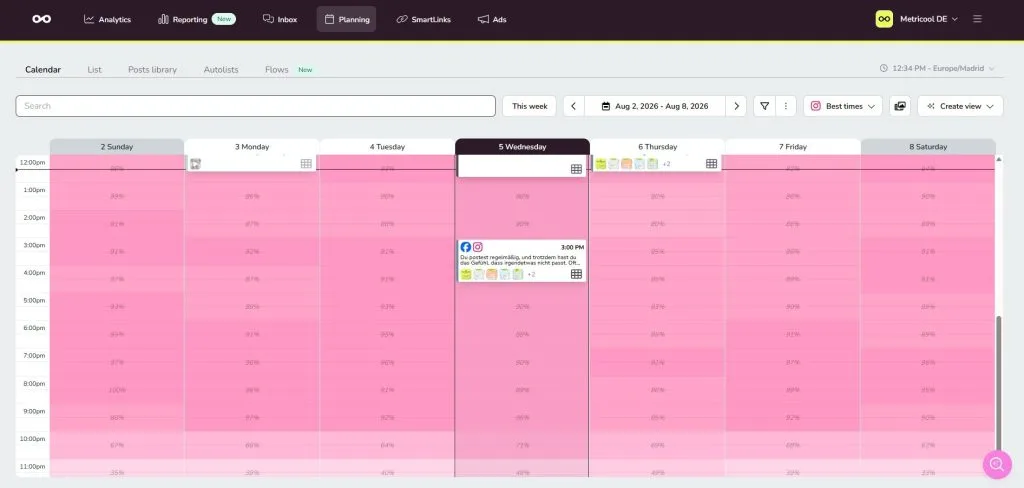
Once you connect your social media accounts to Metricool, the platform automatically identifies your best posting times. The darker the time slot in the planner, the more followers are typically online.
That makes scheduling your content far more strategic than simply posting whenever you have time.
Pro Tip: Connect Metricool to ChatGPT, Claude, or Make
If you already use tools like ChatGPT, Claude, or Make in your daily workflow, you can connect them directly to your Metricool account through Metricool’s MCP.
This allows AI to access your social media performance data and help you with tasks such as:
- Analyzing your best-performing posts
- Planning future content
- Building reports
- Identifying content trends
- Generating personalized content ideas
For example, you could ask:
Analyze my posts from the last 30 days, identify my best-performing content, suggest three new posts based on those results, and recommend the best times to publish them.
Metricool’s MCP is available on every Metricool plan (including the Free plan), making advanced AI workflows accessible without additional costs.
Here’s what that workflow looks like:
- Create your caption using Metricool’ AI Assistant or your preferred AI tool.
- Generate or design your visuals with Canva AI or another image tool.
- Fine-tune your visuals using Metricool’s preview feature.
- Schedule your post at your audience’s optimal posting time.
- Repurpose the content for other platforms with Metricool AI.
- Track your results in Metricool Analytics and use those insights to improve future content.
Instead of treating AI and analytics as separate processes, you can combine them into one single workflow that helps you create, publish, measure, and optimize every post.
Common AI Mistakes (and How to Avoid Them)
AI is a powerful assistant, but it’s not a replacement for strategy or creativity.
Like any tool, the results you get depend on how you use it. The better your prompts and the more you refine the output, the better your content will be.
Here are some of the most common mistakes to avoid.
Giving AI Too Little Context
Generic prompts produce generic content.
If you don’t tell the AI who your audience is, what your goal is, or what tone you want to use, you’ll likely end up with captions that sound bland and interchangeable.
The more context you provide, the more useful the output will be.
Publishing Without Editing
Even high-quality AI-generated content should never be published without a review.
Take a few minutes to adapt the wording, add your brand’s tone of voice, and verify any facts or stats. A small amount of editing can make your content feel much more authentic.
Using Irrelevant Hashtags
AI can suggest hashtags, but it doesn’t always know which ones are most relevant to your audience.
Instead of using every suggested hashtag, choose the ones that genuinely match your topic and audience. Relevance almost always outperforms volume.
Pay Attention to Copyright
If you’re using AI-generated images, make sure you’re allowed to use them commercially.
Always review the licensing terms of the AI tool you’re using, and whenever possible, combine AI-generated assets with your own original visuals or royalty-free images.
Measure the Performance of Your AI-Generated Posts
Creating and publishing content is only half the process. The real value comes from understanding why certain posts perform well so you can repeat them.
Monitor your results and use the data to improve future content.
Here are the key metrics to watch.
Reach
How many people saw your post?
Look at where those impressions came from, whether through the Feed, Explore page, Reels, or another source.
Engagement
Likes, comments, shares, and saves show how well your content resonates with your audience.
High engagement is often a strong signal that your content is valuable and worth recommending to more users.
Watch Time
For Reels, watch time is one of the most important performance indicators.
The longer people watch your video, the more likely Instagram is to continue recommending it.
Clicks
Track how many users clicked through to your profile, website, or landing page.
If your objective is to generate traffic or leads, this metric deserves close attention.
Metricool Analytics brings all of these metrics together in one dashboard, making it easy to compare posts, identify trends, and understand what works across all your social media channels.
💡 Pro tip: Create automated reports in Metricool to review your results every month. Over time, you’ll quickly spot patterns and identify the types of AI-generated content that consistently deliver the best performance.
Conclusion: AI Is the Tool. Strategy Drives Results.
AI can help you create content faster, generate fresh ideas, and streamline your workflow. But successful social media marketing still depends on having a clear strategy.
The brands seeing the best results are combining AI with audience insights, performance data, and thoughtful planning.
Creating Instagram posts with AI cannot replace creativity. What it helps you with is giving yourself more time to focus on the ideas, storytelling, and strategy that make your content stand out.
When you pair AI with a platform like Metricool, you can create, schedule, analyze, and optimize your content from a single place, turning every post into an opportunity to learn and improve.
