



TikTok Automation: How to Automate DMs and Comments
 Kata
25 November 2026

Everyone wants their TikTok to go viral and reach as many people as possible. That is, until your DMs and comments fill up and you have to put on the moderator hat. TikTok automation takes a lot of that work off your plate, so you can focus on your next viral clip. Here’s what you can do natively on TikTok, and what you’ll need a separate tool for.
What Is TikTok Automation?
TikTok automation means using tools to reply to or manage interactions on your account so you don’t have to do everything manually. It covers two areas:
- Direct messages (DMs): automatic welcome messages, keyword replies and FAQs in your inbox.
- Comments: automatic public replies and hiding comments that contain unwanted words.
You can automate DMs inside the app. For comments, you’ll need a tool like Metricool. Let’s start with what TikTok gives you on its own.
Automate Your DMs Natively on TikTok
When you get the same questions in your TikTok inbox every day, answering each of them takes more energy than necessary. To free yourself from that, you can set automatic messages that let you reply instantly and at scale, so no one is left waiting and you get time back for creating content.
Automatic messages are only available to Verified Business Accounts (VBA) and accounts with Advanced Access. If you have a general TikTok account, you won’t see these options yet. If your account does qualify, there are four types you can use.
4 Types of Automatic Messages
These are the type of message automations you can choose on TikTok:
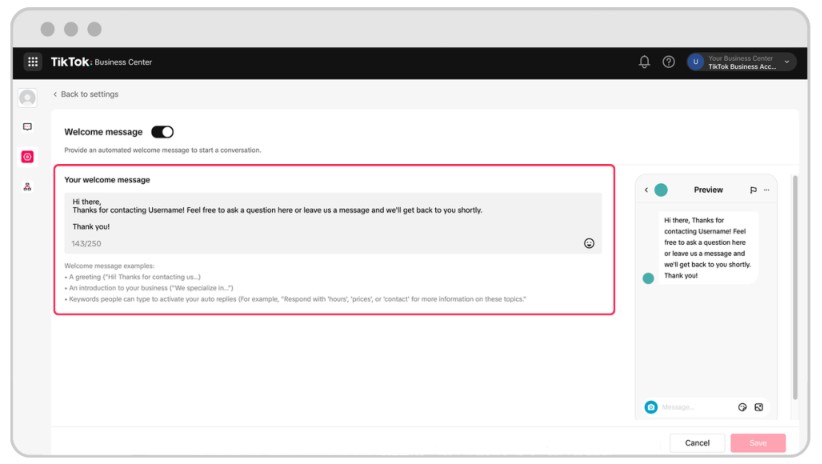
1. Welcome message
Create an automatic message the first time people contact you. It’s your chance to make a good first impression and tell them what to expect, even when you’re offline or busy with something more strategic than answering messages.
2. Keyword reply
Choose keywords and set an automatic reply for each one. When someone sends a message with an exact match, for example “price”, “shipping” or “discount”, they get your answer straight away.
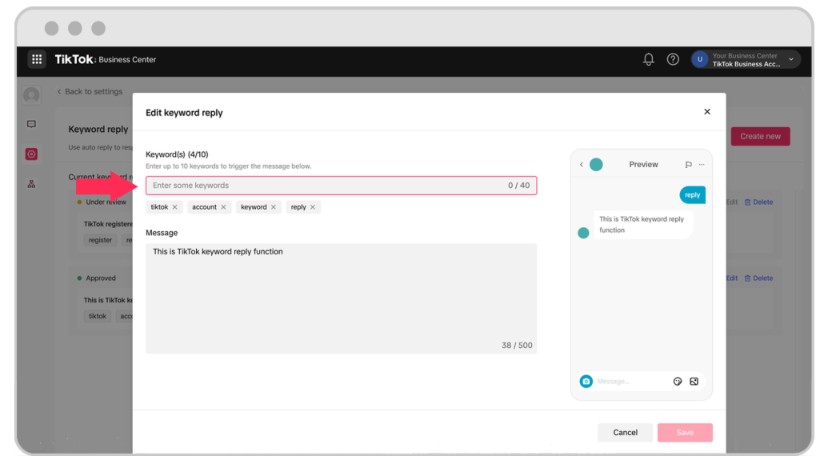
3. Suggested questions
Show your most frequently asked questions as buttons. Users tap a question and get your pre-written answer instantly. It works like an FAQ inside the chat.
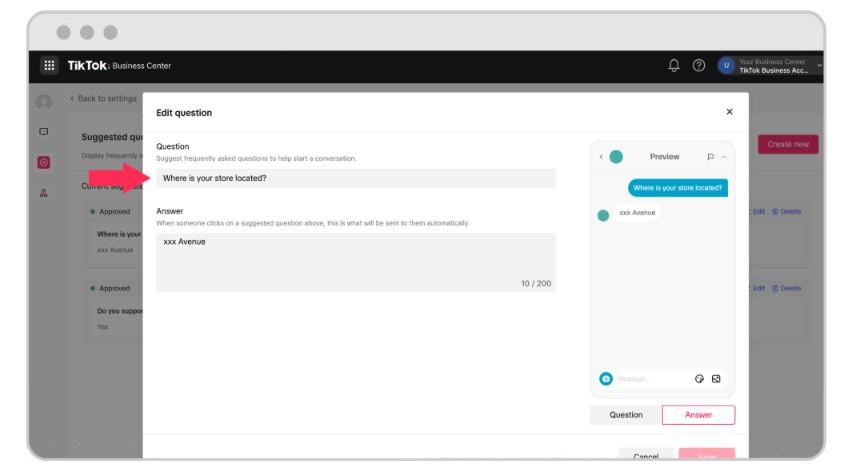
4. Chat prompts
Add topic buttons that help users start a conversation. It’s an easy way to point people toward what they’re looking for, whether that’s orders, collaborations or support.
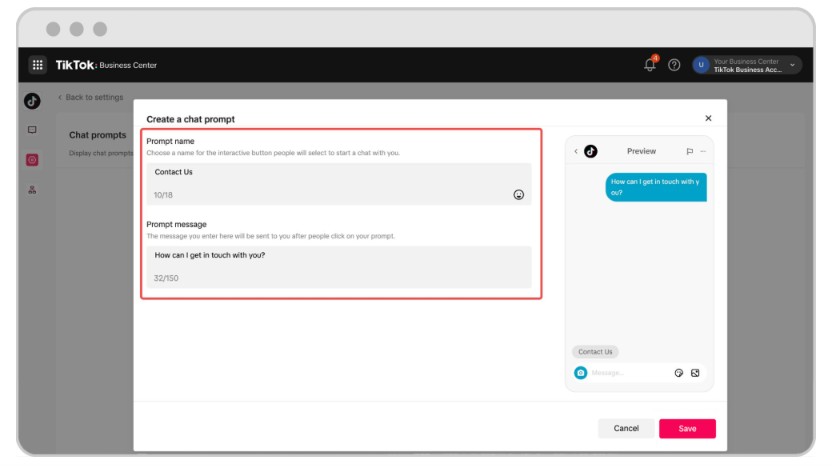
All four are set up from the same place in the app.
How to Set Up Automatic Messages on TikTok
Setting up these options is quite straightforward:
- Open TikTok and go to your profile.
- Tap the ☰ menu in the top right, then Business suite.
- Select Message center.
- Choose the type of message you want and turn it on.
- Write your message and tap Submit.
While it’s an easy setup, there are a few things to keep in mind:
- “Receive messages from Everyone” must be turned on in your privacy settings.
- TikTok reviews every automatic message before it goes live. This can take 1 to 5 business days, and every edit needs a new review, so plan ahead.
- Character limits: 250 characters for welcome messages, 500 for keyword replies and 200 for answers to suggested questions.
Automate Your TikTok Comments with Metricool Flows
TikTok’s native tools only cover your inbox. There’s no built-in way to reply to comments automatically, and comments are where most conversations start.
Metricool Flows fills that gap. It lets you automate comments on your TikTok videos from inside Metricoo in two waysl:
- Reply to comments instantly: Send an automatic public reply to every comment, or only to comments that include specific keywords. It’s ideal for campaigns like “Comment GUIDE and we’ll tell you where to get it” or for answering repeated questions such as sizes, prices or release dates.
- Moderate your video comments: Automatically hide comments that contain words or phrases you don’t want on your videos, such as spam, insults or competitor names. Hidden comments aren’t deleted. They’re just removed from public view, so your comment section stays clean without extra work.
Both start from a template and follow the same setup.
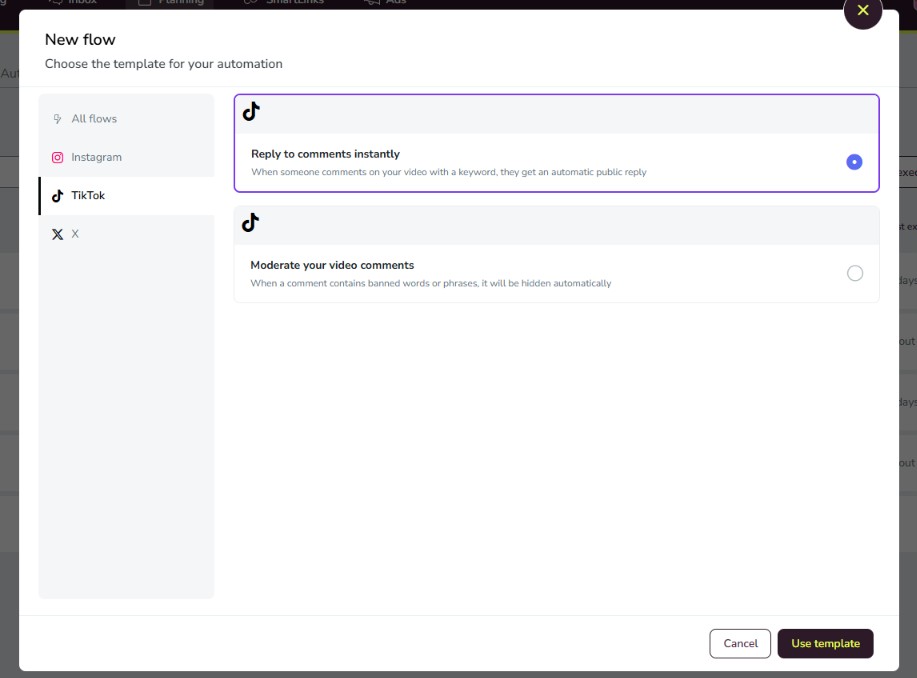
How to set up a comment Flow
- Create a Metricool account if you don’t have one yet, connect your TikTok Business account, and add Flows (available as an add-on from the Starter plan).
- In your dashboard, go to Planning → Flows and click + New Flow.
- Filter by TikTok and choose a template: “Reply to comments instantly” or “Moderate your video comments”.
- Give your Flow a name.
- Choose which videos it applies to: any video, a published video, or a scheduled video from your planner.
- Choose any comment, or add keywords separated by commas.
- For replies, write your message (up to 150 characters) and choose a delay of up to 24 hours. Adding a short delay makes your replies feel more natural.
- Check the preview and activate the Flow.
Prefer to follow along on screen? Here’s the walkthrough:
Tips For Better Comment Automation
A few details make the difference between a Flow that works smoothly and one that fires when it shouldn’t:
- Choose specific keywords. Keywords also match inside longer words, so “art” would trigger on “start”. Pick unique words like “GUIDE” or “DROP”.
- Add both spellings for accented words. Capitalization doesn’t matter, but accents do, so add “café” and “cafe” separately.
- Point people to your bio. Links in comment replies aren’t clickable, so use replies like “The link is in our bio! 🔗”.
- One automation per video. Each post can only have one active Flow, so plan which videos get which automation.
Native TikTok vs. Metricool Flows: Which Should You Use?
Now that you’ve seen both options, here’s how they compare. One thing to watch for: Metricool is also working on DM-to-DM automation for TikTok, starting in the United States.
| TikTok native | Metricool Flows | |
| Automatic DM replies | ✅ | Coming soon (US) |
| Automatic comment replies | ❌ | ✅ |
| Comment moderation by keyword | ❌ | ✅ |
| Choose specific videos | ❌ | ✅ |
| Approval waiting time | 1–5 business days | None, activate instantly |
| Account required | VBA or Advanced Access | TikTok Business account |
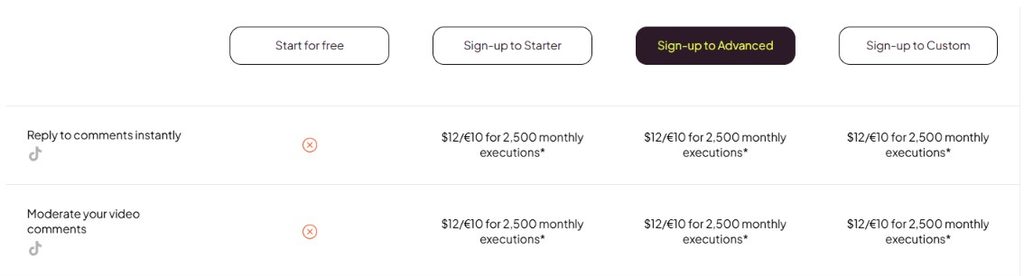
The best option is to use both: TikTok’s native tools for your inbox and Metricool Flows for your comments. Flows is available as an add-on on the Starter plan and above. See our pricing page to get started.
FAQ
Can you automate DMs on TikTok?
Yes. Verified Business Accounts and accounts with Advanced Access can set up welcome messages, keyword replies, suggested questions and chat prompts in the Business suite.
Can TikTok reply to comments automatically?
Not natively. To reply to or hide comments automatically, you need a tool like Metricool Flows.
Can I send a DM when someone comments on my TikTok?
Not at the moment, either natively or with Metricool. What you can do is reply publicly to the comment and invite the person to message you or check your bio.
Is TikTok automation allowed?
Yes, as long as you use TikTok’s own tools or official integrations like Metricool, which connects through TikTok’s API.