

5 Vista Social Alternatives for Social Media Management
 Kalum
26 June 2026
Kalum
26 June 2026 
For many growing teams, Vista Social became a visible option due to its early integration of short-form video features, modern calendar layout, and relatively affordable initial tiers compared to legacy corporate software. However, as digital strategies become more complex, many marketers find themselves searching for Vista Social alternatives that can handle multi-profile networks without forcing them into expensive subscription upgrades.
It’s vital for teams looking to maximize their margins to evaluate and compare free and paid plans for social media management tools. Finding the ideal replacement involves reviewing how each alternative tool addresses the specific functional gaps and tiered limitations found with Vista Social.
What is Vista Social?
Vista Social is an internet-based social media management application developed to assist content creators, digital marketers, and multi-account operators with post distribution, analytical tracking, and review monitoring. Built with a clear emphasis on modern short-form video publishing, the platform focuses on giving users a central location to prepare and schedule visual assets across multiple online networks simultaneously.
The platform allows you to operate in specific workspace blocks, helping teams separate individual corporate entities or client accounts. With features like universal smart inboxes, automated caption generators, and basic white-label PDF reporting, Vista Social targets marketers who need to move beyond manual publishing but want to avoid the high financial commitments traditionally demanded by many social media management tools for agencies and enterprises.
Vista Social Features
- Visual Publisher and Feed Mockups: Provides a drag-and-drop planning calendar that shows exact visual previews of how scheduled images and short-form videos will look on live mobile feeds before publishing.
- Review Management System: Monitors incoming public reviews and customer ratings across platforms like Google Business Profile, TripAdvisor, and Yelp, allowing users to reply directly from the dashboard.
- Unified Smart Inbox: Pools direct messages, profile mentions, and organic comments from multiple networks into a single, continuous communication stream for faster community moderation.
- Basic AI Assistant Integration: Features an integrated text tool designed to help operators generate alternative caption variations, translate post text, or automatically insert relevant emoji combinations.
Supported Platforms and Channels
- Instagram (Business and Creator profiles)
- Facebook (Pages and Groups)
- TikTok (Personal and Business setups)
- LinkedIn (Personal profiles and Company pages)
- X (Formerly Twitter)
- YouTube (including Shorts optimization)
- Google Business Profile
- Threads
- Snapchat
- Open review platforms (Yelp, TripAdvisor, Trustpilot)
Vista Social Pricing
- Professional Plan: $79 per month: Designed for independent professionals and small teams requiring core coordination assets and standard reporting metrics.
- 15 social profiles and 3 user seats.
- Standard planning, publishing, community engagement utilities, and basic performance reports.
- Review management, social listening tools, DM automation paths, and the Vista Page link-in-bio tool.
- Available add-ons include Employee Advocacy, expanded listening packages, and X (Twitter) connectivity.
- Advanced Plan: $149 per month: Built for expanding marketing teams seeking deeper automation workflows and specialized analytical tools.
- 30 social profiles and 6 user seats.
- All Professional features, plus advanced planning approval workflows and advanced reporting dashboards.
- Third-party automation connections via Zapier, Make, and MCP.
- Advanced DM automation rules, expanded Vista Page tools, and custom AI training and knowledge modules.
- Scale Plan: $379 per month: Tailored for growing agencies handling multiple independent brands that require significant volume capacity to grow.
- 70 social profiles and 10 user seats.
- All Advanced tier assets, plus a full white-label dashboard setup and a secure client profile connection portal.
- Unlimited AI assistant engine, higher contact caps, and premium AI training repositories.
- Enterprise Plan: Custom Pricing: Customized corporate solutions built for large-scale operations requiring tailor-made technical integrations and dedicated human support.
- Unlimited social profiles and unlimited user seats.
- Automated community sentiment detection, premium performance analytics, and strict brand safety compliance protocols.
- Onboards your team with a dedicated account manager, personalized training sessions, custom API integrations, and quarterly reviews.
- Supports specialized data migration services and Single Sign-On (SSO) authentication security controls.
Why You Might Be Looking for Vista Social Alternatives
The primary reason professional teams search for Vista Social alternatives is the platform’s rigid tier structure. If your team manages 16 social profiles, you completely exhaust the 15-profile cap of the Professional plan. Instead of allowing you to purchase an individual, à la carte profile slot for a small fee, the system forces you to upgrade entirely to the Advanced plan. This requirement doubles your monthly software expenses just to add a single extra channel connection.
Additionally, many users note that the platform’s most advanced analytical tools and specialized features are locked behind its highest pricing brackets. For example, comprehensive social listening tools require an extra premium add-on fee per month for each tracked keyword list.
The AI-driven features can also feel restricted on lower plans, capping your monthly text generation credits unless you move to more expensive tiers.
Vista Social Alternatives
When looking for an alternative application, it is important to realize that the top platforms differ significantly in how they handle team collaboration, account organization, data reporting, and subscription scaling.
1. Metricool
Metricool serves as an all-in-one digital command center that integrates organic content scheduling, deep audience analysis, competitor benchmarking, and multi-network paid advertising management into a single browser screen. Designed to deliver clean, highly scannable visual data, the platform removes the operational friction of switching between multiple single-purpose tools, allowing teams to manage multi-brand profiles with complete strategic clarity.
Metricool Features
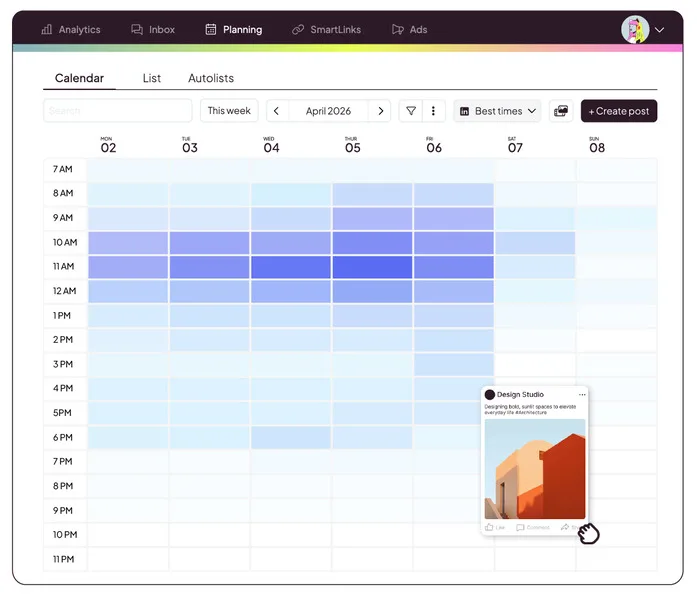
- Visual Content Calendar with Best-Times Chart: Features an interactive drag-and-drop planning calendar layered with a clear, color-coded map showing exactly when your specific target audience is most active online for each platform.
- Integrated Ad Campaign Tracker: Consolidates live budget tracking and conversion analytics for Meta Ads, Google Ads, and TikTok Ads directly alongside your organic social metrics.
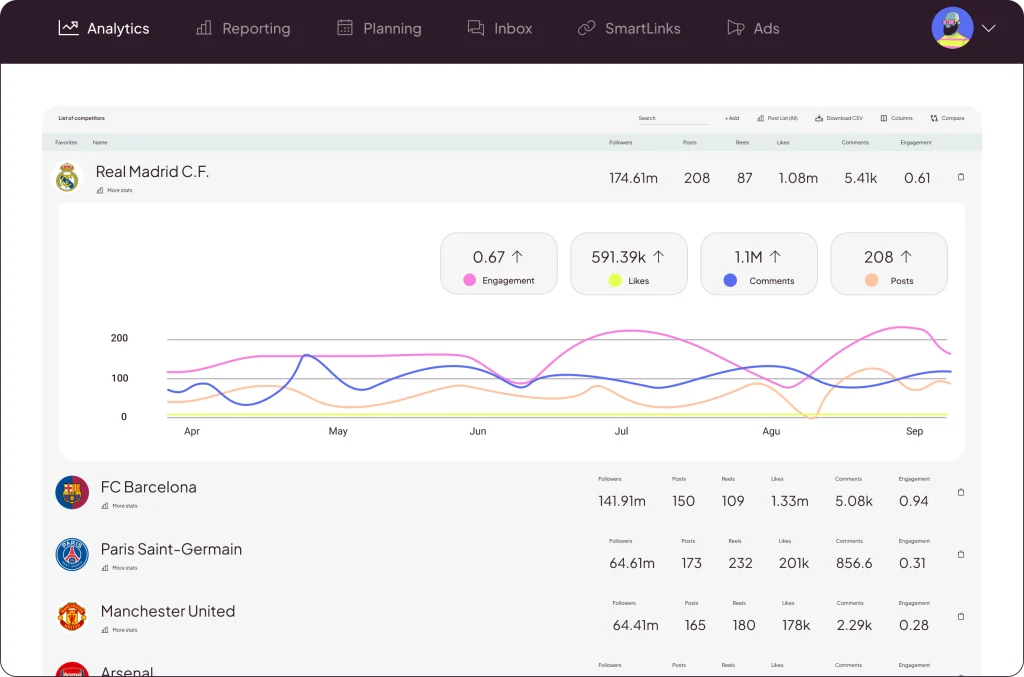
- Comprehensive Competitor Auditing: Allows users to track and analyze up to 100 rival business profiles simultaneously, monitoring their follower growth, posting patterns, and top-performing content ideas.
- Unified Social Inbox and Moderation: Gathers direct messages, organic comments, and customer reviews into a central, assignable inbox with built-in custom labels for fast team triaging.
- Native Data Studio Connector: Streams continuous, real-time campaign performance data directly into external dashboard frameworks, bypassing the restrictions of static report files.
Best for: Metricool is built for independent social media managers, growing digital marketing groups, content creators, and multi-brand corporate operators who need highly accurate data reporting and a clear, predictable subscription model that scales alongside business growth.
Supported Platforms & Channels
- Instagram (Business and Creator accounts)
- Facebook (Pages and Groups)
- TikTok (Personal and Business profiles)
- LinkedIn (Personal profiles and Company pages)
- X (Formerly Twitter)
- YouTube (Channels, Shorts, and Videos)
- Google Business Profile
- Twitch
- Personal Websites and Blogs (via native tracking code or WordPress plugin)
Metricool Pricing
Metricool provides an entry-level Free Plan that supports one complete brand bundle, including detailed analytics tracking, a 30-day data history, and scheduling for up to 20 posts per month. The premium plans (Starter, Advanced, and Enterprise) scale predictably based on the absolute number of brands you manage rather than charging hidden fees for individual feature updates or user seat expansions.
- Free
- 1 brand
- Manage all your brands’ social networks (except LinkedIn and Twitter)
- Schedule up to 20 posts per month
- Analyze 5 competitor profiles
- Access 30 days of analytics
- AI social media assistant
- Starter – from $20/month
- Includes everything in the FREE plan, plus:
- Manage up to 10 brands
- Unlimited content publishing*
- Analyze up to 100 competitors
- Access to the X add-on
- Access to the Advanced Analytics add-on
- LinkedIn connection
- Limited access to Campaign Dashboards and Metricool Studio
- PDF and PPT reports
- Multiple link-in-bio
- Analytics with unlimited history
- Google Drive and Canva integration
- Advanced – from $53/month
- Includes everything in FREE and STARTER plans, plus:
- Manage up to 50 brands
- Team and client management
- Role management
- Post approval system
- Complete Twitter/X analytics
- Customizable report templates
- Data Studio connector
- Metricool API (Zapier, Make, and MCP)
- Custom
- Includes everything in FREE, STARTER, and ADVANCED plans, plus:
- Custom number of brands
- Metricool integration in your business
- White Label
- Dedicated account manager
- Custom AI assistant credits
Metricool vs Vista Social
The choice between Metricool and Vista Social frequently comes down to whether your workflow prioritizes video feed aesthetics or comprehensive data tracking. Vista Social focuses heavily on visual feed mockups and short-form video previews. Metricool, by contrast, provides a far deeper analytical system by integrating your paid ad accounts across Meta, Google, and TikTok directly into your main social calendar dashboard.
Furthermore, Vista Social’s pricing structure creates financial friction when your client base expands. Being forced to double your monthly spend just because you added a sixteenth profile can quickly strain your operating margins. Metricool’s brand-based tier structure scales gently, allowing you to add more client bundles without sudden price doublings.
2. Buffer
Buffer is a highly reliable social media management tool designed around a clean, minimalist software design. The application breaks down social media management into three specific, distraction-free tool modules: Publishing (for calendar coordination and content queuing), Analytics (for performance tracking and simple report creation), and Engagement (for monitoring and replying to community messages). This structural division keeps the interface fast and exceptionally simple to navigate for new users.
Best for: Buffer is an excellent fit for independent freelancers, solo content creators, small business startups, and boutique marketing operators who want a simple, reliable scheduling calendar without the visual clutter or high price tags of bloated enterprise dashboards.
Supported Platforms & Channels
- Facebook (Pages and Groups)
- Instagram (Business and Creator accounts)
- LinkedIn (Profiles and Company pages)
- X (Formerly Twitter)
- TikTok
- YouTube (Shorts and Videos)
- Google Business Profile
- Threads
- Mastodon
Buffer Pros
Exceptionally clean, modern user experience that requires almost zero staff training; modular pricing means you never pay for unneeded channel slots; quick adoption of newer alternative social networks like Threads and Mastodon.
Buffer Cons
Advanced analytics data and multi-user collaboration tools require upgrading to more expensive per-channel tiers; costs can scale up aggressively if you manage dozens of channels across various clients; zero integrated tracking for paid digital advertising campaigns.
Buffer Pricing
- Free: 3 social channels, 10 scheduled posts, 1 user account, basic analytics
- Essentials: $5/month per channel: Everything in Free, plus: unlimited scheduling, AI assistance, advanced analytics, community inbox, hashtag manager.
- Team: $10/month per channel: Unlimited team members and scheduling, API access, Access levels, approval workflows.
Buffer vs Vista Social
The main operational difference between Buffer and Vista Social is how they approach subscription billing and user workspace design. Vista Social bundles your profiles into fixed, tiered blocks (such as 8, 15, or 30 profiles). If you go slightly over your limit, you are hit with a major tier price increase. Buffer avoids this completely by using a strict per-channel pricing model. If you need to manage exactly 9 channels, you pay only for those 9 channels, giving you total control over your software spend.
3. Agorapulse
Agorapulse is a heavyweight social media management platform built specifically around high-volume community moderation, advanced social listening, and deep team workflow coordination. The application features an enterprise-grade social inbox that converts comments, direct messages, and brand mentions into an organized ticketing system. Team leaders can automatically assign specific incoming tickets to individual team members, apply custom moderation rules to filter out spam, and track internal team response speeds down to the minute.
Best for: Agorapulse is designed for established corporate marketing departments, large customer support teams, and busy corporate groups that manage high volumes of daily incoming messages and require absolute control over internal team workflows.
Supported Platforms & Channels
- Facebook (Pages and Groups)
- Instagram (Business profiles)
- LinkedIn (Personal and Company pages)
- X (Formerly Twitter)
- YouTube
- TikTok
- Google Business Profile
Agorapulse Pros
Top-tier community moderation inbox with advanced automated filtering rules; highly detailed social listening data; professional social ROI dashboards that connect with Google Analytics to track actual website conversions.
Agorapulse Cons
High entry price point that can strain smaller marketing budgets; pricing scales per individual user seat, making team expansion expensive; interface can feel intimidating to casual users.
Agorapulse Pricing
- Standard Plan – $79 per user, per month:
- Unlimited publishing
- Centralized inbox
- Branded reporting
- Professional Plan – $119 per user, per month: Includes everything in the Standard tier, plus:
- Expanded publishing toolbox
- Paid comment moderation
- Team coordination
- Advanced Plan – $149 per user, per month: Includes everything in the Professional tier, plus:
- Workflow automation
- Shared content calendars
- Upgraded analysis
- Custom Plan – Tailored Pricing: Includes everything in the Advanced tier, plus:
- Unlimited scaling
- Enterprise collaboration
- Full reporting control
- Dedicated account infrastructure
Agorapulse vs Vista Social
Agorapulse and Vista Social target different segments of the social media management market. Vista Social positions itself as an affordable, video-focused alternative for growing teams and cost-conscious creators. Agorapulse is built as an enterprise-strength moderation and reporting engine. While Vista Social’s social inbox handles standard community interactions fine, Agorapulse’s ticket-assignment system, automated comment moderation rules, and team response-time tracking are far more robust for high-volume corporate customer service.
The pricing models highlight a major difference in how these platforms scale. Vista Social allows multiple team members onto its mid-level plans for a flat monthly fee. Agorapulse charges a premium fee for every single user seat you add to the system. If you have a team of five managers, an Agorapulse subscription will cost significantly more than a Vista Social plan.
4. Publer
Publer is a practical, budget-friendly social media scheduling tool designed to simplify high-volume posting through smart automation shortcuts. Key features include a visual drag-and-drop planning calendar, automatic post recycling loops that keep evergreen content active, and a bulk CSV uploader for planning weeks of text and image updates at once. It also offers unique formatting tools like “Spintax,” which helps users generate text variations to keep recycled posts looking fresh across different profiles.
Best for: Publer is ideal for solo content creators, blog operators, affiliate marketers, and small business owners who need a highly reliable, low-cost scheduling utility focused on content distribution rather than deep data analysis.
Supported Platforms & Channels
- Facebook (Pages, Groups, and Locations)
- Instagram (Business and Creator profiles)
- LinkedIn (Personal profiles and Company pages)
- X (Formerly Twitter)
- TikTok
- YouTube (including Shorts)
- Google Business Profile
- Threads
- WordPress websites and Telegram channels
Publer Pros
Extremely low starting price point, making it one of the most accessible paid tools available; built-in evergreen content recycling; supports direct publishing to WordPress blogs and Telegram channels.
Publer Cons
The reporting and analytics dashboards lack the visual depth needed for formal client presentations; the user interface can feel functional and utilitarian; lacks advanced paid advertising integrations.
Publer Pricing
- Free:
- 1 user
- 1 workspace
- 3 social accounts (except 𝕏)
- 10 scheduled posts per account
- 25 saved drafts
- 24-hour post history
- Free trials on paid features
- Professional: $3.52/month (prices multiply with each social account and additional member):
- Everything in Free
- Unlimited scheduling & drafts
- Schedule 1st comments & threads
- Unlimited media storage
- Unlimited workspaces
- Unlimited RSS automations
- Eternal posts history
- Trending posts & news
- Twitter / X integration
- Business: $7.04/month (prices multiply with each social account and additional member):
- Everything in Professional
- Unlimited AI prompts
- Analytics insights & reports
- Best times to post
- Competitor analysis
- Hashtag suggestions & analytics
- Spintax-powered post recycling
- Access to Publer API
- Enterprise: Custom pricing:
- Everything in Business
- Higher volume discounts
- 1:1 onboarding
- Prioritized support
- Unlimited daily posting
- Early access to new features
- Expedited feature requests
- Bank/wire transfer payments
Publer vs Vista Social
The comparison between Publer and Vista Social centers on the balance between pure scheduling utility and comprehensive account management. Publer is built to be a fast, affordable content delivery system. It excels at taking text, links, and media files and pushing them out across a variety of web channels—including blogs and messaging apps—at a fraction of the cost of traditional social media tools.
Vista Social, on the other hand, offers a more polished suite of brand management tools. While Publer focuses mainly on the publishing calendar, Vista Social includes built-in review management for tracking public business ratings, a unified smart inbox for message management, and cleaner PDF reporting templates for client updates. However, if you are a solo operator who doesn’t need to generate formal reports or track public review sites, Publer’s low-cost base plans and evergreen recycling tools provide a budget-friendly alternative to Vista Social’s fixed monthly tiers.
5. Sendible
Sendible is a mature social media management platform engineered specifically around multi-client coordination, custom brand isolation, and professional white-label options. The software uses a unique “Services” framework where every individual stream—such as posting to a Facebook Page or pulling analytics from an Instagram account—counts as one service. This structure allows users to build highly customized data feeds for each client, supplemented by built-in Canva integration, shared client approval calendars, and automated email reporting schedules.
Best for: Sendible is a strong option for growing digital agencies and independent consultants who want to present a highly professional image by white-labeling their dashboard and reporting tools directly for their clients.
Supported Platforms & Channels
- Facebook (Pages and Groups)
- Instagram (Business profiles)
- LinkedIn (Profiles and Company pages)
- X (Formerly Twitter)
- YouTube
- Google Business Profile
- WordPress and Medium blogging platforms
Sendible Pros
Deep white-labeling capabilities that let you run the entire platform under your own agency branding and custom domain; excellent client approval calendars that keep stakeholders aligned; reliable publishing integrations with blogging sites.
Sendible Cons
The “Services” counting model can feel confusing and restrict usage quickly, as a single client can easily use up multiple services; the analytics processing engine can occasionally experience data sync delays; user interface feels traditional compared to newer tools.
Sendible Pricing
- Core – $30 / month: Aimed at solo operators, providing basic scheduling for a restricted number of services and a single user.
- Plus – $84 / month: Designed for small teams, expanding user access, and increasing the available service cap.
- Premium – $169 / month: Targeted at small businesses in need of advanced features like custom approval pipelines and access to automated report generation.
- Elite – $254 / month: Aimed at growing businesses, agencies, and resellers with features like live reports, custom tags for bulk uploads, and advanced user permissions.
- Enterprise – $638 / month: An enterprise-level tier allowing teams to fully white-label the dashboard interface (at an additional cost), host the application on their own domain, and expand service limits to match large portfolios.
Sendible vs Vista Social
The primary difference between Sendible and Vista Social is how they approach client workspace organization and brand customization. Vista Social uses a modern, standardized interface where you switch between different client accounts using a simple sidebar dropdown menu. Sendible goes a step further with its premium tiers, allowing you to completely white-label the software. This means you can replace Sendible’s logos with your own branding, map the tool to your own custom web domain, and allow clients to log directly into a portal that looks like your company’s proprietary technology.
However, the way they count account connections is a key factor to consider. Vista Social’s profile-based billing is straightforward: one channel equals one profile. Sendible’s “Services” model requires careful attention. If you want to publish to a client’s LinkedIn page and pull analytical reports from that same page, that setup can consume two separate services on lower plans.
Comparing Vista Social Alternatives
| Management Tool | Free Plan Availability | Account Metrics Model | Paid Ad Tracking Integration | Data Reporting Capabilities | Primary Operational Focus |
| Vista Social | 3 Profiles / 1 User Max | Fixed Profile Tiers (Requires complete tier jump if exceeded) | None (Organic performance tracking only) | Standard Static PDF Document Exports | Modern short-form video scheduling and public review tracking |
| Metricool | Permanent Free Tier (1 Brand Bundle included) | Flat Brand Bundles (Group all of a client’s channels under 1 slot) | Comprehensive (Meta, Google, and TikTok Ads) | Custom PDF/PowerPoint Templates + Live Data Studio Streams | Integrated organic data, paid ad performance, and competitor audits |
| Buffer | 3 Channels / 10 Posts per channel queue | Per-Channel Modular Pricing (Pay only for what you connect) | Basic Paid Impression Metrics Only | Custom Report Component Block Builder | Minimalist, distraction-free scheduling calendars |
| Agorapulse | Single User / Basic Account Limits | Per-User Seat Billing + Profile Caps | Basic Google Analytics ROI Tracking | Detailed PPT Reports + Social ROI Dashboards | High-volume community inbox management and team triage |
| Publer | 3 Accounts (X/Twitter excluded) | Per-Account + Per-User Modular Fees | None (Organic performance tracking only) | Standard Performance Tables and Charts | Low-cost content distribution and automated post recycling |
| Sendible | Limited 14-Day Free Trial Only | Modular Service Counting Structure | None (Organic performance tracking only) | Automated Email Reports + Complete White-Label Customization | White-labeled client portals and client approval workflows |
