

How to Capture Leads From Instagram Comments Automatically
 Gretchen Oestreicher
29 September 2026
Gretchen Oestreicher
29 September 2026 
Someone watches your Reel, likes what they see, and comments to say so. That comment is the closest thing you get to a raised hand on Instagram, and it usually cools off in the time it takes you to notice it. A lead generation chatbot built for comments catches that moment for you. It reads the comment, opens a DM, and hands over your lead magnet while the person is still interested.
Metricool Flows runs this on Instagram without you watching the feed. You build the lead-magnet Flow once, and it works every comment on the post while you’re doing something else.
How Comment-Triggered Lead Capture Works
Every Flow runs on one pattern: a trigger, then an action. Someone comments a keyword on your post, and Metricool replies for you with a set sequence of messages. For lead generation, that sequence turns a public comment into a private DM that carries your guide, checklist, discount code, or signup page.
It works like a lead generation chatbot, though it lives in your comments and DMs rather than a website widget. There’s no chat window to embed and no script to maintain. You set the keyword, write the messages, and the automation handles each comment as it comes in.
The payoff is a list of people who asked for what you offered. Each automatic DM carries a name, so every lead is warm and already identified.
What You Need Before You Build
The lead-magnet Flow uses Instagram’s Comment → DM template, which needs a few things in place:
- A professional Instagram account connected to Metricool
- The Edit Flows permission on your user
- A Facebook Page linked to your Instagram account
The Comment → DM template only opens once a Facebook Page is linked, so if you skipped that step, reconnect Instagram with its Page. You build it from the web dashboard, since it isn’t in the mobile app yet.
Build the Lead-Magnet Flow Step by Step
Open Planning, then Flows, and select + New Flow. Filter to Instagram, choose Turn comments into DMs, and open the editor. From here the build runs top to bottom.
Step 1: Pick the Lead Magnet and the Keyword
Decide what you’re giving away before you touch the editor. A lead magnet Instagram DM campaign works when the offer is worth a comment: a template, a mini-guide, a discount, or early access. Pair it with a keyword that’s quick to type. Short, plain words like GUIDE, LINK, or INFO match more comments than anything with accents or clever spelling, since every misspelled comment is a lead the trigger misses.
Then name the Flow something you’ll recognize in the list later, like “March lead magnet: content calendar.”
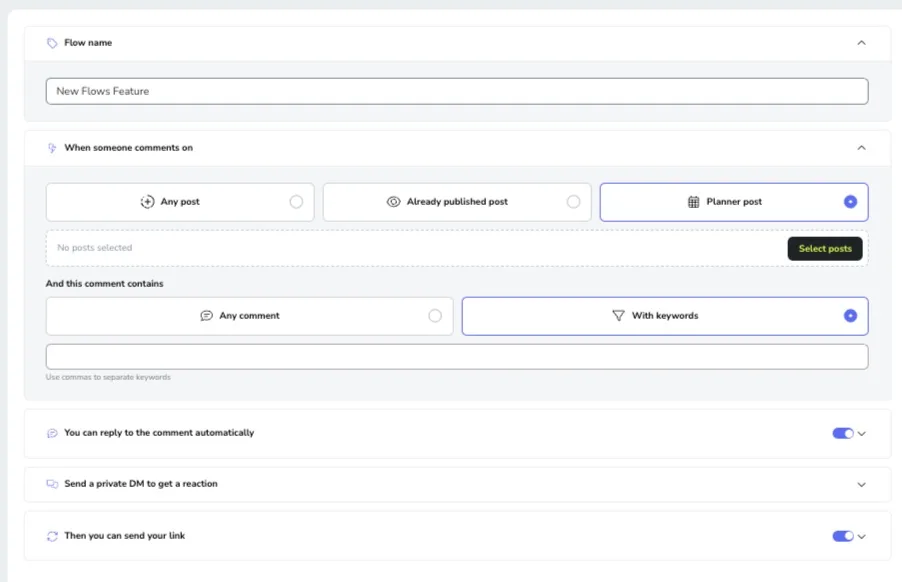
Step 2: Set the Comment Trigger
Under When someone comments on, choose the scope: any post, a post that’s already live, or one from your planner. Then under And this comment contains, pick With keywords and enter your word. Separate several keywords with commas, and note that matching is case-insensitive, so GUIDE and guide both fire.
Tie the Flow to the specific post running your campaign. A post can only hold one active automation, so you won’t have two Flows competing for the same comments.
Step 3: Add a Public Reply (Optional)
You can reply to the comment in public before the DM goes out. A quick “Check your DMs 👀” reassures the commenter and signals to everyone else scrolling that the offer is real. This step caps at 300 characters, and you can write up to three variations that rotate at random so the thread doesn’t read as copy-paste.
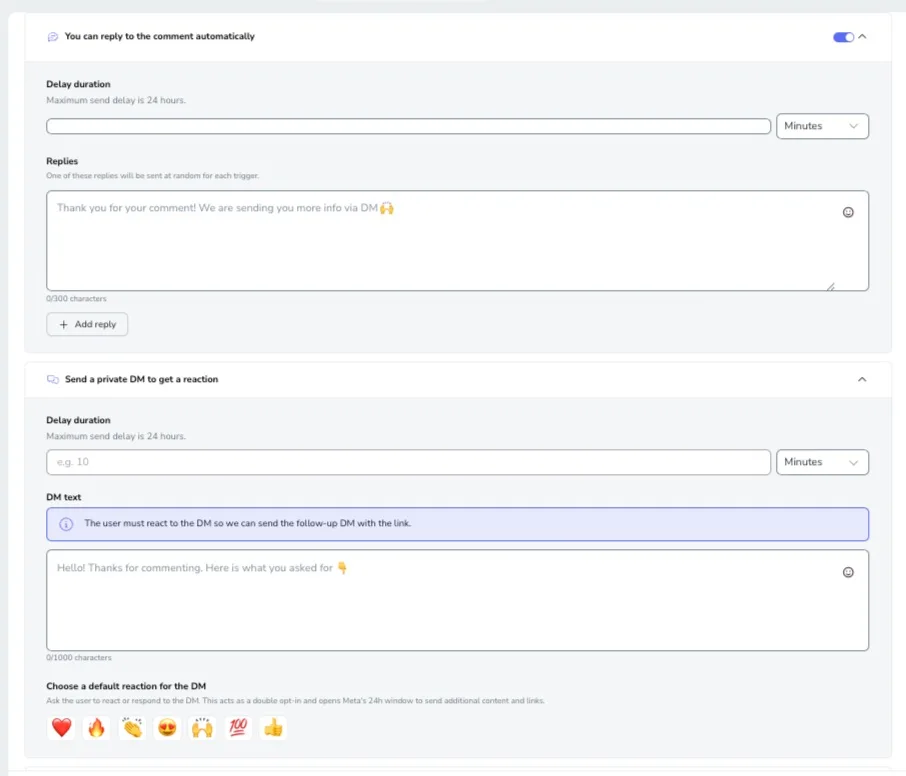
Step 4: Send the First DM to Open the Conversation
The first private message can’t carry your link, and that’s a Meta rule rather than a Metricool limit. This DM is text only, plus a reaction button you choose from a set like ❤️, 🔥, or 👍. Ask the person to react or reply: “Tap the 🔥 and I’ll send the link to the guide 👇.”
A reaction or reply counts as a double opt-in, which opens Meta’s 24-hour window for you to send the link. A reaction to the DM counts as a valid response on its own, so the Flow advances the moment someone taps the emoji. You have 1,000 characters here, though shorter tends to get the tap.
Step 5: Deliver the Link in the Follow-Up DM
Once the person reacts or replies, the follow-up DM sends, and this is where your link lives. Write the message, add Button text like “Get it,” and paste your Link. Keep the delay short so the resource arrives while they’re still in the app, and remember the follow-up has to go out within 24 hours of that interaction.
Step 6: Turn the Flow On
Check the mobile preview on the right to see the sequence the way your lead will see it. When it reads right, activate the Flow. If you’re not ready, save it as a draft and finish later.
The Meta Rules That Shape Your Flow
A few of Instagram’s limits explain why the Flow is built the way it is, and knowing them keeps leads from slipping through:
- No Links in the First DM: Text and a reaction button only, with the link saved for the follow-up.
- Seven Days for the First DM: The clock starts the moment someone comments.
- A 24-Hour Follow-Up Window: The link has to go out within a day of the person reacting or replying.
- One DM Per Comment: Each user gets a single DM per comment on a given post.
If you miss the window, the DM doesn’t send, so a Flow built around a fast reaction and a short delay captures more than one that waits.
How to Tell If It’s Capturing Leads
Your Flows list shows sends, interactions, and CTR for each automation. Sends count how many times the Flow fired. For a Comment → DM Flow, interactions count the reaction taps and replies to that first DM, and CTR is interactions divided by sends, so it reads as the share of commenters who opted in.
Open View Analytics on any Flow for the execution history: username, date, network, and whether each send completed or failed. A failed send usually means a window expired or the API hit a snag. Watch the metric that matches your goal. If leads are what you’re after, the reaction rate tells you whether the offer and the keyword are pulling their weight.
Tips to Convert More Comments
- Name the Keyword in the Post: Tell people exactly what to type, like “comment LINK and I’ll send it over.” A clear instruction gets followed.
- Keep the Keyword Short: Short, accent-free words match more comments.
- Write the DMs Like You Talk: Say them the way you would to a person, not the way a bot would.
- Add a Small Delay: A short pause on each step keeps the reply from feeling robotic.
- Review the Numbers: After each campaign, check what happened and adjust the offer or the wording.
How This Compares to a Standalone Chatbot
A dedicated lead generation chatbot tool can do more branching and cover more platforms, which is worth a look if your campaigns need that range. What Flows gives you is comment-to-DM lead capture inside the tool where you already plan and schedule your Instagram posts, with no separate subscription and no second dashboard to check. For teams whose lead generation automation lives on Instagram comments, that’s usually enough to run the whole campaign.
Start Capturing Leads From Your Comments
Every comment on your next Reel is a lead waiting for a reply. Build the lead-magnet Flow once, and the warm leads keep arriving in your DMs while you work on the next post. Set up your first one on the post you’re running now.
Turn Comments Into Leads With Metricool Flows
Metricool Flows catches every keyword comment and DMs your lead magnet, so warm leads collect while you work on the next post.
