

The 5 Best ManyChat Alternatives in 2026
 Kalum
23 September 2026
Kalum
23 September 2026 
ManyChat established itself early on as a dominant tool for Instagram and Facebook messaging workflows. However, as social media marketing has matured, many brands, agencies, and creators are actively seeking a ManyChat alternative. Increasing costs tied to subscriber list sizes, separate software subscriptions, and overly complex visual builders have pushed users to look for lighter, more integrated solutions.
Whether you need a free ManyChat alternative or a platform that combines publishing, direct message automation, and analytics under one roof, this guide will help you pick the right software for your operational goals.
Why Social Media Managers Are Moving Away from ManyChat
While ManyChat offers extensive rule builders, it introduces friction points that make daily management harder for growing accounts. Understanding these pain points helps clarify what to look for in the best ManyChat alternatives.
- Contact list pricing penalties: ManyChat charges based on the number of contacts stored in your database. As casual followers comment on your posts to receive product links, your subscriber list swells. You end up paying higher monthly tiers for passive contacts who only requested a single link.
- Tool fatigue and fragmented social media management: Running ManyChat means managing your inbox, post publishing, scheduling calendar, and performance reporting in separate tabs. Jumping between distinct dashboards wastes time and fragments your operational data.
- Complex rule building: Most social media campaigns rely on straightforward triggers like sending a link when someone comments a keyword, replying to direct messages about business hours, or sending a promo code when someone reacts to a Story. Building these sequences in ManyChat often requires navigating multi-layered decision trees.
- Add-on costs for advanced features: Essential features like advanced artificial intelligence responses or multi-team seats often require additional paid add-ons, driving up your total software bill.
Quick Comparison: Top 5 ManyChat Alternatives at a Glance
| Platform | Primary Focus | Standout Advantage | Free Tier Availability | Starting Price |
| Metricool Flows | Unified Social Planning & DM Automation | All-in-one scheduler, inbox, analytics, and auto-replies | Yes (Free account access) | Free / From $18/mo |
| Chatfuel | Visual Messenger & E-Commerce Bots | Strong Shopify integration and visual funnel builder | Yes (Limited trial) | From $14.99/mo |
| Tidio | Website Live Chat & Social Support | Combines website chat widgets with social messaging | Yes (50 chats/mo) | Free / From $29/mo |
| LinkDM | Instagram Creator Link Delivery | Simple comment-to-DM link sending | Yes (Up to 1,000 DMs/mo) | Free / From $19/mo |
| Meta Business Suite | Native Meta Inbox Management | 100% free official tool built directly into Meta | Yes https://metricool.com/instagram-automated-replies/ (Completely free) | $0 / Free forever |
1. Metricool Flows: The Best All-in-One ManyChat Alternative
For marketers who want to eliminate subscription clutter, Metricool Flows stands out as the top ManyChat alternative. Instead of forcing you to use a standalone messaging tool alongside a separate content scheduler, Metricool incorporates intelligent direct message automation directly into its social media management platform.
Core Metricool Flows Capabilities and Features
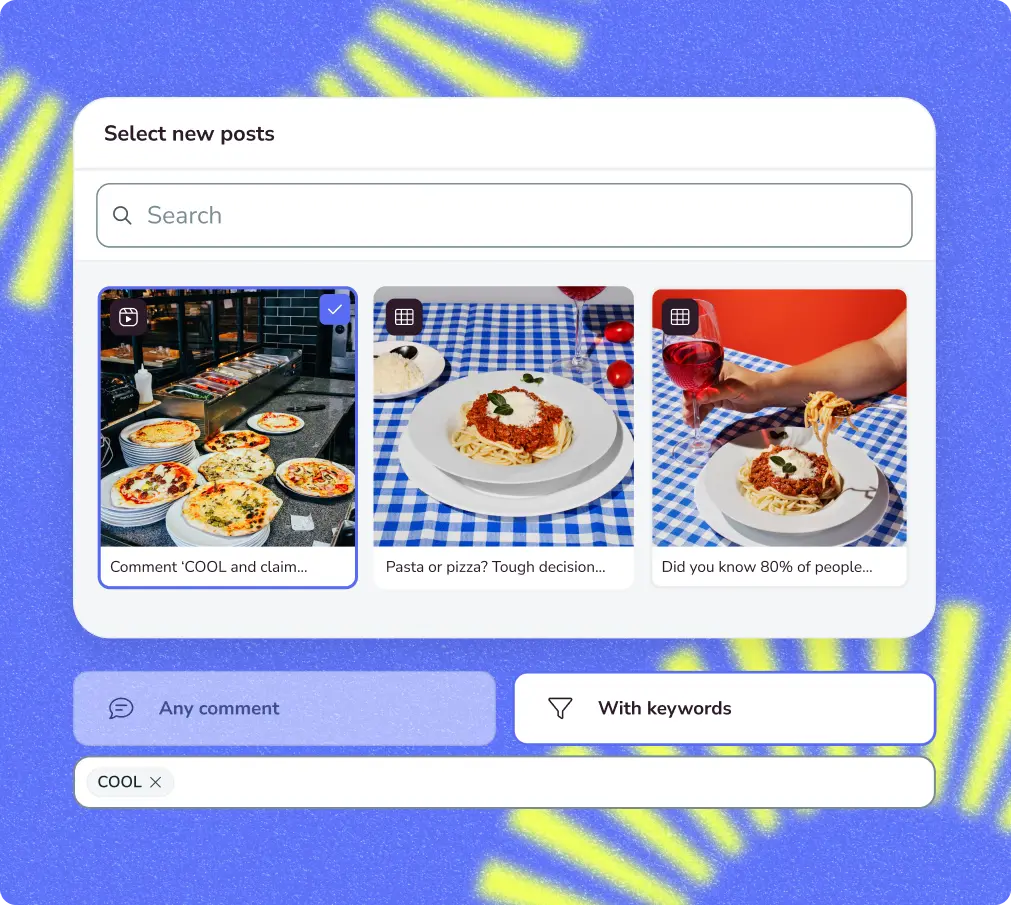
- Comment-to-DM workflows: When followers comment a specific keyword on your post or Reel, Flows automatically posts a public comment reply and sends a direct message containing your target link or resource.
- Direct message keyword replies: Automatically respond to incoming direct messages that contain specific terms like “pricing”, “hours”, or “booking”, keeping your response times fast.
- Story reply automations: Set up story reply keyword terms or specific emoji triggers (like 🔥 or 🙌). When viewers respond to your Instagram Story using those terms, Flows immediately sends the corresponding resource to their inbox.
- Anti-bot protections and delays: Set custom delay intervals (seconds, minutes, or hours) and write up to three randomized public comment replies so your automated interactions sound natural and human.
- Double opt-In Meta API compliance: To comply with official platform rules, Flows sends a text-first direct message with a default reaction button (❤️, 🔥, 👋, 😍, 🙌, 💯, 👍). Once the user reacts, the follow-up message delivers your direct link, protecting your link domain reputation.
Why Metricool Flows Outperforms ManyChat
- No stored contact penalties: Metricool does not penalize you as your contact list grows. You pay for your overall social management tier, not per contact stored in a messaging database.
- Single dashboard: Schedule posts, plan Reels, publish content, manage your unified inbox, measure profile growth, and run automated message flows from one single screen.
- Multi-platform reach: Beyond Instagram, Metricool provides automation options across TikTok and X (Twitter), allowing you to manage multi-network campaigns seamlessly.

2. Chatfuel
If you prefer building complex visual decision trees specifically for Facebook Messenger and Instagram, Chatfuel remains one of the direct ManyChat competitors.
Key Features
- Visual drag-and-drop builder: Build multi-branch decision flows that guide users through interactive questions.
- E-commerce platform integrations: Connects directly with Shopify storefronts to pull product catalogs, send cart abandonment reminders, and track order statuses inside direct messages.
- AI agent capabilities: Includes basic AI response add-ons capable of answering general customer questions based on site data.
Pros and Cons
- Pros: Smooth visual builder interface; strong e-commerce integrations for online stores.
- Cons: Pricing scales rapidly as contact volume increases; separate dashboard from your primary social post scheduler; visual flows can break if users submit unexpected responses.
Chatfuel is a solid option for e-commerce brands focused primarily on automated product selling within Meta messaging channels, though it shares ManyChat’s pricing scale limitations.
3. Tidio
For businesses whose primary support strategy centers around an e-commerce website or web application, Tidio offers a versatile hybrid messaging platform.
Key Tidio Features
- Unified live chat widget: Combines website live chat, email inquiries, and social media direct messages inside one customer service dashboard.
- Lyro AI support bot: Uses conversational AI trained on your website FAQ pages to resolve customer support questions automatically.
- Order management tools: Integrates with platforms like Shopify and WordPress to display customer order details alongside direct message conversations.
Tidio Pros and Cons
- Pros: Excellent website live chat capabilities; strong AI support options for e-commerce help desks.
- Cons: Social media comment-to-DM triggers are limited compared to dedicated social platforms; higher starting costs for full AI features.
Tidio is ideal for retail brands that want to manage website chat support and Instagram customer inquiries in one unified support desk.
4. LinkDM
Creators who only require a tool to send link URLs when followers comment on Instagram posts often find ManyChat unnecessarily complicated. LinkDM focuses specifically on lightweight link delivery.
Key LinkDM Features
- Comment-to-DM delivery: Automatically detects designated keywords in Instagram comments and sends direct message responses containing target website links.
- Creator-focused interface: Streamlined setup screen designed specifically for single-user creator accounts.
- Automated story auto-replies: Triggers link delivery when followers interact with Instagram Stories.
LinkDM Pros and Cons
- Pros: Extremely easy to set up; focused single-purpose tool for creators.
- Cons: Limited to Instagram and Facebook; lacks post scheduling, analytics, and broader multi-channel capabilities; pricing adds up if you manage multiple accounts.
LinkDM is a neat option for solo creators who only need simple comment-to-DM link delivery and do not require comprehensive social media management features.
5. Meta Business Suite
When evaluating ManyChat competitors, you should not overlook Meta’s native platform tools. Meta Business Suite provides zero-cost messaging tools built directly into Instagram and Facebook.
Meta Business Suite Key Features
- Native inbox management: Centralizes direct messages, post comments, and Instagram Story responses across Facebook and Instagram.
- Basic automated instant replies: Set up instant welcome messages, away status notices, and simple FAQ button menus.
- Zero third-party connections: Operates natively inside Meta’s servers, eliminating setup friction and third-party software risks.
Meta Business Suite Pros and Cons
- Pros: 100% free forever; official native tool; zero risk of third-party API connection errors.
- Cons: Lacks advanced comment-to-DM keyword triggers; no custom delay controls; lacks multi-step opt-in logic or randomized public comment replies.
Key Factors to Consider When Evaluating ManyChat Alternatives
Selecting the right messaging tool depends on your team structure, budget model, and social media strategy. Keep these critical decision criteria in mind as you compare platforms:
1. Pricing Structure: Contact-Based vs. Flat Subscription
Traditional chatbot tools charge based on total stored contacts. As your audience engages with your content, your monthly bill increases automatically. Modern solutions like Metricool Flows offer flat subscription pricing tied to your overall management workspace, letting you capture unlimited leads without worrying about contact count limits.
2. Official Meta API Compliance
Using unauthorized scraping tools or unverified software puts your account at risk of shadowbans or action blocks. Ensure any alternative you choose connects officially through Meta’s Graph API, utilizing double opt-in sequences and compliant messaging practices.
3. All-in-One Integration vs. Tool Fragmentation
Managing your content calendar in one tool, reviewing analytics in another, and configuring direct message automation in a third creates unnecessary complexity. Choosing a platform that unifies planning, scheduling, inbox management, analytics, and automated messaging saves hours of administrative work each week.
4. Customization and Humanization Options
Automated messages should support your customer relationships, not feel like rigid automated broadcasts. Look for features like randomized public comment replies, custom delay timers, and emoji reaction triggers that keep your interactions warm, authentic, and engaging.
How to Transition from ManyChat to Metricool Flows in 4 Simple Steps
Switching your message automation to Metricool Flows takes only a few minutes. Follow these simple steps to move your workflows over:
- Connect your Instagram business profile: Log in to Metricool and connect your Instagram professional account. Because Metricool is an official Meta Business Partner, the connection uses secure OAuth authorization without requiring password sharing. Don’t have an account yet? Click the button below:
- Open the Flows dashboard: Navigate to the Planning tab in your Metricool navigation bar and select Flows. Click + New Flow to open the automation builder.
- Configure your trigger rules and keyword terms: Select your campaign objective (such as Turn comments into DMs or Turn story replies into DMs). Enter your target keywords or story reply terms, specifying whether the flow applies to all published posts, specific Reels, or upcoming scheduled posts.
- Write your public and private responses: Draft up to three randomized public comment replies, configure your text-first private message with reaction emoji buttons, and set your destination link in the follow-up message. Add your preferred delay timing, click Activate, and your new flow is live.
ManyChat Alternatives FAQs
Will switching to an alternative affect my Instagram account safety?
As long as you choose a platform that uses Meta’s official API (such as Metricool Flows, Chatfuel, or Tidio), your account remains completely safe. Official API tools follow Meta’s messaging standards, rate limits, and security protocols, protecting your profile from action blocks or shadowbans.
Can Metricool Flows automate replies on platforms other than Instagram?
Yes. Beyond Instagram comment, DM, and Story automations, Metricool Flows automates TikTok and X (Twitter), letting you manage multi-platform interaction rules from a single dashboard.
How does Metricool Flows handle link sharing without violating Meta rules?
Metricool Flows utilizes a compliant double opt-in sequence. The initial automated DM sends text alongside an emoji reaction button (e.g., ❤️, 🔥, 👋, 💯, 👍). When the user taps a reaction, it serves as an explicit opt-in, opening Meta’s 24-hour messaging window so you can safely deliver your direct destination link.
