

YouTube Marketing in 2026
 Kata
27 August 2026
Kata
27 August 2026 
YouTube was launched in 2005 and has since become the most popular video-sharing platform. In fact, YouTube is the second most visited site in the world. With this, we know there are unlimited possibilities for brands to have their name see fresh sets of eyes. Therefore, if you’re looking for ways to improve your account’s YouTube marketing strategies in 2026, you’re in the right place.
What is Marketing on YouTube?
Designing a marketing strategy for YouTube is essential for any type of business or brand. This isn’t just impactful in your brand awareness, but also drives traffic to your site and boosts sales. In this guide, we will explain how to create a YouTube strategy from scratch, and then how to implement this into your content plan.
If you are new to YouTube and want to become more comfortable with the network, read this YouTube tutorial for beginners.
YouTube Marketing Funnel
As we are all aware, YouTube has become a powerful platform for businesses to reach their target audience and promote their products or services. The marketing funnel is a framework that illustrates the journey of a potential customer from being aware of a brand to becoming a loyal customer. It consists of three main stages – the top, middle, and bottom of the funnel.
Top of the funnel
The top of the funnel is where the audience becomes aware of your brand through various channels such as social media, search engines, or word-of-mouth. This is the stage where you need to create engaging and informative content to capture their attention and spark their interest.
Middle of the Funnel
Moving down the funnel, we have the middle stage. This is where the audience has shown interest in your brand and is considering making a purchase. This is a crucial stage where you need to nurture your audience with more targeted and personalized content. YouTube is a great platform for this as you can create product demos, tutorials, and customer testimonials to showcase the value of your products or services.
Bottom of the funnel
At the end, we have the bottom of the funnel, where the audience is ready to make a purchase. At this stage, you need to provide a clear call to action and make it easy for them to convert. Utilizing YouTube’s advertising options, such as skippable in-stream ads (formerly known as TrueView) or bumper ads, can be effective in converting viewers into customers.
How Can YouTube Marketing Help Your Business?
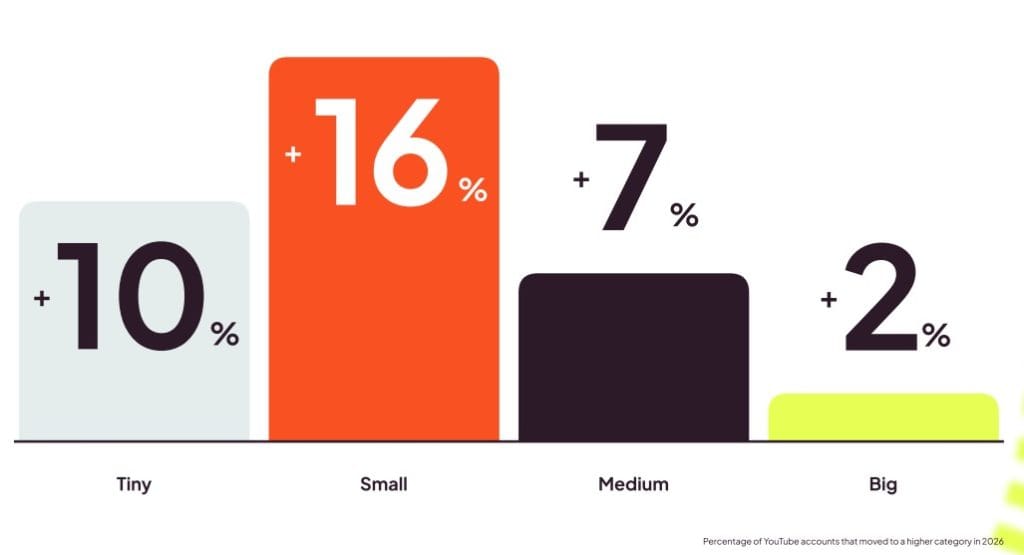
Many brands are hesitant to jump on YouTube because they don’t believe they can benefit from this platform. Even if your brand isn’t established on YouTube, it isn’t too late – quite the opposite actually. According to Metricool’s 2026 YouTube Study, accounts with 2,000 to 10,000 subscribers have the highest likelihood of moving up to the next subscriber tier. That’s great news if you’re just getting started
Here are just a few of the benefits that YouTube marketing can have for your brand or business:
Searchability
As mentioned above, YouTube is an extremely established social media network, that not only serves as an entertainment platform but one of the largest online search engines. This means that by creating quality content and optimizing it for your ideal audience, you increase the chances of being found on YouTube and Google. This alone can be a huge win for your brand.
That said, search is no longer the primary way most viewers discover content on YouTube. Our latest YouTube Study found that only around 9% of views come directly from YouTube Search, while just 3% come from users navigating straight to a channel. Instead, the majority of views (more than 61%) come from the Shorts feed, with subscribers accounting for another 11%. In other words, while search optimization remains an important part of a strong YouTube strategy, algorithmic discovery through Shorts is currently the biggest driver of visibility.
Content “half-life”
Another major advantage of YouTube – unlike other platforms – is the longevity of its content.
The “half-life” of YouTube videos, or how long it takes to receive half of its total engagement, is much longer than other networks such as Instagram, TikTok, and Facebook. According to Scott Graffius’s 2026 data, Instagram posts now have a half-life of 1,096 minutes (18.27 hours), Facebook posts sit at 86 minutes (1.43 hours), and X (Twitter) posts at just 52 minutes, compared to YouTube videos, which have a half-life of 15,276 minutes, or 10.60 days.
This means that this content is normally more “evergreen” than other social networks, allowing it to be relevant for longer. Our YouTube Study confirms this pattern: a video hits its strongest moment in the first three days after publishing, capturing the bulk of its total interactions, but performance doesn’t drop off after that. Instead, it settles into a steadier, lower rhythm that, with good keyword optimization, can keep generating views for months or even years.
Drive traffic and boost sales
YouTube makes it easy to tag products, include website links, promote other videos, and add context to your products or services. We know that video content is very valued across social media because it allows the user to connect with the brand/business on a deeper level. You can add up to 14 links to your YouTube Channel which can lead to other social media platforms, websites, or resources. Those who want to tag products can also join YouTube Shopping to sell products and boost an e-commerce website.
Build a community
Although there are many other benefits that YouTube can bring to your business, one of the most important is building a community. Since video content is so important today, this allows you to have the space to tell your brand story, build your reputation, and gain loyalty.
Creating a YouTube Strategy
In order to organize your efforts, and track your growth, you first need to create a thorough marketing strategy for YouTube. This will help structure your efforts and a resource you can come back to at any time.
There are four different important stages when creating a YouTube strategy that we will explain below.
Define Your Channel Objectives
When creating a YouTube marketing strategy from scratch, you need to think about the purpose of this strategy, and how it aligns with your overall brand’s goals. Do you want to increase brand awareness? Drive traffic? Boost sales?
Here is a list of the most common objectives:
- Increase brand awareness.
- Drive traffic to your website or product listing.
- Grow your community.
- Sell your products or services.
- Create a community, and build trust.
After you have decided on your primary objectives, it’s time to create a content plan for YouTube.
Conduct Market Research
This second stage is vital for understanding what your audience is looking for, and how you can best find them. You also want to see what your competition is doing, so you can see at a scope what your competitors are talking about.
First and foremost, you need to define your ideal clients and understand your channel demographics. If you already have a YouTube channel, you can view your channel demographics in either YouTube Studio or third-party tools like Metricool.
To help find trending keywords, and understand what users are searching for, you can use tools such as Google Trends, Statista, SemRush, Keyword.io, and Answer the Public. Here you can search topics and view keyword trends specifically on YouTube. Not only will this help you understand what problems your ideal clients are facing, but this will also give you content ideas.
Of course, you also need to see what your competitors are doing. This doesn’t mean that you “steal” their content, however, you can view their top-performing posts to see what has worked well for their brand so you can content model. You can analyze your competitors on YouTube with Metricool, inside the Analytics section.
💡 Pro tip: If you want to see how your own channel stacks up against the accounts whose activity powered Metricool’s 2026 YouTube Study – not just against global averages –, try Metricool’s Claude Skill, which was built specifically for this purpose. It connects to your Metricool account, analyzes your channel’s performance, and benchmarks it against the 71,177 accounts included in the study, broken down by subscriber tier and content format. You’ll receive a scored report, along with tailored recommendations to help improve your YouTube strategy.
Create a YouTube Content Plan
Now it’s time to put your strategies into action. Creating a YouTube content calendar will help organize your ideas, and will help you stay on track with your content. You first need to decide who will be creating the content, and who will publish it.
Then, you need to decide how often you will post, and what themes your content will cover. A clear sweet spot for long-form video is 2 to 4 videos per week. Posting more than that doesn’t meaningfully improve performance, and the effort of producing extra content stops paying off.
However, Shorts work differently. There’s no real ceiling, and posting more consistently tends to keep adding to your monthly views, since each upload is just another shot at being surfaced in the Shorts feed.
These themes are known as your “content pillars” because they act as the foundations of what your content will be. This can themes such as educational, entertaining, community, engaging, etc. To help you build your content calendar, follow our social media template below with step-by-step instructions:
Once you have created this plan, create a workflow with your team to ensure your projects are consistent. Using project management tools such as Notion, Asana, Monday, or whatever your preferred workflow process.
You can also utilize Metricool’s approval process, to send videos to a reviewer before it is scheduled to publish. This allows you to send content to your clients or team members for them to review before the content goes live. This workflow allows you to move efficiently and effectively as a team.
Optimize Your Channel
To stand out from the rest, optimizing your YouTube channel is a must. This will ensure your channel is accurate and up to date, and also optimized for SEO and ranking purposes.
First of all, you want to make sure your channel name accurately reflects your brand, and your profile pictures include your brand logo or brand image. However, just ensuring your username and photo are good to go isn’t enough. Here are some more strategies to consider when optimizing your YouTube channel.
Consider a YouTube business channel
If want to access more tools to manage your YouTube channel, you may want to consider switching to a brand account for YouTube if you haven’t done so already. This allows you to add multiple team members to your channel, and even create new channels related to your brand if desired.
Create quality content from the start
If you’re just starting to create content on your YouTube channel, it can be overwhelming to know where to start. If you want a full guide on creating a video for YouTube:
After the filming and editing are finished, consider these tactics to add to your YouTube marketing strategy before uploading:
✅ Include an introduction video on your channel talking about:
- Who you are?
- What will you offer in your channel?
- How will your channel benefit your viewers?
- How often will you post videos?
- Where else can viewers find you?
✅ Create a description using keywords:
Adding descriptions to all your videos is fundamental. Use the intro video to drive your followers where you want. Your website, other social networks, etc. You can also add keywords to your video descriptions to boost your search rankings.
✅ Don’t rely on hashtags for discovery
Metricool’s 2026 YouTube Study found that hashtags aren’t a major ranking factor on YouTube the way titles, thumbnails, and descriptions are. Videos with hashtags actually saw a 17% drop in views (though interactions rose 13%), suggesting hashtags can bring in a more engaged, but smaller, audience rather than boosting overall reach. If you use them at all, stick to 1-2 directly relevant to your content. Your title, description, and keywords will do far more heavy lifting for discoverability.
✅ Make sure you use an image with the right size. This is important so that no content gets cut off, or loses its quality. Read this guide below for the correct dimensions for all images and videos on YouTube:
✅ Optimize your videos and include a cover photo that represents you. This way your banner will be associated with your brand.
✅ Capture attention through your images
Images will be the first point of contact when someone accesses your videos.
Use texts, frames, or striking images.
Make your content SEO-friendly
Uploading videos is not the only objective. The ultimate goal is that your visitors watch the video until the end and click the links included in the video or text. For SEO, the watch time is crucial, that is, if videos are watched until the end and also the number of subscribers attained from videos.
✅ Choose the title for your videos carefully
The title of your videos is a great ally for SEO and your YouTube marketing strategy. Decide the keywords that you want to be found by and include them in the title. This is the moment to do so.
✅ Add descriptions with links to your videos
The same as you did with your intro video, add a description to each of your videos. Add links that you want to drive your viewers to and remind them to subscribe to your channel.
✅ Mobile still leads, but TV is catching up fast
Globally, around 60–70% of YouTube watch time happens on mobile. In the US, though, connected TV has already overtaken mobile as the biggest viewing surface, accounting for roughly 60% of watch time.
So, when editing your videos, optimize for both. Keep text, graphics, and key visuals clear and easy to read on a phone, but don’t design exclusively for small screens. For longer-form content especially, remember that a growing share of your audience may be watching on a TV.
✅ Use storytelling and keep the best for the end
Complete views will help your YouTube marketing strategy and visibility. Spend time in creating a good script for your videos to encourage subscribers to watch until the last second.
✅ Create playlists
In the same way as the architecture of a website is important for SEO, creating playlists is crucial to categorize your videos properly.
YouTube Marketing Tips & Tricks
Now that you have built the base of your strategy, here are a few more tips that can help you mature your channel, and continue to improve your strategy.
Schedule YouTube videos
Both the YouTube platform itself and Metricool offer you the option to schedule your videos.
This is a great way to save on work time, giving you the chance to film several videos at once and space them out over time. What’s more, both YouTube and Metricool post the automatically scheduled videos for you.
💡 If you’re wondering when to schedule that content, Metricool’s 2026 YouTube Study found that the 10 AM to 4 PM window sees the highest volume of long-form videos published, meaning it’s also the most competitive slot. For Shorts, the busiest posting window shifts to the afternoon, between 2 and 6 PM. Use these as a reference: post during these windows if you want to be where the activity already is, or aim for quieter hours if you’d rather avoid the competition.
Utilize YouTube Studio
With YouTube Studio, you can control everything that happens regarding your channel. From the control dashboard, you can manage the content, upload videos, create playlists or monetize your channel: discover here how to upload a video to YouTube.
Add captions and subtitles
Captions and subtitles make your videos more accessible, easier to follow without sound, and more discoverable to a wider audience.
YouTube has moved these settings around, so don’t be surprised if you see Languages instead of a dedicated Subtitles section in YouTube Studio. The exact layout can vary by interface version.
Here’s the current workflow:
- Open YouTube Studio.
- Select the video you want to edit.
- Go to Subtitles or Languages in the left-hand menu.
- Add a language, then choose how you want to create the captions: Upload file, Auto-sync, or Type manually.
- Add your spoken content, review the timing and accuracy, then publish when everything looks good.
Pro tip: Always review auto-generated captions before publishing. Fixing names, technical terms, and other transcription errors can make a big difference to the viewer experience.
Go LIVE to build audience loyalty
Advance on your channel when you are going to stream a live video on YouTube. It’s a great way to drive audience from your website or social networks to YouTube. Run live workshops and sessions, or host Q&A’s to allow your audience to ask any questions.
Film Shorts for YouTube Channel
Make the most of the resources you have on YouTube and upload “short” format content: Also learn how to download YouTube shorts and never lose your content: tips for YouTube Shorts.
Lasting a maximum of 60 seconds, these clips will allow you to show a different kind of content, a more relaxed feel, including music and text. Short but sweet.
It will also help you connect with your viewers or reach a new kind of audience with your YouTube channel. And the data backs up prioritizing this format: Shorts views grew 127% year over year, and accounts with under 10,000 subscribers saw the strongest growth of any tier, with views up over 200% and interactions up 42%.
If you have a smaller channel, Shorts are currently one of the few places on YouTube where being small is genuinely an advantage – the algorithm rewards how people respond to your video, not how established your channel is.
Create YouTube clips from your content
YouTube retired its original viewer-facing Clips feature in April 2026. That means you can no longer create clips from other users’ videos or third-party content.
If you’re a creator, you can still repurpose your own long-form videos and archived live streams into standalone clips using YouTube Studio’s Video Clips tool. YouTube has also announced plans to bring this functionality to Shorts later in 2026, with AI-powered suggestions to help identify your most “clippable” moments.
For a more organized approach, combine YouTube’s Video Clips tool with a Metricool content calendar. Turn your best long-form moments into standalone videos or Shorts, schedule them alongside your other content, and use them to reach new viewers.
Use YouTube premieres
Premieres on YouTube are a feature that allows you to publish a video in premiere format as if it were a movie, and broadcast it live so that viewers share their impressions through chat.
You can publish these premieres directly when uploading the video or schedule them for a later date. In this case, YouTube users will be able to add a reminder to receive a notification when the video is released.
Affiliate Marketing on YouTube
YouTube Affiliate marketing is a form of online marketing where a company or individual partners with a YouTube content creator to promote their products or services. The content creator then earns a commission for every sale or referral made through their YouTube channel. This method of marketing has proven to be highly successful, as it allows companies to tap into the vast and diverse audience of YouTube, while also providing content creators with a means of monetizing their channels.
Analyze channel statistics
The last tip, but one of our favorites, is analyzing your channel statistics. You can do this one of two ways, using YouTube Studio, or using a tool like Metricool.
With YouTube Studio you can view a multitude of statistics which you can see in the screenshot below including analytics for the overall account, your content, audience, revenue, and research. View specific content, or select a time frame to see how your content is performing.
You can also use Metricool to analyze, schedule, and manage all your YouTube content in one place. On the Analytics side, you can view community growth, subscriber balance, demographics, revenue, top-performing videos, and competitor stats.
When viewing specific videos, you can view metrics such as video views, watch time, average views duration, likes, dislikes, comments, and shares.
One metric worth watching closely is average view duration. According to the 2026 YouTube Study, average view duration for long-form videos fell by 37% year over year, even as views increased by 76%. That gap matters for monetization because fewer minutes watched per view create fewer opportunities to serve mid-roll ads.
The study also found that estimated ad revenue declined by 55%, while monetized playbacks dropped by 59% over the same period. In other words, more views don’t automatically translate into more revenue. To build a sustainable YouTube strategy, it’s just as important to monitor watch time and engagement as it is to track raw view counts.
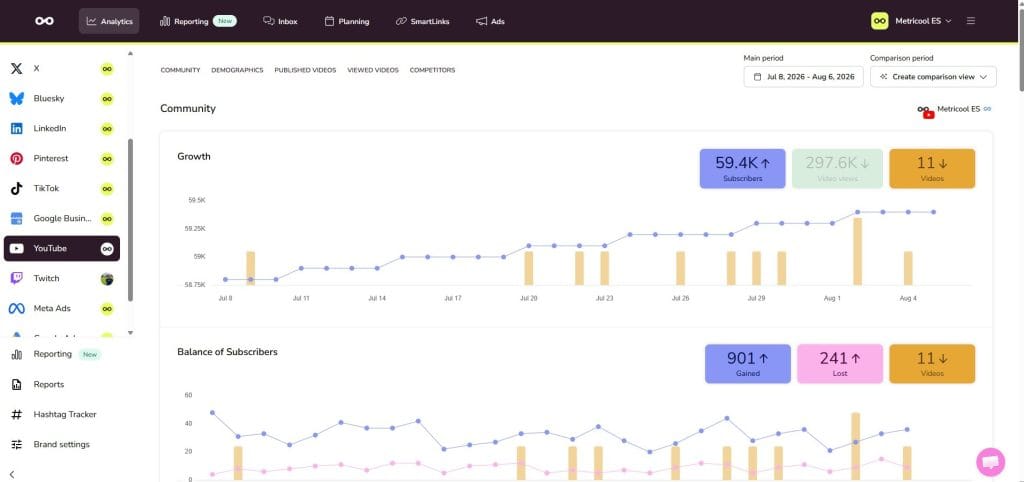
You can schedule content and view analytics on YouTube for free with Metricool. Plus, if you manage accounts across multiple networks, you can schedule content, manage messages, and view analytics all in one place.
Hope this YouTube marketing guide helps you to create quality content that converts.
Happy YouTubing!
